All About Escher Sketch
Category: Legacy Docs · Tags: eschersketch, eurorack, legacy, orion · Posts: 7
#1 — Z0NK0UT · 2019-07-22
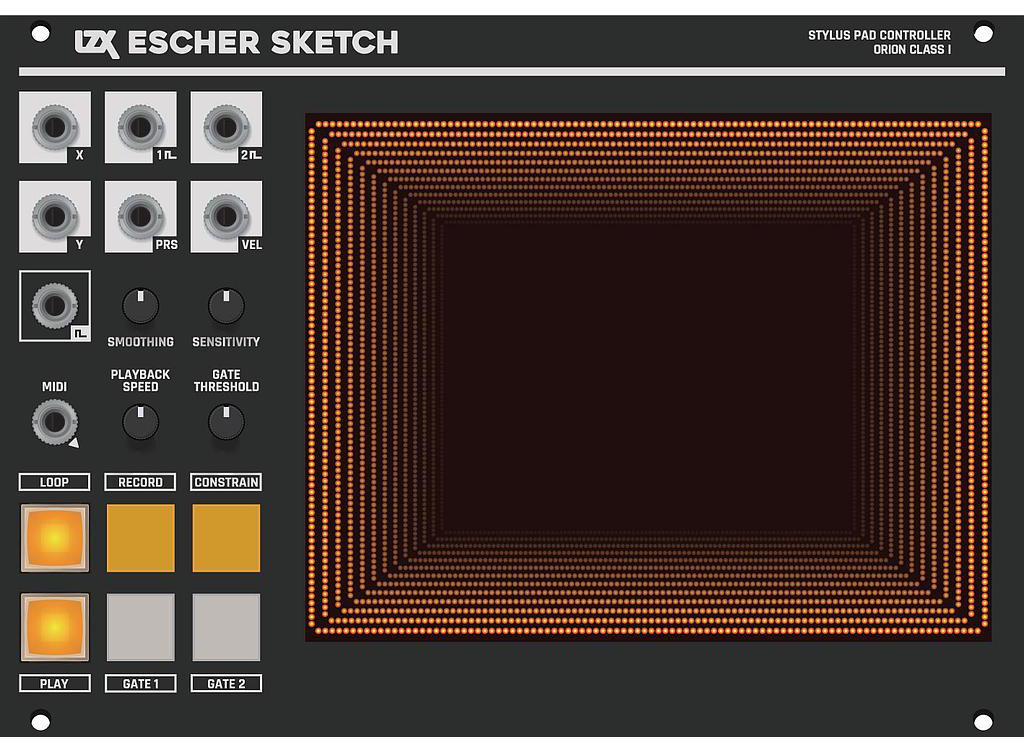
Touch/stylus pen controller interface for video synthesis, featuring a high resolution 5.7 inch drawing surface. Provides XY positioning voltage outputs as well as pressure and directional velocity sensing. Stylus pen included.
The Escher Sketch uses a classic resistive touchpanel in order to replicate the feeling of video painting devices and early trackpads from the 1980’s through the 1990’s. A point is registered when enough pressure is applied to the touchpanel surface, either by a finger tip or using a stylus with a hard or spring-loaded nib. The included stylus has a fixed, hard nib, but we encourage you to explore other stylus options to find what suits you best as an artist.
Escher Sketch’s touchpanel sits atop an “infinity mirror” optical illusion, created with over 300 surface-mounted LEDs, reflective mirror foil, 2-way acrylic mirror glass, a 3D printed frame, and diffraction grating film. The light from the LEDs bounces between the two mirrors and then passes through the diffraction grating.
- A voltage scale switch on the rear of the module can be set to either 5V or 1V. This adapts the module’s inputs and outputs for usage as a CV controller in Eurorack audio Systems.
- MIDI output is passed on a TRS stereo 3.5mm jack. A switch on the module’s rear can select between the two different pinout standards (type A or B).
Specifications
- Width, 36HP
- Mounting Depth, 50mm
- Power +12V @ 180mA
- Power -12V @ 30mA
User Reference
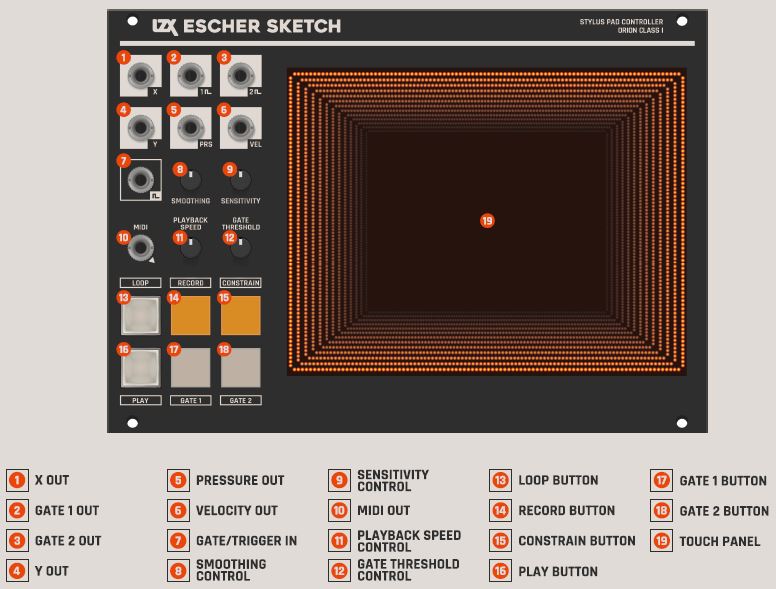
- Outputs voltage from stylus movement along the X axis.
- Sends a voltage pulse when the Gate 1 button is pressed.
- Sends a voltage pulse when the Gate 2 button is pressed or stylus pressure is applied.
- Outputs voltage from stylus movement along the Y axis.
- Outputs voltage from applied stylus pressure.
- Outputs voltage from the speed of stylus movement.
- Accepts a voltage pulse to initiate playback.
- Adjusts slew of voltages available at X and Y outputs.
- Adjusts sensitivity of the touch screen.
- MIDI output.
- Adjusts playback speed of recorded stylus movement.
- Adjusts the pressure required to send a gate pulse to Gate 2 Out.
- Loops playback of recorded stylus movement.
- Records stylus movement.
- Constrains voltage output to a single axis when held.
- Starts playback of recorded stylus movement.
- Sends a voltage pulse to Gate 1 Out when pressed.
- Sends a voltage pulse to Gate 2 Out when pressed.
- Used to register stylus movement.
Videos
Downloads
Other Resources
#3 — creatorlars · 2019-12-24
This is a known issue, but yes, it’s fixable! We’ll have new firmware for Escher Sketch early in the new year.
#4 — a_digital_index · 2021-09-26
Is there a chance ES will ever to be able to “State Save on power cycle!”?
#5 — Z0NK0UT · 2021-09-27
As Escher Sketch has now been discontinued, it won’t be able to do anything new or different in the future.
#6 — a_digital_index · 2021-09-27
Copy that. DIdn’t realize it was Discontinued for some reason. Thanks.
#7 — wednesdayayay · 2021-09-28
so just to be clear even the known issue lars was talking about above where the output wasn’t going all the way to 1v won’t be fixed?
#8 — Z0NK0UT · 2021-09-28
That is correct. There won’t be any further revisions of Escher Sketch.