Mac Laptop into Visual Cortex
Category: Unknown · Tags: converter, externalvideo, videosignal, visualcortex · Posts: 45
#1 — Rychard · 2018-07-30
What device do I need to convert the HDMI out from my Mac laptop to 480i, so I can send it to the Visual Cortex?
Thanks.
#3 — Rychard · 2018-07-30
DesertMuseum wrote:
TBC2
Any idea when?
Thanks.
#5 — luix · 2018-07-30
Rychard wrote:
What device do I need to convert the HDMI out from my Mac laptop to 480i, so I can send it to the Visual Cortex?
You can also try an downscaler … I have purchased a couple of cheap downscaler and none of them seem to work… so I got one of these as recommended by some users of the LZX community forum.
http://shop.jmc.se/jmc-artiklar/jmc-sdihdmi-2-dvianalog-scaling.html
and works perfectly… the key is that your scaler can be configured to 576i/480i depending if you are PAL/NTSC, otherwise you will get monochrome video input.
#6 — destroythings · 2018-07-31
You could use a Blackmagic Intensity to grab the output of laptop and send into the Visual Cortex.
I also have a cheap HDMI to Component box i grabbed off Amazon that works fine.
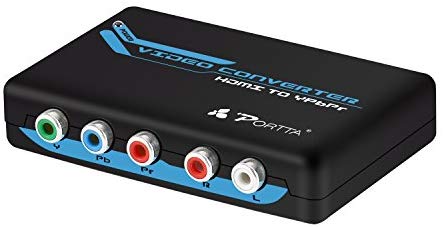
https://www.amazon.co.uk/dp/B00A8FIQXA/ref=psdc_949408031_t1_B0080KN18K £23.33 Link: Portta HDMI Converter HDMI to YPbPr Component Plus R/L Audio Converter V1.3 Support HDMI 1080P@60Hz 2 Channel LPCM Plastic Case for HDTV PS3 HDVD Player Wii XBOX: Amazon.co.uk: Computers & Accessories
#7 — Agawell · 2018-08-18
any recommendations for vga and/or usb-c to YPbPr?
#8 — a_digital_index · 2018-08-19
I use an intensity shuttle TB2 with the usb-c/TB3 outputs of my current MBP. Very reliable. Take the Mac TB3->TB2 into Intensity Shuttle very well
#9 — Agawell · 2018-08-19
thanks for the answer @a_digital_index!!
am I right in thinking that they work perfectly with syphon via black syphon?
and am I also right in thinking that if you use the input then the outputs are throughs?
so you can’t do:
component in from lzx -> intensity shuttle -> black syphon -> lumen -> black syphon -> intensity shuttle -> component out to lzx
#10 — destroythings · 2018-08-19
I don’t think the Intensity passes the signal as a thru so that set up wpild work.
You would need 2 x Intensity for that workflow.
#11 — a_digital_index · 2018-08-21
I’m pretty sure the other post is correct. That the Intensity Shuttle cannot do output and input at the same time. That would require some heavy transcoding in two directions. But I’m not sure. It isn’t part of my workflow.
I don’t use Syphon. Let me lay out my output workflow and hopefully it will help.
Devices (In order of signal flow)
1.MacBookPro (2016) Running 10.12.6 (Sierra)
2.Black Magic Intensity Shuttle Thunderbolt. (there is a Apple TB3 to TB2 dongle between this and laptop)
3.A Bunch a LZX Gear
So the MBP is running Final Cut Pro 7. It’s old software but what I am most comfortable with. Final Cut sees the Intensity shuttle as an external video device. In external device settings I tell Final Cut what to output to the Intensity shuttle. In this case I am feeding 1080i, 59.94, 10 bit. This setting is really about the codec of the footage and the editing timebase (in this case FCP 7).
So the 1080i, 59.94, 10 bit footage runs into the Intensity shuttle. The software for the Intensity Shuttle is “Desktop Video Setup.” I’m running 10.9.7. The setting I use for this is under the Conversions tab, select HD to SD in the output conversions section. I let it letterbox because most of my footage is widescreen.
In this setup, understand that the Intensity Shuttle is doing the conversion to SD. That’s not exactly a through. THE MBP and FCP are not doing any hard work here. There may be other methods but this works for me. So, if Syphon can see external monitors you should be able to replicate the following workflow to get video out from your MBP.
I hope this helps. Let me know if you have further questions.
Chris
#12 — nazz · 2018-09-17
Hello, I just purchased an HD video converter like the one you posted. I’m currently connecting: imac > display port > hdmi > hd video converter > ypbpr input to Cortex. The result I’m getting is a slight flashing display of what could be my video play from my imac. What are the display settings you set for your converter on your mac to be able to get a solid video display into Cortex?
Thank you for your insight.
#13 — creatorlars · 2018-09-18
Set your converter to convert output timing to NTSC/480i or PAL/576i output mode. It sounds like it’s probably on an HD setting at the moment.
#14 — Agawell · 2018-11-27
OK so I just got my Visual Cortex home and racked and switched on and I have a similar issue - I have a similar device to the above portta hdmi->component converter - it just has vga out as well
I have a late 2016 macbook pro 13" - so usb-c only
I am using an amazon basics usbc -> hdmi converter - I can possibly borrow a different one tomorrow evening from someone at work - but it’s not an apple one either - startech perhaps
converter works on all 3 possible settings from hdmi to component in on tv
plug component in on all 3 possible settings to VC and synch light is red/flashing - so sees picture but can’t synch
possible settings are 1080i, 1080p and 720p
I’ve tried rebooting the box after changing the settings on the mac but no luck with that either so far - maybe I have to wait a little longer before rebooting
@destroythings what settings are you using - I can’t imagine that there’s much difference in the 2 devices
#15 — Agawell · 2018-11-27
argh - I just compared the amazon ads for the 2 - problem is with the adapter
the hdmi->component and vga (which I have says supports up to 1080p
the hdmi->component adapter specifically states 480 and 576 as well - bugger - looks like I need to get the other one - oh well a few more days of waiting won’t hurt I guess
#16 — Agawell · 2018-11-27
Ok so I re read the full specs for the converter I have and it can support:
Interlaced Resolutions(50&60Hz):480i,576i,1080i
Progressive Resolutions(50&60Hz):480p,576p,720p,1080p
and I worked out how to see the other settings for resolution (hold alt when selecting scaled
I see 1080p, 1080i, 720p, 480p, 1024 * 576, 800 * 600 and 640 * 480 options but no 576i or p - which I was suspecting would be the one to use given PAL - which I’d set the cortex to
currently none of the above are working solid red light on all available options - including after quick reboot of the converter
will try changing the pal/ntsc setting on the cortex tomorrow evening and try again!!!
UPDATE
quick update I now have something approaching lock
the lock light is mostly green with steady flashes of red might be about once every 50/60Hz cycle
I have a picture being output to the screen
but it’s like there are 2 copies side by side with a stripe down the middle

any ideas anyone???
2nd update:
I’ve pretty much tried everything - the best I seem to get is the picture output side by side with a vertical bar separating them - this is currently scrolling from side to side too
my current best guess is that it’s a combination of things
cheap amazon usbc -> hdmi converter - which only allows options for NTSC (480i) and not PAL (576i) in preferences going into a cheap hdmi -> component converter - which somehow is causing the vc not to lock to the signal from the computer -> I will try to borrow a hdmi adapter from someone at work
BUT
I’ve just tested the component cable from that was in the output of the cortex and moved it to the output of the converter - that is working perfectly at 480i
I’ll try swapping the cables about a bit just in case and report back - but so far all cables were brand new
swapping the cables did not make any difference
further update
OK so to cut a long story short it appears that a lot of apple products post 2012 do not support 480i/576i output via hdmi
however I have now after much searching found this
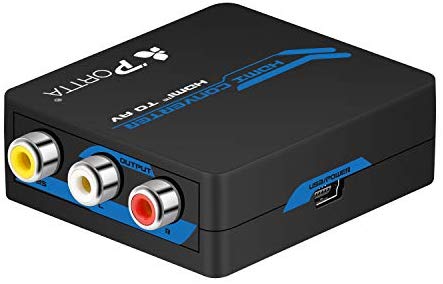
https://www.amazon.co.uk/Portta-Converter-Composite-Support-Notebook-white/dp/B008MHY1VC/ref=sr_1_1?ie=UTF8&qid=1545415834&sr=8-1&keywords=Portta%2BHDMI%2BConverter%2BHDMI%2Bto%2BAV%2Bor%2BCVBS%2BComposite%2BMini%2BConverter%2BSupport%2B1080P%2BNTSC%2Band%2BPAL%2BTV%2Bformat%2BOutput%2Bfor%2Bfor%2BPS3%2BPS4%2BBlu-ray%2BDVD%2BXBOX%2BNotebook £18.72 Link: Portta HDMI Converter HDMI to AV or CVBS Composite Mini: Amazon.co.uk:...
which specifically states it converts hdmi to 480i/576i and is less than 20€ delivered
it’s arriving sometime next week (allegedly the 27th, but it’s xmas so I expect a delay)
fingers crossed that this works - if so I will be very happy - I will be able to process camera feedback through both lumen and then the modular - without shelling out another 300€+ on an intensity shuttle tb & tb2->tb3 converter & tb2 cable!
UPDATE: the above box works perfectly, but for composite, not component - so black and white only - I am seeing similar boxes for hdmi -> component with scaling for about 40€ - so one of those will be next
#17 — JohnWynberg · 2019-02-25
Hi… I’m new here, new also into video synthesis, though I had been playing with Lumen before. Now I got a Visual Cortex and Bridge, to start experimenting with my eurorack system.
Reading some comments around, I was worried I might have problems getting video from my laptop into Visual Cortex, but it seems I’ve been lucky with a Musou Mini HDMI to CVBS converter.
I have a MacBook Pro 2016 running Sierra and I’m using a Letscom LC-USBC001-SL to get HDMI out of USB-C. I have no problems with sync (at the moment using NTSC, just because yesterday I was using an old XBOX 360 to play some NTSC videos into the Visual Cortex). The only issue seems to be that the colours are not the same. When connecting to a TV they are fine, so it’s not a problem with the converter. But, also, the signal in Visual Cortex is definitively not just black and white. It has some colours, with the Mix and Colorize turned off. They re probably better with YPbPr. Anyway, since one of my purposes is to use the Visual Cortex to colorise material, it doesn’t bother me for now.
#18 — 48HourVideo · 2019-02-25
Hi @JohnWynberg ! You hit the nail on the head in your last paragraph, you need to use YPbPr into the Visual Cortex’s decoder for color video. A composite signal to the Y input will only provide luma data.

#19 — JohnWynberg · 2019-02-25
Hi… Thanks for the prompt reply. What confuses me is that some colours do seem correct… like the Tags from one of the Finder windows in my Mac. It’s that just an effect of the Luma when split into the RGB? I don’t think I’m colorising them yet.
#20 — 48HourVideo · 2019-02-25
@JohnWynberg That’s pretty interesting, especially if all the colors you see look correct and multiple colors are showing through. Not sure what’s up. Is it possible you have Spectrum mode on?
#21 — JohnWynberg · 2019-02-25
Well, not 100 percent correct, some seem ok, others off… Spectrum and mix are turned off. I had to try again, to make sure I’m not hallucinating. Here is a photo from the TV, after running the signal through the Visual Cortex.

#22 — 48HourVideo · 2019-02-25
That’s interesting… I’ve never seen this on my system. Not sure what’s at play here. Awesome result though!
#23 — JohnWynberg · 2019-03-15
I got one of those Porta HDMI to Component, but so far can’t get Visual Cortex to sync to it. I seem to have the same results as @nazz
Would you mind explaining how did you get it to work?
As for my previous experience with getting some colour out of composite (as discussed above with @48HourVideo), it seems it might have been the tv I was using, that somehow manages to decode some colours from the composite coming through the Visual Cortex. The video grabber I’m now using to monitor and record on a laptop only gives me black and white, as expected.
#24 — nazz · 2019-03-15
I ended up purchasing a blackmagic intensity shuttle. I use rca in the ypbpr. You can download the the driver and most recent software through the blackmagic site. Adjust the settings in the software to match your settings (pixel aspect ratio) in whichever video program you are using.
Here are some videos that helped me:
#25 — JohnWynberg · 2019-03-16
Thanks for the reply. Which one did you get, Thunderbolt or USB-3? My MacBook uses USB-C, so I will need an adapter. Also, the Intensity Shuttle doesn’t seem to support Mac OS 10.12 (or Adobe Premiere CS6), and I hate upgrading the OS. All considered, it seems a bit too much (around 250€ including adapter), just so I can get colours into the Visual Cortex. For that money, I rather but another LZX module. But I’ll keep it in mind.
In the video you linked, they guy uses Windows… Does it work very much the same in Mac? The other video is cool, I really like that Visual Cortex series, but I would love to see him getting composite from a new MacBook Pro. He just connects his DVD-player to the Cortex and it just works… I would also love to know what DVD player is that, with composite out. Maybe it’ll be cheaper just to buy a DVD-player like that.
#26 — a_digital_index · 2019-03-16
Get the thunderbolt version. It works fine with a MacBook Pro, adaptor, and premiere.
#27 — JohnWynberg · 2019-03-16
Ok, thanks. Noted. That would cost me € 315 (including adapter and Thunderbolt 2 cable) here in Germany. On the seller’s page I see that it supports Mac OS 10.6 and above, so that’s a relief. Still, at the moment I think I’ll prefer to buy another LZX for that money. But I’ll definitively think about it.
#28 — scolopendra · 2019-03-17
This thing is perfect, but it might be hard to find in Europe. It also claims to do PAL, but I’ve never tried that.
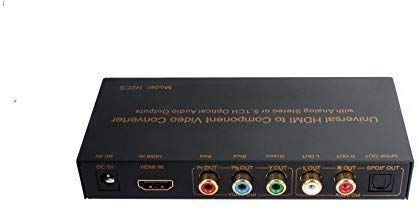
https://www.amazon.com/dp/B017LVMAWG/
Link: Amazon.com: Universal Premium Quality HDMI to Component Video Converter with RCA...
#29 — JohnWynberg · 2019-03-17
This one is available in Europe, and claims to support 480i Ypbpr resolution: https://www.amazon.com/Musou-Component-Converter-Adapter-Coaxial/dp/B01F6URXYY/ref=cm_cr_arp_d_product_top?ie=UTF8
Not sure if to give it a try, but at least their (Musuo) HDMI to AV works fine with the Visual Cortex, so there’s hope.
#30 — catbiscuits · 2019-03-19
I bough the Thunderbolt Intensity Shuttle, connected via thunderbolt 2 to 3 adapter to MBP 2018. I can see the Intensity Shuttle from the Mac (it appears in Desktop Video software), but I can’t output to my Visual Cortex as the Intensity Shuttle just won’t appear as a second (or third) display no matter what I do. Any ideas, friends?
#31 — catbiscuits · 2019-03-19
Ok, I guess this wasn’t clear. It’s easy enough. I’ll explain for other users and then ask my questions.
I’ll explain. You have to install Black Syphon. I also installed Syphon. I’m not sure if that mattered, but what the heck!
Then you have to connect the Blackmagic Thunderbolt Intensity Shuttle and launch Black Syphon and Lumen. Choose Lumen for the video stream and Lumen-Main Output. For Video output choose NTSC, and now you are good to go.
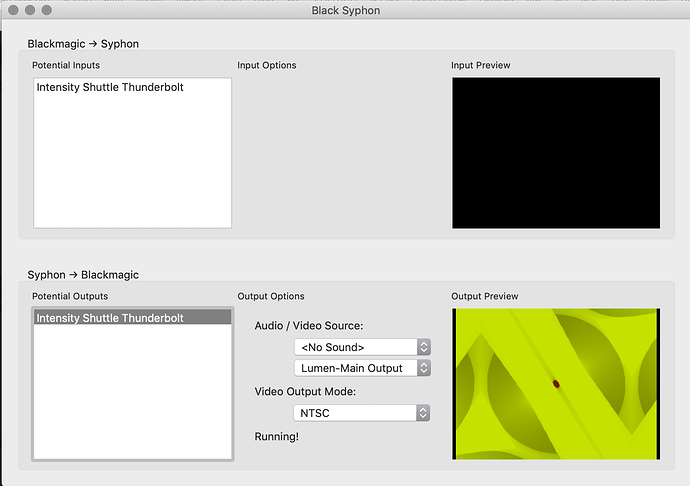
The only thing is that my colors are off. How do we set the Visual Cortex to have all the colors correct.
Also, ok, lovely, great, brilliant, ace! But how can we, say play a youtube video to Black Syphon?
#32 — Agawell · 2019-03-19
hmm not sure if there is a browser plugin for syphon, but I’ve not looked recently
I do video playback to lumen via either processing or praxis_live into syphon
both are really simple java programming environments & praxis is to some extent a visual drag and drop environment - quite easy to knock up a feedback mixer with camera input, video playback and the syphon from lumen being mixed and effected - with the mixing and effects modulated by other objects or midi cc inputs
#33 — JohnWynberg · 2019-03-20
Does that mean that the Intensity Shuttle wouldn’t just output everything I can see on my screen?
#35 — catbiscuits · 2019-03-20
Until someone proves me wrong, I will assume that. Why must is be so?
#36 — GaelJaton · 2019-03-22
I got this one, good working, acceptable picture quality : https://www.amazon.fr/dp/B00T75W692/ref=pe_3044141_189395771_TE_dp_1
I’m in the PAL world, doesn’t test it in ntsc…
take the scaler version to be sure it will work.
#37 — GB01 · 2019-07-30
Hey All,
Question on the output encoder of the visual cortex does RGB to HDMI need just a converter?
On the Input decoder of the visual cortex , what would be a proper hdmi to rgb scaler to 480i (windows media player to visual cortex )
scolopendra wrote:
This thing is perfect, but it might be hard to find in Europe. It also claims to do PAL, but I’ve never tried that.
(are there other options that are known?)
I am interested in using Windows media player video hdmi to rgb in through the visual cortex and rgb to hdmi out to the projector ( mainly curious about conversion and scaler)
thx
Gbz
#38 — devingreenwood · 2020-05-04
@scolopendra I’m thinking of grabbing one of these to feed NTSC to Vidiot from my Mac’s second monitor port. Did your experience remain positive? Do you still use the “Universal Premium Quality” Scaler?
#39 — scolopendra · 2020-05-04
I haven’t had any problems when using that HDMI-to-Component converter with my Mac, although I haven’t been doing much of that lately. Need to get back to that!
I’ve mostly been trying to use it with iPad, Andor-1, and Waaave Pool recently, with varying amounts of frustration and ‘loss of sync’ issues. Some of that is probably user error- not sure my stuff is in the optimum format for Andor-1, and the flash drive I had been using with it was probably too slow. I just got a much better flash drive, but haven’t tried it yet- I’ll update this thread when I figure out how many of my problems are self-inflicted…
A friend got one just like mine, and he’s been using it to go from a Windows laptop to Cortex without any issues.
#40 — William · 2020-11-18
Hello. I bought this same unit. What are you plugging into the HDMI input? I can’t make mine work and only getting a red light on my mixers sync indicator. I’m connecting my Mac Pro HDMI output into the HDMI in on the Porta box. Any help would be greatly appreciated. Thanks
#41 — wednesdayayay · 2020-11-18
have you tried the resolution button? cycle through the available resolution outputs until you find one that works
#42 — Vdot · 2020-11-18
Is this a Panasonic MX mixer you are connecting to? Do you have other devices you could try to directly like display?
Personally on my Panasonic MX-10 and AVE5 I’ve never managed to get an HDMI-analog box to work without passing the signal though a TBC(a Panasonic DVDR recorder in my case) first. They always display in monochrome otherwise.
#43 — William · 2020-11-19
It’s a LZX Visual Cortex mixer. Yes I tried a display and other types of inputs.
#44 — William · 2020-11-19
sorry mine doesn’t have a resolution button on it.
#45 — GaelJaton · 2020-12-11
I provide 800x600 hdmi from an old EeePc running ubuntu, and work also great with MacBookPro from 2012 (ubuntu too), try to feed it with lowest résolution you can.
#46 — catbiscuits · 2020-12-19
I don’t see the Intensity Shuttle on BlackMagic’s site anymore. That’s not good! The USB 3 version is apparently not going to be supported on Big Sur while the Thunderbolt 2 one appears in my new Apple M1 Silicon Macbook Air’s “System Report” but isn’t seen by the software. I’m hoping they will support it, but if it’s not on their site anymore, then it’s days are limited.
Are there any alternatives?
#47 — Tundra_Tides · 2021-02-07
(Running Mojave because older MacBook / new software incompatibility)
I found that I had to go back a few versions to get the thunderbolt shuttle working. Version 11 I believe works fine for me. I don’t know if version 11 will run on OS after Mojave though
#48 — catbiscuits · 2021-03-10
It won’t run on M1 Macs.