Structure vs. Memory Palace
Category: Forum · Tags: — · Posts: 52
#1 — praiseofpeace · 2020-05-30
I am looking to expand my modular synthesizer into the visual realm and as such find the ethos and workflow of LZX products to be very appealing. My primary objective is to manipulate recognizable visuals in tandem with audio modulation.
From my understanding, the Frame Buffer of the Memory Palace would allow me to access images for manipulation without any external equipment yet there are some clear limitations to this capacity (# of files etc.). The Erogenous Tones Structure can also store images, not to mention short videos with (seemingly) no such limitations, yet its online documentation isn’t exhaustive.
My question is: Does the Memory Palace provide any features that the Structure lacks?
I have come to this forum with the assumption that participants are LZX users and as mentioned above, I appreciate and even gravitate towards the LZX methodology (not being a user myself). However, I have a hard time justifying the investment in a Memory Palace when the Structure suggests so much more capability, Am I wrong?
Will the Chromagnon or TBC2 add even further complication?
Any thoughts? Convince me otherwise?
#2 — SPIKE · 2020-05-31
i delved into visualizing my noiz with videosynths a while back.
my needs are to be able to construct things that look like my noiz in a quick manner.
(i’m primarily focused on making the noiz)
i had a Memory Palace for a few days but ended up returning it.
it’s an interesting thing but you do need to delve pretty deep for the really cool results.
i have seen some amazing results with it!
you really don’t need much instruction with Structure.
as someone mentioned in a review…the programming of Structure is “elegant” in its workflow and design.
as far as your specific question…
the two are quite different in execution and complexity.
my personal experience is that Structure has a fast ease of use with amazing results.
i currently own three Structures that i use with several other videosynths.
if you would like to see some of their use here’s my playlist:
#3 — praiseofpeace · 2020-05-31
I appreciate the response and specificity of what opinions are influenced by your personal workflow and objective.
I must admit, part of my aversion to Structure is my lack of understanding of GLSL Shaders, they just don’t gel with the way my mind works as opposed to the building blocks of analog video that LZX modules tap into. But this is somewhat of a digression, considering that that methodology is not featured in the Memory Palace, nor do I see myself pursuing the pattern-oriented outcomes of analog video synthesis.
Is most of the work featured in your playlist shader-based? And if so, could you give a brief rundown of the shader workflow?
Ultimately, I believe my work will incorporate more symbolic images with quite simple modulation, even at times just image changes triggered by gate. Is the use of shaders even necessary in Structure with this objective?
#4 — wednesdayayay · 2020-05-31
the newest version of structure (out today 2.8) has added live keyboard input to the text node
just load up a font that is full of the symbols you want

or you could load up individual images and then skip between them using CV
the question of what is necessary is a dangerous one but structure could do this for you pretty easily
if you don’t want to get into working with shaders you could spend a whole lot of time with structure and never even think about a line of code no problem
#5 — Z0NK0UT · 2020-05-31
Memory Palace and Structure are different instruments and are hard to compare to one another.
I have spent many a joyful hour manipulating short (64 frame) loops with Memory Palace and using no other inputs or sources. Each Memory Palace slider does something really unique to the image, so it is very hands on and easy to find a wide range of possible effects. If you add TBC2, you will add two distinct video inputs (or images/loops from TBC2’s media loader). Adding Chromagnon to Memory Palace will result in a powerful analog/digital hybrid modular video synthesizer, with a single external video input and multiple outputs.
#6 — praiseofpeace · 2020-06-01
I did see that announcement, like the notion of live text, and can certainly see applications, however I don’t want my use of the term ‘symbols’ to be taken too literally - I guess I more meant recognizable images as opposed to Wingdings.
It is exciting to see the how firmware can expand the possibilities of a product but I guess I’d like to see a more definitive list of what is currently possible in Structure for example what can actually be manipulated by CV.
#7 — praiseofpeace · 2020-06-01
Yes, one of the things that draws me to the Memory Palace is the amount of hands-on control, or perhaps how dedicated and therefore understandable the controls are as opposed to the more esoteric front panel of Structure.
You mention 64 frame loops, what route are you actually taking to achieve these? Through still images? The user manual states “Up to 32 subfolders and 32 images per subfolder are allowed (others are ignored)” Has this been expanded?
As for the TBC2, has its media playing capabilities been confirmed? Will it be able to play images and even videos from the SD card? Will the limitations be the same as that of the Memory Palace?
#8 — SPIKE · 2020-06-01
praiseofpeace wrote:
Is most of the work featured in your playlist shader-based? And if so, could you give a brief rundown of the shader workflow?
well…
i don’t dig into the GLSL code and such.
even though i have seen some VERY simple manipulations of code…programming code is not really my thing.
things tend to break rather quickly if i mess with code.

if i am using Structure…i tend to rummage around through a horde of node sets and then tweek it’s file choices to dial it in to visually represent what i am hearing.sometimes i get lucky hitting the Random button to get a foundation that i can start with.

praiseofpeace wrote:
Ultimately, I believe my work will incorporate more symbolic images with quite simple modulation, even at times just image changes triggered by gate. Is the use of shaders even necessary in Structure with this objective?
I use images and a lot of the times i use a sigil set i made into a font in order to get simple line art into a TEXT node set that can be manipulated.
you of course can use images and you can just feed it images with a P-10 or some other source if you wanted to.
i do that from time to time.
as @Z0NK0UT stated…
they are two VERY different beasts.
Memory Palace has a lot of immediate hands on controls and you can go CV crazy with everything.
for me…it seemed that Memory Palace can be a mega heavy lifter when integrated into a more broad and supplemented modular video synth.
i don’t have that sort of thing.
i just have a whole horde of videosynth generators that i warp and mix together.
like all of the Critter & Guitari doodads, DU-NTSC, Hypno, BitVision, P-10, Gieskes and so on.
Structure has CV, Audio and MIDI control.
i send all three of those sources into Structure simultaneously almost all the time…and now with 2.8 you can hook up a USB computer keyboard and live type stuff right into it!
(i test drove that last night and it’s pretty awesome.)
so it’s an immediate result.
it also has Composite vid IN and OUT so again…it’s an immediate signal flow for my setup.
hope that answers a few of your questions.
feel free to ask me about anything else!
glad to help!
#9 — Z0NK0UT · 2020-06-01
Ah, “32” was a typo. You can auto cycle (or trigger cycle) through 64 images in a folder, thus creating an animation. There is a good example in the last Memory Palace video.
https://www.youtube.com/watch?v=mDPB47sZsio
#10 — drumasaurusrex · 2020-06-01
Just here to give my two cents. I came into video synth modules with a desire to make visuals I could enjoy while tweaking my audio modules. I quickly got addicted to exploring the world of live video construction, and that kept me fascinated for a couple years (even with a very small budget and only a few modules). However, I found that I have two main workflows I find myself following due to my limitation of only having two hands: [1] setup a cool, semi/quasi-generative video patch while I noodle with audio; and [2] The opposite… get some mind-numbing musical ostinato going that I kind of like and then explore the videoscape with knob twiddling and patching. For the record, I would love to own a Memory Palace, but I don’t know if that’ll ever happen. However, I do own a Structure, and it changed my video life – I find I have to force myself to use other modules because it is so rewarding and easy to make something that evolves slowly without needing a massive inter-patched rig to do so. In the last two years, I’ve been doing weekly video gigs for bands (before covid crapped on everything), and when I got Structure, it was a serious game changer. The main ways it helped me are: [1] it is very versatile (lots of different flavors can be coaxed from it easily); [2] can save presets, so its easy to change things up quickly for a different feel; and [3] I can tweak (and save) interesting patches/presets so that they evolve over minutes or longer. That last point is huge for me in a performance setting because it allows me to take my focus away from Structure for a minute or two in order to reconfigure other parts of my performance… examples: cue a different clip on r_e_c_u_r, switch input to a camera, rearrange some patch points, get something else ready to mix in, etc.
I should say, the first two nights I had Structure, I kept thinking… hmmm… this isn’t for me… it’s too different from my old ways. But then it just clicked and I loved it. And since then, the firmware updates just keep rolling out with new features/shaders, and its at-least doubled in its capability since I’ve owned it. Such a treat.
#11 — praiseofpeace · 2020-06-01
Z0NK0UT wrote:
You can auto cycle (or trigger cycle) through 64 images in a folder, thus creating an animation. There is a good example in the last Memory Palace video.
I like the clarity of that video, this was one of the things that initially got me interested in Memory Palace.
I guess this brings us to the nuts and bolts of my question @SPIKE and @drumasaurusrex you may be well equipped to answer this: The Memory Palace certainly has a lot of clearly defined patch points whereas Structure has those 5 undedicated CV inputs. Could you theoretically assign parameters like Scroll, Key, Rotate, Saturate, etc. to be modulated through any of the 5 cv inputs?
On a somewhat unrelated note, we’ve clarified that the Memory Palace can contain 64 images per folder. And Structure’s Clip Node has the following limitations:
*320×240 or 640×480 clips (and only 1 size active at a time)
- 320×240 allows 1600 frames total
- 640×480 allows 400 frames total
- Max clip length can be set in system menu (like 20 frames per video)
- Max of 16 clips supported
Are there similar limitations on the IMG Node? It says in the manual “720x480 and 24 bit color.” but does not specify the number of files or folders supported.
I really appreciate everyone’s input thus far, I think we are getting to the crux of my question!
#12 — wednesdayayay · 2020-06-01
yes the cv inputs on structure are for assigning to different parameters within shaders
assign them to whatever you want
structure is on 1024x768 max for img node now
max amount of pictures is up to the size card you have I don’t know that there is a limit other than that at least that I’ve run into yet
#13 — praiseofpeace · 2020-06-01
wednesdayayay wrote:
max amount of pictures is up to the size card you have I don’t know that there is a limit other than that at least that I’ve run into yet
So I could have a series of photographs to create a cycling animation?
wednesdayayay wrote:
cv inputs on structure are for assigning to different parameters within shaders
And if I wanted to adjust contrast for example, would this be done via a shader?
#14 — SPIKE · 2020-06-01
praiseofpeace wrote:
The Memory Palace certainly has a lot of clearly defined patch points whereas Structure has those 5 undedicated CV inputs. Could you theoretically assign parameters like Scroll, Key, Rotate, Saturate, etc. to be modulated through any of the 5 cv inputs?
yup.
like i mentioned…everything is freely assignable.
since there are five CV ins, three gate INs and one gate OUT…i use all the MIDI CC i can feed into it.
praiseofpeace wrote:
Are there similar limitations on the IMG Node? It says in the manual “720x480 and 24 bit color.” but does not specify the number of files or folders supported.
not that i know of.
i have yet to run into a limit.
#15 — wednesdayayay · 2020-06-01
contrast is one of the macros over the output so you could CV that
or I’m sure there are shaders that also have contrast
my three macros are setup for
time
hue
contrast
(three knobs on the top right)
#16 — praiseofpeace · 2020-06-02
Alright, thanks for all the info, you’ve all been very helpful. One final clarification: Image change is possible via CV, correct?
#17 — bobster · 2020-06-02
Why not simply add the laptop for infinite content? Probably will need a converter from HDMI. By the way Memory Palace is awesome.
#18 — praiseofpeace · 2020-06-02
More complicated to control via CV.
But in the end my entire eurorack system could easily be replaced by a laptop but it’s really not about capability, it’s about tactile enjoyment and the experience of use
#19 — Daisuk · 2020-06-02
Structure and Memory Palace are the only two video modules I have - and while I absolutely adore the Memory Palace, I would definitely recommend Structure as a sort of starting module. You don’t really need anything more than that to make some really, really interesting visuals. It’s extremely powerful with a ton of shaders and node sets and Erogenous Tones keep on updating the firmware pretty much every month. You can also add your own shaders (which is easy enough), images, videos and hook up external sources to it. I can’t recommend it enough! It’s an absolutely brilliant piece of kit. I love it to bits!
The Memory Palace is way more specific, but although I’ve only had mine for a few days (and only use it with still images at this point), seeing as you can load still images into it - the potential is pretty much limitless. Lots more patch points than Structure, so more possibilites for cv control, which is ace - and you know, it’s made to make feedback - which is just … the best fucking thing when it comes to video synthesis, in my opinion, haha. And it does it really well. I can’t wait to hook a Chromagnon up to it.
I wholeheartedly recommend both, but I’d personally start out with a Structure, you simply get more options and more of a “full” package. Structure also has lots of feedback nodes, which can do somewhat what Memory Palace can do, but not quite as well, and not as specific, in my opinion, and obviously not with the level of control you get with the MP.
Check out my Instagram for some audio visual stuff made with just Structure (I haven’t gotten to upload any which uses the Memory Palace just yet): https://www.instagram.com/grtlfsk/
Also, be sure to join the ET Facebook page, Rick and James (the makers) are in there daily answering questions and requests - they’re just top top guys! Really so helpful and kind, I don’t think I’ve seen that level of support anywhere else, to be honest.

https://www.facebook.com/groups/665151290630398/Group for users of the Erogenous Tones STRUCTURE Visual Generator Module.
Link: STRUCTURE Visual Generator User Group
#20 — bobster · 2020-06-02
Actually i was only saying to use the laptop for picture and video clip storage, maybe also editing images.
#21 — praiseofpeace · 2020-06-03
I really appreciate the direct comparison between the two and if your Instagram was made with Structure, I think you’ve just about convinced me

Funnily enough, I have looked around on the facebook group before and a few particular comments caught my eye, they may look familiar…"4) Is there a demo of still images being manipulated anywhere?
-
Which parameters are cv controllable on which shaders? And how many parameters are typically cv-controllable per shader? Is it the parameters you can control on the sandbox page that are cv-controllable?
-
Is there an overview of the FX available anywhere (or all the nodes available, in general)?
-
Any news on the 3d objects video tutorial?"
Many of these questions I shared
One user responded:
“If yr curious, it’s best to just dive right in. Structure does anything and everything you could ever imagine; generation, manipulation, far beyond imagination. In beta-testing, I pushed it to its limits and then some and still to this day, have barely scratched the surface.”
And another:
“each node has parameters that can be set to different cv controls. This is so expansive I can’t convey it in one comment.”
I guess this looks promising and just about sums it up, but for someone like you or myself, who has a very particular vision, it is nice to know specific things for certain before ‘diving in’.
A couple specific questions I have is with regard to the image node:
- Is there the ability to advance through a series of images using CV/Gate? For example could you send a trigger to the structure to change to the next/previous image?
- Can you cycle through a set of images to create an animation as in Memory Palace?
Both of these would appear simple enough, however a user on the facebook group recently commented on using the Clip Node for this, which would imply compiling stills into a video file and scrubbing through using the play modes. Would that be the only way or is it possible in the IMG node?
Once again, I apologize for all of the questions but without the thing in front of you it is hard to find the limits of what is “limitless”
#22 — Daisuk · 2020-06-03
Hah, yes, those were my questions, so familiar indeed!
I was also very much on the fence, but decided to give it a go, and haven’t looked back since. It can do sooo many interesting things. I don’t want to bash other people’s tastes, of course, each to their own, but a lot of the stuff I saw with Structure before I bought just wasn’t my thing - but after getting it, I can safely say that there simply has to be something in it for everyone, whatever you may like - it can glitch out, it can do very minimal stuff really well, more full on psychedelic stuff, it can look more traditional if you wish and so on. The pallette is just enormous.Anyways, let’s see.
- With just a little bit of looking into the code for each shader, you can easily define which parameters you want to be CV’able. Most of the shaders inside Structure already have cv-able parameters assigned, but if you wish, you can simply open the code in a code editor and change it - and it’s simple to do so (this comes from someone with basically 0 coding skills).
- I don’t think there’s an overview for the various FX, as there’s tons of them, and they keep adding to it. Doing an overview video would take a while, hehehe.
- I still haven’t seen the 3D tutorial, so not out yet, but honestly, there’s too much stuff to get around anyway, so haven’t missed it!
- There are 3 gate ins on Structure you can assign to different things, but you can’t do a “next image” with gate ins as of yet! It has been requested though, and Rick has said that it’s coming in one form or another - so it’s definitely coming!
- You can actually load animations (or video clips) straight onto Structure and play it back from there, or do as I do, I got this cheap media file player with composite out (cost like 40 bucks), and I’ve loaded a ton of video footage, including animations I’ve made with Iorama Looom, onto it, and just use the VID node to get video in from an external source. It’s ace!
But yeah, currently, the VID node with an external player or the CLIP node are as close as you get to what the MP can do with an image sequence currently. I do believe an update to this is coming shortly though. Or actually, you can save presets containing different images, and sequence through that with gate ins. That’s possible now! Thing is, you’re limited to just 64 presets currently, but this is also being worked on currently, with plenty more preset slots opening up eventually.
Here’s a patch with Memory Palace processing an animation I made an Ipad app called Looom in paint mode, by the way (using 64 images):
#23 — wednesdayayay · 2020-06-03
and if what you really want is even more CV control you could always get something like the VCMC and then go from that midi into structure
it may not be as nice as the ones built into structure (I’ve never used CV to MIDI modules before) but worth a shot
#24 — praiseofpeace · 2020-06-03
Great answer, very thorough, I’ll stop picking your brain soon and get down to making decisions
It seems like a small component but the thing that attracts me the MP and Structure is the ability to load images and I would love to be able to trigger changes, I guess I would fall into the minimalist camp you mentioned. If I was going the media player route, I would probably just be happy with a Vidiot.
I wish there were readily available Eurorack video sampler, but as Lars posted on facebook :
“It’s some intense hardware to do video playback, especially if we’re talking live decoding of compressed formats – unless you’re piggybacking off another platform like Raspberry Pi. An LZX module can’t use a Pi alone for playback because there’s no way to genlock it without another FPGA + RAM based system. That said, we are working on some clip playback features for Memory Palace, and have a big sampler/recorder instrument in development. I agree that a slim clip player would be a great addition to the system. TBC2 has the same media features as Memory Palace, so we’ll be updating them both in tandem as new capabilities are added”.
So I suspect it will be sometime before that but it seems like Structure and MP are bridging the gap. As for limitations, could you also clarify, the “Max of 16 clips supported” in Structure’s clip node – Is that the Maximum that can be loaded into ram or is that the maximum on the SDcard overall? Could you have one preset with 16 clips loaded and another preset with a completely different set?
#25 — praiseofpeace · 2020-06-03
Great point, brings in a whole other array of options…and decisions

Would not even have to stick to Eurorack format at that point…
#26 — Daisuk · 2020-06-03
Hmmm, I haven’t used the clip node much at all, but I believe the 16 clips are the total on the memory card. If the sequencing of images is your main thing, then the Memory Palace is probably best suited at the moment - but I’m pretty sure Structure will be better at handling sequencing of images in the not too distant future, so I wouldn’t rule it out, if I were you.
#27 — praiseofpeace · 2020-06-03
Daisuk wrote:
I’m pretty sure Structure will be better at handling sequencing of images in the not too distant future, so I wouldn’t rule it out, if I were you.
Yeah, I’m really starting to get a sense of their productivity when it comes to firmware updates. I’ve worked with stop motion in the past so image sequencing would be a very intuitive way to interact with individual frames.
Daisuk wrote:
actually, you can save presets containing different images, and sequence through that with gate ins. That’s possible now! Thing is, you’re limited to just 64 presets currently, but this is also being worked on currently, with plenty more preset slots opening up eventually.
I guess in someways this already rivals the internal memory restrictions on MP especially if you bring the clip node into the equation…
#28 — Daisuk · 2020-06-04
Bottom line is - you can’t go wrong either way, but Structure is probably more useful as a single module. Good luck in choosing!
#29 — praiseofpeace · 2020-06-07
Just an update, I’ve been emailing with Rick from Erogenous Tones and have attached the entire conversation below incase anyone had similar questions (simultaneously, I apologize that there is some overlap with the above thread)
As of June 6, Rick stated:
“We are going to test today how well stepping through images work. I am going to add an increment mode for CLIPS, just so there are options out there!”
This was in response to my request for some features to synchronize stop motion animation with CV, however as seen in this thread alone, everyone’s objectives and applications differ slightly.
I was wondering how the following features would mesh with everyone’s workflow?
Do you have any pointers/requests that would strengthen and diversify the application of such updates? Let me know, I’ll pass them on…
THE IMPORTANT QUOTES:
Rick:
“What I want is to be able to select a bunch of files and have them stored in the preset. That way, it ONLY points to those files. It’s a little more work to add them, but then even for like the GEN node you could have a list of things you want to load.
I think this would REALLY be helpful for people, so they could swap between shaders easily!
Would that work for you? Like how many frames per movie are you thinking? (Just so I have an idea).
…If I add a way to step through frames of a video file, that might be even better! With like a gate. Because then you can use the abilities already in video to randomly seen in the video with a voltage. (it’s just a different mode).
at 640x480 you can have 400 frames. At 320x240 you can have 1600 frames. (all within up to 16 files. Those are TOTAL frame counts)”
OUR CORRESPONDENCE IN CONTEXT:
Rick:>>>> There is a ‘NEXT’ in IMG that you can assign to a gate (or midi) to advance. Sorting is done alphabetically, so you’d just have to make sure you use a naming convention that makes sense for that. You could create a preset that points to the first file. It will wrap around when it hits the end of the file list. RIght now, STRUCTURE doesn’t support any directories to separate different animations, but I’d like to add in the future.
The speed of the image load will of course be relative to the size of the image.
CLIP does not do frame by frame at the moment. Not that I couldn’t add that. It will load a maximum of 16 video clips. All the clips are stored in RAM. If you had more than 16 clips (or you exceeded the maximum frames in the loaded clips to a certain point) it will stop loading anymore.
Me:>>>> So in the Next Image scenario you mentioned would I be able to load a folder of images into a single preset and cycle through? Or would each preset be a different image thus limiting me to 64 frames total?
Rick:>>>> You can fill the img folder on the front SD card with all the images. Then just point a preset to the first image. What is not supported is having multiple folders, so if you had multiple animations, you’d have to know where one set ends and another starts, and not generate a gate to go past the last image file.
A way around this would be separate front SD cards for right now.
Me:>>>> But is this just one image per preset?
Rick:>>>> No no. The preset will store a pointer to an image in the file list. When you hit NEXT it will advance and load the next file in the global IMG file list. The next is on file load, not next preset.
Me:>>>> Oh, wow ok. So say you had a 6 frame animation, could you have the preset start with file “2M” and each time you send a CV trigger to NEXT it would advance until you reach “2R” and then it would go back to “2M”? Then could you have another preset pointing to “3A” ending with “3F”?
Rick:>>>> The list of files is just one big list, so if you had:
2M>>>> 2R>>>> 3A>>>> 3F
if you had a preset pointing to 2M, then hit next 3 4 times, it would go: 2R, 3A, 3F, 2M. It will go through the whole list of files then wrap back around. It doesn’t have the concept of separate file lists right now.
Me:>>>> So you wouldn’t be able to limit the number of files it would go through before returning to the pointer file? It would have to go through all of the images before recycling?
Rick:>>>> That is correct. One thing you could do is reload the preset when you got to the end, then it would point back to the beginning. So if you were driving with either MIDI you could know exactly where you were and reload it, if that makes sense.
Me:>>>> Would the preset reload be possible using a CV trigger? As an example would this be possible with something like Pamela’s Workout, with one clock reloading the preset and another division advancing through images?>>>> You guys are very prolific when it comes to firmware updates, any idea when some of the IMG node capabilities we’ve discussed may become available?
Rick:>>>> Yes, you can assign a preset to load from a gate input. You an also use a GATE->MIDI module to get more gates so you can trigger more things.
I would say this is high on the list of things I want. Although it might work a little differently.
What I want is to be able to select a bunch of files and have them stored in the preset. That way, it ONLY points to those files. It’s a little more work to add them, but then even for like the GEN node you could have a list of things you want to load.
I think this would REALLY be helpful for people, so they could swap between shaders easily!
Would that work for you? Like how many frames per movie are you thinking? (Just so I have an idea).
Me:>>>> That would work, in fact I believe the method you outlined above with a selection of files per preset would be ideal, I was just seeing if there was a current workaround that would achieve the same effect.>>>> I’ve be discussing this topic with people a bit on the LZX forum because I wanted to determine if Structure was capable of cycling through media files like the Memory Palace does in this videohttps://www.youtube.com/watch?v=mDPB47sZsio So as far as the number of frames is concerned I would be happy with something like the video demonstrates. However, I would want to have a number of different sequences stored to access for different songs/concepts.>>>> I must confess, I have next to no understanding of Shaders and many of the features in the Memory Palace don’t necessarily fit my personal aesthetic, but these two modules seem like the best options for my desired applications. It would be wonderful to be able to trigger frames with a Eurorack sequencer or even better, scrub through a series of frames in synchronization with an LFO or Envelope.
Rick:>>>> Well if I add a way to step through frames of a video file, that might be even better! With like a gate. Because then you can use the abilities already in video to randomly seen in the video with a voltage. (it’s just a different mode).
at 640x480 you can have 400 frames. At 320x240 you can have 1600 frames. (all within up to 16 files. Those are TOTAL frame counts)
Me:>>>> Yeah, that was definitely one of the workarounds I was considering. Having thematic sets contained to video files would also have its own performative merits with potential for expansion, transitions, and randomization. Again, I don’t have a Structure in front of me (yet…) but I feel as though “Pos allows you to use the CONTROL parameter to set the position in a video mapped across the whole range of CV values!” would be very helpful in this scenario.
Me: Just a follow up, I was looking around some more and it appeared as though XY scrolling and Zoom was unavailable for the IMG node as of December 2019 but possibly added in February, can you confirm this? If they are controllable by CV I believe they would add exponentially to the potential of even a short series of frames. Are these parameters available in the Clip Node as well?>>>> Also, as I mentioned before, I’ve been discussing this topic on other forums. Do you mind if I share our thread to see if any other members have pointers on the implementation of frame by frame Clip node stepping vs. IMG node navigation within folders? We all have different objectives and mine are focused on unadulterated images but others may see other applications related to their own workflow.
Rick:>>>> Hello! Absolutely you can share anything I’ve said!
Yes, IMG node now has shader support so there are different shaders to do different things, like zoom, rotate and all kinds of other things (like a ken burns type effect as well).
CLIPS do not have a special shader, but, you can load a node with EFX after then and use EFX for zoom and such. Clips are much more restricted as they only handle specific sizes.
We are going to test today how well stepping through images work. I am going to add an increment mode for CLIPS, just so there are options out there!
#30 — Dr_Rek · 2020-06-08
I have two MPs and a Structure. Love both. Which to buy first, depends on your goals. If you love feedback cornucopias and lots of physical controls, MP all the way. Structure can do similar things but the workflow and controls are not as immediate without using an external controller. Structure can do a lot more than MP too with it’s 4 node virtual patch system and large variety of nodes, but menu diving, reassigning controls, and finding the right node structure all slow down workflow. That said I still love it and MP.


#31 — praiseofpeace · 2020-06-08
The variety and immediacy of controls is certainly one of the things that attracts me to Memory Palace, I feel like they provide a lot more impetus for experimentation on the fly. That being said my personal tastes are quite simple when it comes to video manipulation so it could be that I will assign a set of parameters to the Structure and leave it.
Dr_Rek wrote:
using an external controller
Is an additional possibility, and considering the size difference I would have the extra hp not to mention the $$$, relative to memory palace. @Dr_Rek are you currently using an external controller? Is it a MIDI to CV module as @wednesdayayay suggested? If so, how do you find it, does Structure allow you to access essentially any of its parameters through these channels?
My key concern at this point is Structure’s ability to handle the content I intend on feeding it. As mentioned previously, my key objective is not necessarily video manipulation by way of effects but rather synchronization of clips and images built outside of the module. Rick updated me on their progress last night:
Rick:>>>> Shaders of the type we are using (called fragment shaders) have 2 purposes in STRUCTURE. One of generation, and one of manipulation. So like the GEN node, those are coded to create visual information. The ones used in EFX and IMG are used to manipulation image data coming in. Truth is, every one in the IMG set could be in the EFX set as well, since technically they are just taking input data, manipulation, and outputting (using an image format called a texture).>>>> We are benchmarking doing IMG walks right now to see what the frame rate is like on the cards we started with. Like 640x480 is not super fast since each frame is loaded from the card. James will be sharing details on it.>>>> I have half implemented the CLIP variety as well, will be interesting to see how well that works.
Me:>>>> Thanks for the explanation, the analogy of the image as a texture is very helpful for understanding the way in which manipulation is achieved with shaders.>>>> It will be interesting to know what sort of frame rates can be achieved, I believe equally important is how instantaneously the change can respond to CV. Do you expect the delay following a trigger, for example will be approximately the same as the speed of loading?
Rick:>>>> Yes, the trigger causes the image load, so the larger the image the longer it would take.>>>> For clip however, those are pre-loaded so just movement in ram which is MUCH faster.
#32 — Dr_Rek · 2020-06-18
I haven’t used any controllers yet, just audio and cv inputs on the front panel. I just finished reading the manual today but have been using for a couple months. You have to map whatever you want and save the mappings for a controller. It’s all very customizable, but the trade is that it takes time to setup and dial in things how you want.
#34 — praiseofpeace · 2020-06-24
Have you attempted switching images by way of CV? If so, what are your response times like?
#35 — Dr_Rek · 2020-06-24
I haven’t tried any images in Structure yet. But I’ll test that out someday and get back to you.
CV response times to other controls have been instant I think, but I haven’t tested it thoroughly.
There are a few frames lag compared to an audio input, so there could be a little lag on CV too.
Something I’ve been dealing with with LZX stuff as well with audio reactive work.
Vidiot has about 2 frames lag, but Memory Palace has about 7 frames lag when using an audio source to drive. Structure also seems to have maybe 3 frames lag in my recordings. (These are all being driven by Sensory Translator usually, but sometimes Diver, or Vidiot’s audio follower too) So when compositing the various sources in my video mixer for a single output recording, there can be disparities between sound to sync visuals. Workaround for now is just do audio driven stuff on only one source, but maybe it could be adjusted for with frame delay settings on video mixers. My Roland V4-EX will let me do that for one channel, so I could potentially dial in two sources sync. And I believe TBC2 would do stuff like this too.That said, each source being a few frames off from each other for audio sync to visuals isn’t always noticeable.
#36 — Marizu · 2020-06-24
That’s interesting.
The latency in Structure means that I can’t get it to slam tightly on audio reactive stuff. I tend to have slower moving textural stuff happening in Structure, which I take into the Visual Cortex and the rest of the analogue rig if dynamic audio reactive processing is required. Sometimes I bring it into the Cortex through a converter to get it in colour.
I’ve never had a chance to use the Memory Palace. I like the idea of having greater direct control over more parameters than Structure offers. MP seems more ‘modular’ in approach than Structure. It looks to have been designed to sit at any point in a signal flow wheras Structure really wants to be at the end of the chain.
I’d read that the Memory Palace aux input is at full video rate. Does this mean that you can modulate within individual scan lines? Would it also mean that you would only see these modulations a few frames after they happened?
#37 — praiseofpeace · 2020-06-25
Dr_Rek wrote:
I haven’t tried any images in Structure yet. But I’ll test that out someday and get back to you.
That would be much appreciated, I’m very interested to know. However if as @Marizu says:
Marizu wrote:
The latency in Structure means that I can’t get it to slam tightly on audio reactive stuff. I tend to have slower moving textural stuff happening in Structure
I would suspect image loading would suffer a similar or even more significant delay. At this point I’m leaning towards either biting the bullet on a Memory Palace (I too like the modularity of its design) or building a r_e_c_u_r supplemented a small LZX rack or even a 3trinsRGB. The key thing for me is source material; much of my audio work incorporates samples and I would like the visuals to be equally recognizable. The image loading capability are the only thing that really attract me to Structure, the shaders not really fitting my personal aesthetic and the capacity for images and clips seem limited at best. r_e_c_u_r seems to be able to trigger a different clip immediately as long as there is a second to prepare, loading it into the buffer. Compounded with the unlimited storage I think I could make it work for my applications, the key question being how to interface it with my eurorack: a CV-MIDI module or via the GPIO…
#38 — Marizu · 2020-06-25
I haven’t used Structure for images, but it does seem to load clips in to memory when it starts up, so that might be just the regular Structure latency.
I do sometimes use r_e_c_u_r. I mainly use it for playing video clips. It is good for shaders,too, but that interface isn’t as intuitive as Structure. There is an additional PCB called i_n_c_u_r that is a good way of interfacing with eurorack. It’s supported in the project and it gives you four CV ins, a MIDI socket and a front composite out.
I did some gigs where I had written shaders for r_e_c_u_r that were modulated using CV through i_n_c_u_r. I took the output of the r_e_c_u_r into the analogue system as the basis for tight audio and sequencing reactive effects.
#39 — praiseofpeace · 2020-06-25
Marizu wrote:
additional PCB called i_n_c_u_r that is a good way of interfacing with eurorack. It’s supported in the project and it gives you four CV ins
r_e_c_u_r is the first thing that has really drawn me into the Raspberry Pi world. Was i_n_c_u_r relatively easy to build?
Marizu wrote:
shaders for r_e_c_u_r that were modulated using CV through i_n_c_u_r
In general what sort of parameters of video playback can you manipulate by way of CV? I know you can trigger clip change. Are you able to scrub/navigate through video by way of CV? Change speed?
#40 — Marizu · 2020-06-26
praiseofpeace wrote:
r_e_c_u_r is the first thing that has really drawn me into the Raspberry Pi world. Was i_n_c_u_r relatively easy to build?
i_n_c_u_r was easy to build. Easier than a Cadet. There are very few components. Its PCB files are in the gitub repository i_n_c_u_r pcb. I didn’t get round to populating the MIDI or the Composite out.
praiseofpeace wrote:
In general what sort of parameters of video playback can you manipulate by way of CV? I know you can trigger clip change. Are you able to scrub/navigate through video by way of CV? Change speed?
I can’t remember. I only ever controlled shader parameters with them. The videos that I used were more ambient and got manipulated in the analogue realm. Unfortunately, I probably won’t have access to my r_e_c_u_r to check this within the next couple of weeks. Maybe someone on the https://scanlines.xyz/ forum or the facebook group could help with that.
#41 — Fallinggirl · 2021-02-06
I bought the very first Structure to roll off the production line. I literally bought it from Rick of Erogenous Tones directly. It’s a great module but not LZX. LZX and Structure are different animals. I love the node building process of Structure but I prefer the patching of LZX. They both serve their purpose though.
#42 — drumasaurusrex · 2021-04-23
Hey all,
Lots of great points here about different aspects of these modules. Sorry I’ve been pretty much absent from the forum for months. One thing I wanted to share that I think is awesome, is the new Structure firmware update includes multiple assignable internal/virtual LFOs. So… previously I would pair Structure with a quad-LFO module in a small case… but I recently split them up because I longer need those external LFOs to accomplish the modulation/animation I want. Granted, the immediate adjustability of a dedicated LFO module is still preferable, but I’ve enjoyed freeing up my LFOs for other uses.
#43 — rempesm · 2021-04-23
They continue to have excellent updates for Structure. This last one that added all the internal LFOs really helps get patches moving and morphing without any additional modules.
#44 — Jefro · 2023-01-27
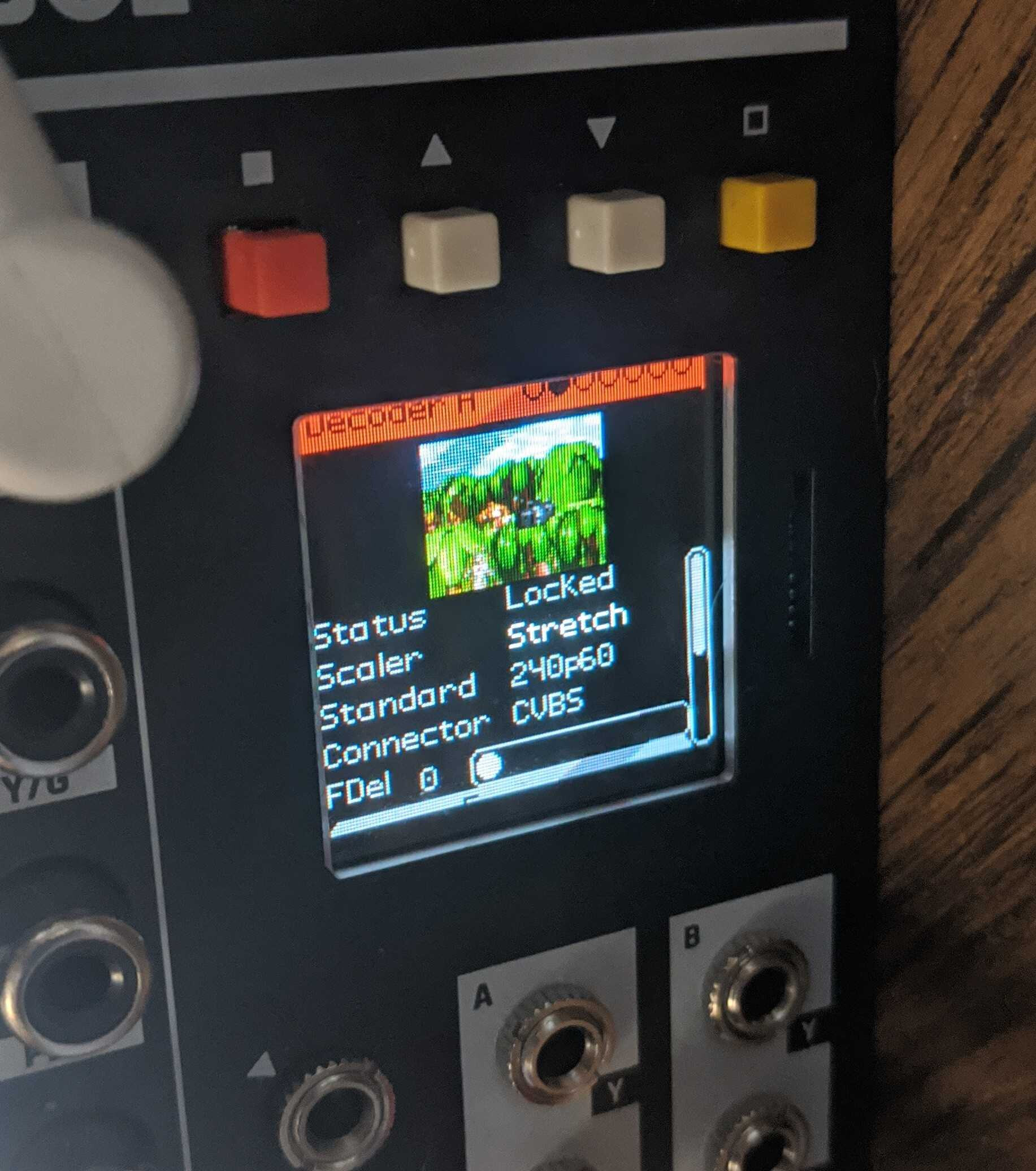
I like to play with a lot of 240p video sources, like game systems. Structure handles those like a champion, where they can be sent into LZX land and play nicely. I tried sending some into TBC2, and it didn’t handle them well, so for me Structure will stay indispensable.
#45 — yuya · 2023-01-27
Thank you for information!

I am waiting for the arrival of TBC2.
I was thinking of using the TBC2 for input of 240p sources such as Ming Mecca, but it’s very sad to hear that it doesn’t work well…

#46 — Jefro · 2023-01-27
Stay tuned. I know Lars wants 240p to work well, so I’m sure the bugs will get sorted out.
#47 — creatorlars · 2023-01-27
I got it working this morning. It’ll be in the 1.0.1 update.
#48 — wednesdayayay · 2023-01-27
scaler
and
FDel
these sound like fun parameters to play with!
#49 — Jefro · 2023-01-27
Lars, you kick ass!!!
#50 — creatorlars · 2023-01-28
wednesdayayay wrote:
scaler>>>> and>>>> FDel>>>> these sound like fun parameters to play with!
Yes there are 4x Scaler Modes: Bypass, Fit, Crop, Stretch.
These are mainly for aspect ratio correction, for example 4:3 to 16:9 and 16:9 to 4:3 upscaling and downscaling scenarios.
Frame delay varies based on the size of the scaler’s output frame buffer. In NTSC, it goes up to 43 frames.
#52 — dryodryo · 2023-01-29
creatorlars wrote:
Frame delay varies based on the size of the scaler’s output frame buffer. In NTSC, it goes up to 43 frames.
YEAH baby! So for 1080i we can expect ~six frames?
#53 — creatorlars · 2023-01-29
dryodryo wrote:
YEAH baby! So for 1080i we can expect ~six frames?
It’s at least that. Right now there’s a fixed memory size per modular part of the app, so each input stream has an equal amount of memory. What I’m getting at is that I can make this more flexible later on. For example, decreasing the max delay of one channel could increase the max delay of the other.
#54 — dryodryo · 2023-01-30
creatorlars wrote:
decreasing the max delay of one channel could increase the max delay of the other
Fantastic! So we can expect single channel operation to enable delay of ~12 frames @ 1080i. That is (visual) music to my ears.