Chromagnon Synthesis Concepts
Category: Forum · Tags: chromagnon · Posts: 111
#1 — Z0NK0UT · 2020-08-06
Ahead of a demo video to show what Chromagnon can do, and in response to questions about how it works, here are some notes from Lars about the new LZX standalone synthesizer.
So to explain it compositionally, in a no-input case, it starts with ramp shape selection as the “scene”. You reach over to the right, set it to “triangle ramps” or whatever you like and then you select “Vector” if you want to process the ramps natively or “Shape” if you want to process them as a quadrilateral (4 quadrant mirrored AKA triangle ramps) space. Then you have XY controls, edge softness, etc. like a typical Navigator/Shapechanger based patch.
To change that shape, you modulate it either directly (with ambient motion generator or directly patched source) or you use the Modulation Vector, which allows you to define a 2D rotation for the ramps in parallel and then use that to displace the original ramps thru a mod matrix (the 5 buttons on the lower left). Imagine if you had a 2D staircase and that 2D staircase had dual VCAs feeding the rotation angle of Navigator–that’s what the Modulation Vector section is.
*Now if you want something a little more wiggly, like an oscillator pattern, that’s what the “Fold” button does (Fold button on = Super Staircase = Chromagnon is complex shape generator).
Fold will add more density to the pattern (like Staircase does), whereas fold off allows for dimensional displacements (like this is where you’d patch luma for your Rutt Etra effect).*
Right side buttons in order…
- HV/Ramp shape select (8 ramp shape options)
- XY Mode – this sets the main function of the instrument: Chroma gen/proc, Luma gen/proc, Vector (for ILDA or XY displays), and HV (for shape/pattern generation with ramps)
- Luma output source (these go thru a YUV to RGB converter, and then into the Porter-Duff Compositor as the Top Layer/Foreground)
- Chroma output source
- Porter-Duff Compositor (12 modes). These settings change the way the processed output and the input source are blending together, like a wet/dry composite. There’s a lot of analog logic and dual key generation trickery here, to achieve the complex RGB logic.
To break down button 2 a bit more, you can think of it like 4 different patches. You effectively have two modes for external source processing (Luma and Chroma), one mode for pattern synthesis (HV), and one mode for vector/laser synthesis (Vector). It changes the context in which the signals interact. Vector and HV mode are almost identical–just different ramp settings and VCA/Gain strategy. For example, in Vector mode Edge controls raster size. In HV mode, it is a high gain clipping function.
#2 — wednesdayayay · 2020-08-07
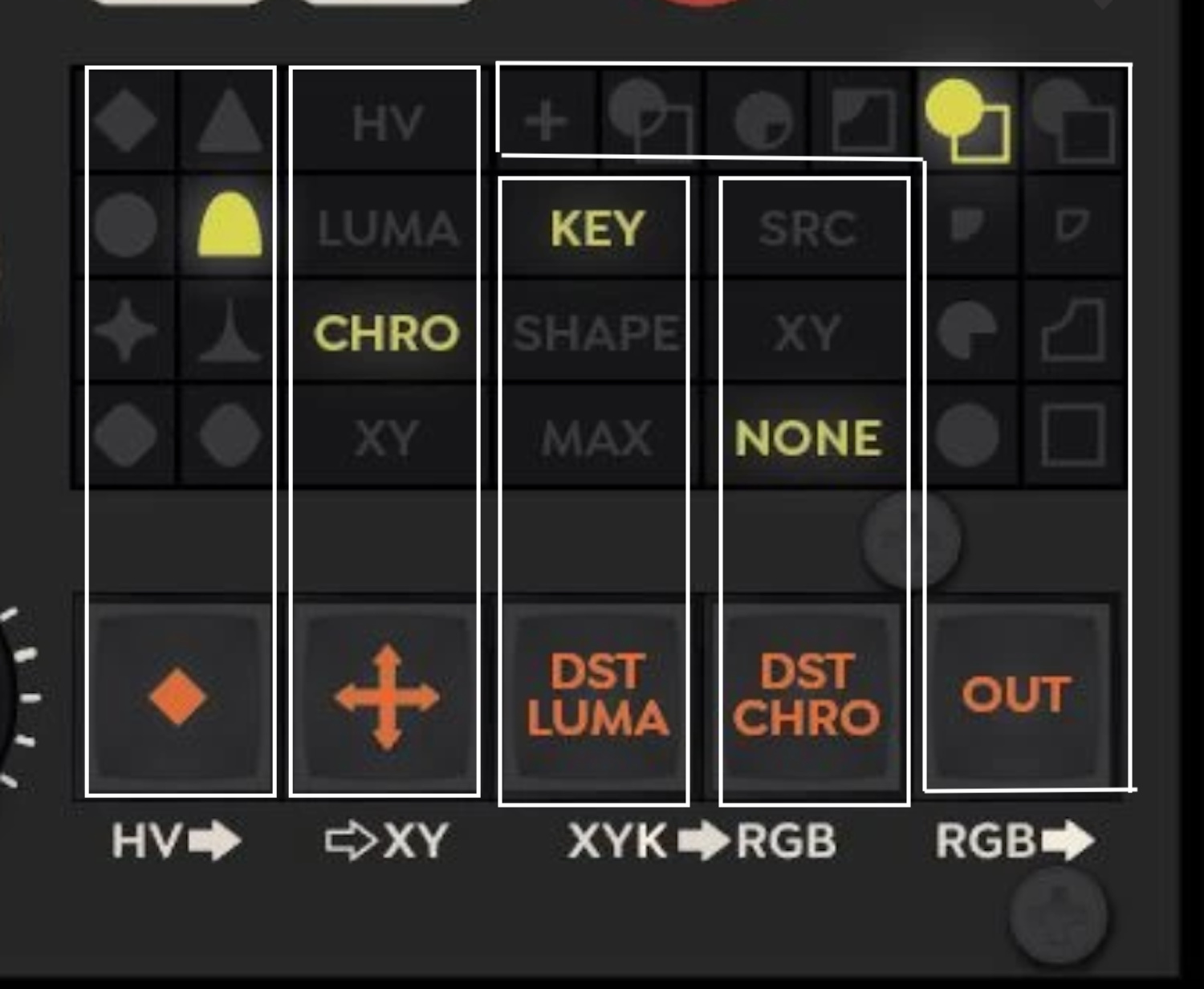
so this is the layout for the keying section display?
there are 8 hv ramps (HV>),
4 described “patches” (>XY),
and 12 modes for the porter duff compositor (RGB>)
that leaves 3 options for both DST LUMA (XYK>) and DST CHRO (>RGB)
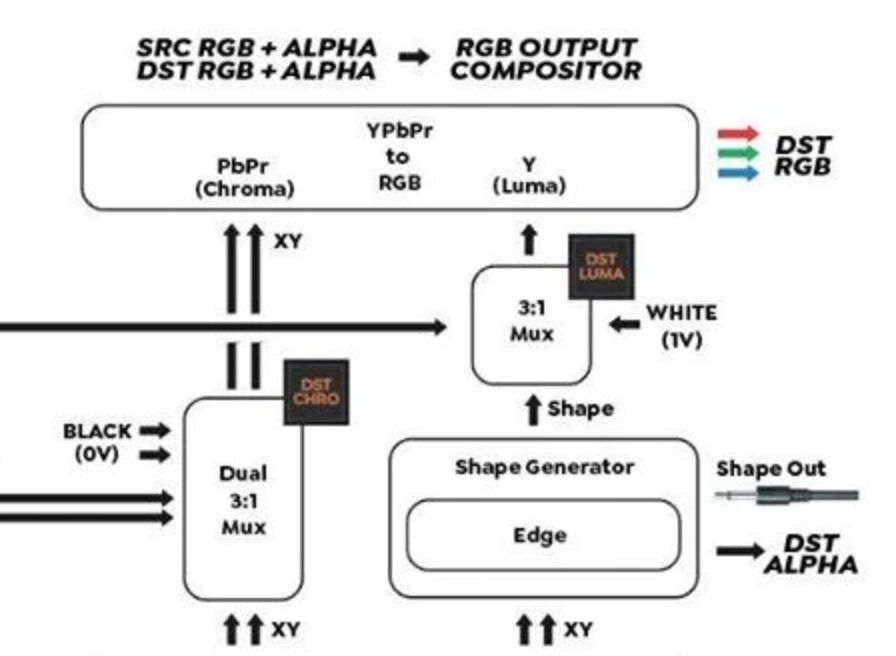
in the signal flow both the DST LUMA and CHRO have 3:1 mux
with the names of the buttons would make sense
luma
key, shape and max (assuming that is the 1v white)
chroma
src, xy, and none (assuming that is the 0v black)
I’m feeling some wheels clicking into place about this layout
it seems like this trick (seen in the video below) I stumbled onto the other day with the v440 mixer and switching between two sources luma/chroma combinations was not a coincidence but maybe mental preparation for chromagnon
instagram.comhttps://www.instagram.com/p/CDMPEyoBoz9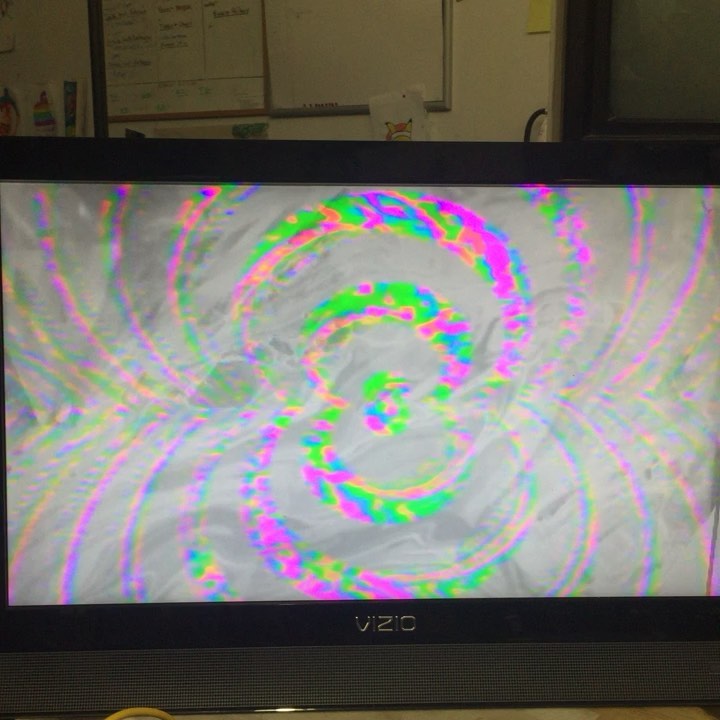
https://www.instagram.com/p/CDMPEyoBoz9Here is something I stumbled onto the other day where I was using a v440hd mixer...Link: @nicholepichon
#3 — nerdware · 2020-08-07
I was looking at this and thinking a similar thing just a few weeks ago. I didn’t bother working out all the details, but I realised a Chromagnon would work better for me than a whole lot of other modules and/or external devices, like a V440. Every time I look at that mixer, I come to the same conclusion. This signal flow/generation/processing explanation confirms it. Thanks, Lars.
However, the real big selling point, for me, is the power and case. Clean power with a stand-alone case wins. If I can also rack it on 84hp rails, that’s another winning feature. Chromagnon looks like it has all of that, but I’ll hold back my excitement until its available from a UK shop.
Thanks.
#4 — Vdot · 2020-08-07
Neat!
Any idea when the first video will drop?
#5 — Z0NK0UT · 2020-08-07
The first video will drop after a complete Chromagnon unit is finished and delivered to Johnny Woods. Right now the team is finishing TBC2.
#6 — Dr_Rek · 2020-08-07
Super stoked! I’d love to make some examples too when my first day pre-order arrives.


#7 — brendanleespengler · 2020-08-09
So helpful! The anticipation has been stoked.
#8 — Z0NK0UT · 2020-08-21
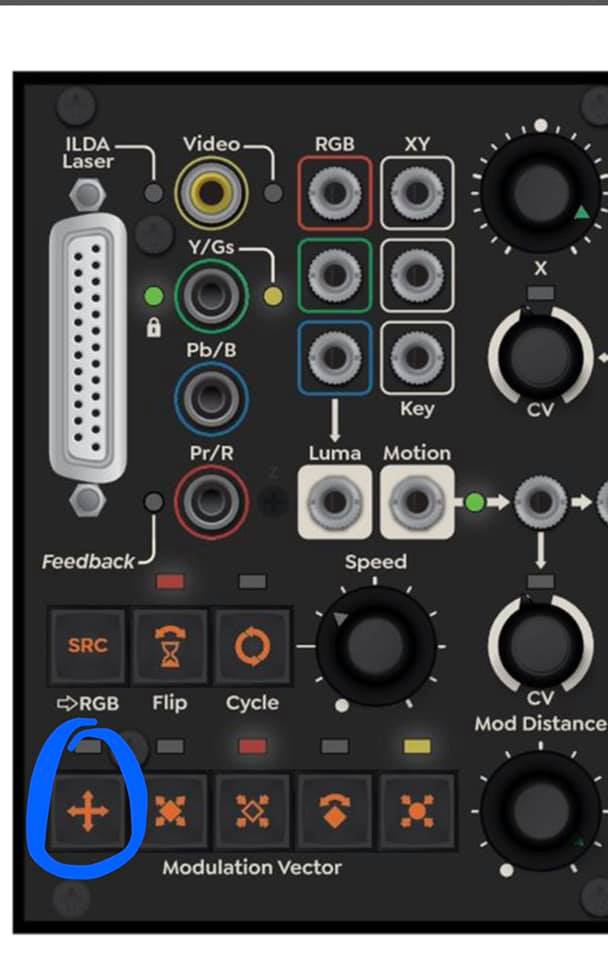
Q: What is this modulation vector?
A: “That’s “orbital displacement.” The modulation vector has Sin/Cos output, so if you feed an LFO then orbital displacement will cause the shape to position itself around a circular path. You could do something similar by feeding a quadrature LFO sin/cos into Navigator XY. Or using navigator 1 out to modulate XY of navigator 2. Something that’s not implicit from the panel is that there are four states for each modulation vector button. off/red/green/yellow = off/x/y/both.”
#9 — Z0NK0UT · 2020-08-24
A note on Chromagnon’s video i/o:
It will support “240p/288p/480p/576p/720p/1080p30. We could even add some timing profiles to match some weirder formats as well. On the rear we have an 8 position dip switch. 1 switch turns sync auto-detect on/off – with it on, system genlock switches to match the format of the TBC input source if no sync input is present. Auto-detect is always on for the sync/genlock input, and that overrides any TBC input source. The other 7 bits select up to 128 different video standards. So in the case of using Chromagnon with no input, or as master sync gen, you will select your default video format with these switches.”
#10 — Dr_Rek · 2020-08-26
1080p video feedback possibilities ermahgerd!!! Can’t wait.
#11 — gzifcak · 2020-08-27
Does this mean it will sync to arbitrary rates that fit the data rate but are not specified? If not I would love to see standard SMPTE rates like 24p, 23.98p, 29.97p, 59.94i, 59.94p
#12 — praiseofpeace · 2020-09-02
I wasn’t familiar with “Porter-Duff”. Upon googling I found this image (it happens to have 12 examples

)
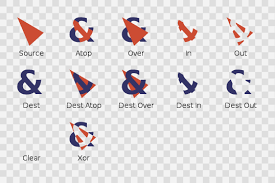
Will most of these compositions be essentially possible?
#13 — Z0NK0UT · 2020-09-02
This corresponds with the 12 compositor modes available in Chromagnon.
#14 — praiseofpeace · 2020-09-02
Thanks for clarifying, very exciting!
#15 — Z0NK0UT · 2020-09-04
Lars, quoted from FB comments, says:
The number of frame synchronizers in a system you need is equal to the number of input sources minus one. So with Chromagnon + Visual Cortex, you can have two external sources. One is the master timing reference, and the other is frame synchronized by Chromagnon’s TBC. Key to the Automata series concept is that all units include a TBC and a 2:1 RGB function. Meaning each device can mix itself into an external source. RGB inputs are separate from the decoder/TBC section. Yes, you can feed the outputs back through the TBC in feedback mode while still using the RGB inputs. Visual Cortex locks itself to the timing of an external source. That external source can also be fed to an input decoder, so you can patch the video through the system. Visual Cortex has to slave itself to the external timing in order for this to work. Chromagnon locks itself to the timing of an external source via the genlock input (or not, can be free running). Where it differs is that the input decoder has a TBC/frame sync this time. So the external sync/genlock source and the external video source don’t have to be one in the same. Meaning we can sync Chromagnon #2 to Chromagnon #1, while both of them can frame sync an asynchronous external video feed, resulting in two synchronous external input channels. So technically Chromagnon has two external inputs (Genlock/Sync Input and External Video inputs). Whereas Visual Cortex only has one (Input Decoder and Genlock/Sync Generator must be the same).
#16 — wednesdayayay · 2020-09-04
so with a visual cortex, chromagnon, TBC2 setup you could have 4 external sources?
#17 — Z0NK0UT · 2020-09-04
Correct. TBC2 and Chromagnon share the same video input platform.
#18 — wednesdayayay · 2020-09-04
oh wow things are going to get wild
#19 — monads · 2020-09-05
^Agreed!! Had to jump on the pre-order bandwagon!!!
#20 — RoseColouredGlasses · 2020-09-07
It’s stated that the chromagnon will replace the functionality of the polar fringe, yet no joystick, I’m not all too sure about how this will work. So I’m wondering if this is going to be built in to the modulation section. Also does this mean an eventual discontinuation of polar fringe?
#22 — wednesdayayay · 2020-09-07
here is some info from lars on facebook
"Note that with Chroma (PbPr) to XY inputs, the shape generator is producing a chroma key.
Since the XY processor performs at video rate bandwidths, it can process the PbPr (Chroma) channels of the input video source as UV colorspace (which is a two dimensional plane.) For example, X & Y Position become PbPr offsets (hue selection). Rotation becomes Hue shift, and Gain becomes Saturation. So to process chroma we first convert RGB to PbPr, then feed those to the X & Y inputs. Then we take the X & Y outputs and convert them back to RGB (along with a luma component). This is complex in the block diagram, but easy on the synth – you just select “Chroma” as the “Vector Mode.”
So imagine this (UV at constant luminance) as the “2D plane” that is being processed/generated by the XY Processor, when we feed in Chroma as the vector source.
Yes, that is the key idea behind this instrument! General purpose XY processor (analogue computer style) with a lot of complex interfacing that allows its use as color processor, colorizer, shape/key generator, vector rescan driver, etc. I hope it gets people to think about how all of these applications are driven by similar math at their core. There is also a Polar-to-Cartesian processor in the XY Processor (the “modulation vector.”) This can take angle and distance inputs and give XY outputs. The Angle input can be used for a direct voltage to Hue function, which allows for a Luma-to-Hue map colorizer."
#23 — Dr_Rek · 2020-09-11
Starting to wonder why all the juicy info gets posted to Facebook? Thank you to the folks who are reposting it here, I’m sure I’m not the only one ethically opposed to having a Facebook account.


(I was on there a regrettable 9 years)
#24 — Z0NK0UT · 2020-09-11
I think it’s because people are on it all the time anyway. It’s designed to be addictive, after all.
#25 — Dr_Rek · 2020-09-11
An addiction my life is so much better without now. Don’t want to preach or belittle anyone here, but the idea that Facebook is something we need in our lives is an illusion, and I’ve been super great without it for over two years.

The fact that LZX has this forum site is most supreme, considering the current era of some companies main presence only being on Facebook or Twitter.
Thank you!
#26 — RoseColouredGlasses · 2020-09-13
Totally understood, but used as a tool and not a portal to ego, facobook can be used as a forum for all the forms you are interested in. In my opinion of course. Personally i use it for many types of synthesis discussions and or informational groups, audio, video synthesis, drum machines. Sound design. Anything can be a tool or a distraction, it’s how it’s used. With all due respect.

#27 — Z0NK0UT · 2020-10-11
A little update for those not on Facebook; Lars posted,
“RevB units were built and passed all tests so far. This is after a lengthy review of all the RevA boards over the Summer. Jonah, Nick and the assembly team have been kicking ass on that and just getting on top of production prep. I’m holed away still with my software project for tbc2/Chromagnon/mempal, and almost ready to show it off. This week I also need to dig in to the RevB review, during which I hope to start showing some video.”
#28 — LILWILLY · 2020-10-11
#29 — Robbertunist · 2020-10-11
Austin James just asked a couple of questions regarding the #Chromagnon’s 1080 output & it’s composite output on the FB page, I can’t copy the text so here’s a screenshot.
#30 — Robbertunist · 2020-10-11
@LILWILLY, you beat me to the line

#31 — LILWILLY · 2020-10-11
i took the robbertunity
#32 — Robbertunist · 2020-10-11
Note to self, posts must be 20 characters long

#33 — Z0NK0UT · 2020-10-12
Some ILDA ideas from Lars:
“Radiator into Chromagnon adds an additional analog rotator/processor/recolorizer to the ILDA signal chain. So you could use it to add an additional rotary access with direct displacement via audio and CV.”
“…there are multiple YUV/RGB converters in there. It’s going to process whatever it’s fed as continuous 0-5V RGB and +/-5V XY voltages. There’s all sorts of neat tricks. For example you could use the chrominance of the RGB channels as a Cartesian displacement vector for the XY path.”
#34 — Hager · 2020-11-09
Hi I think I saw something about being able to scale the output to an oscilloscope when working with x-y graphics. Can you also invert the output or would I need to do that elsewhere? Im looking for an oscilloscope but some has a z axis that lowers the brightness with higher voltage.
#35 — Z0NK0UT · 2020-11-09
I believe the gain controls for X/Y/Luma do not invert, so you would have to invert the signal after Chromagnon.
#36 — scavengers · 2020-11-12
Am I understanding correctly, that I would be able to connect a video source such as a VHS deck as an input to Chromagnon without a TBC in between, and it would time base correct it for a clean picture?
#37 — Z0NK0UT · 2020-11-12
Chromagnon incorporates its own TBC at the input, allowing you to send in full color video from signals like a VCR.
#38 — pitfiend · 2020-12-09
How easy would it be to do the camera-at-a-screen feedback workflow on Chromagnon? The one the Vidiot is known for.
More specifically, would it be possible to have a chain like [external video in > Chromagnon processing > video to screen > camera > feedback into Chromagnon > capture solution out]?
It seems like it should, but I’m not 100% able to tell from the info that’s out there.
#39 — rempesm · 2020-12-09
If you’re planning to work with Chromagnon as a standalone unit, it would only sync to one external video input. Your second camera wouldn’t be synced to Chromagnon when you try to feed it back into the module. Probably would still look neat as a feedback source but you’d need to use something like the upcoming TBC2 or other means of genlocking your equipment to get additional synced inputs.
I’ve had pretty good success with using Extron VSC700 boxes as a cheaper alternative for full color synced inputs and have posted a few times on the forum about them.
EDIT: Oh wait, that’s not quite correct–I’ll eat some of my words here.
Since there is a RCA genlock input on the back and an external video input on the front that feeds into a frame synchronizer, you could feasibly loop your external video into the genlock input to get Chromagnon synchronized to that. Then put the other source into the external video input which will be frame synchronized.
You’d need to loop the external video going into the genlock input through the other RCA sync out connector and use some other type of video input module like Cadet III to condition the signal before patching it into Chromagnon. A RCA to 3.5MM adapter would work if you could strip the sync off the signal before patching it. Things might be a bit screwy otherwise.
#40 — sean · 2020-12-09
If they’re asking about a set-up possible with Vidiot, I think they’re actually referring to a simple, single camera situation, no? So the signal flow would be:
Camera pointed at monitor > Chromagnon > Monitor + Capture
Processing possibilities are of course different than Vidiot, but that should work just fine.
And, indeed, since Chromagnon has multiple outputs — which I assume, like Visual Cortex, can be used at the same time — it will be easier to monitor and capture simultaneously (not that it is hard to make that happen with Vidiot but it does require something to distribute/pass the signal externally).
#41 — pitfiend · 2020-12-09
I should have clarified, I was thinking about combining that single camera workflow with an additional external video source. So a seed video goes in (such as gradient stills), gets processed, then goes back in as a feedback source as well.
#42 — sean · 2020-12-09
Ah, okay. Well then, yes, you would need a second device to get that second external input into your system (same as you would with Vidiot).
Sync won’t really be as much of an issue with Chromagnon (as it is with Vidiot) because its external input has a built-in TBC.
#43 — wednesdayayay · 2020-12-09
1 video mixer at the end of the chain mixing/keying feedback with output
2 video mixer in front of chromagnon mixing/keying between feedback and source
3 take a 1/8 LZX standard video signal into one of the many video rate modulation inputs (assuming you’ve got modules that produce those signals)
4 camera -> mult -> chromagnon sync, dirty mixer A channel
still source -> dirty mixer B channel
dirty mixer out -> chromagnon video input
because things are sync’d together I would imagine you’d get the result you are after with this! I could be misunderstanding how those two inputs work with each other though
those would be the places that I would start messing around with that kind of workflow
#44 — pitfiend · 2020-12-10
Follow up question since you guys are so helpful and I’m struggling with capture options. Chromagnon has distinct Chroma/Luma/Shape modes. What type of workflow should I look for to run a single video through Chromagnon multiple times?
For example: [external video > Luma pass through Chromagnon > (record) shape pass > (record) Chroma pass > digital capture]. I suspect you could get amazing results from varying the order of operations and compositing modes on Chromagnon. But I can’t think of an elegant way to do this.
Something like [DVD player > Chromagnon > Ambery analog to HDMI convertor > Atomos Ninja 2 > computer > burn DVD > repeat]. That sounds too slow. Or maybe two shuttle recorders, rotating which is the input and output?
What type of workflows have people used for this? Anything from dirt cheap to primo…I’m stretched on budget but willing to save up for upgrades eventually. It’d be a shame not to take advantage of 1080i60 component outs on Chromagnon.
#45 — Z0NK0UT · 2020-12-11
It might be easier to use a source that also records, so you can switch between your recorder and source in the chain. For example, 2x Atmos Ninjas, or a DVD recorder and a DVD player, or two laptops, or an Andor and a laptop, or any combination of these.
Maybe better to continue this discussion in one of the capture threads, as Chromagnon isn’t necessarily relevant to the methodology. You could apply this workflow to any processor.
#46 — vhsdestroyer · 2020-12-14
So I’ve been thinking about how to use TBC2 and chromagnon to distribute sync between two cases. TBC2 has an rca sync out, so would sending this output to chromagnon on its video input sync the two cases?
#47 — wednesdayayay · 2020-12-18
I’m going over the 12 compositor modes and trying to match them up with the examples posted.

https://www.facebook.com/groups/lzxindustries/permalink/1702560236581956/LZX Video Synth Community has 3,183 members. Official group for support and user discussion about LZX Industries and other compatible video synthesizer instruments.
Link: Facebook Groups
this post is showing some interesting data about how these modes will work
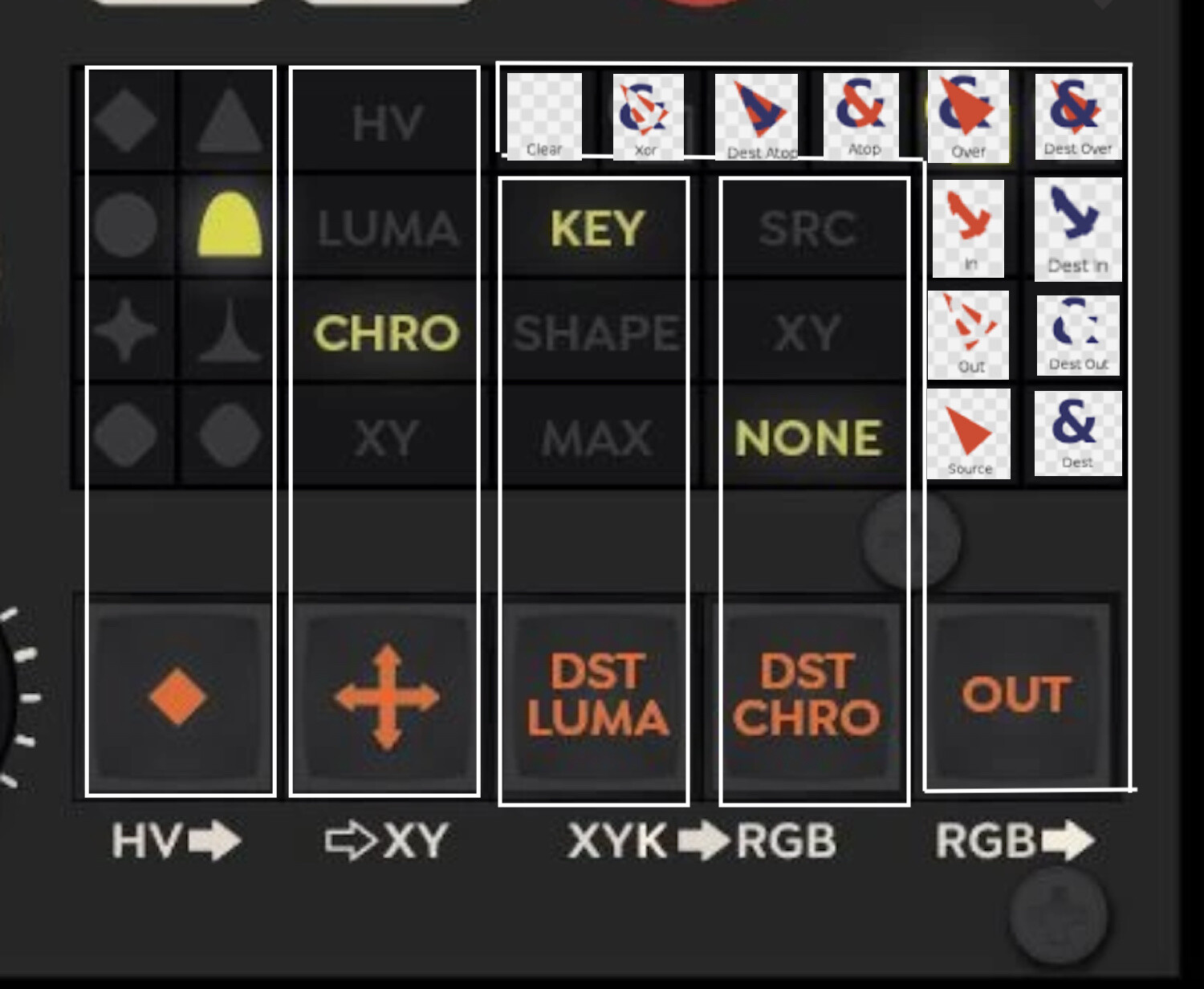
Is this the way the modes are laid out?
I’m assuming “clear” should be “add”
going over the data and matching the names up really helps be able to spins some more wheels about chromagnon.
I’d like to do a module layout with graphviz to approximate the navigator,shapechanger,staircase,polar fringe,mapper layout chromagnon can be.
I’m having a hard time fully understanding the polar fringe (is it used in the 12 compositor modes?) mapper (is it in the RGB to YUV conversion?) and staircase (I’m reading the 2d staircase explanation but don’t really get it) modules places in the patch.
I’m excited to understand it better!
also in preparation for the chromagnon I think it makes sense to try making a single modulation source that gets sent to many places in a patch. I personally haven’t really used that technique yet.
#48 — Cannonball · 2021-01-13
Hello all, on the fence about diving into video synthesis for some Rutt Etra visuals. I have a 12u on normal eurorack. Would the Chromagnon cover all the territory in the example patch on this site? Aside of course from the cctv and XY display? If not, what would I be lacking?
#49 — Z0NK0UT · 2021-01-13
Chromagnon provides an all-in-one vector rescanning workflow. You would use the X/Y/Shape outputs (which will have rear panel trimmers to tailor the output to your vector monitor) into your X/Y/Z inputs.
#50 — Z0NK0UT · 2021-03-31
More from Lars about the compositor: [Chromagnon’s] Porter-Duff compositor is a 2-channel RGB mixer driven by two separate key sources controlling the gain of each channel. The key sources come from a few multiplexed min/max and summing amp circuits, so all the Porter-Duff logic is created there. When both alpha channels are active, I expect a lot more negative space in the resulting composition in comparison to what we’re used to with raster patterns – since you have a multitude of ways to constrain two sources onto a black backdrop, and can easily avoid the “full frame wiggly rainbow square” look.
#52 — wiatrob · 2021-04-01
What I was trying to say was: avoiding the “full frame wiggly rainbow square” look. is overrated!

#53 — VitreousSpaghetti · 2021-04-17
has Memory Palace similar power needed
to a Crohmagnon?
- 550 mA +12V
- 50 mA -12V
- 0 mA 5V
#54 — Z0NK0UT · 2021-04-19
Chromagnon could pull as much as 1.5A (1500mA) on the positive rail. This is still an estimate and is on the high side of the possible range.
#55 — giantmecha · 2021-08-25
Was curious about Chromag — is it possible to combine the feedback path/mode with external inputs, or have the two interact in any way? Also, is there a way to switch between feedback and external input modes via CV (or USB)? Thanks

#56 — Z0NK0UT · 2021-08-25
Feedback is considered an external input, so you wouldn’t be able to combine it with incoming video. Input sources are only selected manually, not via CV or USB.
#57 — pitfiend · 2021-08-28
You could do this with a video mixer, I’ve heard. Use the mixer to mix the Chromagnon output and the external video, then plug the mixer output into the Chromagnon input.
#58 — creatorlars · 2021-08-28
Definitely! You could even put other devices into that feedback path, too.
#59 — giantmecha · 2021-08-29
Oh yeah, great idea. I wonder if there’s a mixer out there that could work in this instance, while still preserving Chromag’s HD signal path?

#60 — creatorlars · 2021-08-29
The V4EX / V8EX can accept HD Component over the VGA connector with a breakout cable I believe.
#61 — giantmecha · 2021-08-29
Awesome. That sounds like a pretty dang powerful setup.
#62 — cinema.av · 2021-08-30
This is true, and often upscales the input coming in quite significantly, as it’s a full rgb signal, instead of composite. Really makes a difference when going hdmi out on the big screen on a proper cinema (no pun intended) projector…
Moral of the story, component out wherever possible.
#64 — Z0NK0UT · 2021-10-18
dryodryo wrote:
Will the Chromagnon RGB inputs be able to handle anything other than LZX formatted video? My guess is no. It would be super sweet to just feed it a VGA signal, but I’m not seeing any Hsync or Vsync inputs on the front panel graphic.
So the highest quality input to the Chromagnon would be YPbBr with sync on Y?
The Chromagnon RGB inputs use the 1V LZX modular video standard. Some folks have used Extron gear (as illuminated in other threads) to send RGB signals directly. TBC2 has an optional VGA expander, but you would have to convert VGA to component if using only Chromagnon.
#65 — pitfiend · 2021-10-18
Puzzled by the signal flow graph…Chromagnon’s TBC section is separate from its RGB in/out, right? So if I wanted to use it as both a synth/processor and an input/output encoder, I could?
For example: plug Chromagnon RGB outs into other video modules, process process process, send the signal into Chromagnon RGB ins, then capture out of Chromagnon’s YPbPr?
Could I plug an external source into Chromagnon RCA, take from RGB out, process it with other modules, send it back into the RGB in, process it with Chromagnon, then capture from the RCA out?
#66 — creatorlars · 2021-10-18
pitfiend wrote:
zzled by the signal flow graph…Chromagnon’s TBC section is separate from its RGB in/out, right? So if I wanted to use it as both a synth/processor and an input/output encoder, I could?
It is a synth/processor with a single input section and a single output section. It is not a combo TBC module + output encoder module with separate IOs. The YPbPr/CVBS inputs are just one of the ways to use the input section. If you patch into the RGB inputs, it will override anything going into the YPbPr/CVBS inputs.
If you are using Chromagnon as the base for a modular system, you would not use it like you would use a traditional Encoder + TBC in an LZX system. It’s a self contained voice, and any modules would expand the internal section (represented by the 9x analog controls/CV inputs, HV outs, etc. – that is, the part of the signal path between the video input and video output.)
Could I plug an external source into Chromagnon RCA, take from RGB out, process it with other modules, send it back into the RGB in, process it with Chromagnon, then capture from the RCA out?
If you did this, the external source would be overridden/detached when you patched back to the RGB inputs. You could patch the RGB outs through other modules and then feed them back into the CV inputs though, to create parameter feedback. You could patch the HV outs into other modules, create shapes, then use those as inputs to the CV modulation as well.
#67 — pitfiend · 2021-10-18
That makes way more sense. So the workflow of [Chromagnon > RGB processing > HD output] will not work without an additional Automata instrumen or a future output encoder.
So if I want to expand on Chromagnon without a second Chromagnon, CV modules are the main thing to add for now? The HV outs are basically like a Shapechanger/Navigator output and would require an output encoder. I’m very curious to see what this CV feedback would look like, though.
#68 — creatorlars · 2021-10-18
pitfiend wrote:
So if I want to expand on Chromagnon without a second Chromagnon, CV modules are the main thing to add for now?
For a “self contained Chromagnon system” you don’t need additional encoders or TBCs (video IO), but any generator/processor modules (DSG3 Dual Shape, DWO3, Dual Osc, FKG3 Keyer, SMX3 Matrix Mixer) would be great expansion options.
#69 — dryodryo · 2021-10-19
So there are RCA sync input and output jacks on the back?
On the front panel graphic, I see a lowercase “s” on the TBC RCA jacks … “Y/Gs”. I presume this is sync.
Can Chromagnon sync to the incoming component signal?
What is the RGB standard for the RCA inputs to the TBC? I assume it’s 1V p/p. Is RGsB sync on green supported?
Is it possible to use the composite RCA jack as a sync input? RGBS?
Thanks!
#70 — rempesm · 2021-10-19
dryodryo wrote:
So there are RCA sync input and output jacks on the back?
Yes.
dryodryo wrote:
On the front panel graphic, I see a lowercase “s” on the TBC RCA jacks … “Y/Gs”. I presume this is sync.
Yes.
dryodryo wrote:
Can Chromagnon sync to the incoming component signal?
Study this diagram first:
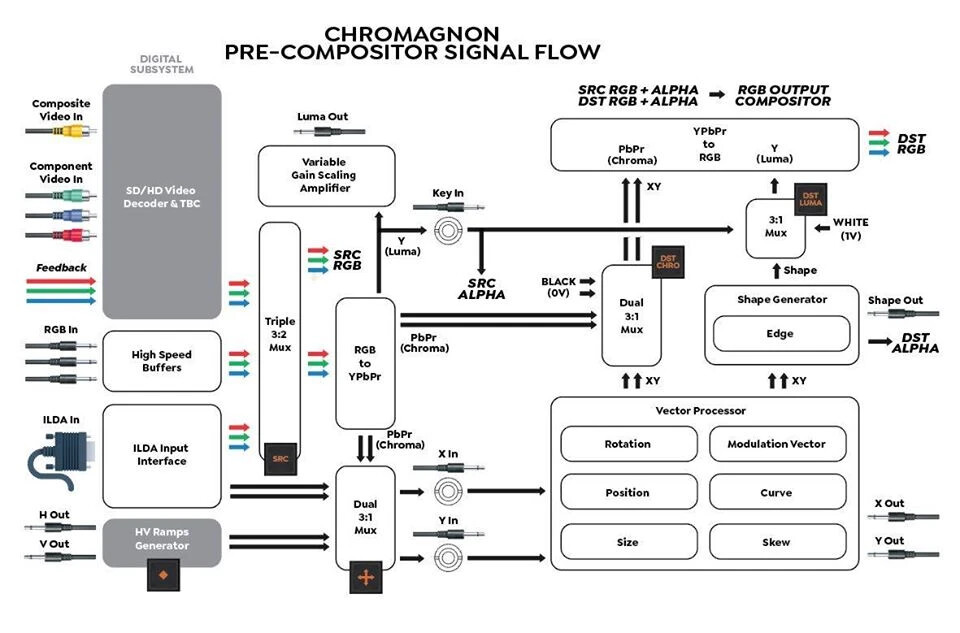
Its front panel YPbPr inputs go directly to a TBC so not in the way you’re thinking. Even if you mult the Y from a YPbPr signal into Chromagnon’s rear sync input to genlock it from that and then also into the front panel YPbPr inputs, it’s still going through a frame buffer before being passed to the next stage. If your goal is to have Chromagnon genlocked to an external source and input a YPbPr signal into its 3.5mm RGB LZX 0-1V standard connections while bypassing the TBC, you would need a separate input decoder module. Basically, mult your Y from a YPbPr source into Chromagnon’s rear sync input and then decode your YPbPr into RGB LZX 0-1V standard with a HD YPbPr input module that doesn’t exist yet. There are SD versions available like Syntonie’s VU003 for now.
dryodryo wrote:
What is the RGB standard for the RCA inputs to the TBC? I assume it’s 1V p/p. Is RGsB sync on green supported?
Not sure on first question but second one, yes that’s the meaning of “Y/Gs”. It’s still going to go through a frame buffer though if you input RGsB into its front panel connectors. A separate RGsB input decoder module that doesn’t currently exist would let you bypass the TBC and plug directly into Chromagnon’s RGB LZX 0-1V standard connections, provided you had multed the Gs through to Chromagnon’s rear sync input.
dryodryo wrote:
Is it possible to use the composite RCA jack as a sync input? RGBS?
Dunno but that might be useful! It would only allow for SD timings, presumably.
#71 — dryodryo · 2021-10-19
Thank you @rempesm –
I understand that the RCA input will always go through the TBC, delaying the source by one frame regardless of whether or not Chromagnon is genlocked to the source.
I do want to bypass the TBC so I am trying to figure out my options. Getting a lag-free RGBS signal out of a computer and into Chromagnon may be challenging. A YsUV to RGBS converter would do the trick, but they are probably unobtainium. Extron used to make one, back in 2009.
https://www.extron.com/product/cvc300
Maybe I can use an HDMI to DVI-D cable and this Extron converter?
https://www.extron.com/product/dvirgb200
#72 — dryodryo · 2021-10-19
BTW there are a couple of YUV → SCART converters available, but A) I think the voltages are not what Chromagnon expects, and B) I do not relish building a SCART breakout cable.
#73 — creatorlars · 2021-10-20
Just plan to use the YPbPr TBC inputs for your external video source – you’re trying to fit a square peg into a round hole, when there’s already a square hole!

#74 — Ritzy · 2021-10-21
I’m sorry, but getting a “lag free” signal out of a computer for quite literally anything for all intents and purposes is impossible by the sheer nature of how digital systems work. More importantly, it’s right in the territory of people sweating the purity of the copper in their audio interconnects. Not a single human on earth can hear the difference in copper purity, no matter what an audiophile magazine will tell you.
The true answer here is obvious. You’ll have to sign up for a computer to brain interface as soon as possible so you can negate the latency of your eyes processing the incoming photons

#75 — transistorcat · 2021-10-22
Lag matters if you’re syncing to sound or doing feedback, and comparing trying to iron out multiple frames worth of lag to copper purity purist audiophile madness makes little sense.
#76 — jwsmithwick1 · 2021-10-22
For those trying to sync up their patch to an audio source like a synth that uses pitch and gate CVs, one way to cut lag is to mult the pitch and gate CVs (filter cutoff CV very relevant too), and scale those voltages into whatever part of one’s patch that they care to modulate. This cuts out the “audio synth lag”, so that your video synth and audio synth are firing at the same time.
Btw, Really excited about the Chromagnon! I was looking at the front panel last night

. What did I Preorder!?! Can’t wait to run some feedback through it!
#77 — b4_H · 2021-11-17
Did this video drop? I’ve been off and on in terms of searching. My apologies if the answer is blatant, I’m late to the party…
#78 — nerdware · 2021-11-17
The production schedule suggests “not yet”. Note that FKG3 was in there until very recently, but now its shipping. Also note the warning highlighted in yellow.
#79 — b4_H · 2021-11-17
…thats a new “yellow”, I’m ready for it. Keep up the good work folks. The synergy isn’t just locally generated - we got you
#80 — modmodmodmod · 2021-12-11
I’ve been paying attention to LZX since the first generation, but I needed a size of 16: 9 instead of 4: 3 because the purpose is to capture it on Mac and make my music video.
So I gave up on it and 10 years have passed. And recently, I heard that LZX supports 1080p output, and I’m considering introducing Cromagnon.
Please let me ask some questions related to that.
These are very rudimentary contents, so these were likely answered in the forum already,But I couldn’t find it. I’m sorry if there are duplicates.
Q1:
Why does LZX not introduce modern resolutions such as 4K, 6K, 8k, but introduce legacy resolutions of 1080p?
Due to my lack of knowledge, I expected that Cromagnon would be equipped with an HDMI output port and could output resolutions up to 8K.
Is it a technical issue that LZX does not introduce today’s resolutions? Or is it a ideological issue?
Q2:
I was wondering if there are many 16: 9 size videos made by pre-HD system on LZX’s Youtube channel etc. Are those online videos capturing the 4:3 SD output from LZX on a computer etc. and then forcibly stretching it sideways?
Q3:
I’m interested in the Orion series, especially the fortress, in addition to Cromagnon, but will the Orion series continue to be produced in the future?
Also, I’ve seen vague information about whether the Orion series supports HD. Is it possible to input the video output from the Orion series to Cromagnon and then capture it on a Mac in HD?
Excuse me for the beginner’s question.
#81 — nerdware · 2021-12-12
Aspect ratio is a feature of the display device. Once you get the video into a computer, you can use whatever aspect ratio you like.
Some video players, like VLC, will let you override the ratio set in the file. The default settings on all the “smart” TV sets I’ve seen seems to be to use 16:9 regardless of the broadcast ratio. However, it may be possible to change this in a menu option.
Many videos created using LZX modules that I’ve seen use 4:3, but some of us prefer 16:9. I also like upscaling to HD and applying other post-production transformations. For example, I like cropping the image to get cleaner edges, then adding horizontal and vertical mirroring. As the starting point is SD video, I actually downscale to get HD. If I did this starting with HD video, then I’d get 4K without any scaling. Adding another level of mirroring would give 8K. However, I don’t yet have a 4K monitor, so I don’t bother. HD is good enough for me.
Everyone has their own post-production style. That’s why so many of us use a video editor or something similar.
As for LZX hardware resolution, I think that may be a technology issue. Eurorack PSUs in the past struggled to provide enough power for SD modules, nevermind HD. Gen3 solves this by supporting 12V dc supplies.
However, I think HD is the maximal possible resolution. That’s a limitation of component video. To go higher, you need to go digital.
#82 — wednesdayayay · 2021-12-12
ffmpeg -i pc.mp4 -s 1440x1080 pcO.mp4
ffmpeg -i pcO.mp4 -vf "scale=-1:1080:flags=lanczos,setsar=1,pad=1920:1080:(ow-iw)/2:(oh-ih)/2" pcU.mp4
I use these two ffmpeg commands to go from 640x480 > 1440x1080 then pad to 1920x1080
If the source absolutely has to stay in 4:3 this is the easiest way for me currently
in my system I use an extron 300a to go from component output to HDMI and it also upscales however I want. The video is also going through a v440 before that so it can be upscaled most ways there too.
you can do it with hardware like mixers or upscalers in real time or you can do it via software in post production
there are no LZX modules with a HDMI output
the closest is the DVI out on the memory palace
as far as 4k etc that would be a post processing thing for sure with the current system
using something like topaz AI I would imagine
displaying live video content in 16:9 is totally doable and has been since before this new 1080 era! we are just going to have a lot more clarity at our disposal now if that is the artistic goal.
#83 — a_digital_index · 2021-12-12
16:9 and 4:3 are just ratios and not resolutions. I almost exclusively feed my LZX system 16:9 footage, process it in 4:3, but recapture in 16:9. You can look at some samples of said process here: a_digital_index on Vimeo
#84 — modmodmodmod · 2021-12-12
Thank you for advice.
So that’s it. Since I usually make handwritten animations, I rarely changed the aspect ratio in post production.
For example, if I want to create a perfect circular image with LZX and finish it in a 4k digital movie without changing the aspect ratio, first divide the output of LZX into two and monitor one with a 16: 9 aspect ratio to create a perfect circle. And I just have to make it and capture the other one to Mac etc. via an HDMI converter with 4k upscale function, right?
Upscaling from SD or HD to 4k may not be particularly beneficial as it just makes the file heavier
Thank you for the useful information about electricity too. I didn’t know that the power consumption of a video synth is higher than that of audio

Thank you. It’s so beautiful. I can’t believe it’s an SD signal
Thank you for showing me great job! Well, these works have 16:9 ratio, but the resolution is SD, isn’t it? Is the final codec h.264? And what is the frame rate?
#85 — nerdware · 2021-12-12
The file will certainly be larger after upscaling, but that’s a feature of the final resolution rather than the scaling itself. Pixel format and frame rate will also be issues.
#88 — Rik_bS · 2021-12-12
I can’t find the post but there was some discussion around HD in the LZX environment, which is primarily analogue don’t forget, it was mentioned that the bandwidth required to synthesise 4K would make for some obscenely expensive hardware…
#89 — a_digital_index · 2021-12-12
I use an UDC to convert everything to 1080. That is what you saw. I’ve tried upscaling to 4K and it didn’t really result in a better image; just larger. To a certain degree, your image will only ever be as good as your lowest resolution in your signal flow and with Expedition series as sync that is going to be 480 (SD).
Most of these are captured in 29.97 and the codec is Pro Res which I then turn into .264 for web delivery.
#90 — modmodmodmod · 2021-12-12
a_digital_index wrote:
これらのほとんどは29.97でキャプチャされ、コーデックはPro Resであり、Web配信用に.264に変換します。
Thank you again. It was very helpful.
Capturing with 29.97 ProRes and rendering with h.264 after post-production seems to me to be the best way for current webcasting.
And It’s very interesting to see what the image quality will look like when capturing LZX’s new HD video output.
#91 — Marizu · 2021-12-13
I’ve never seen a 4k or 8k analogue signal. Outside of VGA, I’m not aware that there are any standard analogue signal resolutions that went much higher resolution than 1080. VGA could get to just over 2k.
A big strength of the LZX approach is that it is an analogue process, so when you patch things together, they pretty much happen instantly. Adding extra modules into the chain doesn’t add frames of latency (except for the Memory Palace but that’s kind of its job).
Digital video (HDMI etc) doesn’t transmit a constant stream of pixels in the way that analogue video does (okay, continuous voltage). It groups chunks of information and compresses it in places. This means that a digital modular system would have to wait until it has received a whole frame of information before processing it. This would add latency. Every module would need enough memory to store the full 8k frame. This would increase complexity and cost.
Computer software is most efficient for this type of workflow.
#92 — modmodmodmod · 2021-12-13
Thank you for the easy-to-understand advice even for me who has little knowledge of video. I don’t feel like making video with software for some reason. After all I want to use LZX. Because it looks very fun.
#93 — wednesdayayay · 2021-12-13
there are so many good software interfaces that are free
cables.gl hydra touchesigner lumen
all are either free or have a useable “demo”
I get that you want to use hardware but being able to prototype in software is very helpful.
for instance my system is down entirely right now but I’m still keeping my patching practice up through touchdesigner. I just built a video synth idea that has been floating around in my head for ~3 years. The system it would take in order to build this patch would be giant and cost an insane amount of money.
getting to understand some of the core concepts of synthesis through hydra would be a great way to get your toes wet. Understanding more of the how’s and why’s of video synthesis is something a lot of people tend to step over because they get distracted by the shiny things. I know this because I was also one of those people.
I am by no means telling you to NOT buy hardware in fact I think working in TD is making my hardware choices harder. I have a much clearer idea of what I’m trying to achieve but also now I know how to achieve that look through practice. Before I’d just buy a module with the hope it would do what I wanted it to and that didn’t always work out.
I would also recommend a book that really goes in on the basics of digital compositing depending on your level of proficiency there as understanding some of those compositing concepts will also be hugely helpful in moving forward in video synthesis.
#94 — jwsmithwick1 · 2021-12-13
I 1000% agree with the book recommendation! Chapter 3 is probably the best manual for the Memory Palace that I have come across.
#95 — modmodmodmod · 2021-12-13
Thank you. Great information! I researched lumen before, but it didn’t look very interesting. I don’t really like to work with software even if in the field of audio, and I’m the type of person who enjoys working with hardware equipment, not to mention Eurorack.
However, I was interested in cables.gl and hydra. I don’t hate MAX that much and I’m interested in live coding. The touche signer looks like a mystery. It may be the type of software I have never seen before.
In any case, the cost issue is big. I think Cromagnon has unprecedented cost performance when introducing LZX, and HD support is really attractive, but even so, the total cost of shipping and tariffs is close to 1400 USD, which is a fairly high hurdle for me. Before that decision I will try cables.gl and hydra.
#97 — MODR · 2022-04-21
Does anyone know what Q3 means on the production schedule?

#98 — Agawell · 2022-04-21
3rd quarter - so somewhere around july/august/september best estimate at moment…
#99 — monads · 2022-04-22
Q3 Calendar or Fiscal Year? They are different. Since FY22 Q3 is over that could mean FY23 Q3. As opposed to Calendar 2022 Q3.
#100 — Z0NK0UT · 2022-04-22
It’s the calendar year. But it’s only the best guess at the moment. Impossible to know for sure with the supply chain disruptions.
#101 — Animalchin8 · 2022-04-24
So when this inevitably gets pushed back to 2023 will you then begin offering refunds?
#102 — Z0NK0UT · 2022-04-25
Suggesting a delay to 2023 is being a bit presumptuous, but I understand why you would say that. The world has made small scale electronics manufacturing very difficult.
LZX does not offer refunds on pre-orders, but exchange credit is always available.
#103 — Animalchin8 · 2022-04-25
Why would I want exchange credit from a company I have lost trust in?
#104 — killumina · 2022-04-26
If you wanted currently available, in-stock modules over funding a preorder that’s been (and is still being) hit by pandemic manufacturing and component delays.
#105 — monads · 2022-04-27
If you ordered from a third-party seller then it should be just as easy to cancel your order. But if you ordered Direct from LZX then not the same. Sometimes you have to choose risk/reward where to pre-order from i.e. “do I wait for a vendor to receive? what if they don’t get any stock?” or do I “secure my order directly with LZX and wait?”. I’ve done both. I feel Chromagnon is just around the corner!! Pre-ordered mine in January 2021 from a vendor. I really want TBC2 + Expander first though, pre-ordered them from LZX in August 2020!
Just got to hang on folks!! This should be the year LZX catches up!! In the mean time…more LZX Expedition black panels please

#106 — jwsmithwick1 · 2022-04-27
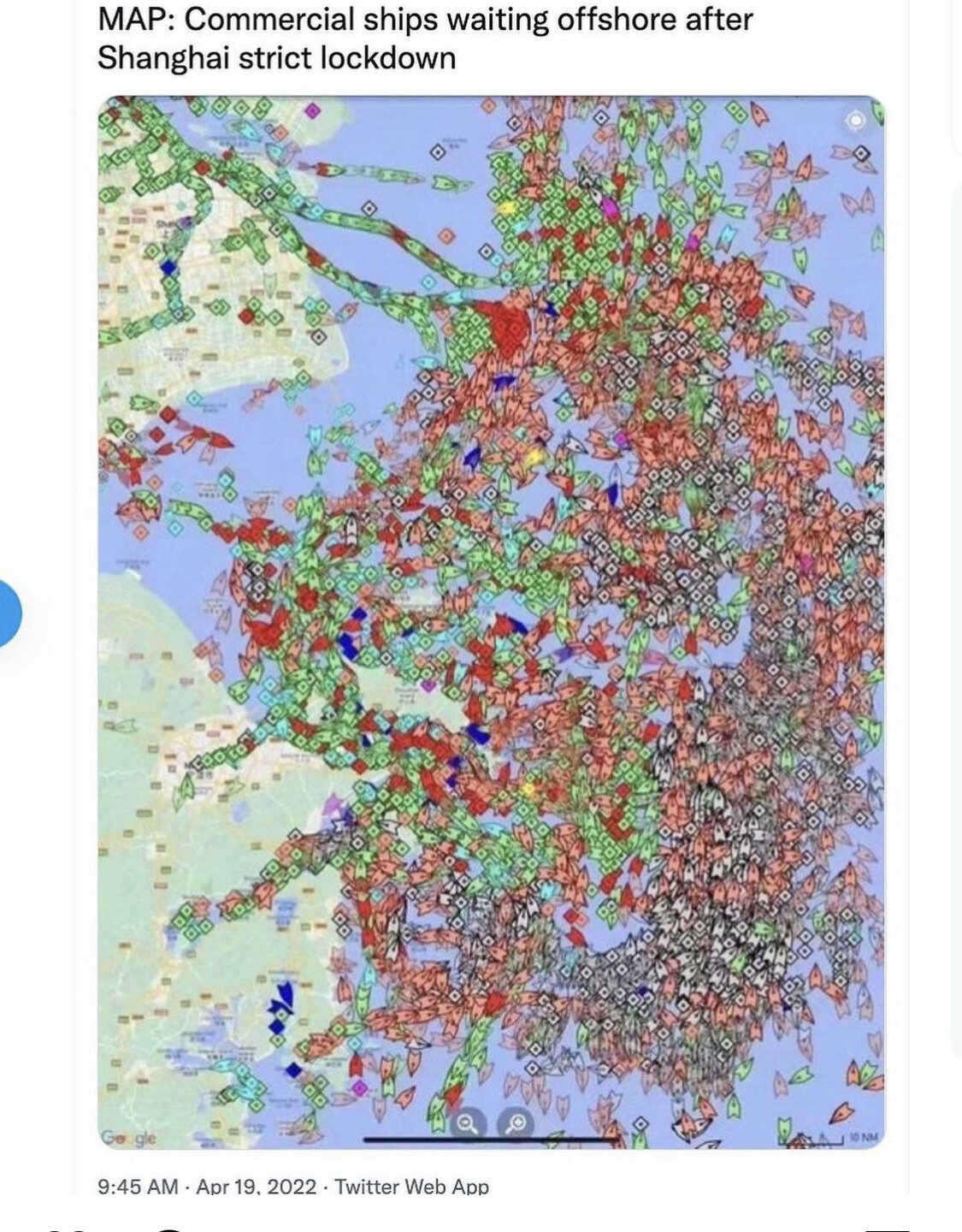
Sharing this just to paint a picture of the current shipping backlog.
#107 — Rik_bS · 2022-04-27
In my workplace’s Global S&OP the Logistics team love sharing many slides worth of images like that - long term sourcing delays have been a hot topic for 6 months now

#108 — nerdware · 2022-04-28
I’ve been seeing stories like this for over a year: Semiconductor firms: China lockdowns play havoc with supply and demand. The car industry was slow to restart last year because of similar issues. Here’s just one story: Volkswagen: Expect chip supply problems until 2024. One last story: Semiconductor sales forecast to hit $676b in 2022. Key quote: “With the current ongoing situation in Europe… it is difficult to predict how it [chip supply] will pan out; there are potential disruptions.”
#109 — killumina · 2022-04-29
Yeah, fabrication of components in industrial towns having been intermittently shutting down with outbreaks even still

When the first shutdowns occurred, everyone canceled their orders due to lack of demand, with basically only Apple still continuing to slurp down remaining stock, months to years of spotty availability and large vendors are Hamsterkaufing many years of future production to avoid any long future outages and screwing mid-tier producers and absolutely fucking small/boutique industry for basic chips and controllers, perhaps there’s some way for LZX to keep in better contact with updates (though the spreadsheet seems ok, if updated regularly) but at whatever Digikey/Mouser end there are either broad and inaccurate estimates or NO estimates for when many of these parts on order will come back in stock after all the largest manuf orders have been fulfilled.
Ok, back to synthesis concepts…
I’m curious how well the output of a NeonCaptain Radiator’s ILDA output would take to the Chromag’s ILDA input for additional processing, either back to ILDA out or as an input source for analog video modulation.
#110 — saiteron · 2022-04-30
pretty sure there are likely folks out there wiling to buy out your pre-order if you ask - it’s happened plenty of times before in the Discord and possibly elsewhere on the forum here. if your pre-order was before the price increase i’d gladly buy it out for the price you paid
#111 — b4_H · 2023-02-21
Does anyone know if Chromagnon started to ship to Canada yet?
Just curios if we all are still waiting or just me…
#113 — Robbertunist · 2023-02-22
Hey @b4_H, there was some clear info in the latest newsletter and it includes a link to a excel sheet regarding production progress.
https://mailchi.mp/lzxindustries/lzx-end-of-year-update
#114 — Z0NK0UT · 2023-12-19


https://lzxindustries.net/journal/chromagnonomicsLars provides a development update on the Chromagnon video synthesizer.
Link: Chromagnonomics | Journal
The new journal section of the LZX site will feature regular posts about Chromagnon, including synthesis concepts. The inaugural post is a general update on the project, but features some cool simulations.
#115 — Polite · 2023-12-19
I enjoy this journal format.
Sucks that Chromagnon has probably become that giant millstone around all your necks. I couldn’t personally imagine the pressure.
Still cheering you on from the virtual sideline. When it comes out it will be the best of presents/parties.
#116 — Z0NK0UT · 2024-02-19
In case you missed it…Chromagnon output videos!
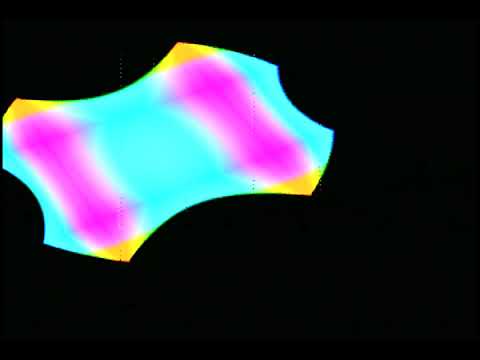
https://www.youtube.com/watch?v=rxZHwIVFh7I Chromagnon manual controls in NTSC. There are a few visual artifacts and gain levels to resolve in the signal path (software related), but this is a decent first look at the range of the shape generation controls without any modulation (internal or external) applied. All the image generation here is the analog portion of the instrument (digital system is just generated ramps and managing the user interface.) Video footage is sped up 300%.
All attenuverters at null.
Modulation Vectors #1 thru #5: Disabled
Ramp Shapers: Off
Fold: Enabled
XY Mode: HV
Luma Mode: Key
Chroma Mode: XY
Compositor Mode: Additive (first part of video), Source In (last few seconds of video)
Controls adjusted: X, Y, Edge, Size, Skew, Curve
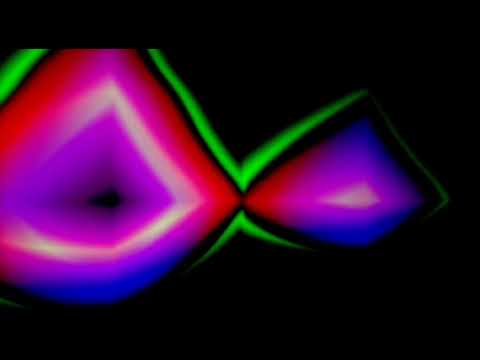
https://www.youtube.com/watch?v=X2D14JDnUug Using DWO3 oscillators and DSG3 shape generators as modulation and texture inputs to Chromagnon.
#117 — wednesdayayay · 2024-06-30
do you all have a laser to show any of the Chromagnon > laser functionality? or better yet radiator > Chromagnon > laser if that is how those items would most reasonably be set up.
I’m really thinking about picking up the radiator/laser combo.
#118 — Z0NK0UT · 2024-06-30
Yes! There is a laser in the lab, and we look forward to beaming some demos when the time is right.