Why use a CRT? I don't get it
Category: Unknown · Tags: — · Posts: 49
#1 — nerdware · 2020-08-14
I don’t understand the obsession with CRTs at all. The last one I used was a Trinitron TV, which I got in the 90s and don’t miss at all. It was way too big and heavy, and I’ve not had space for anything like that for well over a decade.
So what’s the big deal? Is there a zero-frame-delay? Is that an advantage for feedback via a camera? I use mainly B/W cameras and an LCD for FB. I put filters on the signal path inside the synth, then mixing/blending the filters gives me exactly the results I love.
So what more could I get by using a massive CRT? It’s a serious question. Perhaps you all get something useful from a CRT that I don’t, maybe because you’re doing things that I’m not, and looking for results that I’m not. I don’t know, but I’m curious.
#2 — nerdware · 2020-08-14
BTW, I used CRTs for decades until I switched to LCD screens in the early 2000s. This was for TV and computers. I have no love for them at all. The only advantage I can see is that some, like the last two (yes, only two) TVs I used, have S-Video and SCART sockets. Some pro CRTs I see on ebay have component inputs, which is nice, but they’re all filthy.
#3 — reverselandfill · 2020-08-14
It can handle any kind of signal, does not care about sync loss.
feedback with a camera is much faster and has good qualities in color, contrast and edges, and is more ‘smooth’. no delay because it is direct.
#4 — nerdware · 2020-08-14
Ok, thanks. That’s interesting. It doesn’t convince me that I need a CRT, but it sounds to me like something is different in your video rig. Perhaps if I describe my setup in a little more detail you can compare it with yours.
When I began building a video synth, I first used an upscaler that took component and s-video and converted it to DVI. The only problem I had with that was the image from the synth was a little poor, but it worked. A signal from any other source was perfect. Then I switched to a pro LCD monitor with composite and SDI inputs. After I purchased an SDI converter and SDI capture card, I began using that system for all monitoring and capture. My FB results improved, but noise remained. I eventually traced this to the PSU and began looking for a cleaner solution. That took a few years. Since then I’ve used several other LCD monitors and been happy with them all.
As I have no decent colour cameras, I use them exclusively as B/W signal sources, with sync. I’ve never noticed delay - could my converter/monitor combo be that efficient? I had to use a video mixer to introduce noticable frame delay.
Adding the triple multimode filter module to my synth gave even better results, but I was doing well before that. As I said, PSU noise was an issue. All my videos from that time show it to some degree, but I could use it FB as an effect. Today I use hard keying on my Diver for another noise source. Nevermind the actual noise module.
Sadly, I still don’t have space for a CRT in my video rig. Right now, I don’t even have space for the cameras, and I really miss using them! I’ll need to radically downsize my rig to do that. So I’d need a seriously compelling reason to consider a CRT, and I’ve yet to find one.
#5 — sean · 2020-08-14
What Reverselandfill said.
But also it is mostly a matter of look & feel for me. CRTs simply have more character, like film photography vs. digital. Partially this is nostalgia, no doubt, but how a CRT is producing an image is more raw and rough and physical than an LCD/LED/etc. I mean, it is shooting a moving beam of electrons! It also seems appropriate to use an analog device to display analog video.
To some extent, I think one either sees it or one doesn’t.
Myself, I don’t really understand always and only seeking a perfect, fluid, noiseless signal. Why not just use software only then? I’m mostly being rhetorical here. I think each look/style has its place, and obviously the workflow is totally different with software. (And it can often be a big pain in the ass to get a rescanned CRT image to look how one wants.)
…But totally don’t understand one saying one doesn’t have the space for a CRT though. I live in a little one-bedroom apartment and have six CRTs at home. But I may be more comfortable with clutter than others.
#6 — LILWILLY · 2020-08-14
Hi Friends!
I really really appreciate the aesthetic of my approximately 600lb. 20" Sony PVM. But would love to see some results from a more weight and size economical monitor. Dear @nerdware would you please share some more details of your setup and potentially some captures from the output?
Shoma lama bing bong,
And good day!
#7 — Agawell · 2020-08-14
Hi Lilwilly
check out my instagram (jimhowell1970) almost all of it is lzx modules into a sony flat (lcd/led???) sceen tv (40" about 10 years old) shot on an iphone 7 from about a metre away
ignore the wonkiness of the camera!! my tripod is crap
#8 — nerdware · 2020-08-14
As I hoped I’d made clear, I’m happy to use noise in video, but I don’t like having it inflicted upon me. I.e. when every video is noisey, when it should be totally clean. I should also make it clear that my entire video rig lives on a single table and it’s full. I have no space for another table at present and for the forseeable future. I’d very much like that to change, but I can’t make the room larger. Nor can I make the video gear smaller. The only way to make space for a CRT would be to remove half my video rig. So the biggest obstacle to me using a CRT is a lack of space. No space even for an 8" CRT.
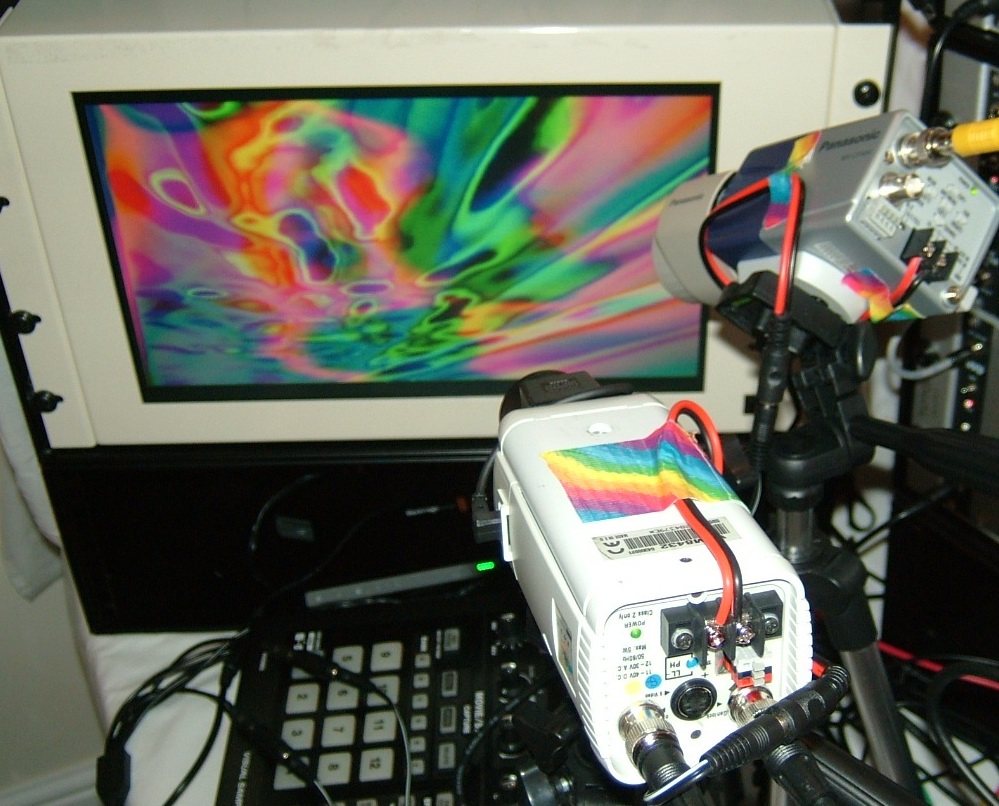
That’s a typical feedback setup from a few years ago, before I added a Mantis case (I missed my chance to buy a Vessel) for the video modules that wouldn’t fit in my main cabinet. You can see how tight space is - my capture system is hidden away, almost out of reach, until the monitor cabinet. The camera stands had to fight for space with a P10 and a V4 (out of shot). Two cabinets occupy the rest of the table, one with Rowpower40 PSUs (very noisy) and the other with a pair of Malekko PSUs (very clean, but currently unavailable from shops). The monitor has SDI and composite inputs and is here fed from a BMD miniconverter that lives under the main cabinet. No space is wasted. The power bricks and other devices live out of sight behind or under the cabinets.
Before I had a table for everything, I had a temorary setup I’d use on my bed. Yet I was still able to produce results like this:
From 2018:
#9 — LILWILLY · 2020-08-14
i gots a vessel for buy/trade if u shneed it
#10 — sean · 2020-08-14
Was mostly joking about space for CRTs. Don’t really think my borderline Hoarders model of “organization” is something anyone should emulate.
But, yeah, if you’re happy with the results you’re getting, you’re not missing anything not having a CRT. The prices on them these days is getting to be ridiculous. Not that I’ve had a problem still finding people giving away consumer-grade ones (though finding ones smaller than 20" is getting harder and harder).
#11 — LILWILLY · 2020-08-14
i guess my real question is what is the broadcast grade equivalent of the trinitron in the lcd context? like where does one start looking for high quality component/svideo compatible lcd solutions.
#12 — nerdware · 2020-08-14
“i gots a vessel for buy/trade if u shneed it”
Thanks for the offer, LILWILLY, but that ship has sailed (no pun intended). Now I’m more interested in downsizing my rig right now, restructuring it and focusing on feedback again. So I’m more interested in selling gear than buying.
Anyway, good luck selling your Vessel and thanks again for the offer.
#13 — nerdware · 2020-08-14
The monitor pictured above is another company and that model is ancient. I must’ve bought one of the last available on ebay. Also, it’s a 4Kg tank. I’m not kidding. So I can’t recommend that, even if its great for FB.
I currently use a set of BMD monitors, one 17" (now discontinued, bought cheap off ebay) and a dual 8" job that gives incredible images (also bought cheap). The latter displays proper black and proper white, which the 17" doesn’t.
So I use the 17" set to 16:9, one 8" monitor for colour reference, also set to 16:9, and the other 8" is set to 4:3 and is fed via a BMD Multiview 4 (which lives inside the monitor cabinet) set to display audio meters. The 8" pair are fed via the Hyperdeck Shuttle (discontinued but available cheaply on ebay), so I can also use them for playback. I rarely bother doing that, however.
I have no experience with the BMD 4K monitor, and don’t expect I ever will. I’m strictly SD here. I only upscale to 1080 in post, so while I have monitors that can display up to 2160, I’ve only ever used HD to test things like the Andor video player (via an HDMI to SDI microconverter, also BMD) and a couple of HD-SDI cameras (mainly as an experiment). HD doesn’t tempt me, but I can see why other video synth users use it.
#14 — bentoncbainbridge · 2020-08-15
What could be more magical than a glowing, moving picture inside a box?
(I use flatscreens as well, but it’s expensive to get quality LED/OLED/QLED screens - more so than you can get the highest quality CRTs for)
#15 — nerdware · 2020-08-15
I’ve looked at the prices for good LCDs and CRTs. They’re not so different. E.g. prices for refurbished medical grade CRTs compare well with the prices for a used pro video LCD. This is in the UK, of course. I can’t comment on prices anywhere else.
I’ve seen “glowing, moving picture inside a box” and compared them with the same images on a good LCD. E.g. 8" CRT compared directly with an 8" LCD. One of them was heavy, massive and very filthy. The other was light, small and very clean. The LCD was also silent, unlike the CRT. No contest, other than price. The CRT was as dirt cheap as it was covered in dirt. I examined every feature on the CRT and couldn’t get it to do anything that the LCD couldn’t.
I grew up using CRTs, so there’s absolutely nothing romantic or magical about them for me. Instead I have decades of familiarity and a deep appreciation of the space all hardware occupies. It’s a matter of trade-offs. I’m not trying to pursuade anyone to give up their CRTs. Nor am I likely to be swayed by descriptions of charms other people see in them. I have a better understanding for retrogamers who want a CRT. If you have an original working C64 and you want to get that 80s experience as it would’ve been available in the 80s, then a CRT is the only way to do it. Back then, that’s all there was. Find an 80s TV set, plug in your machine and pretend you’re in the 80s. Add some 80s style wallpaper. Recreate that living room or bedroom you remember or you’ve seen in some movie. Get the complete 80s gamer experience.
Is that all we’re doing here? It doesn’t look like it to me. We’d be very poor retro purists, if we were. I have no problem with that, of course. I just don’t believe that’s what we’re doing. It’s definitely not what I’m doing.
So I still don’t get it. Nobody has so far successfully addressed this question. What are the real advantages to using a CRT, assuming there are any? For years I’ve read about the things people do with CRTs, like capturing from a screen using an HD camera. Some of that makes some sense to me, if you can find a decent 20" CRT, if you can afford it, if you can move it, and most critically, if you have the space for it. Some of us have stacks of CRTs, or even a wall of them. I love that. Please don’t stop doing that. It’s extreme art. That’s reason enough!
However, there are many other art extremes that we can explore using video. I think there’s room for all it. My little niche is video feedback. I’ve seen arguments for CRTs and CCTV cameras based on the availablity and low cost. I agree on the availablity, but there are other factors to consider and I don’t see any discussions of those.
#16 — nerdware · 2020-08-15
Anyway, thanks everyone. This is helping. I appreciate everything everyone is saying.
#17 — bentoncbainbridge · 2020-08-15
#18 — reverselandfill · 2020-08-15
if you work with glitch, a CRT will show all your weird experiments.
A digital monitor will lose sync, give ‘no signal’ or make weird glitches (which can be cool)
It depends on how much cash you can throw at your digital monitor. It can be fast, give good contrast and be noise free. But with low budget options it will give you (unwanted) trails, bad contrast, grey-ish black, noise, flat colors, pixels, scaling etc.
CRT monitors used to be cheap. Now they are expensive.
I guess you can look at a video monitor as you listen to a audio reference speaker.
It’s very personal and can have large or small differences in quality and ‘perfection’.
#19 — nerdware · 2020-08-15
I don’t work with glitch. If anything of mine looks glitchy, its never caused a problem here. I’m more likely to have difficulties in HD on my computer, but I really hate watching anything glitchy fullscreen.
You can see here how far I went to reduce any flicker in this video. See if you can spot which of my FB videos were mashed together to make this post-production HD monstrosity:
#20 — reverselandfill · 2020-08-15
Well, I’m just trying to point out why -anyone- would use CRT, not just you .
If you really want to know the exact difference, you should do a side by side test.
Make a simple camera - > monitor feedback setup , I think you can see different behavior with each camera and monitor type.
Then conclude what you like best?
ps: my FB setup is all analog:
camera → CRT monitor → LZX video input → [processing] → LZX RGB Encoder → CRT monitor.
I have a PAL capture card to get it into my PC
I used to have an old tube camera, which gave extreme feedback results (good fade outs, perfect detail on edges and patterns (which causes perfect ‘brain’ patterns) such like this
(found on the web, not mine. although I got similar results)
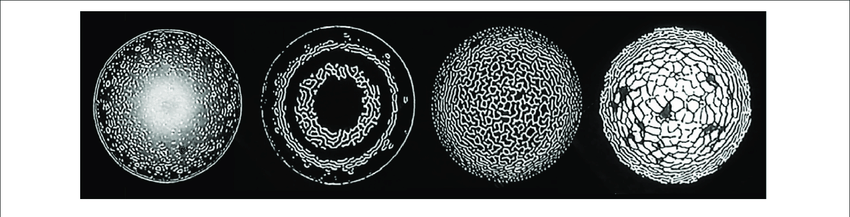
but it is gone now. lost it in a move I think. Good memories though.
https://www.youtube.com/watch?v=WS8v6jKPP68
#21 — nerdware · 2020-08-15
That’s some very tasty feedback! Are you moving the camera or mixing other signals, like oscillators, to perturb the image? Is the camera aligned with the screen?
You can see from the pic I posted earlier why I don’t work quite like that. I tend use a handheld camera and/or more funky orientations, as that works better with my space constraints. That may be the key to the differences in our working styles.
Thanks.
#22 — reverselandfill · 2020-08-15
Like I stated in my post above, this is not my work. just an example.
"Video Feedback’ by Japhy Riddle
None of this imagery was computer generated.
This is an example of very controlled video feedback using all analog 1970’s equipment. Shot with a Sony AVC-3400 vidicon tube camera aimed at a Quazar black and white CRT, and fed into it via RF—This was pre video-in. One advantage of using RF is that tuning away from the correct channel frequency results in noise (static) being introduced into the signal, which adds all the “wormy” detail. "
#23 — nerdware · 2020-08-15
Yes, I remember TV sets like that well.
E.g. I used a B/W portable TV for years. It could run on internal batteries, off a car battery or a wall socket. I only used the latter. The image on that 5" screen was so crisp, I just loved it. The tuning knob was rotary, so I learned the order of the channels and how far to turn the knob between them, so I could switch channels between commercial breaks in an instant. I’d channel flip as quickly as if I was pushing buttons, but only in a sequential order. After a while it felt very natural. The TV set was so well designed, so that knob was the largest and easiest to turn. The others were for volume, brightness and contrast. I think there was also a headphone socket, but I don’t recall. All housed in rugged dark green plastic. So of course it was called the “Commando 505”. You can still find them on ebay. Recommended, if you want a cheap, small B/W CRT. Just add an RF converter and point a B/W camera at it.
I sold mine years ago. I loved it but I don’t think I’d want to use it now. However, some people out there still seem to.
#24 — pbalj · 2020-08-15
I use CRTs, and I use lcd.
LCDs are convenient and small, but the image quality is pretty crap on the ones I have. Viewing angle is typically atrocious. I may photograph a crt, or an lcd, depending on the look I want. I always compare them to amps. This is like “why do people use tube amps?” because it adds some quality the user enjoys.
Something no one has addressed yet is using CRTs for scan processing, oscillographics, vector stuff. The only way for me to do that stuff is with a crt. I don’t have a stroke to raster converter, but even if i did, I would still use the crt too.
I’ve drifted away from rescanning a typical tv crt, I don’t like the surface distortion, and the varied moire it imparts, I mostly rescan off an lcd…
#25 — nerdware · 2020-08-16
I can understand the vector rescanning argument, at least when using an oscilloscope. I have one of these myself, originally for another purpose. Like a CRT monitor, I don’t yet have any space for it, but I’ve certainly tested it with my video synth. While I’d prefer a solid state way to do vector rescanning, I don’t know of any device that can do that, so a 'scope with an XY mode seems to be the only option. If you can find one with a Z mod input, that’ll be even better. My 'scope has both and a removable graticule. It should be ideal.
I’ve no idea how you use a TV to do vector rescanning. I’ve watched a Youtube video that demonstrated it, but said and showed nothing at all about how to modify a TV to do this. The DIY part would be beyond most people, anyway, but it would’ve been nice to have seen how it was done.
BTW, the displacement effect I used in the last video I posted uses a technique very much like vector rescanning, but done entirely in software. I used the resulting images to softkey between pairs of FB videos.
I’d love to see that done in hardware, but all the vector rescanning videos I’ve seen have just used the 'scope image directly. I wonder how much more can be done using the 'scope image as modulation? I’d like to try that someday, if I have ever find space to get my 'scope set up properly and with a camera to rescan the screen.
You’re reminding me of the many things I want to do, and why I want to do them. Thanks!
#26 — joem · 2020-08-16
I think a good, simple, general answer to “why CRTs?” is “because they’re different from LCDs.” If someone can tell the difference between a CRT and a LCD, that alone is reason enough why someone might want to use one instead of the other. They’re tools in our discipline, and they can provide different results, so why not use either? A person might prefer one over the other, but that’s just personal opinion. Given the nature of the work that we all do, it seems only natural that we’d be more interested in (and own more) CRTs than the average person on the street.
#27 — nerdware · 2020-08-16
Yes, I think may be the simplest, most honest reason. It may also explain my preference for LCDs.

#28 — nerdware · 2020-08-18
Here’s a near perfect CRT for video feedback. A 17" Trinitron. I remember using one of these in the 90s. Beatiful. Hey, I even know the seller, via another forum. Just make sure you have enough space for it. If I had a spare table waiting for a monitor like this, I’d buy it. However, I don’t even have the space to store it until I do - and its very unlikely I ever will.
So I just hope somebody who’ll appreciate this monster will buy it instead. Perhaps it’ll be someone on this forum, but more likely it’ll be a retrogamer. There seem to be a lot more of them around, and they’ll want a CRT for exactly the same reasons as you. They might even have more space for it, if they have a single console. OTOH, a CRT for each console would take up a lot more space. Imagine if your video rig was made entirely of Vessels and monitors like this, one monitor per Vessel. You could quickly fill a room like that.
Actually, I do remember a room like that, in ths 90s, packed with computers. Three of them used this very model of monitor. So 90s.
Gateway DX17S 17" CRT Monitor with Sony Trinitron 17FQ2-E5 tube, 1152x864 @ 75Hz
#29 — nerdware · 2020-08-18
SOLSTICE - Performance at Flux Factory
I’ve been following this artist for a while now, but this video was uploaded just 2 days ago. Nice timing.
Skip 3:32 in to see the camera/monitor rig. A few seconds later you’ll see the results. Please note the similarity to the video you posted. That’s clearly an LCD being used. Perhaps something other than the monitor is important to this style of feedback? Can anyone here work out what it might be? It appears to be a lens filter thing.
#30 — reverselandfill · 2020-08-18
I did not say you cannot get that type of feedback only with CRT monitors.
It just can look very good on them.
Compare both video’s and you will see differences .
It is like @joem said. personal preference. That, in combination with budget
edit: the clip of Solstice can also be prerecorded feedback with live camera effects
it seems to be a very specific feedback image (4:28)
#31 — LILWILLY · 2020-08-18
Thanks for sharing. I find her gimbal head/LCD rig to be very interesting. I imagine it affords a resolution of control that is really helpful. Can anyone ID the model of the camera?
#32 — nerdware · 2020-08-18
I can’t even guess whether the camera is analogue or digital. It looks interesting, whatever it is. Clearly the LCD is digital, but does it take a composite input?
I’m most intrigued by the mounting for the monitor and, of course, the filter thing. Note how she whips out a filter to change the feedback. I can’t figure out how removing a filter produces a circular keying effect, but I may be misunderstanding something important.
So many questions!
#33 — sean · 2020-08-19
Looks like the monitor is on a magic arm and the camera on a gimbal tripod head.
#34 — nerdware · 2020-08-19
Oh, yeah. Very tasty. Thanks.
#35 — nerdware · 2020-08-19
BTW, I use cheap Chinese tripods for my CCTV cameras. You can see in the photo I posted why I don’t use accessories like gimbols. One of them has a spirit level built in.
However, my cameras are very light. Some are even smaller and lighter. Heavier cameras will need something much sturdier. I have a Manfrotto clamp and an arm for mounting hardware like that.
This is way off-topic for this thread, but still relevent to our interests. Some of us use small monitors like that. I can easily imagine how my smaller cameras could work with a tiny monitor, making a very compact video feedback system.
#36 — nerdware · 2020-08-19
Another detail of the rig used in the SOLSTICE video that intrigues me is the focal length. The smallest monitor size I’ve used so far is 8" and the largest is 17". My lenses are all 4-12mm, which covers all my needs so far. So now I’m thinking about filters. I’ve been using a videosynth for my “filtering”, which works very of course. It’s also very on-topic for this forum. So I’ve neglected the more lo-tech options. I know others have explored them, but I don’t recall ever seeing examples of their use before now.
I can imagine how a small feedback rig like this, with small videosynth (Chromagnon, Vidiot etc) in the fb path, plus a projector could make very portable system for live work. I could downsize my whole system to something like that, if it worked well enough for me.
#37 — 337is · 2020-08-19
The artist and performer in the Solstice video is Paloma Kop:

https://palomakop.tv/Paloma Kop - electronic media artist
Link: Paloma Kop
She uses a variety of filters in her work, and the color effects in the early portion of the performance feature a polarizing filter. The feedback was definitely NOT prerecorded.
The gimbal in use is this model:
She is friendly and approachable and easy to reach via her website.
#38 — reverselandfill · 2020-08-19
extra credits for her then, as that feedback liveset is very good!
#39 — nerdware · 2020-08-19
Yes, she has an excellent website. I found several interesting resources via the links etc.
#40 — banyek · 2020-08-30
Indeed. I do videosynthesis on DLP projectors and mainly CRT’s. I find that CRT’s apart from being different to each other as well (I have a 12cm and a 28cm, each one looks and feels different), they also have a certain glow and presence that I would miss from an LCD or a digitally projected (even upscaled) image. Yes, digital screens also have those and some of you are mastering them in several ways.
…Before I forget: I live in Central Europe, where most artists are constantly broke. CRT’s are cheap as hell (or even free) and are available in large varieties. I am thinking about buying a 3rd monochrome one.
#41 — nerdware · 2020-08-30
Broke and short of space. These two problems often go together. It amazes me how much gear people can cram into the tiniest rooms. Every item must justify the space it occupies.
#42 — Rik_bS · 2020-09-02
Without falling in to analogue romanticism, there is something special about having the signal that leaves your system be the signal that draws the image on the screen.
Each dot of colour across each line is directly related to the voltage that the system is generating… no conversion, no interpretation, just the image as you intended.
Anything that goes through processing changes that signal.
It might not mean much if we’re capturing, rescanning, editing, manipulating or whatever before it’s shared with the outside world.
It could mean a lot if the upscaling or processing for the LCD screen alters the image, and you never see the “true” output of your system.
For pure romanticism, there’s an interview with Carsten Nicolai (Alva Noto) where he touches on some of the decisions to to work with the sounds he does. He said he is drawn to 15KHz, since that high pitch sound reminds him of being a child with the home TV always on.
#43 — Agawell · 2020-09-02
But you could also counter that up scaling etc is part of the system!
#44 — Marizu · 2020-09-02
If you do visually reactive work with audio, then the lag that can occur with LCD’s can be problematic.
If I put my system through my TV downstairs, the display lag is problematic. I can counter this by putting the audio through the TV, as this delays it by the same amount as the image. In that case, my audio cues are delayed, so I can’t manually switch the eurorack audio in sync with rhythmical transients for a performance.
A CRT removes all of these compromises because the display is being drawn at exactly the same moment that the voltage is being produced.
#45 — nerdware · 2020-09-02
Apart from the TV, are you using pro video gear for capture? Have you tried using a pro monitor? The processing delay may be in the TV, where such matters are less important than in the pro world. There are many others differences, so I would recommend only using pro gear in general. By “pro”, I mean gear intended for use in the broadcast TV world.
I can easily understand why some people dislike HDMI, esp for live work. I’ve also noticed some pro converters addressing some of these issues, like the HDMI handshaking delays.
#46 — nerdware · 2020-09-02
BTW, the most extreme audio lag I’ve seen on TV was during Live Aid in 1985. Audio and video came from London and Philadelphia mainly via satellites. This was probably one of the many things being done for the first time ever that day. The scale of the event was definitely unprecidented. Many mistakes were made - and corrected on air.
So of course there were technical problems like audio delays. E.g. For a few seconds during one of the sets I saw, audio and video were very obviously out of sync. I read later (in a pro studio magazine) this was due to the satellite links being re-routed. Other issues were more subtle but still notable, like Brian Ferry’s use of two microphones, one for radio and the other for TV.
#47 — Marizu · 2020-09-02
I’m not using pro gear. I’m using relatively inexpensive gear. A CRT for £40 looks great, takes away a lot of pain and frees funds for me to build a fun and creatively expressive system. I appreciate that they take physical space and that the prices have been increasing.
I’d be interested in recommendations for responsive, pro LCD screens that are relatively inexpensive. In some cases, pro refers to things like colour reproduction, rather than display speed.
My understanding is that a digital display needs to buffer (at least) one frame of information for encoding before it starts sending it down the HDMI. For some reason, many of them have many frames of delay. Gaming oriented monitors seem better for this.
Some digital modules, such as Structure and MP appear to process at the frame level and introduce latency. If you start stacking them in the way that you flow signals between analogue modules, then
realtime response is a pipe dream. How these modules progress is something that I have been watching with interest. I own Structure and tend to feed its output into analogue stages to try and make it appear snappier.
I’m not using pro gear for capture. I do capture the audio and video at the same time, though, so they are in sync with each other. They are captured through different outputs than my zero latency monitoring channel. If my work improves, or people start offering money for it then I will invest in a higher level of capture.
#48 — nerdware · 2020-09-02
The latency issue is an end-to-end thing, so anything in the chain could contribute to it.
Latency from the A/D converter will at the sampling rate, which I think would be the pixel rate. So, no latency greater than that.
An LCD monitor may well upscale and add latency, of course. I mainly use a pro monitor that can display 2160, but I usually feed it SD. Another LCD monitor only displays SD PAL. That one has composite and SDI inputs, but I only briefly tested the composite input. Anyway, it doesn’t need to upscale. I can get lovely video feedback results with it. Before that I used a non-pro upscaler and a standard computer monitor. The results were poor equality. Curiously, that monitor and upscaler worked fine with CCTV cams - all the images were very sharp, no noise. PAL and NTSC. I only had difficulty when using an LZX video source.
So I’ve tried a number of solutions. A CRT was never a practical option for me, but I’m glad that works for you and others here.
Thanks.
#49 — nerdware · 2020-09-02
Memory Palace is indeed a frame buffer. That’s how I rememeber Lars described it back in 2010!
Any TBC will introduce latency, too. So most video mixers will add latency. You might find a very old mixer that doesn’t. I saw one such mixer on ebay, a few years ago. It required all video inputs to be frame synched. No, I wasn’t even tempted to buy it!