How to spin (or rotate) a shape
Category: Unknown · Tags: arch, navigator, shapechanger · Posts: 38
#1 — destroythings · 2018-08-09
Another cross post from Facebook. This was a question i had been looking for a answer to recently.
> Zach Michels> > - If I had a Navigator, could I spin shapes I am making in Cortex from Cortex ramps? Most of the videos I see with Navigator are doing exciting things, but I don’t feel like I’ve seen examples of this. I understand that with the release of Shapechanger this will be possible, right? Any one who has a Navigator wanna make an example video?>>>> Cheers all.
> Lars Larsen> > - The missing ingredient for what you’re describing is an H/V mirroring (saw-to-triangle) circuit. If you want to rotate a 2D shape, you need to rotate the ramp waveforms, THEN perform H/V mirroring/saw-to-triangle conversion on both ramps, and then you would be ready to mix or combine them in some way to create a 2D shape key.
Navigator includes the facility for mirroring, but its mirrors are placed BEFORE rotation, in the signal path – this is great for quadrilateral/bilateral mirroring when feeding Shapechanger, but does little if you want to create a rotated shape without the Navigator+Shapechanger combo.
> Lars Larsen> > - To make myself doubly clear, (1) The Navigator+Shapechanger combo gives full 2D shape generation/rotation (in the spinning the shape clockwise/ccw sense.) (2) If you want to do this with Navigator alone, you need a way to (a) mirror your HV ramps post-Navigator, (b) mix/combine them in some way, (c) generate a key of that mix, such as with Doorway or Cortex. FYI, Staircase is five mirror circuits in series! So a pair of them could mirror H/V and then keep going…
> Lars Larsen> > - In fact, Navigator+2xStaircase makes for a pretty interesting pattern/geometry voice in its own right. These kind of relationships are what the XY series modules are all about!
> Lars Larsen> > - When imagining patches, it may also be helpful to think of Navigator as positioning/rotating a camera, rather than the shape itself.
> Zach Michels> > - Ok… more like rotating the reference frame than the object kind of?
> Lars Larsen> > - Yes! Because everything derived from the ramps which have been rotated will have their own geometries rotated identically. Say you have a Navigator with HV outs multed to 2x Shapechangers. One creates an ellipse, another a squiggle. When the Navigator rotates the ramps, both shapes will rotate, as if a camera pointed at them is spinning.
> Lars Larsen> > - For me, a video synthesizer “voice” consists of 2 components: one for spatial parameters (position and rotation) and one for geometry (width/height, curve). Think of it like the VCF-to-VCA relationship in a monosynth. Usually the VCF is before the VCA, but you can also do it the other way around create different and interesting results. Navigator+Shapechanger present to you a holistic approach to the spatial+goemetry processor concept, but there are other ways to patch up the essential pieces of ramp processing based shape generation.
#2 — destroythings · 2018-08-09
Would the H/V mirroring now be possible with Arch?
#3 — creatorlars · 2018-08-09
Yes it would! But you’d need two mirror functions (for H and V separately, before combining them.)
#4 — destroythings · 2018-08-09
So my main reason for wanting Shapechanger is to spin a shape. What would be the signal path to use Arch and achieve this.
Something like this
H Ramps >Arch > Bridge Mixer > Navigator
V Ramps > Arch >
#5 — creatorlars · 2018-08-09
You’ve almost got it! Like that, but with Navigator between Ramps and arches. The patch above would give you double mirroring on the input to Navigator.
You can also use Staircase to do mirror function, but may have to tweak it a little to dial it in.
3 of the 4 functions in Arch are patched out utility block versions of some of the Shapechanger circuitry!
#6 — destroythings · 2018-08-09
I tried by using Staircase for the second H mirror and was able to spin things!!! Still need to tweak some more but will share some notes over the weekend. I may need to head out and grab a second Arch.
I’m using doorway to try and scale but looks like I’m missing the ability to skew the ramps from what I’ve learned from watching videos of how Shapechnager behaves.
#7 — destroythings · 2018-08-09
What I’m looking to do at its simplest is have a white diamond shape spinning 360” set against a black background.
Would this be possible without the scale and skew functions of Shapechanger?
#8 — luix · 2018-08-09
what is the analog function of the mirror? just wondering what it does to the signals… if its just rectifiers or something else?
#9 — creatorlars · 2018-08-09
It is an absolute rectifier (very fast, with video opamps and high speed schottky diodes) but in a frequency doubling configuration. So the input signal as 0-1V is scaled to +/-1V so that it will slice right in the center. The rectifier then slices positive/negative portions and inverts the negative portion to give 0-1V on output, but at double frequency.
#10 — creatorlars · 2018-08-09
Yes you can get a white diamond rotating that way! You will want to run H/V ramps into Navigator, then essentially you are doing a sawtooth to triangle (frequency doubler) conversion on the outputs. You can use Arch to do that or Staircase (at low frequency settings, you want 2X). Basically you are converting the sawtooth ramps into triangle ramps AFTER the rotation. Then you mix them (a crossfader works well for this, and gives you something similar to the skew control) and then you key them (using Doorway or Cortex) to get the flat shape results.
#11 — dni_br · 2018-08-10
Hello,
so if navigator doesn t spin a shape, wath exactly does it do ?.
thx
#13 — destroythings · 2018-08-10
Navigator does spin the shape but from my understanding the mirrroring needs to take place after which is why I’m using Arch as a replacement for Shapechanger.
#14 — creatorlars · 2018-08-10
Navigator rotates the XY dimensions of the “scene” that the shape is created within.
#15 — destroythings · 2018-08-11
Some spinning things.
Patch notes.

#16 — destroythings · 2018-08-23
More spinning shapes.
Patch notes.
#17 — destroythings · 2018-08-25
Even more

I’ve been waiting a long time to get this technique down so please bear with me sharing lots of experiments.
Patch notes to follow.
#18 — destroythings · 2018-08-25
Patch notes.

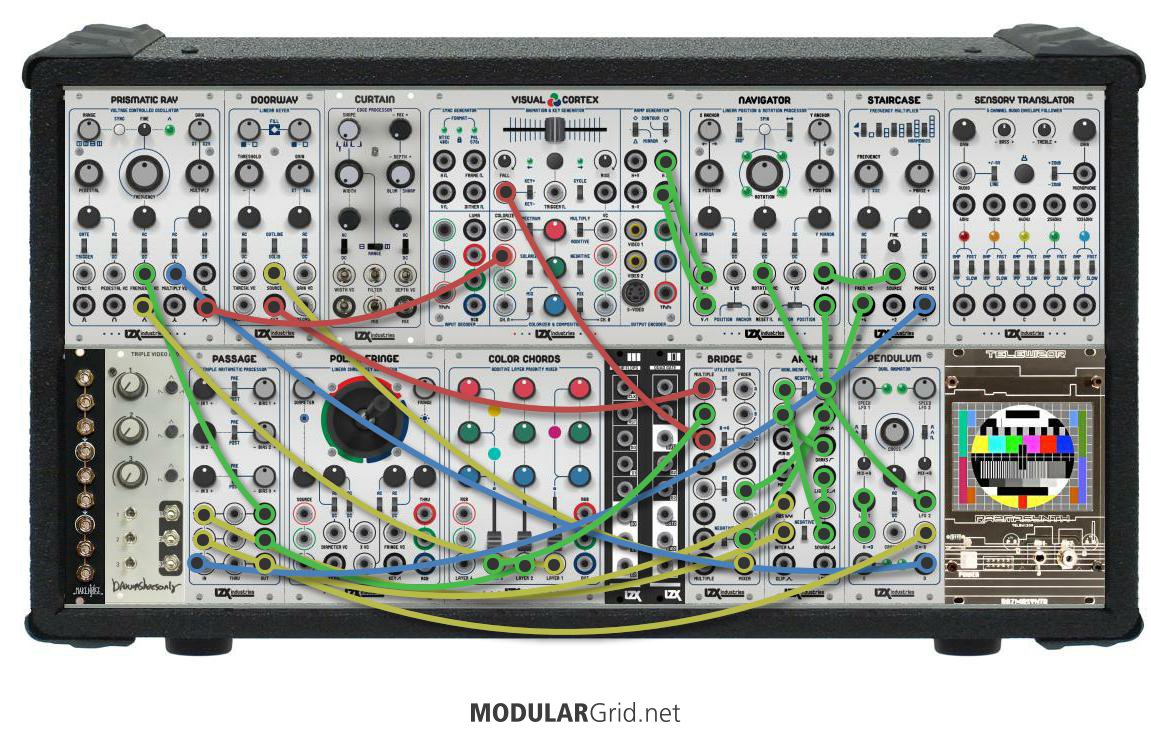
This is the patch for the videos above but if you were to remove Navigator you would still achieve the same look. Also im using one Staircase and one Arch. A cheaper route would be to use 2 x Arch. If you were to use 2 x Staircase that would up open up a world of variation but would be a bit more expensive.
The videos basically show the same patch but with different levels of mirroring switched on. Spinning shapes 1 shows the patch with all mirroring switched off. The only mirroring is whats taking place via arch and staircase to draw the shape. The rest of the videos show different combinations of the mirroring options on VC ramps and Navigator switched on.
#19 — destroythings · 2018-08-25
More variations. Similar kind of as patch as before.
#21 — destroythings · 2019-01-04
I didn’t get round the grabbing a second Arch but its on my wish list. I had filled my current case and only just started setting up a second case for new stuff so now can start planning to expand.
#22 — Strutter · 2019-01-04
Would Arch bring a lot to a setup that already has Shapechanger in terms of bending and shaping things?
#24 — destroythings · 2019-01-04
Yes for sure. Arch is my favourite module by far. Can get a world of shape variations of out when using ramps. Also processing control signals can get some amazing results.
#25 — Strutter · 2019-01-04
Cool! I’m having a bit trouble understanding logic stuff in video synthesis. I just got the multi gate and love it but I guess arch is doing something entirely different to the signal.
#27 — creatorlars · 2019-01-04
I got Photoshop 3.0 at 8 years old and it’s been a continual source of inspiration! A lot of the work on Expedition series is from looking at the way computer graphics evolved from analog computing, and then figuring out ways to do the next level of analog by emulating a lot of the computer graphics workflows. For example, Shapechanger + Navigator perform a lot of the same math you’ll find in any 2D graphics engine, only they do it with analog computing circuitry. Marble Index (and Cortex Compositor) perform a lot of the same blending modes math you’ll find behind Photoshop or more robust digital compositing suites, only they likewise do it with analog circuitry. Most of the design challenge has been on how to take these functions and present them in a patchable hardware way, UI wise, and design analog circuits that do the math.
#29 — wiatrob · 2019-01-04
Arch is my favorite too, You should see what you can do with four
#30 — wiatrob · 2019-01-04
Speaking from experience, the best way to augment MP is with a solid analog synthesis setup behind it. It is a ground breaking module, but to truly exploit it’s power feed it the best material. It will do really cool things with live video input and still frames, but IMO where it really shines is as an integral part of diverse system. That said, you can do some awfully cool stuff with just a Vidot and an MP
#31 — wiatrob · 2019-01-04
And now I’m completely off topic
#33 — northerntao · 2019-12-12
Even though I have a Shapechanger, these patches are very educational. Thanks!
#34 — nerdware · 2019-12-12
Yes, thanks! Every little trick helps. I’m at the stage now where I’m looking for new layers to add to a patch, and I’ll look to any modules that are as-yet-unused-in-this-patch to do this.
#35 — phosphenes · 2022-08-23
Big bump!
I’m playing about trying to rotate some shapes with mostly 4HP Cadet and other DIY modules, does anyone have a nice block diagram for simple shape rotation?
#36 — rempesm · 2022-08-23
Z0NK0UT wrote:
cos(α+β)=cosα> > cosβ−sinα> > sinβ>>>> sin(α+β)=sinα> > cosβ+cosα> > sinβ
sinα and cosα are the H and V ramp inputs.>>>> sinβ and cosβ are the internally generated Sine/Cosine quadrature waveforms.>>>> sin(α+β) and cos(α+β) are the HV outs
I’ll draw up a diagram in a minute.
#37 — nerdware · 2022-08-23
I don’t know who did these or recall where I got them (probably here), but I have some useful images. I’ll see if I can upload them.
[EDIT]
Sorry, every upload attempt fails.
#38 — nerdware · 2022-08-23
Ahh, yes. From another forum, years earlier, a diagram of basic Rutt Etra. Now I need to find the source for the other image, a diagram illustrating the rotations using phase quadrature.

#39 — creatorlars · 2022-08-23
Note that there are some exceptions – for example, the “CROSS” switch on Navigator inverts one of the Sin/Cos outputs, so that one output rotates the opposite direction from the other (creating a kind of perspective morph rather than a rotation.) In other words, there are lots of fun ways to patch it up, which are similar to but not the exact same as the textbook rotation formula.
#40 — sprthhfk · 2022-08-24
#41 — Rik_bS · 2022-08-24
https://www.instagram.com/p/CIAkBDlhfxZ/?igshid=YmMyMTA2M2Y=
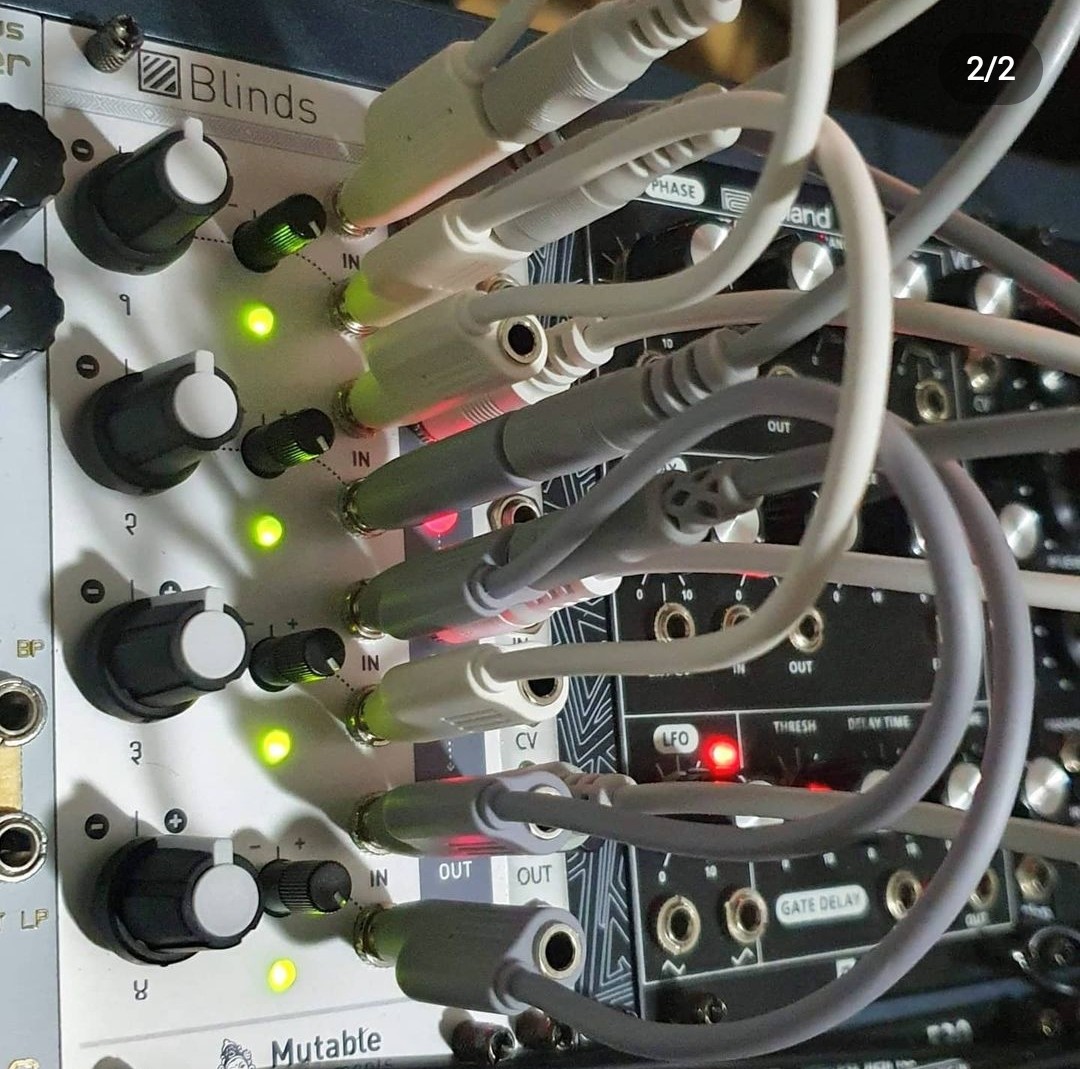
That is just one third of the patching required to do it!
#42 — Robbertunist · 2022-08-29
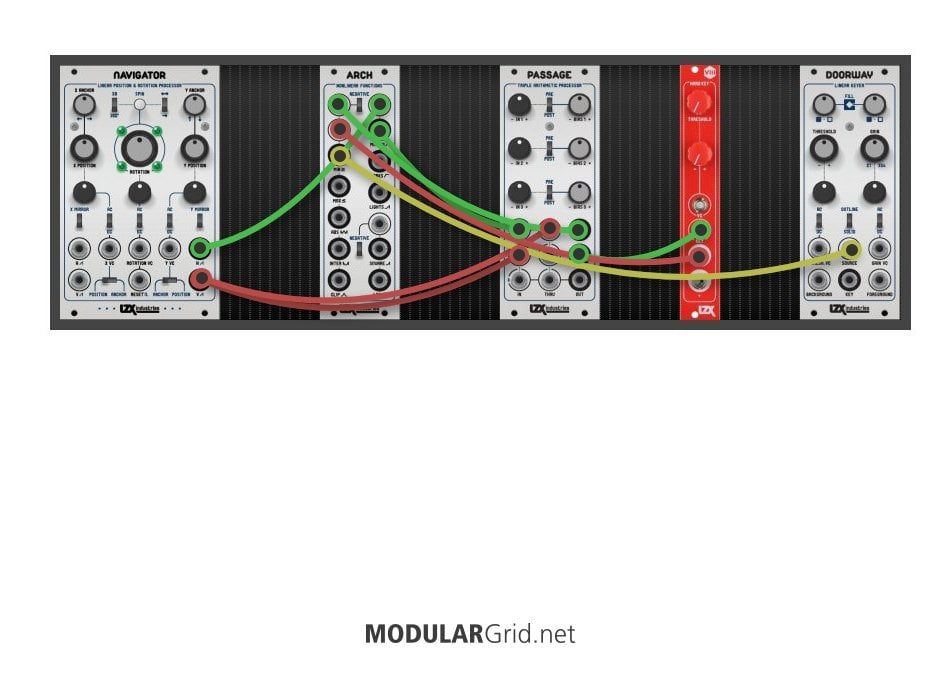
Cheers @sprthhfk for posting the 2nd picture in particular. I was aware of the first & I found that it helped or worked but was a lot of modules just to perform a rotation, especesially how the Prismatic Ray was used.
The 2nd image makes so much sense but if someone doesn’t have an Arch, the top right corner (2x recitifier) can be done with a Syntonie VU-002 or Staircase just dialled a fraction. But how about the top left of Arch? It’s the min output function under the two inputs.
#43 — destroythings · 2022-08-29
Robbertunist wrote:
I was aware of the first & I found that it helped or worked but was a lot of modules just to perform a rotation, especesially how the Prismatic Ray was used.
The prismatic ray is not necessary for the basic action of spinning a shape. The patch notes i posted were showing how to recreate the effect in the videos i had posted along with them.
You can remove the final part of the patch after arch and bridge for a basic spinning shape patch. The Prismatic Ray was just used for the spinning lines that were overlaid over the main spinning shape part of the patch.
#44 — Robbertunist · 2022-08-30
Cheers for clarifying that @destroythings

I was just gotten a bunch of Expedition modules at the time I tried it so I most likely messed up a part of the patch before it hit the Prismatic Ray.
I’m glad to see you’re still on here & that this thread you created is still relevant & of interest to people on here 
I’m still minus a Shapechanger so it’s most definitely relevant to me 