Connecting your sync generator to other modules
Category: Legacy Docs · Tags: sync · Posts: 36
#1 — creatorlars · 2018-07-16
This is a guide to understanding video sync distribution in your modular video synth. Some video synthesis modules require connection to the timing references of the system generated by the system’s video sync generator. A sync generator module sends sync pulses to modules which require them.
There have been 2 standards for distribution of a sync signal in the history of the LZX video synthesis standard:
-
Video Reference via rear RCA Connectors. This is the current standard for production modules. There is an RCA jack input / output on the rear side of modules that require these connections. The output from the sync generator module is connected to the input of the next module which requires it, and this connection is daisy chained throughout the case from module to module.
-
14-pin Sync Distribution Cable. This standard was using with our first generation modules (Visionary series) and by previous DIY series modules (Cadet, Castle.) A 14-pin ribbon cable with multi connectors is used to send 5V TTL level signals from the Sync Generator module to other modules in the rack.
Modules that can generate sync include:
- Visual Cortex (Rear RCA Sync In + Rear RCA Sync Out + Rear 14-pin Sync Distribution Cable Out)
- Cadet I Sync Generator (Front RCA Sync In + Front RCA Sync Out + Rear 14-pin Sync Distribution Cable Out)
- Memory Palace (Rear RCA Sync In + Rear RCA Sync Thru + Rear RCA Sync Out)
- TBC2 (Rear RCA Sync In/Out)
- Chromagnon (Rear RCA Sync In/Out)
- ESG3 (Rear RCA Sync In/Out)
Modules which require connection to a sync generator include:
- Prismatic Ray, since 2018 production (Rear RCA Sync In + Rear RCA Sync Thru)
- War Of The Ants (Rear RCA Sync In + Rear RCA Sync Thru)
- Diver (Rear RCA Sync In + Rear RCA Sync Thru)
- Memory Palace (Rear RCA Sync In + Rear RCA Sync Thru)
- Fortress (Rear RCA Sync In + Rear RCA Sync Thru)
- Navigator (Rear RCA Sync In + Rear RCA Sync Thru)
- Liquid TV (Rear RCA Sync In + Rear RCA Sync Thru)
- Cadet IX VCO (Rear 14-pin Sync Distribution Cable In)
- Cadet II RGB Encoder (Rear 14-pin Sync Distribution Cable In)
- Cadet IV Dual Ramp Generator (Rear 14-pin Sync Distribution Cable In)
- FKG3 (Rear RCA Sync In/Thru)
- DSG3 (Rear RCA Sync In/Thru)
- ESG3 (Rear RCA Sync In/Thru)
Modules which receive sync via the EuroRack CV/Gate connections on the power header:
- Prismatic Ray, before 2018 production
- Castle Clock VCO
#2 — creatorlars · 2018-07-16
#3 — 337is · 2018-07-20
Can you also talk a bit about the power bus sync which was used on Prismatic Ray and the Castle VCO prior to the move to RCA sync jacks on the back (at least for PR) in 2018?
Edit: I found this relevant post:
Placing the Prismatic Ray on the same power buss as your sync source (Visual Cortex, Cadet Sync Generator, etc.) will provide sync to the Prismatic Ray via the buss connector. > Admin note: This answer was provided by Phil Baljeu on the former LZX Knowledgebase>
#4 — dni_br · 2019-12-11
Is it possible to use the Visual cortex composite output #2 instead of the rear rca sync output to sync a memory palace. I tried but it doesn t work.
Will it work with the tbc2 ? i want to sync 2 cases with front rca input output sync.
#5 — Z0NK0UT · 2019-12-12
You should be able to send one of the Visual Cortex front composite outputs to the rear RCA sync input on Memory Palace. Just make sure that the Palace is set to external sync.
#6 — dni_br · 2019-12-12
Yes. but it doesn t work. same cable same input in mp. work with rear rca vc output, but not with the front composite output.
#7 — dni_br · 2019-12-12
My VC is in pal.
when i connect it to MP via VC rear sync output, it syncs in pal. When i m using the VC front composite output to sync MP it syncs in NTSC. So it s scrolling. Weird no ?
#8 — jsonpayload · 2021-01-19
If my understanding is correct, Video Waveform Generator can be added to the CV/Gate list. I’d also mention that the Vessel supports CV/Gate sharing between cases.
(with the caveat that both of those products are discontinued)
#9 — Fallinggirl · 2021-02-07
Is there any way to sync the Cadet Series video modules to the Vidiot without the Cadet I which is no longer available? Does anyone make an RCA to 14 pin sync module? Or does anyone have a Cadet I for sale?
#10 — reverselandfill · 2021-02-07
there is some talk on the scanlines forum on diy sync generators


https://scanlines.xyz/t/diy-video-euro-sync-option-in-february-2021/390Occasionally I get people who want to start out in DIY eurorack video synthesis asking about my modules, and I have to let them know that right now their biggest challenge is finding a sync generator/extractor and an encoder. Now Syntonie’s VU007...
Reading time: 1 mins 🕑Likes: 5 ❤
Link: DIY video euro sync option in February 2021?
#11 — vhsdestroyer · 2021-02-07
I was also wondering lately if TBC2 can distribute sync to another case through the RCA sync output to another module (like visual cortex, or chromagnon) through the video in, without the need for a distribution amp taking sync from the front to back panel. In other words, distributing sync through front panels of LZX options only.
#12 — sean · 2021-02-07
You could make/buy a passive panel like this to take sync from front to back (or vice versa): https://www.etsy.com/uk/listing/771380776/trash-team-video-sync
See also discussion here:
Hey folks! > I just got a visual cortex used from a friend, and I finally need to add sync rca connectors to my mantis cases to run sync between them. > Rather than use a euro rack panel, I’d like to get parts and add them to the case. > Can anyone recommend rca female to female parts for this use case that may have done something similar? > Also can someone please remind me of the simple neon clear green euro rack sync panel someone put out. Worst case I could order that and use it’s parts. > Thank …>
#13 — vhsdestroyer · 2021-02-07
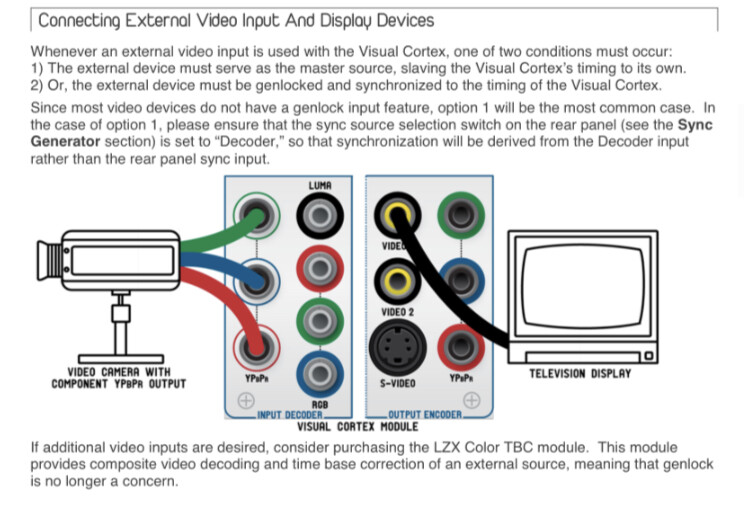
See I’ve been looking into all the sync distribution options and I feel like having to use up hp for it is not ideal. Especially with so many new projects lined up, I’d like to leave as much space open as possible. The reason I think Visual Cortex would work in this instance is this mention of accepting sync in product descriptions on a couple websites.
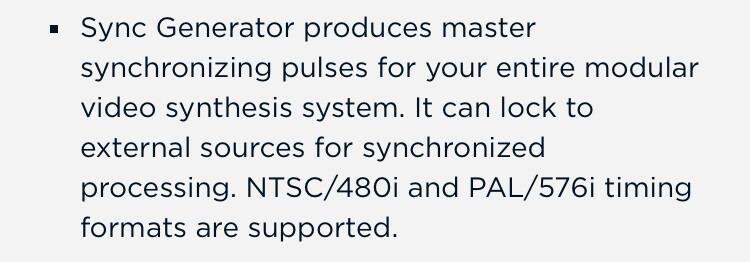
Edit: So I read through the Visual Cortex documentation, and it looks like this would be a totally valid method of synchronizing between two racks. If TBC2 front panel sync out is linked to the Visual Cortex via the decoder, it should sync the two systems together.
#14 — rempesm · 2021-02-07
If you’re feeling adventurous, you can just drill a hole in your case and put a pass through RCA connector or two there. Has helped me with routing sync around cases, anyway.
#15 — sean · 2021-02-07
You could also get a camera with sync in, sync that from TBC2, and then use that to input into Cortex.
That’s how I’ve gotten around the sync limitations of Vidiot, so I don’t lose an input dedicating it to sync.
On the other hand, I do wonder if it mightn’t just be easier to use one of the Cortex composite outputs to sync TBC2? As no one (but LZX) has one in their hands yet, hard to tell how much advantage there is to using TBC2 as master sync gen over Cortex.
#16 — vhsdestroyer · 2021-02-07
I suppose it will just be up to testing when the modules are in our hands. Though reading the documentation makes me feel very likely that this will be a perfect way to distribute sync through two cases with TBC2 as master sync.
I think I might set up a test scenario tonight using mem pal as master sync and see if its sync out will work through the vc decoder in as a proof of concept.
#17 — prakodr · 2021-02-14
Hi, newbie here. Newbie to lzx synthesis - I’ve been doing video for a looong time.
With the rest of you, I’m awaiting the new crop of equipment. My rack is still mostly empty so I’m trying to learn as much as I can before my stuff is shipped.Rack
If I understand correctly, lzx sync is composite sync; but a color video signal will also work?
After perusing my collection of ancient video equipment, I see I have a broadcast-style black burst generator. I’m curious if there is any advantage to using this directly to each module rather than looping?
#18 — csboling · 2021-02-14
prakodr wrote:
lzx sync is composite sync
Yes, for all modules that accept an RCA sync input.
prakodr wrote:
a color video signal will also work?
Yes, assuming the color video signal is an NTSC or PAL composite video signal. The genlock circuit includes a sync extractor so anything with appropriate sync embedded should work, like a green channel from an RGsB (sync-on-green) component feed or something.
prakodr wrote:
broadcast-style black burst generator
This is probably a good sync generator and may produce a more reliable sync signal than some other equipment you might have. If it has multiple buffered outputs you can connect several downstream modules to each of them. Daisy chaining sync through several LZX modules is nice because you generally get buffering at each module can get buffering from certain modules, generally those which genlock / generate their own sync. But if you have a black burst generator with enough outputs or can pass the black burst to a distribution amplifier with enough outputs then this should work.
#19 — Fallinggirl · 2021-02-14
So composite sync means the actual video coming out of the Vidiot, for example, has the sync in it? Does that mean that all composite video sources can be synced with any expedition or Orion module without a Vidiot?
#20 — prakodr · 2021-02-14
csboling wrote:
get buffering at each module
Oh, I didn’t realize that. I suspect that the benefit would be minimal then. I was assuming it was a passive loop through
#21 — prakodr · 2021-02-14
Reread the first post again. Wait! that’s not the one. I’m not sure where I was reading about this.
But composite video is also known as cvbs which is a combination of
C olor information
V ideo (brightness)
B lanking (don’t worry about this)
S ync
Short answer, yes, you can sync off any composite - yellow rca signal. But,might not be the best way to do things
#22 — csboling · 2021-02-14
prakodr wrote:
I was assuming it was a passive loop through
Actually you are probably right about this depending on the module. Things like oscillators I think have a passive loop thru in some cases (so you can use either jack) though they may have IN and OUT indicated? I would have to experiment. Modules with their own sync generation (Cadet I, Visual Cortex, Memory Palace) genlock their own sync to the input and pass along a buffered copy of the input.
Edit: My apologies, I tested with a multimeter and you are right that at least Fortress’s LOOPTHRU is passive. Edited my post above.
#23 — csboling · 2021-02-14
Fallinggirl wrote:
composite sync means the actual video coming out of the Vidiot, for example, has the sync in it
Correct.
Fallinggirl wrote:
Does that mean that all composite video sources can be synced with any expedition or Orion module without a Vidiot?
It depends on if they are standard-compliant composite, specifically NTSC or PAL. This map shows which TV standards are in use in which countries (and are generally used by analog video equipment made in those countries). LZX stuff should work with either but may need a switch on the back of the module set to the appropriate standard.

An example of standard-noncompliant video: a Nintendo Entertainment System marketed for sale in North America. These will output something that uses the same color encoding as NTSC, so it will work with analog NTSC displays, but the output resolution is 240 progressive lines rather than 480 interlaced lines. This plug is a yellow RCA connector used to mean “composite video”, and an NTSC CRT television will deal with this fine because the signal representation is basically the same as a standard TV broadcast signal, it’s just that the timing is different. But LZX gear (prior to Chromagnon and TBC2 input stages) is only designed to deal with 480i (NTSC) or 576i (PAL) so it can’t sync to a 240p output like the NES.
For an input like this, or something that maybe has some sync timing errors (VHS tapes being a good example) you may be able to use a video mixer or time base corrector to translate a particular input source into a standard format. I’ve had success using a Panasonic MX50 video mixer to take in NES or SNES signals, for instance, and output nice NTSC composite video I can sync my LZX rig to.
#24 — Fallinggirl · 2021-02-14
Thank you sooo much

. This was a PERFECT explanation. I love this forum.
#25 — Fallinggirl · 2021-02-14
Thanks so much
. This is so helpful. I’m learning so much here.
#26 — bentoncbainbridge · 2021-07-22
Thanks for this helpful guide!
question on those modules which require RCA sync:
- for modules which have a termination switch, which position is ON and which is OFF? Am I correct to assume that the switch should be UP if the RCA sync is not looped out to another module? thanks!
#27 — bentoncbainbridge · 2021-07-24
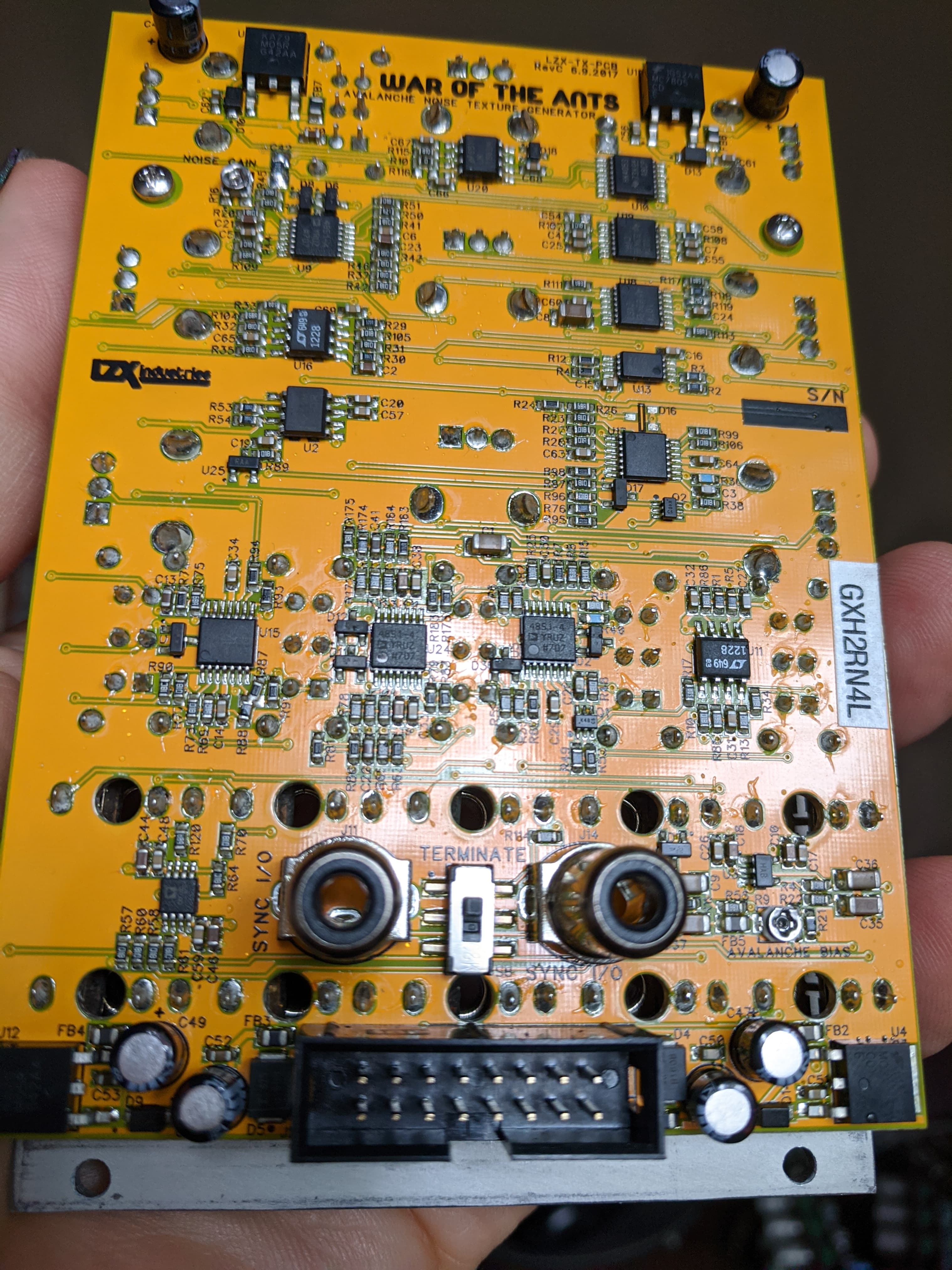
Ah, i just racked my new Escher Sketch, whose sync termination switch is labeled! Are all the switches set for UP as loopthrough and down for terminated? Just making sure I’m setting my WOTA correctly
#28 — joem · 2021-07-24
The WOTA user reference card says Up is for Terminate: lzxdocs/War of the Ants User Reference Card.pdf at master · lzxindustries/lzxdocs · GitHub
#29 — bentoncbainbridge · 2021-07-24
Thanks @joem! I think I’ll start a spreadsheet to keep track of all these details

#30 — mauiey · 2021-12-02
Hi @creatorlars, could you update this with info about Gen3?
#31 — Z0NK0UT · 2021-12-02
Updated. Thanks for the reminder.
#32 — eraxeg · 2022-02-01
Can an FKG3 sync to a cadet system by plugging one of the Cadet 2 outputs to the FKG3 sync input?
#33 — creatorlars · 2022-02-01
Yes, you can do that.
#34 — unnameable · 2022-04-22
Anyone know if you can use a bus sync Prismatic Ray synced to an Erogenous Tones Structure? I was thinking maybe connecting the front sync input on the PR to the sync out of the Structure, but I’m not really sure if that would work.
#35 — rempesm · 2022-04-22
Neat idea but it wouldn’t give you the results I think you’re anticipating. It would respond but it would look ‘glitchy’ with all the other information being sent at once on those cables.
Whether you’d use one of the front composite outputs or rear genlock I/O on Structure, it wouldn’t be what a Prismatic Ray is expecting for typical H/V sync usage. Those signals would either be a full composite video signal or possibly just a black burst signal (valid video with no picture) but neither one is quite right to get stable vertical / horizontal bars. The Sync input on PR has voltage clamps so you don’t have to worry about hurting anything by using a RCA to 3.5mm adapter cable to get some funky looks. I’d put it into a voltage processor (Passage, Cadet VII, Fox Access, VisibleSignals Wrangler) first so you can bias the signal’s output around the Sync input’s comparator threshold–try it!
For more predictable H/V sync settings, you’d need to be able to strip everything from either of Structure’s possible outputs except for the synchronization signals, really just individual H and V pulses. You’d need a Cadet I, Video Sync Generator, or Visual Cortex to immediately patch H/V sync into a PR’s front sync inputs. If any of those modules are on the same CV/Gate bus as the PR, you do not have to patch sync from the front as those signals are already shared on the CV/Gate bus.
Another route is hijacking the H/V outputs from the LMH1980 on the power/RCA board of the @syntonie VU009 into the CV/Gate bus where your PR is powered up. I’ve done this very thing with a Structure, bus sync Prismatic Ray and VU009–it works just fine. Maybe it’s possible to tap those signals from one of the Gen3 Power/Sync backpacks (FKG-3 at present) but that seems more expensive to attempt.
#36 — mrfang · 2023-04-05
Video Waveform Generator is missing from the list of modules requiring sync, and can receive sync over the cv/gate bus.