Recent LZX entrant asking/musing about a couple things
Category: Forum · Tags: gen3, vidiot, visualcortex · Posts: 56
#1 — scuto · 2022-12-07
Hi everyone, I’m a very fortunate recent entrant into the LZX ecosystem, in that I acquired a Visual Cortex, and have been enjoying exploring it.

I found Shawna Lee’s VC/Vidiot video, and was taken with quite a few of the patterns, shades, and textures in it. https://www.youtube.com/watch?v=_sZ2DDvdkvk I’m sure the Chromagnon could accomplish this and more with the VC, though I’m interested in expanding my LZX set sooner. If I were to choose some Gen3 modules to do similar things, do you think the DWO3 and maybe the FKG3 would be the first choices? A few time markers that caught my fancy were at 2:00, 3:00, 5:30… I’d like to be able to CV some of those sections that she was adjusting via knobs, especially the 3:00 one. This seems to be adjustment of oscillator frequency–gentle FM of DWO3 might do this?
…When I first saw what the DSG3 could do, I wanted to smoothly transition between the various settings that the switches select–a smooth morph instead of the hard cut the switch delivers. However, the more I read about analog video synthesis, it seems my desire would require a ridiculous amount of extra circuitry added to the module–is this correct? I thought maybe the FKG3 could be the morphing function, mixing between the two separate DSG3 generators, with their respective settings set to the patterns I want to morph between. If this is correct, it makes me think two FKG3s would be even better, like VCAs in audio modular. And furthermore, with the multiple outs on the DSG3 and ins on a FKG3, various very happy morphing accidents would result. Do I have any of this right?
…
A little of my background is I’ve been doing eurorack audio for around 6 years, and got into it with a specific idea of what I wanted to explore. I’d like to do the same with analog video synthesis, and start by exploring the shifting of patterns and colors. Who knows what the future will bring, but at this time this is what compels me and what I want to focus on.
…
A bit of what I’ve done so far with the VC: I’ve gotten a big kick out of sending all 4 of VC’s ramp outputs into a modulated 4 channel VCA, sometimes with an offset, into various ins in the colorizer & compositor. I’ve tried amplifying a sync out from the VC to get an analog oscillator to sync to it to varying degrees of success, one of which was getting my Synchrodyne+Expand to make (amusingly wiggly) verticle lines. I still don’t grok the animation and key gen section, but I’m giving myself time with it.
…
Thank you if you’ve read this far! If someone’s interested I can share the audio modules I used in another post since this is a book.
#2 — sean · 2022-12-07
Sorry, don’t have time to look at specific time stamps of the video at the moment, but if you’re looking for pattern synthesis and have a Visual Cortex (which has both basic ramps and mixing/keying — somewhat analogous to DSG and FKG, respectively, though less feature-rich than either), the next module I’d probably recommend is Stairs, since that plus ramps can do a lot of fun stuff. Especially if you already have LFOs.
Then probably a DWO, yeah, to get some video-rate oscillators into the mix. Or a DSG, if that more symmetrical look is your jam.
But to answer your question about DSG, rather than trying to mod it, you could just put some outputs into Channel A of the VC and others into Channel B and voltage control the mix/fade between them there. …And, yeah, you could also do this with an FKG.
#3 — creatorlars · 2022-12-07
scuto wrote:
I thought maybe the FKG3 could be the morphing function, mixing between the two separate DSG3 generators, with their respective settings set to the patterns I want to morph between. If this is correct, it makes me think two FKG3s would be even better, like VCAs in audio modular. And furthermore, with the multiple outs on the DSG3 and ins on a FKG3, various > > very> > happy morphing accidents would result. Do I have any of this right?
Yes, you are spot on. This is exactly in line with how these modules are designed to be used together, and the right thought process to explore sculpting video shapes with them. The functions of the modules are specific as a prompt for understanding their functions – but the patch is entirely freeform. If you look at FKG3 and DSG3 as a pair, you have 8 outputs on DSG3 and 11 inputs on FKG3 – that’s an enormous number of patterns and configurations, that are entirely defined in the patch, with no wrong answers.
#4 — creatorlars · 2022-12-07
scuto wrote:
However, the more I read about analog video synthesis, it seems my desire would require a ridiculous amount of extra circuitry added to the module–is this correct? I
Yes, this is correct. It’s often nice to have things like interpolators/faders, multipliers, etc on separate modules – that way they can be patch programmed to make whatever transition you want, rather than fixed to a specific processor/function. It’s exactly the same as “never too many VCAs” and “modulate the modulator that modulates the modulator” principles in audio synthesis.
#5 — 337is · 2022-12-07
scuto wrote:
I wanted to smoothly transition between the various settings that the switches select–a smooth morph instead of the hard cut the switch delivers.
Welcome @scuto!
Riffing on the great suggestions already presented, another possible way that you could smoothly morph between DSG3 outputs would be by using a crossfader:
https://www.videoheadroom.systems/storefront/p/channel
PROC would be another useful tool for dialing things in and for processing your DSG3 outputs in a more specific way:

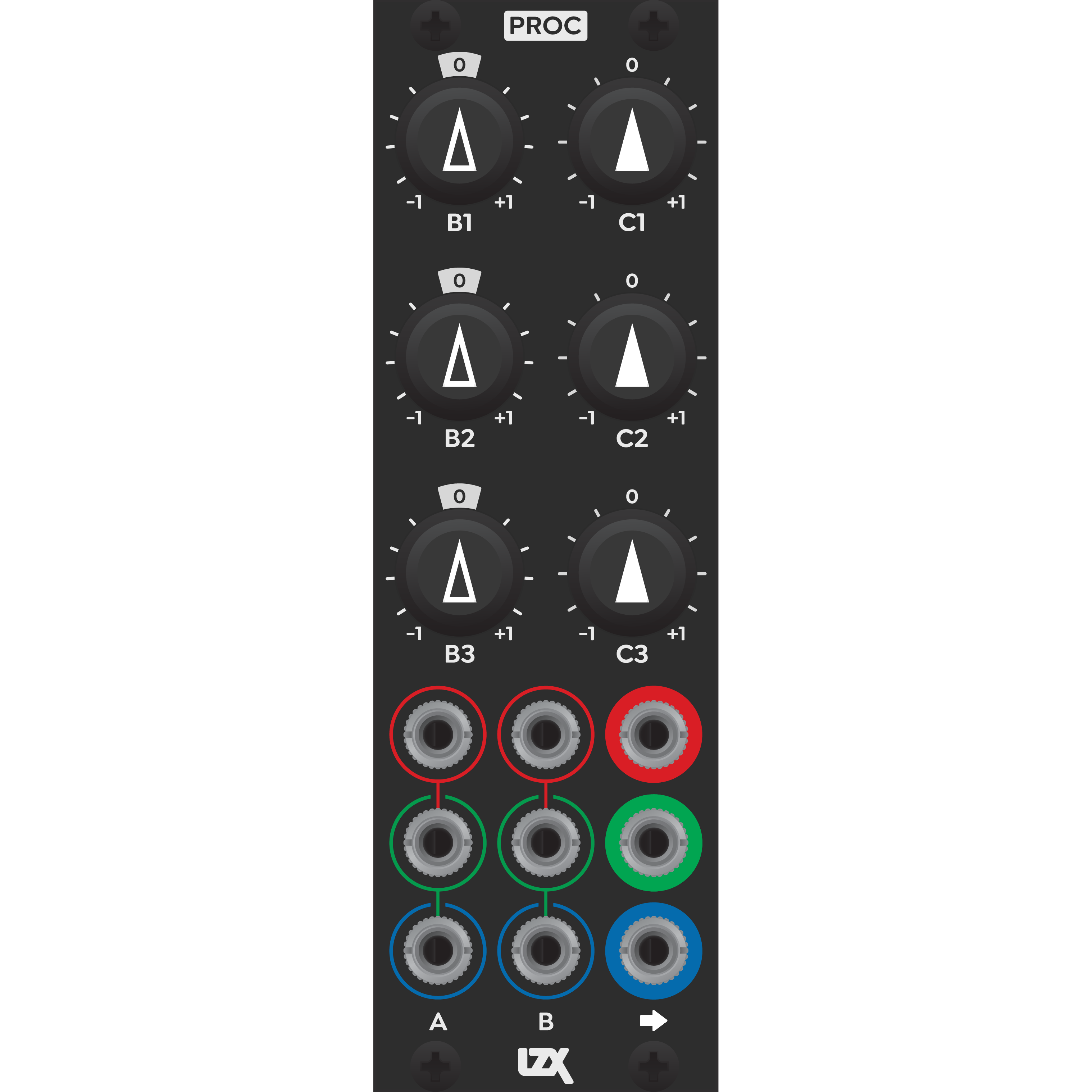
https://lzxindustries.net/products/procProc is a triple voltage processor and summing amplifier. For each channel, it provides continuous control over inversion, attenuation, and DC offset. L...
Link: Proc | LZX Industries
Have fun and let us know what you discover along the way.
#6 — scuto · 2022-12-08
Stairs looks interesting, then I watched the three patch video on your suggestion. Short-listed! The self-feedback was an unexpected perk, and has led me to consider other modules’ self-patching/feedback.
With your and others’ replies, it seems DSG is more the way forward for me for a foundational shape-maker, though I am intrigued by the potential patterns and shapes it and a DWO interacting could make.
Good suggestion to make more intentional use of the features on VC–I’ll get to know it better while ogling the next module or two.
#7 — sean · 2022-12-08
The LZX twitch streams (though at times a bit, uh, meandering) can also be a useful way to learn what does what.
#8 — scuto · 2022-12-08
Thank you for this feedback and clarifications! It feels good to start to understand the rationale behind the structure of the Gen3 framework–seems like a good fit for me to both learn the concepts and functions while having fun exploring them. (The VCA analogy makes a lot of sense.) Plus, that 8>11 situation is appealing, plus the VC (and Stairs!) I could have a lot of fun! I feel I’m better understanding patch programming in video modular so far compared with audio, possibly out of pure ignorance of “proper” signal flow in video. In audio I already had certain notions that I’ve been chipping away at with the help of patching modular.
#9 — scuto · 2022-12-08
Thanks for this lead! I’ll check this out. I just found the Discord, which I’ve only “skimmed” so far.
#10 — scuto · 2022-12-08
Thank you for the welcome, and the interest!
I’ll have to look into Channel, it seems feature-dense.
Interesting about Proc–the benefit of it over an audio module with the same features is the 0-1v range, and it can handle video frequencies? From the module page with the front panel legend I wasn’t clear on its offset function–if one of the two inputs marked with the same color are unpatched, that one adds an offset to the signal in the other one?
#11 — creatorlars · 2022-12-08
scuto wrote:
With your and others’ replies, it seems DSG is more the way forward for me for a foundational shape-maker, though I am intrigued by the potential patterns and shapes it and a DWO interacting could make.
Ramps are the landscape, Oscillators are the weather…
Ramps are the harp, Oscillators are the harpist’s fingers…
Oscillators are the escalator, Ramps are the passengers…
Lots of ways to think about how to define the relationship in a given patch.
#12 — creatorlars · 2022-12-08
scuto wrote:
if one of the two inputs marked with the same color are unpatched, that one adds an offset to the signal in the other one?
Proc is a very handy block for situations when you need to create manual voltages, attenuate a signal, invert a signal, offset a signal, or sum two signals (like a source with a modulator). Having three in one module makes it easy to patch for RGB workflows, or you can use the 3 functions independently. Generally a useful utility function block.
It can also be used as an expander for other modules. For example, 3x Proc + 1x FKG3 could create an extended color processing subsystem system where you have Gain + Offset knobs for all 9 color inputs on the FKG3.
#13 — Boneoh · 2022-12-08
creatorlars wrote:
It can also be used as an expander for other modules. For example, 3x Proc + 1x FKG3 could create an extended color processing subsystem system where you have Gain + Offset knobs for all 9 color inputs on the FKG3.
This just made Proc the top module on my wish list!
#14 — scuto · 2022-12-08
creatorlars wrote:
Oscillators are the escalator, Ramps are the passengers…
I think I’ve already stumbled upon a visual related to this! It seems Gen3 modules would give me more control and predictability than I have now for this kind of visual.
I appreciate the Proc description! However I’m still not clear on how it creates an offset–whether the first or second column is dedicated to offsets (and the other atten/invert), or if it comes about via patching in a certain way. 3 Procs plus a FKG3 would be a remarkably detailed system for RBG-fests!
Edit: Just watched the Proc video, and it’s the column of C knobs that provide the offset, if anyone in addition to me was unclear!
#15 — creatorlars · 2022-12-08
scuto wrote:
I appreciate the Proc description! However I’m still not clear on how it creates an offset–whether the first or second column is dedicated to offsets (and the other atten/invert), or if it comes about via patching in a certain way. 3 Procs plus a FKG3 would be a remarkably detailed system for RBG-fests!
The output function is A + B + C.
A is a direct input.
B is an input with it’s level/inversion controlled by the corresponding B knob.
C is a bias voltage generated by the corresponding C knob.
In general if you see knobs with outlined triangles these are controlling the level of a specific input jack that’s on the same panel.
Knobs with solid triangles are a bias control or related to some other function.
#16 — scuto · 2022-12-08
Nice–I appreciate that, and the conventions of triangle types is a good call!
#17 — scuto · 2023-09-22
I wasn’t sure where else to put this, so I’ll post it here: Is there a Gen3 module that has (or down the road will have) the same functions as the upper left Sync Generator section of Visual Cortex? I’ve been getting more out of it than I initially suspected I would, specifically feeding the H and V sync to things to see what might happen, including audio oscillators that can handle it (shout out to uniCYCLE and Synchrodyne + Expand).
#18 — jwsmithwick1 · 2023-09-22
Unfortunately not yet. Been waiting for this functionality myself.
#19 — scuto · 2023-09-22
Gotcha. Good to know others have this in mind as well!
In thinking about it, what I’m asking may be easier with SD resolution(s) in that an analog audio oscillator may not respond as well–or at all–to an HD sync signal compared with the SD ones from Visual Cortex. Guesstimating tho’.
#20 — jwsmithwick1 · 2023-09-22
People with RCA sync Prismatic Rays have had success syncing them to HD rates. They say the contrast is a little softer, however still very useable.
#21 — rempesm · 2023-09-22
HD sync vs SD sync is really not that much faster. Frequency and bandwidth are two different things. If you can get an audio oscillator to lock to SD H/V sync, it seems unlikely it won’t be able to lock to other sync pulses in timings that are just a little bit faster.
EDIT:
jwsmithwick1 wrote:
People with RCA sync Prismatic Rays have had success syncing them to HD rates. They say the contrast is a little softer, however still very useable.
Yep, I’ve been able to do this with both RCA and CV/Gate sync bus versions of Prismatic Ray. My experience has been that PR’s outputs have a perceptibly softer character in 1080i and especially 720p (an inherent low pass filter is being revealed in those timings) in comparison to SD timings but no obvious issues with sync itself.
#22 — scuto · 2023-09-22
rempesm wrote:
HD sync vs SD sync is really not that much faster. Frequency and bandwidth are two different things.
Ah, interesting, thanks! Makes sense. If/when I go to an HD encoder it’ll be interesting to see how they fare.
#23 — dryodryo · 2023-09-24
I believe H/V sync is likely to be implemented in a TBC2 firmware update. I’ve certainly been harping on it long enough.

In general, any module that does not require SD sync will work fine in HD timings, with some horizontal blur. That blur is scene-dependent. In other words, with some images you will notice significant blur, with others you may not notice it at all. It all depends on how much detail is present in the horizontal dimension. Fine details are lost, hard edges are softened, but smooth gradients are unaffected. It’s basically a very light slew applied to changes in the brightness of each channel. Try to push a one pixel wide vertical stripe test pattern through, and you’ll get something close to solid gray. But with a normal camera image, it may look perfect.
Technically the chips are not fast enough to do full HD resolutions even though HD timings are not a problem at all.
For reference, pixel clocks:
1080i60 ~62 MHz
720p60 ~55 MHz
480i60 ~9 MHz
If I’m not mistaken, the chips in pretty much all modules top out at 10 MHz.
#24 — scuto · 2023-09-25
I wasn’t aware about TBC2 getting that in the future–I thought my wallet was safe from it since I’m not focused on processing external images/video!
Regardless, this is good info to know. I’ve been working with gradients up until very recently, so smooth and slew is in my wheelhouse.
#25 — dryodryo · 2023-09-25
There’s been no promise of H/V sync front panel output for TBC2… I’m just speculating. But presumably it would not be a difficult feature to add.
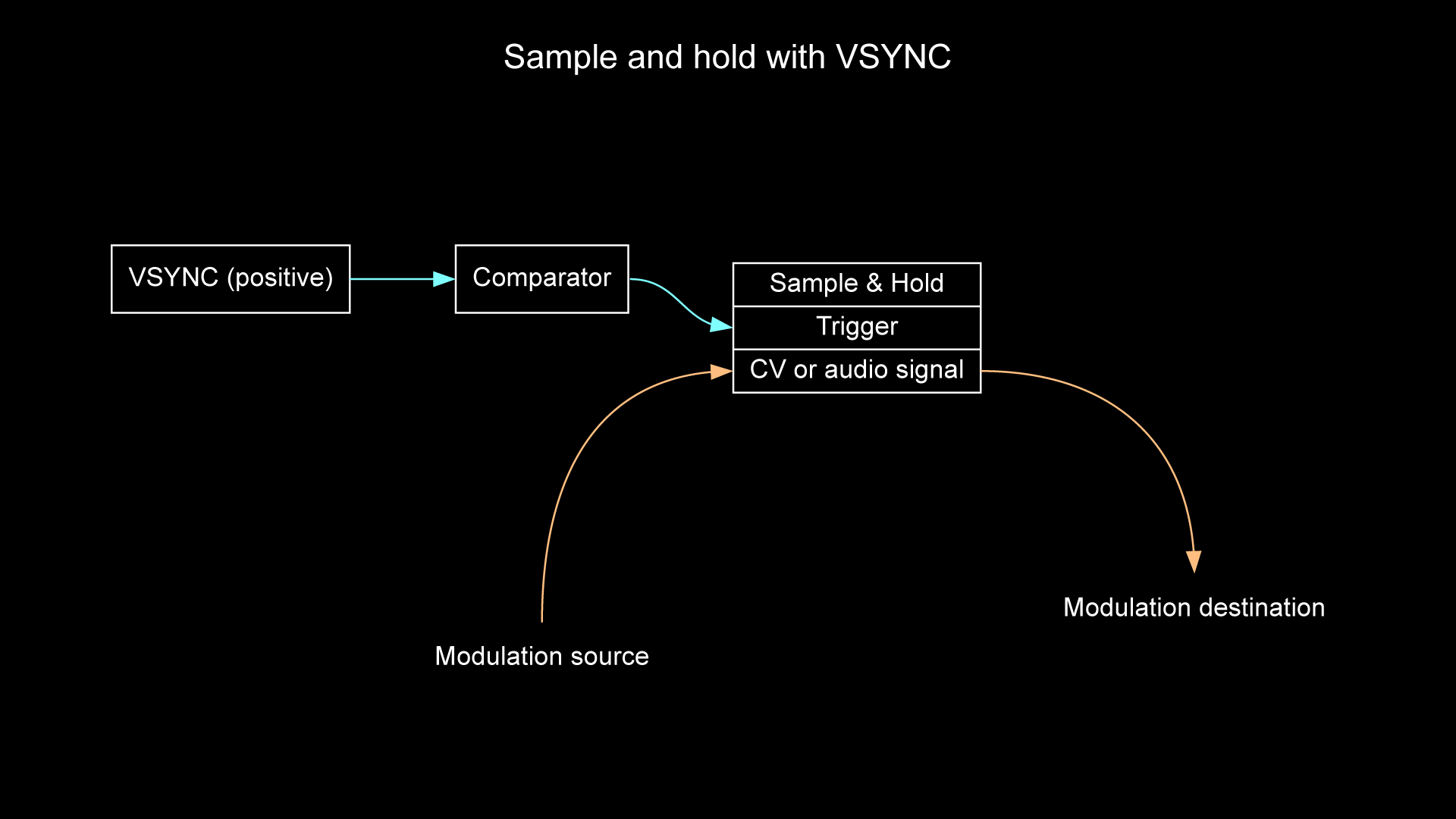
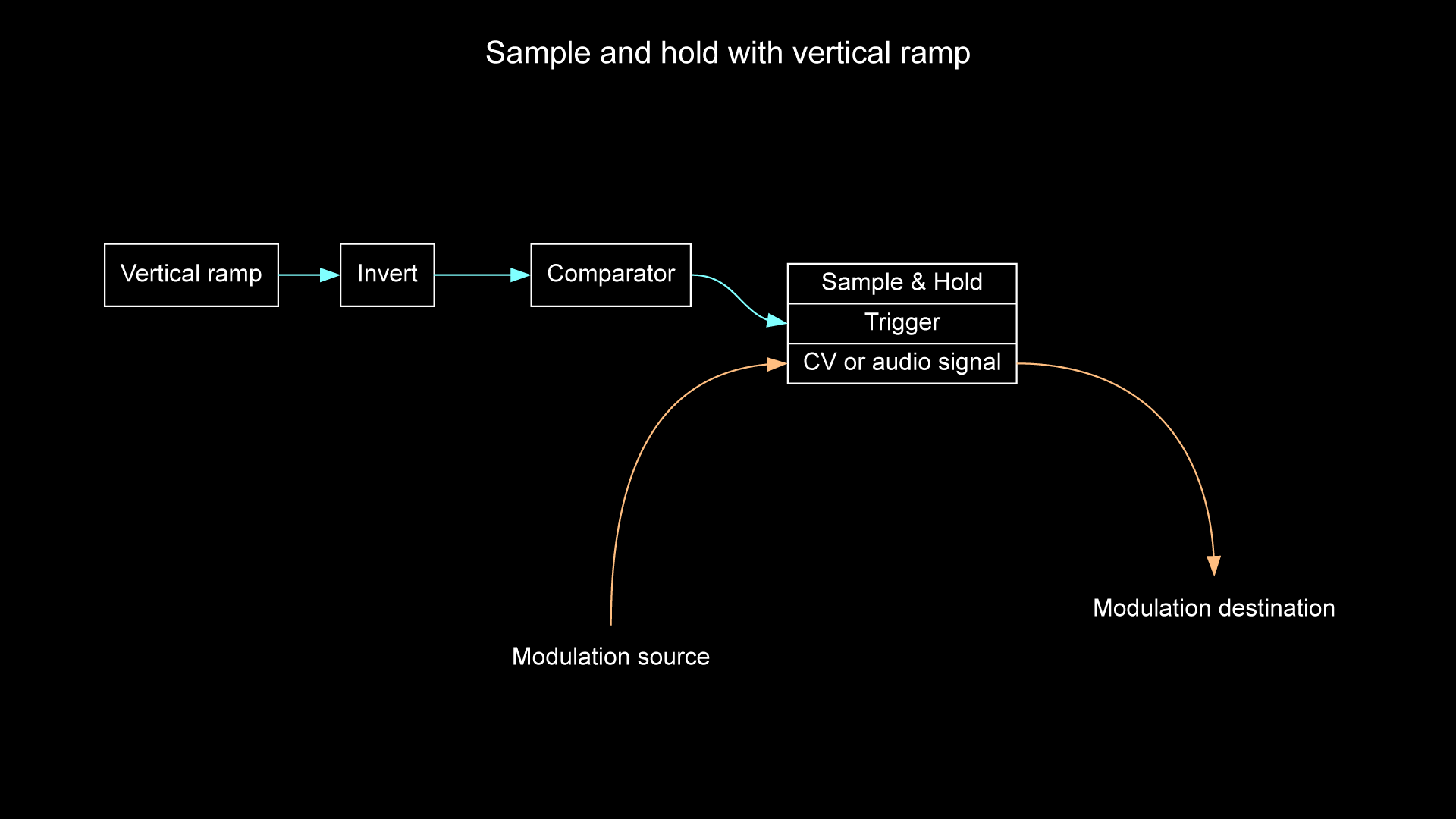
BTW, in all of my patches I use a sample and hold circuit to prevent horizontal tearing. I use Pulp Logic tiles because they are simple and inexpensive. Send any video synced oscillator or vertical ramp through a comparator to generate a pulse. That’s the S/H trigger source. Modulation source goes into S/H signal input. Result: modulation value is held for the entire duration of the field/frame.
#26 — jwsmithwick1 · 2023-09-25
rempesm wrote:
Yep, I’ve been able to do this with both RCA and CV/Gate sync bus versions of Prismatic Ray. My experience has been that PR’s outputs have a perceptibly softer character in 1080i and especially 720p (an inherent low pass filter is being revealed in those timings) in comparison to SD timings but no obvious issues with sync itself.
I think this is proof that the CV/Gate sync bus output works
#27 — rempesm · 2023-09-25
Yup, can confirm you just need to flip the dipswitches on the back of TBC2 to enable H/V sync to be sent to CV/Gate bus.
#28 — nerdware · 2023-09-25
I confirmed this earlier this year, in another thread.

Also, I noted an interesting sync artifact when syncing vertically in HD. My Prismatic Rays are slow enough to get oscillating, after an HD sync, that there can be a noticable space on the left side of the image before the first bar appears.
For me, this just makes the PRs more fun. When a patch makes me notice this effect, I can look for creative ways to use it. That can only be a good thing.
#29 — 337is · 2023-09-26
dryodryo wrote:
Send any video synced oscillator or vertical ramp through a comparator to generate a pulse. That’s the S/H trigger source. Modulation source goes into S/H signal input. Result: modulation value is held for the entire duration of the field/frame.
Great info share that should be stickied!
#30 — scuto · 2023-09-26
I’ve still not put a visual to the term “tearing” in my brain, but your explanation makes sense. It’s good to know that other modules made for audio can be useful in a video synth context! I’d not thought of using a S/H in video, though again I’d have to try it out to know what it does visually.
I had a Kinks in my video case briefly, but didn’t fully explore it before it was moved back to audio case duties. I liked its first and second function blocks, though I don’t recall what (if any) limitations it had for video.
#31 — rempesm · 2023-09-26
Patch a clock or trigger source into your encoder. You will mainly see the whole screen flash on/off but when the pulse does not line up exactly with the vertical sync generated by your sync generator, you will very briefly see the flash ‘start’ in the middle of the frame. This is what we mean by “tearing”.
Video may seem continuous but it’s actually discrete moments in time when you consider we’re seeing n frames per second.
#32 — dryodryo · 2023-09-26
Yeah, “tearing” is any instantaneous change in the picture that does not happen during the vertical interval between frames. It manifests as a sharp horizontal line. Commonly seen in fast-moving computer games, where the render update is not synchronized to the display refresh rate. Graphics cards have a setting called “Vsync” in which the rendered data is held in a memory buffer until the next vertical interval. It’s an option because some people want faster updates to rendered frames, others want smooth video with no tearing.
By the way, if you want horizontal bars in an image, resulting from e.g. cranking a modulating audio oscillator up into supersonic video range, then you can’t use the sample/hold technique. It’s always going to limit the modulation frequency to the current frame rate, so you will never get intraframe transitions, i.e. horizontal bars.
Also by the way, we’re starting to see this sort of thing implemented within modules. VH.S Aural Scan has the vsync S/H circuit built into it.
#33 — scuto · 2023-09-27
Thank you both for thse explanations. I’m at work so can’t try the clock into encoder thing, and am having difficulty understanding:
dryodryo wrote:
By the way, if you want horizontal bars in an image, resulting from e.g. cranking a modulating audio oscillator up into supersonic video range, then you can’t use the sample/hold technique. It’s always going to limit the modulation frequency to the current frame rate, so you will never get intraframe transitions, i.e. horizontal bars.
Does this mean that I would use, say, a ramp instad of an oscllator (either audio or video) in order to try the S/H technique? Or is it meant for processing external video?
I find the term “intraframe transitions” a useful way of conceptualizing horizontal bars–thank you!
Aural Scan is a tempting one, for sure. Eventually I’d like to coordinate my audio and video, but feel I have much to learn.
Question for either of you–or anyone, really!: how is the frame sync out on the front of Visual Cortex related to this discussion? I’ve not yet tried plugging it into an audio oscillator to sync it since I was having too much fun with the other outs.
#34 — dryodryo · 2023-09-27
The concept here is to limit the modulation frequency to the frame rate. A free-running oscillator, or any modulation source, can change value within a single frame. If it’s a sudden change, you get a sharp horizontal line. If it’s a gradual change, like a sine wave, you get a gradient.
In the former case, you can put the modulation source through a sample/hold circuit. Whatever value the modulation source has at the beginning of the frame is held until the next frame. No jagged horizontal bar.
In the latter case, e.g. with a high frequency audio oscillator, the horizontal pattern may be desirable. Soft scrolling horizontal bars look cool. If you want that, then you can’t use the S/H method, because that quantizes the modulation so that it can only change between frames, not in the middle of a frame.
Visual Cortex Vsync output should be perfect as the trigger for the S/H. In the absence of a true Vsync, one can generate a pseudo-Vsync from a ramp or video-synced oscillator through a comparator.
None of this is directly processing video images, it’s solely about wrangling the low frequency and audio frequency sources that feed into video processor modules.
#35 — scuto · 2023-09-27
Ah, scrolling vs synced audio oscs! That was the distinction I didn’t pick up on, makes much more sense now. Recently I’ve only used audio oscs synced, if you can believe it. Sync up a PDO, get those self-phase-modulations going, (attenuate) and have some squiggly fun (for just one example). And I’ve definitely been on a gradient kick, more sine than tri (though don’t tell my VU009!). Thank you for taking the time with these explanations! I’ve got a few case adjustments to make, which I actually enjoy once I get the time.
#36 — dryodryo · 2023-09-27
Yeah, if you have an audio oscillator that syncs its duty cycle to an external clock, you probably don’t need the S/H. Just feed it Vsync or pseudo-Vsync with sufficient amplitude for the trigger. But for more complex modulations, S/H is a helpful technique.
#37 — scuto · 2023-09-28
I’ll definitely be playing with the S/H teachnique now that I’ve understood it a little better.
dryodryo wrote:
Just feed it Vsync or pseudo-Vsync with sufficient amplitude for the trigger.
It has been interesting to see which audio oscillators take the VC’s V-sync well–some of which I didn’t expect, and others I thought would take it well don’t. Some day I will do a proper test of the ones I have, likely using the Vermona Amplinuator to boost the sync if/as needed since the modules of theirs that I have play relatively well with video.
#38 — rempesm · 2023-09-28
Often you don’t even need to increase the gain of the V sync–you just need to offset/bias it so the rising edge is crossing the voltage threshold the oscillator’s sync input is expecting.
#39 — scuto · 2023-09-28
Ah, interesting! I’ll have the offset option on hand when I give this a shot. I like me an offset module–might test them as well for handling of video signals, got a handful that can offset an incoming signal.
#40 — rempesm · 2023-09-28
Bias/offset becomes much more important in video than audio because we’re primarily dealing with a DC coupled signal instead of AC coupled signals.
If you send offsets into an audio output module, you’re not going to really hear anything exciting. At best, AC coupling will negate any DC offsets you introduce and at worst, you’re going to force the speaker cone to just sit stuck in one position and it will probably not sound great.
Plug offsets into a video encoder module, and you’re directly altering the black level of each color component.
#41 — scuto · 2023-09-29
Thanks for that about offsets in video! Makes sense. I already have a Passage, and may have to get a second or a Proc due to its input cascading/“multing”. Crucial utility modules, those.
When it comes to audio modular, though, I’d argue offsets are important as well–primarily for working with control voltages. If an audio oscillator doesn’t have a fine enough tune control, attenuating an offset into an FM or pitch input gives super fine control. The larger the knob’s diameter, the finer the tuning (AFG, Richter Oscillator as two good examples), but those “trim pot” style knobs for fine tune are too prevelant on many euro oscs–not good for accurate fine tuning unless their range is greatly restricted. I’ll be adding an offset module for fine tuning DWO3 when I get a chance to tend to my case. Offsets are also useful if you want to introduce asymmetrical clipping/distortion to an audio signal. Then there’s combining offsets and a sequential switch to make a simple sequencer.
Not all audio output modules are AC-coupled, since some believe they can hear the capacitor’s effect on the sound. Other output modules AC-couple/ground lift through a transformer instead (I like these, personally). But it’s not even necessary to have an output module in audio since many mixers, audio interfaces, and digital handheld recorders can easily attenuate the (Eurorack) modular level to line level without clipping. Some may clip no matter what, but most seem to handle it fine.
#42 — rempesm · 2023-09-29
Completely valid point about the use of offsets in audio modular. I was more referencing what happens when plugging a DC offset directly into your output stage with nothing in between. Biasing your control voltages is essential for fine tuning whether it’s in audio or video land.
Yup, totally hear you on the AC-coupled point, too. Was just hitting the broad generalization that folks can often have an audio output module and it’s not unusual for them to be AC coupled. Luckily modular lets you pick what works for your approach–I just put all of my outputs into a chunky outboard mixer for years and never had any problems.

#43 — scuto · 2023-10-01
Ah, gotcha! Thanks for clarifying. Yeah, not much interesting in audio putting DC right to the output.
That’s cool–what mixer have you been using? I was using Mackies before going straight into a Zoom H5 and mixing more in the case.
#44 — rempesm · 2023-10-01
Mackie Onyx 1640i, then Firewire

multitracked to a DAW for recording.
#45 — scuto · 2023-10-02
rempesm wrote:
Mackie Onyx 1640i
That mixer is no joke! Nice piece of gear. Haha, I get you re firewire–if it ain’t broke… If I may be so snobby, one of the things I like about us electronic creative types is our relative resistance to planned obsolescence. I love it when I see someone keeping a WinXP/OS9/C64/Atari/etc. computer alive because it runs that software we just need to have because it does that one thing so well–or was the last thing to do it at all.
#46 — brownshoesonly · 2023-11-15
@scuto “Is there a Gen3 module that has (or down the road will have) the same functions as the upper left Sync Generator section of Visual Cortex? I’ve been getting more out of it than I initially suspected I would, specifically feeding the H and V sync to things to see what might happen…”
You could look into the sync trigger stuff using the newly for sale SCROLLS module, which features a PULSE output for these kinds of experiments. (phase adjustable and capable of scrolling motion).
#47 — dryodryo · 2023-11-16
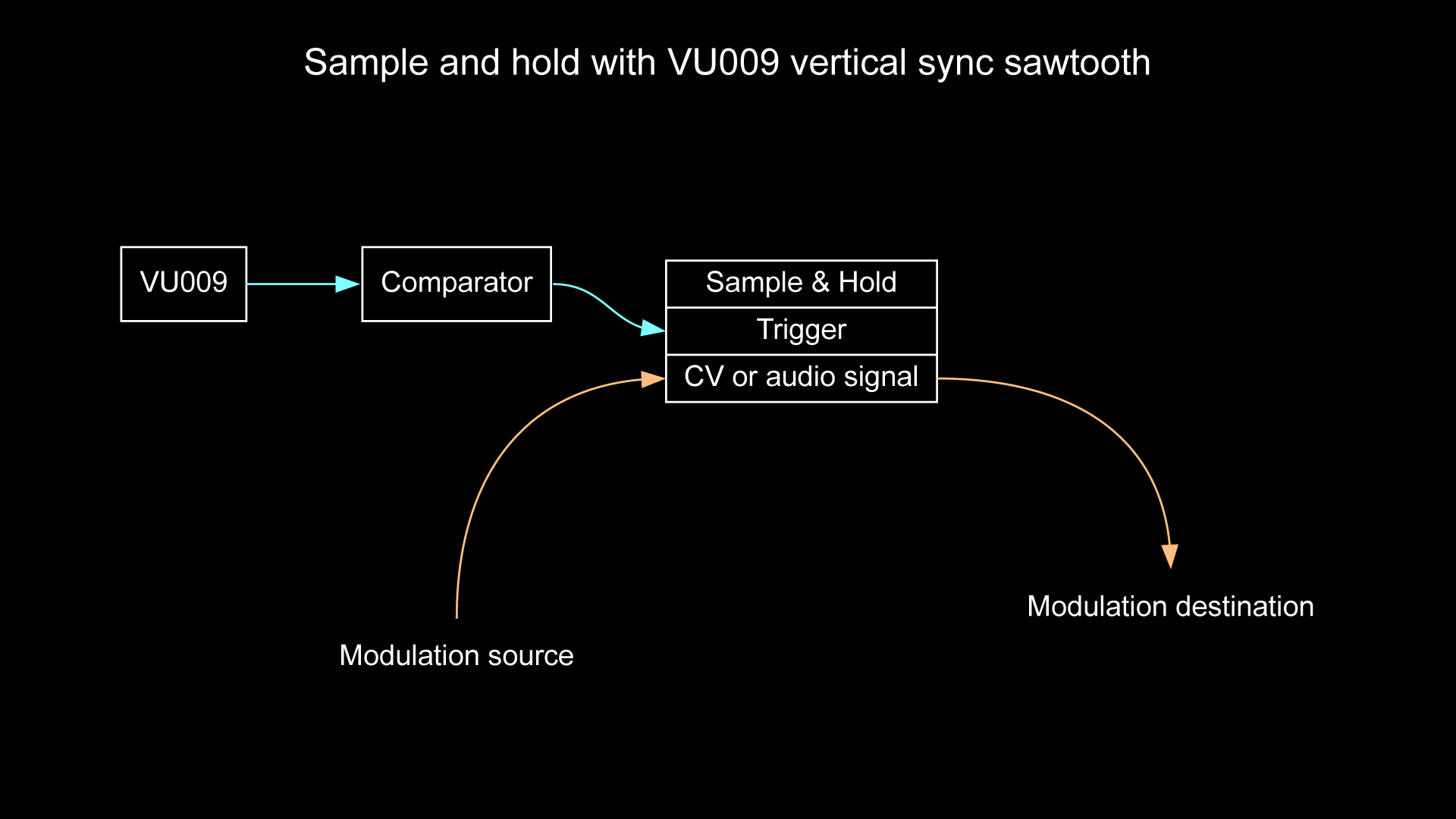
Wanted to add that the VU009 is great for generating pseud0-VSYNC through a comparator because VU009 has an Offset control. Basically it’s a bias, and if I remember correctly, it clips anything above 1 and below 0. @syntonie
#48 — scuto · 2023-11-16
brownshoesonly wrote:
SCROLLS
I wouldn’t have realized this otherwise–thanks for pointing it out!
dryodryo wrote:
VU009
I already have one so this is an interesting suggestion. I used Modulargrid to look up video comparators and saw that Seuils has them (I’ve already been ogling Seuils for its phase shifting and blue-ness).
Also on that MG list was Cadet VIII which leads me to ask if any hard key generator can do this. So far my only hard key gen module is Ribbons, but I’m unsure if being a window key gen is too off the mark to do pseudo V-sync.
(NB I’ve not grokked VC’s keying section yet… don’t even know if it’s working correctly!)
#49 — dryodryo · 2023-11-16
You don’t need a video rate comparator for pseudo-VSYNC. It’s only a maximum of 60 Hz. Any audio rate comparator will work. All you need is a voltage downconverter, since audio rate modules will output variously 5V, 10V, or even 12V
#50 — scuto · 2023-11-16
Ah, thanks! I think you or someone already informed me of the 60Hz rate. Got me some logic, attenuators, and will give this a whirl soon.
#51 — dryodryo · 2023-11-26
I made a video demonstrating sample and hold patches to correct frame tearing and shape distortion.
#52 — scuto · 2023-12-08
Been away for a bit, but this is a treat to return to, as well as your DSG3 video–my weekend will fill my brain now, thank you!
#53 — scuto · 2023-12-10
Ok, that was great! Thanks for making this. Learned a bit more about this topic, and it makes more sense. Mutable’s Kinks has been in and out of my video case for a while, so this will bring it back again. And Mystic’s Ana will likely be my comparator. In addition, your shirt rules, and you’re a fellow Firefox user.
#54 — scuto · 2023-12-11
And it looks like I can set Mutable’s Ears to spit out a 8v gate at a jumper-selectable level, and 1v is among the choices (2v and 4v being the others). Am I thinking correctly this could be the comparator?
#55 — dryodryo · 2023-12-11
I don’t know about Ears. You certainly don’t want the microphone to be active, you only want the gate to be triggered by the sync signal you supply. The threshold probably needs to be slightly below 1V, unless you preamplify the sync signal to greater than 1V.
#56 — scuto · 2023-12-14
Ok, that makes sense. I have some preamp means, so I hope to try it soon!