TBC2 has been released!
Category: Unknown · Tags: — · Posts: 57
#1 — Traviss · 2023-01-07
I’m pretty sure I am not imagining this, my email is trying to tell me my TBC2 has been posted to me

Great start to the year!! Thanks LZX crew!!
How are you guys looking forward to using yours?? I’ll be connecting two Visual Cortex’ both with live feeds which I’ve been waiting to do for some time!
#2 — Boneoh · 2023-01-07
Great news! Kudos to the LZX team! An awesome milestone has been reached.
I’m just starting down the analog video path, the TBC2 will be sending a couple of streams into a FGK3 keyer and SMX3 mixer. The fun will soon begin!
#3 — wednesdayayay · 2023-01-08
we have spent some time getting our rack put back together with a couple upgrades since it was used last time. in the rack will be mostly input stages. At some point I may put all the eurorails into the rack (it is a tower) but for now I’m going to try having them live separately.
4x4 HDMI matrix
two outputs are HDMI > component boxes (1 basic amazon, 2 kramer vp422)
one out for a monitor with passthrough
one out hyper deck 2 for recording
one of the HDMI> component boxes will run directly to a TBC2 input
there is a passive 3:1 component switcher that goes into the component input on a kramer 719.
one of the HDMI>component boxes is one of the inputs on the passive component switcher. the kramer also has 2 composite, 2 svideo, 1 DVI and 1 VGA.
so I’ve got switchable inputs for both channels of TBC2. The secondary run with the kramer 719 also has a feedback channel from a RGBHV distributor.
there is a lot more to the setup but it isn’t finalize yet so I won’t go into too much detail.
I’ve been dreaming of TBC2 inputs front ended by individual switchers for a long time it is crazy that it won’t be that much longer now.
I’ve also got a memory palace sample pack (60-64 frame PNG sequences) I put out a while ago I’m really hoping works with TBC2
one of the biggest steps up I’m super pumped about is a sample based workflow I’ve been cooking up.
I’m using two hyper deck shuttle 2s one for record and one for playback. once TBC2 lands I’ll be able to record the output and then swap SSDs so that I can play that recording back and record its output over and over and over…!
Of course I’m also interested to finally be able to send in and out of touchdesigner and incorporate some of the software tools I’ve made in the last year or so.
I’ve been really thinking about my in/out flow and how much I need vs how much is redundant because of so many different boxes. This basic setup has worked before beautifully but I can’t help but think I can condense and gain features. I’ve been looking at those black magic constellation switchers. Even the basic one with 10 inputs and 6 assignable outputs sounds pretty rad for a video system. However with the next step up to the me/2 you get 20 ins and 12 assignable outs plus a full 2nd switcher essentially. The me series will lets you switch between switcher instances all the inputs are shared but you can have separate program/preview and run the two into each other in a bunch of different ways or just side by side. My biggest concern currently is that I would have to have all of my source be at least 720p & SDI to go into these switchers it looks like. The mid range also has something called super source which would be a lot of fun to use in a video synth workflow. You can have 4 inputs on the screen at once all with individual DVE control for pan/x/y/zoom/crop things. https://www.blackmagicdesign.com/products/atemconstellationhd
20 inputs seems like just a bit too many and 10 seems like just a bit too few. 6 outs I think I could live with using passthrough and distributors.
#4 — Boneoh · 2023-01-08
wednesdayayay wrote:
Of course I’m also interested to finally be able to send in and out of touchdesigner and incorporate some of the software tools I’ve made in the last year or so.
I’m interested in hearing about what you are doing with your software tools. I don’t want to hijack the thread.

If you’d like to start a new thread I’d be happy to discuss what you’re doing and what I’ve been up to as well. Maybe others will join in as well.
#5 — Jefro · 2023-01-10
Got mine around lunchtime yesterday. It works great, but I don’t yet have a module that can output hd (a Syntonie kit is otw, so that’ll be solved soon.) I really love the ramp generator feature, that’s going to prove extremely useful. I haven’t tried messing with an sd card yet to take that functionality for a spin, but that’ll probably happen tonight.
Two camera input running into Memory Palace was extremely fun!
#6 — Z0NK0UT · 2023-01-10
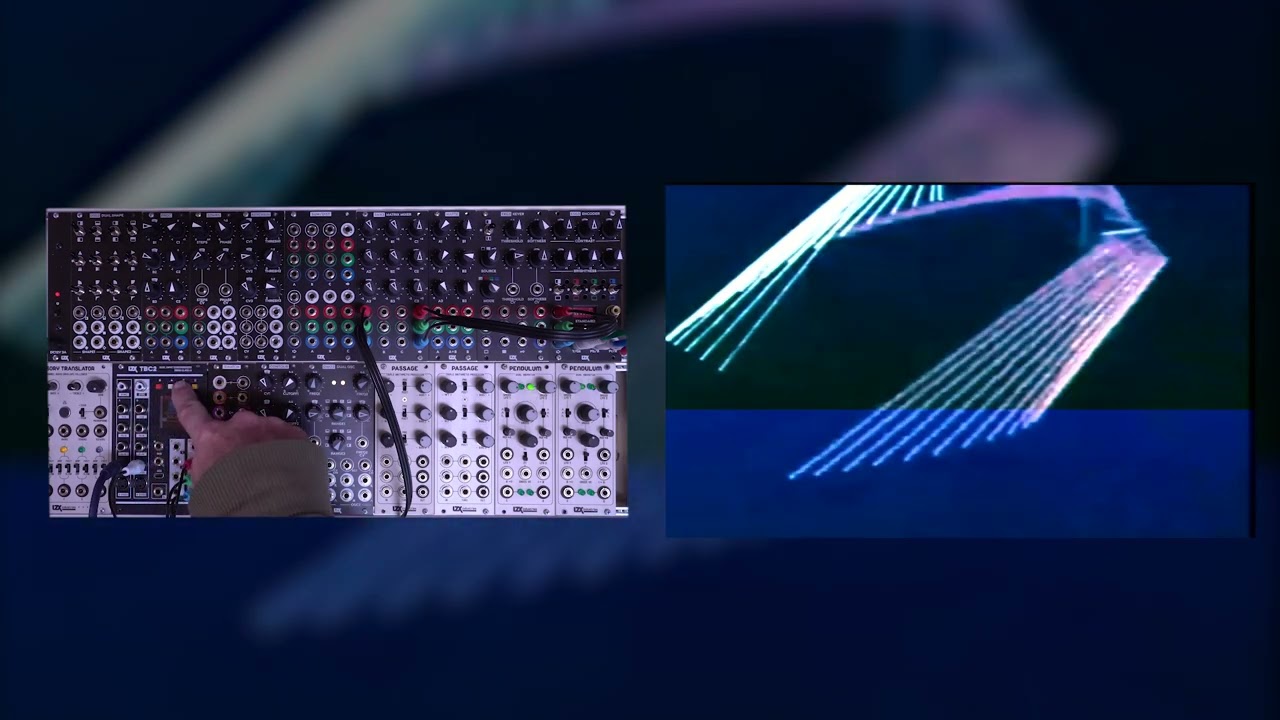
https://www.youtube.com/watch?v=S_R12TJsYic
#8 — analogbrainsurgeon · 2023-01-10
This is awesome! Well done, Lars, and good job to everyone at LZX. I just watched the video and TBC2 is everything I’d hoped for. Now I’m even more excited for what Chromagnon will bring, I’m sure we won’t be disappointed. Our patience has been worth the wait and has been rewarded.

#9 — creatorlars · 2023-01-11
7pip wrote:
this configuration certainly isn’t doing tbc2 character and fidelity any justice? perhaps via visual cortex even.
Does gain look too hot or is it something else you’re seeing? The knobs on SMX3 should be about halfway up if you’re wanting unity gain passthru. Has ESG3 been calibrated using the ramp based instructions here?
Here is a quick process to trim your ESG3 module if desired. If your module’s color balance looks good to you, don’t mess with it! The purpose of the trimmers is to adjust the input range so that a 0V to 1V input scale matches the scale of the black/white level clipping on ESG3’s outputs. >> Patch a Ramp source into the Red input jack. Leave it there – the Red input is normalized to the Green and Blue jacks too, if they are left unpatched.> Set all six control knobs to 50% Center positions.> Mon…>
If not gain related, let me know what you’re seeing!
#11 — creatorlars · 2023-01-11
I’m just an idiot, I thought you were talking about troubleshooting your own setup, and you had one already! I see now you were talking about screenshots from the demo. Yes, it would be good to post some HD in/out cross converter stuff next.
#12 — nerdware · 2023-01-11
HD downscaled to SD looks just great to me. That’s how I’ve been feeding HD into my VC - I downscale it first. Obviously there’s some loss, but how much that matters will depend on how you process the video. Even an ‘identity’ process - no processing at all - looks good to me.
So I expect TBC2 up/downscaling will look equally good.
#13 — Boneoh · 2023-01-11
I’ve watched the YouTube video a couple of times and it’s starting to sink in just how powerful the TBC2 is. I have a question about the part where Johnny is showing the feedback. He switched to NTSC because he said he didn’t have something to handle the component for both feedback and output. What device would be needed to handle component feedback? Some kind of splitter? buffer? amp? Thanks!
#14 — jwsmithwick1 · 2023-01-11
Syntonie makes a component mult

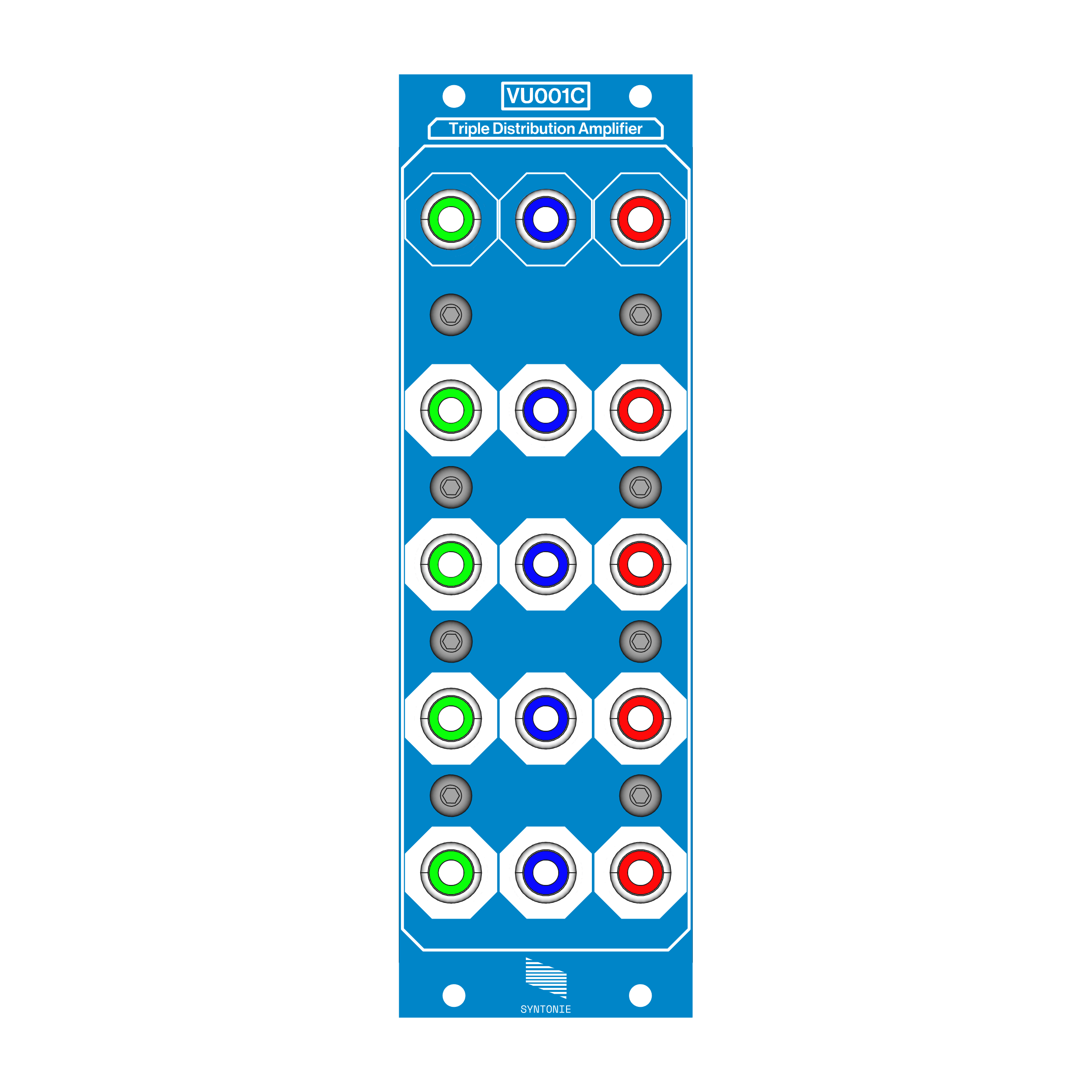
https://syntonie.fr/produit/vu001c/VU001C features 3 video distribution amplifier channels, aimed towards distributing Component video to multiple monitors/capture…
Est. reading time: 1 minute
Link: Syntonie - Video DIY
#15 — monads · 2023-01-25
Does the TBC2 have a screensaver mode after inactivity i.e. 10-15min? Just curious, I noticed screen burn-in on my MP and wasn’t sure if TBC2 will have the same issues.
#16 — creatorlars · 2023-01-26
I’ve added this feature this afternoon, and it will be in the 1.0.1 software release. After 10 minutes of no keypad activity, the screen turns off. Pressing any button turns it back on.
#17 — monads · 2023-01-26
So awesome! Thanks Lars!!!
#18 — TheEarthsMoon · 2023-01-26
this is awesome. i have been meaning to ask the same for the mem palace. My screen is totally burned in and was even curious about how easy it would be to replace the mem palace screen?
#20 — dryodryo · 2023-01-29
jwsmithwick1 wrote:
Syntonie makes a component mult
Hey this looks cool. Sorry I deleted my other post, it was an accident.
Any HD/component video distribution amplifier will work, I have some Extron DAs. They don’t take up valuable Eurorack HP space.
#21 — peloazul · 2023-01-30
I too would like to know this (?easy to replace memory palace screen due to burnin?).
#23 — brownshoesonly · 2023-01-30
no. replacing the screen would be an entirely in house job at LZX.
#24 — peloazul · 2023-01-30
Thanks Nick - better to know than not!
#25 — sean · 2023-01-31
Wonder if the VGA expander pinout info has been/could be shared?
The stock dual expander thingy is just way too big for my needs/case, but would like to DIY a single VGA expander 1u solution.
#26 — yuya · 2023-01-31
My Memory Palace’s screen hasn’t burned in yet, but it would be nice if LZX added a turn-off screen option like a TBC2.

#27 — creatorlars · 2023-01-31
sean wrote:
Wonder if the VGA expander pinout info has been/could be shared?
I’ll publish the pinout in the docs.
#28 — monads · 2023-03-15
I was re-reading the TBC2 specs and I remember at some point there was talk of supporting 240/288p for Ming Mecca compatibility??? It doesn’t look supported and still needs an external device to pass signals accordingly. Just checking.
#29 — rempesm · 2023-03-15
240p input isn’t enabled yet, keep an eye out for a future firmware update.
#30 — wiatrob · 2023-03-18
Can anyone verify the screen saver function works in 1.0.1?
#31 — a_digital_index · 2023-03-20
I haven’t seen it in 1.0.1
#32 — monads · 2023-03-20
I thought the screensaver goes on by default after 10min inactivity? Not something the user has to enable? So it’s not present in 1.0.1 per above then???
#33 — wiatrob · 2023-03-21
I tried reloading 1.0.1 to make sure there wasn’t a versioning issue and I do not have a screensaver after 10 minutes (and longer) of no interaction with controls. @Z0NK0UT should we move this part of the conversation to the Helpdesk or is this issue being tracked internally?
#34 — monads · 2023-03-21
Hoping the screensaver feature receives some immediate attention then!!! I’d hate to get screen burn-in like MP.
#35 — Z0NK0UT · 2023-03-22
Thank y’all for your feedback. Lars is working on a firmware update.
#36 — meudiademorte · 2023-04-04
Will the next update enable the "contrast / hue saturation " proc for component? Looks like the 1.01 version can do this only with composite input.
#37 — Z0NK0UT · 2023-04-04
Yes, that feature will be available in upcoming firmware.
#38 — meudiademorte · 2023-04-05
good to hear! are the plans for a menu to change the parameters like treshold of the internal timebase corrector (like on the roland edirol v8) to get a more stable sync with glitchers like cbv001 / ave mod?
#39 — creatorlars · 2023-04-05
Firmware 1.0.1 is out now, and only includes a couple of quick fixes.
Firmware 1.0.2 is next, and includes some fixes for VGA input detection and any other bugfixes.
Firmware 1.1.0 will be after that, and includes any new feature adds (Component proc amp, Screensaver, etc.)
All of these features have been implemented (some I was planning to make part of 1.0.1), but there have been some new bugs I introduced while adding them, so that’s what’s keeping me from a quick release. I am prioritizing finishing assemblies and shipping orders to those who don’t have the module yet, but am getting close to being caught up. So hang tight, please try to enjoy the initial release firmware, and we’ll have updates soon.
#40 — Boneoh · 2023-04-05
creatorlars wrote:
… I am prioritizing finishing assemblies and shipping orders to those who don’t have the module yet, but am getting close to being caught up.
This is great news! Thanks to the LZX team for all of the hard work that is making this happen. I’m super excited to be getting a TBC2 in the rack soon!
#41 — yuya · 2023-04-06
I’m a late buyer who ordered in May 2022 so of course I haven’t received it yet.
I’m very happy to hear Lars say that assembly is a priority.

I feel like it’s definitely getting closer! 
#42 — brendanleespengler · 2023-04-28
Does the TBC2 require both DC and bus power like the Memory Palace?
#43 — creatorlars · 2023-04-28
No. Either EuroRack or DC input will work, same as Gen3 modules.
#44 — creatorlars · 2023-05-12
Hi TBC2 crew – just wanted to update you. I just received revised boards for some production changes on TBC2 that were necessary for batch #2, and expect to be back to the software related fixes next week. I want to at least get 1.0.2 out in the short term.
For batch #2 we will be moving to a Gen3 style front panel design. There will be some update kits (frontpanel + standoffs/screws) available for anyone who wants to change their Orion era assemblies. We’ll keep the price close to costs on those. They will be available around the time batch #2 lands.
#45 — dryodryo · 2023-05-16
Cool beans… in a way, I’m glad to be a latecomer to the party. Love the Gen3 panel design. Maybe it’s silly of me to care about the aesthetics of tools, but there it is.
Thanks
#46 — creatorlars · 2023-05-17
I definitely understand! We just want to move ahead with that as the default option. If anyone in batch #2 prefers the Orion front panel, we will have some left over and can work that out.
#47 — monads · 2023-07-07
How’s development on Firmware 1.1.0 coming along?
#48 — Z0NK0UT · 2023-07-07
Coming along well. We’re focused on making physical modules at the moment. Fulfilling TBC2 orders is the top priority.
#49 — monads · 2023-07-07
Sounds good!! Thanks for the status update!!
#50 — nerdware · 2023-07-16
I can confirm that TBC2 can sync Prismatic Rays.
I now have my TBC2 in my Gen1/Gen2 cabinet, powered by 2 Malekko PSUs. The TBC2 is powered by the LZX DC power module and brick, with the sync bridge cable linking the TBC2 Eurorack power socket with the PSU for the PR modules.
Everything works fine in HD, but I had to move the switches on the TBC2 rear to the up positions. I can also confirm that I can sync the TBC2 with my ESG3 in the other cabinet.
I hope this info is useful.
#51 — nerdware · 2023-07-30
Here’s a curious sync issue: when I sync a Prismatic Ray at the scan rate, there’s always an offset from the left side of the screen. (I’d upload an image but uploading it keeps failing.)
This isn’t a problem, as I’m more interested in syncing my PR modules at the frame rate, but I am a little curious. Is this a TBC2/PR issue? Does this TBC2 sync signal differ from VC or is it related to the higher frequency for HD? I’ve not yet tested this in SD mode (mainly as I don’t use it anymore).
Thanks.
#52 — Z0NK0UT · 2023-07-31
nerdware wrote:
Does this TBC2 sync signal differ from VC or is it related to the higher frequency for HD? I’ve not yet tested this in SD mode (mainly as I don’t use it anymore).
It could be an artefact of syncing PR at HD rates (what is your TBC2 setting?). This could be determined by testing PR sync in other formats. Worth experimenting.
#53 — nerdware · 2023-07-31
I’m currently using the PAL 1080 25 fps mode, but I can experiment.
Thanks.
#54 — nerdware · 2023-08-02
Ok, I’ve experimented.
This is clearly an HD thing as I can’t reproduce it in SD. My options for experimenting are limited, however. Many video modes don’t work at all for me. So I’m limited to the two modes, PAL SD and HD at 25 fps. Would the fps matter? I tried 50 fps and got a total mess. I can’t recall all the other modes I tried, but even basic NTSC (all video mode switches down) failed. Just another black signal.
I could try again and record all the results, if that’ll help. However, I’m only interested in the results I can get using 1080 and 25 fps. If this is what the Prismatic Rays do with these sync signals, then I can live with that. As I explained earlier, I can use the PR modules mainly with the frame sync.
Thanks.
#55 — Z0NK0UT · 2023-08-02
nerdware wrote:
This is clearly an HD thing as I can’t reproduce it in SD.
That’s helpful to know. Thanks for testing what you could.
#56 — monads · 2023-08-11
Will ‘any’ update be compatible with “Ming Mecca”??? At one point it was announced TBC2 would support but it’s been awful quiet

#57 — Z0NK0UT · 2023-08-11
I think 240p60 input will be supported in the next firmware update.
#58 — monads · 2023-11-14
What’s the difference between the two firmwares below?? Confused if you purchased just the upgraded panel and swapped out but I’m guessing there were some hardware changes when switched over to the Gen3 Panel version of the module so each firmware is specific to a module (serial#00-XX) release.
TBC2 Firmware 1.0.2-mk1 (Orion Panel)
TBC2 Firmware 1.0.2-mk2 (Gen3 Panel]
#59 — brownshoesonly · 2023-11-14
You need the firmware based on your modules release. So if you had an orion panel and that is how it was shipped. You need Orion firmware. It does not matter if you changed the panel yourself.
If you have picked up a TBC2 secondhand, you can just look at the back of your TBC2. If you have a full panel rear plate with a fan in the middle extruding out from the back shield. You have ORION.
If you have a gen3 style power pack on the rear side of your TBC2. You have Gen3.
#60 — catbiscuits · 2024-01-07
Well hello, I purchased the Dingsun HDMI to YPbPR component adapter. After switching it on and off a couple of times, I got it to work with the TBC2 in 800 x 600 mode. Anything higher I might be able to use? It says it suppors 780p, but I don’t see that on my M1 Mac. I can try to install SwitchResX, which used to work well for me back in the day.
Anyway, in 800 x 600, the sides of the screen are cropped on my LiquidTV, which is odd since 800 x 600 is 4:3, which should be the same as SD. Any thoughts?
I am very naive when it comes to video, so this may be obvious.