TBC2 Fan Noise Solution?
Category: Helpdesk · Tags: — · Posts: 44
#1 — pancho · 2023-01-18
Hello, Is there a way to turn the fan of the TBC2 off via the user interface? I also see a fan power print on the back panel, is that also a possible solution? I use my rack for a lot of audio and the fan of this module interferes unfortunately.
#2 — monads · 2023-01-18
Do you want to burn out your TBC2? The fan is there to protect overheating. MP has a fan as well and if TBC2 is the same then I’d recommend to place TBC2 in a deeper case/rig. Placed in a low depth/shallow case exacerbates the fan noise.
#3 — wednesdayayay · 2023-01-18
I was wondering how long it was going to be until there was a TBC2 fan post

it is a loud module that is for sure.
maybe getting a small skiff so that it isn’t in the same rack would help?
#4 — monads · 2023-01-18
I don’t have my TBC2 yet, but I recall for MP there was at some point a firmware recommendation with an option to be added allowing the user to adjust the fan speed? It hasn’t happened, but maybe this is also a future option for the TBC2?
#5 — jwsmithwick1 · 2023-01-18
Someone on here replaced the fan on the Memory Palace with a quieter one. Still trying to find that post…
#7 — Vdot · 2023-01-18
You could setup a 12v circuit for the Gen3 video modules that take barrel power connectors and have it on a switch to turn off and on independent of your eurorack PSU.
I have my Memory Palace on a separate PSU for this reason.
#8 — creatorlars · 2023-01-18
If the fan noise is audibly loud (you should hear a soft whirr), you just need to tighten the securing nuts on the rear panel. We make sure they are not buzzing during QA, but I have observed the screws loosen on some units after being powered on for a while, causing some buzzing. We’ll take extra care when we ship out this next batch.
If the fan is injecting some noise into your EuroRack supply, power the module directly from its 12V DC barrel or DC Distro instead of the EuroRack connector.
#9 — monads · 2023-01-18
Mention of the MP fan is in this thread by user rempsem around Mar.21 and Jun21. It did involve some DIY skills and not just a straight swap out.
Has anyone replaced the fan in their MemPal with a quieter one?>
#10 — nerdware · 2023-01-18
I’m not so worried by the volume - I have a 120mm fan running in one of my cabinets - but I do wonder about the pitch and tone of the noise.
#11 — creatorlars · 2023-01-20
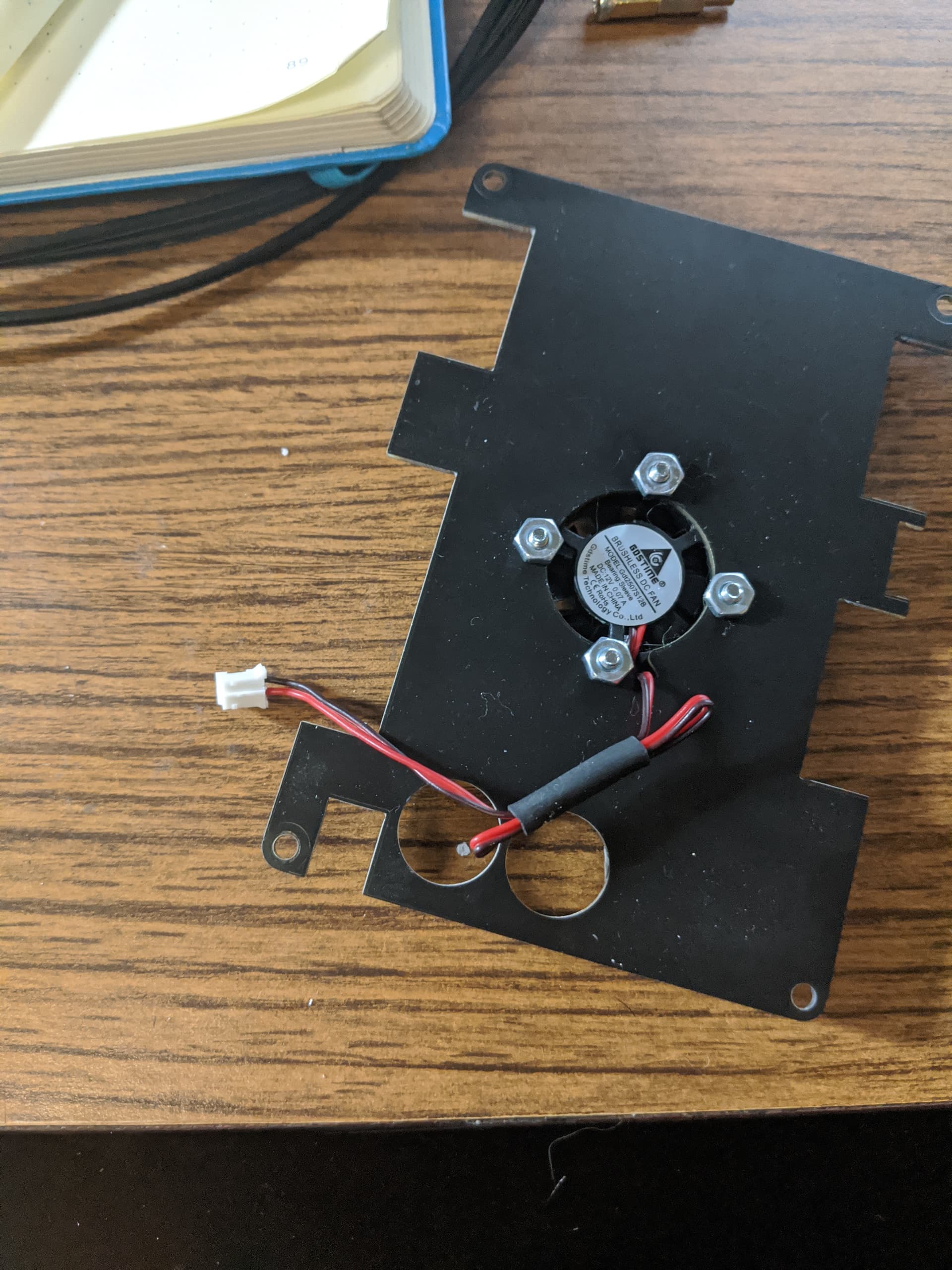
The TBC2 fan is on a standard 2-pin connector/socket, and mounted on the rear panel. So it’s easily serviceable if you ever need to replace it.
#12 — dryodryo · 2023-01-23
Thanks again for future proofing this.
#13 — pancho · 2023-01-24
The noise is not electrical or getting into the power, it’s just the fan. I tightened the nutts and no dice. It still produces a hum that I can hear even when I’m working with my closed ear headphones. Looks like I am going to have to wait for someone to report back on a replacement fan like Memory Palace!
#14 — rempesm · 2023-01-24
The good news is you don’t have to wait on cryptids like user rempsem to figure it out! The model/make number of the fan is right in Lars’ photo so you can search for a datasheet which will tell you what’s required to fit a replacement.
Just make sure the mechanical and power requirements are the same and that it meets your noise rating expectations and it’ll be a snap to replace!
#15 — Rik_bS · 2023-01-24
If the humming bothers you, teach it the lyrics
#16 — pancho · 2023-02-01
Yeah sorry, it’s not nice for people to expect you to figure it out since I’m assuming you don’t work for LZX. I unfortunately can’t take this on.
Would it be possible for LZX to figure out a replacement fan that users can get?
#17 — creatorlars · 2023-02-01
It is a 25mm x 25mm 12V fan with a standard 2-pin connector. They are common as replacements on some 3D printers and graphics cards, so should not be hard to find. Here is an example from Amazon.
amazon.comhttps://www.amazon.com/WINSINN-Bearings-Brushless-Cooling-25mm10mm/dp/B08R9K37DJAmazon.com: WINSINN 25mm Fan 12V, 3D Printer Micro 12 Volt Fans 2510 Dual Ball Bearing, Brushless Cooling 25mmx10mm 2PIN (Pack of 2Pcs) : Electronics
Link: Amazon.com: WINSINN 25mm Fan 12V, 3D Printer Micro 12 Volt Fans 2510 Dual Ball...
#18 — creatorlars · 2023-02-01
And if brand name/specs are important, here is a list of compatible parts at Mouser: https://www.mouser.com/c/thermal-management/fans-blowers/fans/dc-fans/?q=25mm%20fan&height=25%20mm&noise=4.8%20dBA|~14.1%20dBA~~16%20dBA&operating%20supply%20voltage=12%20VDC&width=25%20mm&rp=thermal-management%2Ffans-blowers%2Ffans%2Fdc-fans|~Noise&sort=noise
The only issue with most of the above options is most are not going to have a 2-pin connector crimped on them, just bare leads. So you’d need to splice something like this onto the wires:
amazon.comhttps://www.amazon.com/XLX-25Pair-Connection-Terminal-Connector/dp/B076JFFDWNAmazon.com: XINGYHENG 50Pcs 25Pairs 2.54mm 2PIN Female and Male Connection Plug with Red Black Terminal Connector Wire Cable 200mm Compatible with JST XH : Electronics
Link: Amazon.com: XINGYHENG 50Pcs 25Pairs 2.54mm 2PIN Female and Male Connection Plug...
#20 — brownshoesonly · 2023-02-01
Make sure your fan is not rubbing up against power or sync cables in your case. These fans have all been extremely quiet upon leaving LZX
#21 — wiatrob · 2023-03-19
Extremely quiet translates in to how many dBc?

I was looking at the data sheet of the Sunon fan that was the first in the Mouser list that @creatorlars. On page 7 there’s a cool chart and blurbSUNON’s “Super Silence” fan series was tested
with standard digital home equipment located
one meter away from the user. Based upon “ISO
532B hearing sensation” and charts on human
auditory reactions that were plotted for different
decibel and frequency levels, the threshold noise
level for SUNON’s Super Silence series’ is below
20 phon, the minimum level that is discernible in
daily living.
‘20 phon’ appears to translate to less than 40dB @ a bit over 100HZ. Cased with other modules at three feet away TBC2s fan measures 48-49dB (not taking frequency into account - I’m not pulling out the frequency analyzer for this post

). That would put it at what Sunol’s spiel classifies as above “the minimum level that is discernible in daily living.”Regardless, it’s the loudest source of noise from equipment in my studio. And the frequency is right at the level of ‘truly annoying.’
#22 — Jesse · 2023-03-20
They’re too loud for sure. It’s annoying & an annoying pitch. Definitely the loudest thing in my studio
This Sunon MF25101V2-1000U-A99 runs @ 9600RPM instead of 11k for the stock TBC2 fan GDT2507S12B & rates at 16dbA vs the 25±10%dBA of the stock TBC2 fan.
The Sunon is rated at the same CFM & remember decibels are logarithmic so 6dB is alot
Bet the Sunon will put it into quiet territory. I can throw one in on my next parts order & guinea pig, it is too loud.
If that doesn’t do it I’ma just drill holes & install a bigger fan that’s lower RPM
#23 — wiatrob · 2023-03-20
I re-measured with ‘A’ weighting and get similar readings. Perhaps I’ll try a lower tech approach to mitigation and move it away from head level in the rack

#24 — Jesse · 2023-03-20
When your synth stands 7’ tall

#25 — wiatrob · 2023-03-26
You know my studio desk wouldn’t accommodate the skee-ball version…

#26 — GaelJaton · 2023-04-05
just received my TBC2, and upgrade my MP from v18 to v2.0.2 (sync won’t work before update). Very nice gears but indeed TBC2 fan is even louder than MP one…
I got a deep diy case and some good enough skills, so I got some idea :
I plan to make some kind of ducted fan with larger fan (9 or 12cm).
But I don’t wanna fry anything, so a question @creatorlars does TBC2 have any overheat protections? I saw some temp prob displayed on the TBC2 menu, that’s encouraging…
#27 — brownshoesonly · 2023-04-05
the fan is overheat protection
#28 — GaelJaton · 2023-04-05
I mean auto shutdown when overheat @brownshoesonly … I allready moded some devices with custom caleoduct+fan, but no device such expensive, I’m a bit nervous. According to datasheet I found there no significant noise reduction for same size factor fans & air flow. So I want to try bigger ducted fan. As a musician too, this noise is a bit annoying for me.
#29 — creatorlars · 2023-04-05
There is a thermal limit on the power supply components in the case of an extreme condition, but there is no auto shutdown behavior for overheating. The device should run within limits up to 85C, and needs air cooling + heatsink to reach that condition. Beyond that temperature, you could experience performance degradation or a system crash.
It is likely the fan is obstructed by a ribbon cable or is possibly pressed against an internal element in the EuroRack enclosure. Otherwise, try adjusting the mounting screws to see if one has loosened. A larger fan may run quieter, but you would still need to mount it directly above the heatsink on TBC2’s interior assembly, so that air is being pulled thru the blades of the heat sink.
#30 — nerdware · 2023-04-05
I have 6 120mm fans in my Gen3 rack cabinet. I’m not currently powering them, as the cab is less than half full and still open, so it still has plenty of ventillation. However, when I do power the fans, they may drown out some of the TBC2 fan noise. This will depend on the fan noise level for my replacement TBC2 module, of course. (The replacement discussed in another thread.)
From my experience testing the cab fans and fans from two other TBC2 units, this will depend most of all on the frequency of the TBC2 fan noise. The first TBC2 fan noise had an unpleasently high pitch, while the noise from the fan in the second unit had a much lower pitch. So that was a big improvement.
If I could place the cab fans and TBC2 so that the airflow is directly on the ear of the module, would a module fan even be needed? I very much doubt I’ll want to disable the fan to test that, even if it might work. I’ll simply trust that the noise will be acceptable. If it isn’t, then I’ll either find a way to cope or just live without a TBC2. I can’t speculate about that.
So far, the fan noise has been the least of my TBC2 problems, I’ve not yet had a unit long enough to properly evaluate the noise. At least I have a dedicated PSU for it, so I can switch it off when I’m not using it. That’s not ideal, obviously, but it helped.
#31 — creatorlars · 2023-04-05
nerdware wrote:
If I could place the cab fans and TBC2 so that the airflow is directly on the ear of the module, would a module fan even be needed?
You can keep an eye on the temperature monitor on the system page. You’ll want to keep it below 85C at all times. The biggest load you can put on the system is taking CVBS in and upscaling to 720p formats on both input channels. If you can do something like that, leave it on for an hour, and the core temperature stays below 85C, your alternative cooling solution is adequate.
#32 — nerdware · 2023-04-06
Yes, I really appreciate the temperature monitor. Thanks.
#33 — GaelJaton · 2023-04-06
creatorlars wrote:
It is likely the fan is obstructed by a ribbon cable or is possibly pressed against an internal element
nope, the bottom of the case is open for install/servicing and nothing’s wrong, screws is ok… from datasheet original fan is 25-30db, but it is in normal range for this fan size & air flow. I used to play videosynth live with modular musicians, in some cases 25 db is too loud. thank’s for the tips, if I can trust the temp probe displayed I gonna redesign the cooling, carrfully monitor temp and I will share results. cheer’s!
#34 — raster-fari · 2023-08-05
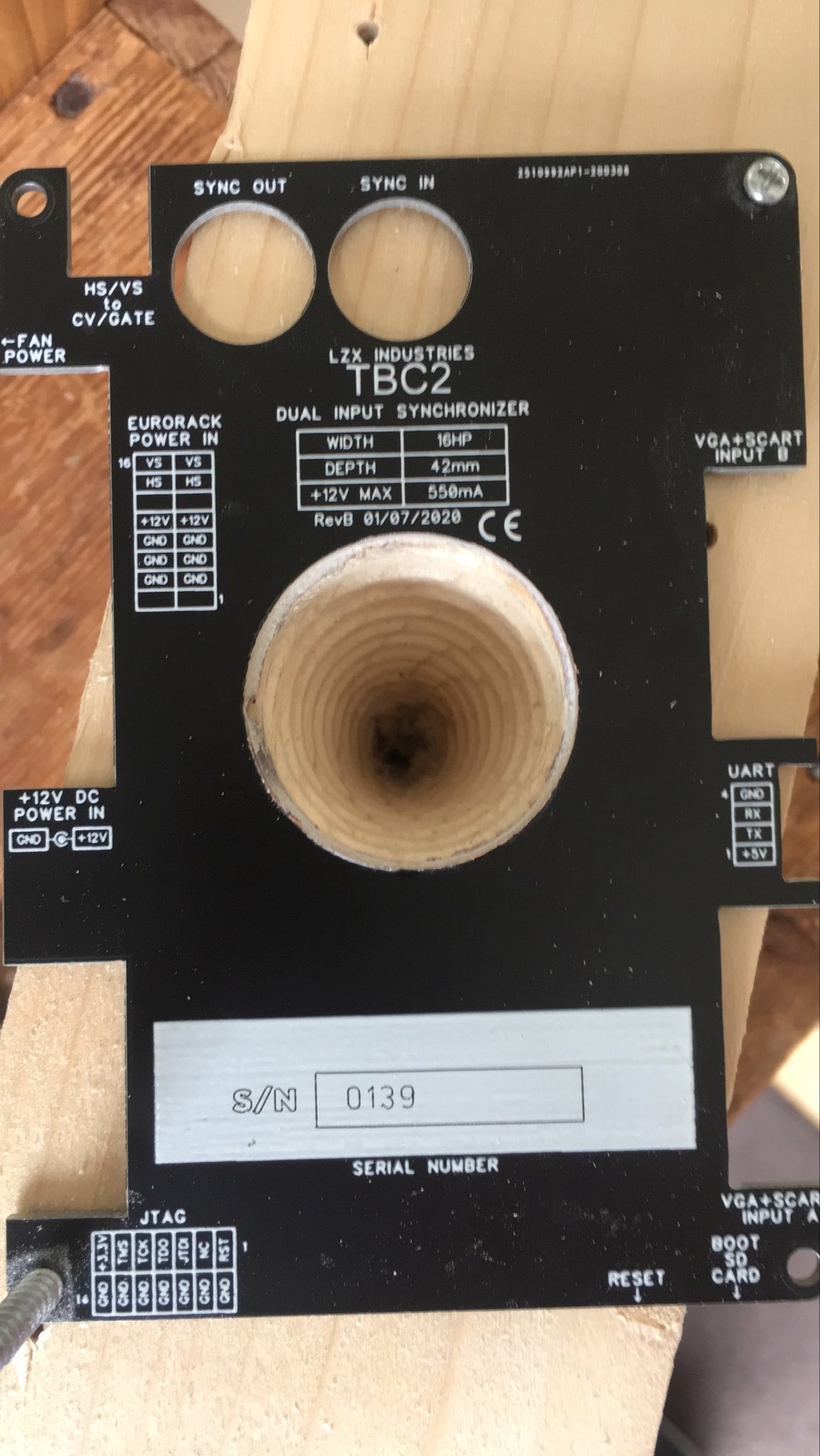
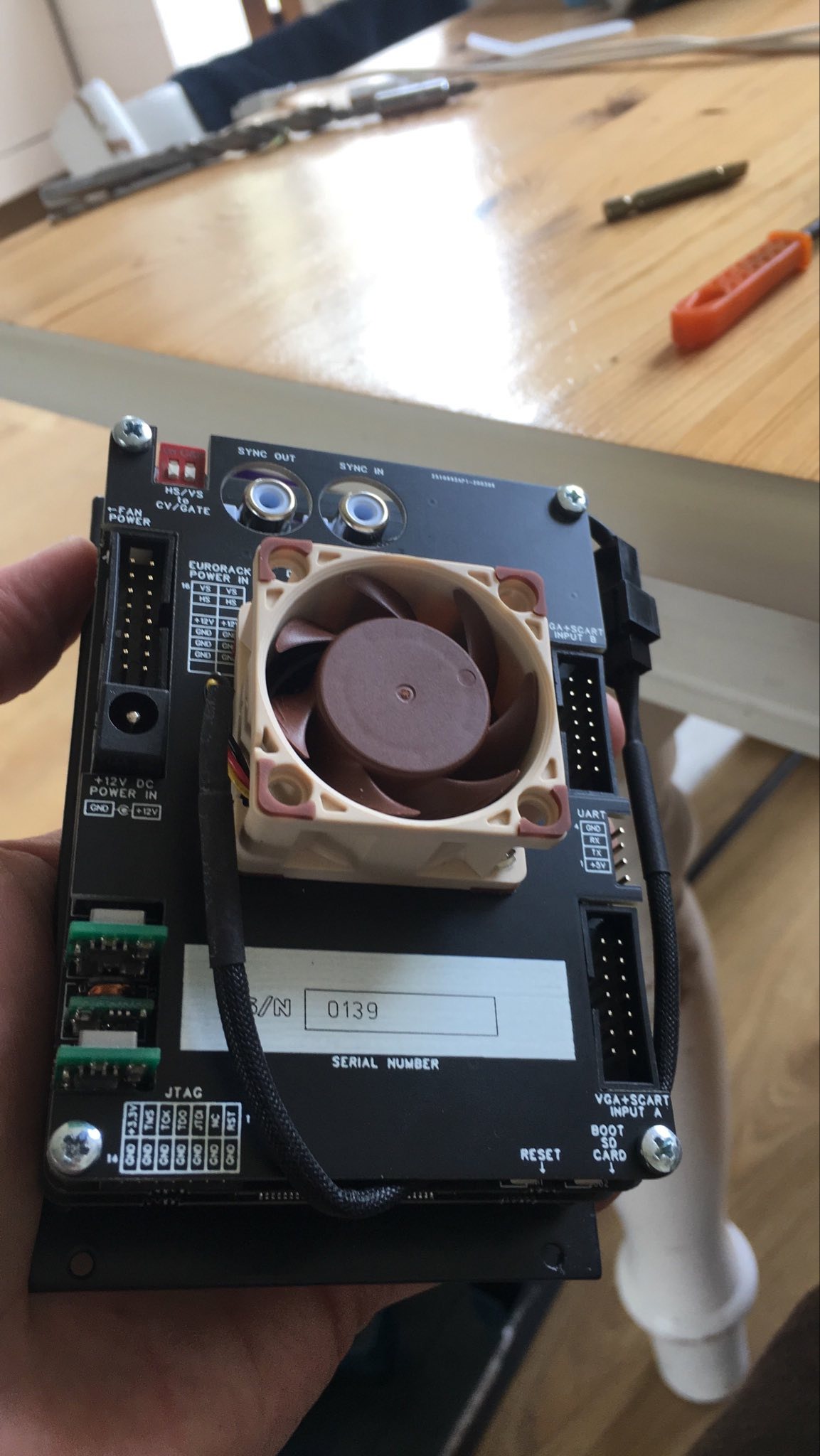
TBC2 Fan replacement. I had this fan already, so I used it. I have been impressed with noctua fans, although no fan is ever silent of course
I made this jig and a stepped drill bit to increase the diameter of the hole (trickiest part of the mod, fine with a jig though. The cable could be shortened though I am able to fit the connector in without trouble and without soldering so . . .The original fan made a hideous noise from the start, perhaps it was defective. Anyway the replacement works fine with only 59 degrees reached after an hour of upconverting 2x CVBS to 720p as recommended heat test by @creatorlars
Replacement fan uses 0.05a instead of 0.07a of the original. Airflow is hugely increased as expected by the size difference in the two fans.
This model fan (404020 @12v) was about 15e. As I had it going spare I think it was a great replacement. I have two other fans in my cases, I used noctua 5v versions (to reduce the chance of noise on the 12v line as they use the case PSU (Erica Synths 104HP powered)
Because I had spare Raspberry Pi heatsinks, I put some on the other chips on the TBC2.
I was busy for a couple of hours with the mod, tho I have quite some exp with modding.
I make AV pieces with my (mostly )LZX modular.


https://www.youtube.com/@robinsutcliffe-video_art/videosI communicate creatively in colour and sound frequencies. I make Video Art, Digital Animation, Music Videos, Digital Art , Personal Meditation Compositions. I also work with energy healing, produce/engineer music, sculpture, video art portraits,...
Link: Robin Sutcliffe - Audio-Visual Art
#36 — VanTa · 2023-08-08
Fantastic!
I’ll try the same with mine. Is that the pwm version? Can’t find an a4x20 12v
#37 — raster-fari · 2023-08-08
Hi @VanTa yes it is the PWM version. It comes with the correct 3 to 2 pin adaptor cable. I used screws (because I already used the rubber mounts) though I would recommend using the rubber mounting bolts.
#38 — kaltwasserTV · 2023-08-10
If the fan is not hitting his case, maybe its just dried out: Try to re-grease the bearings next time. Has brought miracles with my ET structures. Carefully remove the plastic sticker, lubricate with bearing grease (or even soldering grease) inside and distribute with a clean brush. Degrease the surface and put the sticker back on. Danone
#39 — raster-fari · 2023-08-10
With an old, worn out fan, this can help. I have done it. However, it’s never worth the effort in my view.
In this case the fan replaced was a brand new fan : )
It’s just the revs are very high indeed because it’s very small. Which makes it whiney.
A larger fan with more airflow runs much quieter.
#40 — brownshoesonly · 2023-08-10
Any fan replacement should be a ball bearing fan (more expensive)
Avoid sleeve bearings which are not meant to be mounted vertically.
most of the fans you find in these smaller formats are sleeve bearing. especially when shopping for price.
this was a recent discovery while doing fan research at lzx
“Sleeve bearing fans are more economical; however, it is not recommended that they are mounted in any position other than horizontal. Temperature is another consideration; if the temperature exceeds 70°C the fan will become inoperable. The lifetime of a sleeve bearing fan is often shorter than that of a ball bearing fan, however, if the temperatures are low within the application then similar lifetime expectancy can be achieved. So if the application generates low heat or has a short life span than a sleeve bearing fan can be considered.”
source: https://www.axair-fans.co.uk/news/sleeve-bearings-ball-bearings/
#41 — Tremendm_Labs · 2023-11-02
@creatorlars Just received our TBC2 and the fan is not working. The fan spins freely when you touch it but it does come on or spin or blow air. What is the appropriate next step?
#42 — meudiademorte · 2023-11-02
Write a email to lzx support
#43 — Boneoh · 2024-02-17
@raster-fari Thanks for posting this.
Folks, take a look at your fan before buying a new one.
My TBC2 is s/n 196 and has a 5V fan and of course I bought a 12V fan. So I need to exchange it, no big deal.
https://www.amazon.com/gp/product/B071W6JZV8/ref=ppx_yo_dt_b_asin_title_o00_s00?ie=UTF8&th=1
#44 — Robbertunist · 2024-05-22
Maybe there’s a separate thread on here but I’ve just logged in for the first time in a while & this Fan replacement kit from the LZX website should be really handy for some TBC2 owners.

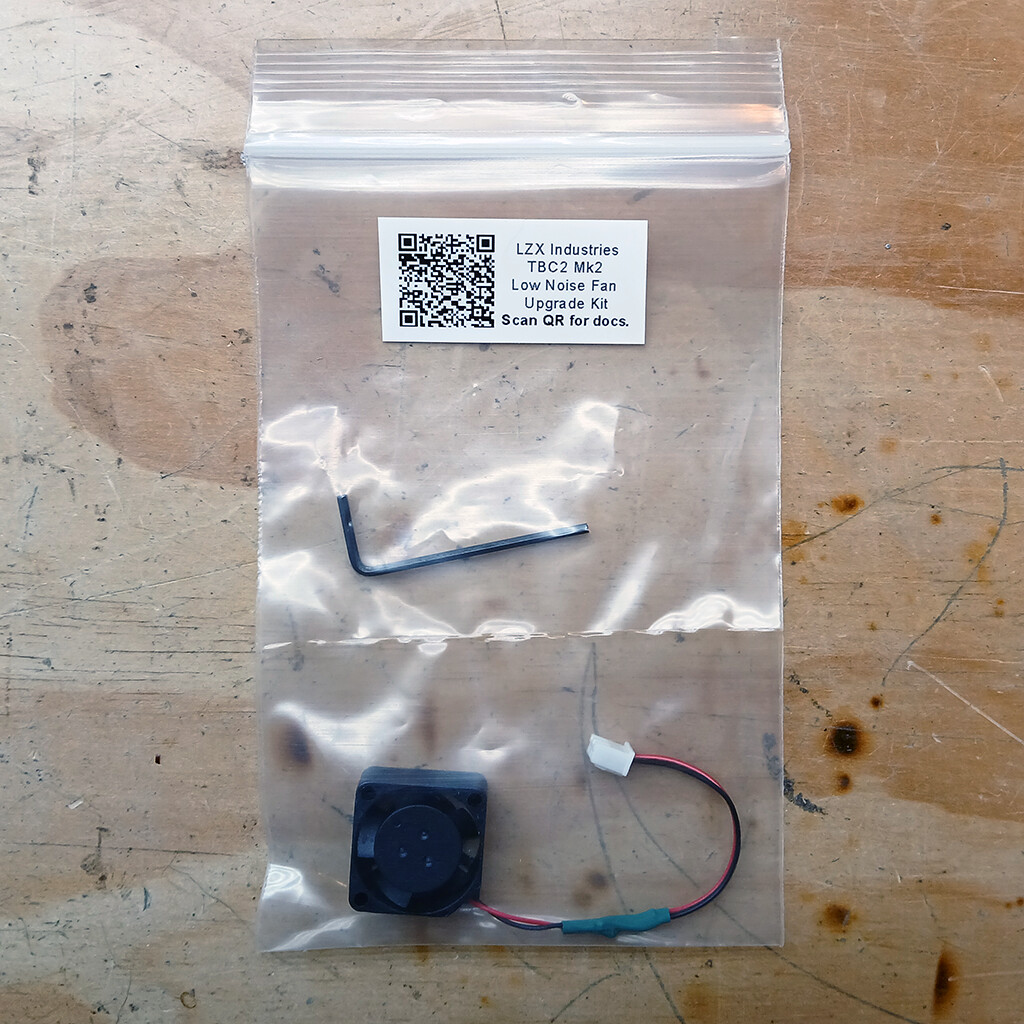
https://lzxindustries.net/products/tbc2-mk2-fan-upgrade-kitThis DIY kit is for TBC2 Mk2 (Gen3) units only. Everything is included to upgrade your fan to this silent version. Illustrated instructions are provided.
Link: TBC2 Mk2 Fan Upgrade Kit | LZX Industries
#45 — Spacenoodle · 2024-12-15
Does anyone else’s TBC2 vibrate? Mine has fan noise but it also hums loudly when it’s installed in a case or even just sitting on the rails.I have the Mk1 and if I put my fingers on the front it has a very noticeable tactile vibration. Mainly I’m wondering if the fan is faulty or if this is normal.
Edit - I ordered some rubber mounts to isolate the fan more. I’ll drop a message here with the results.
#46 — jwsmithwick1 · 2024-12-17
I’ve noticed a lot more vibration when I have mounted my TBC2 with only 2 screws as opposed to 4.
Another thing to consider is that LZX sells an upgraded, quieter, replacement fan for the TBC2.
#47 — Z0NK0UT · 2024-12-17
Correct! There is a quieter fan available: https://lzxindustries.net/products/tbc2-mk1-fan-upgrade-kit