Suggestions for using the TBC2 with a PC
Category: Helpdesk · Tags: tbc2 · Posts: 26
#1 — Entropist · 2023-02-20
Hello,
Wondering if anyone has a good solution for getting a PC into the TBC2. So far, it seems like Startech DVI-VGA converter (p/n: DP2VGA2) I have doesnt produce a compatible resolution (2048x1280, 1920x1200 & 1080p at 60Hz). Probably should have checked that before getting the VGA expander… I tried forcing various resolutions and refresh rates with GPU driver but was not able to get a useable signal to TBC2. Seems like I should have gone with a component based converter instead.
Can’t help but laugh at myself for waiting a few years to then hit a wall so close to finish line because of a $20 converter!
Curious what kind of setups are working for you guys.
Thanks for any help on this one!
#2 — rempesm · 2023-02-20
Look for a used AJA IO XT, native YPbPr out from your PC.
EDIT: Oops I forgot it was intended for Mac with the Thunderbolt ports but maybe you can get a converter for that stage.
#3 — Boneoh · 2023-02-20
I don’t have my TBC2 yet, but am going to follow this thread to see if I can learn from it. Sorry I don’t have any wisdom to share. But in general my motto is ‘buy once, cry once’. I am going the component route, have Blackmagic Design UpDownCross converters and HDMI to Component converters. These are working well with a VU003B into the synth. I’m guessing that it will work just as well with a TBC2.
#4 — Entropist · 2023-02-20
Thanks for the quick responses! Will be taking a look into those
#5 — wednesdayayay · 2023-02-20
I’ve got two HDMI > component converter I was using before I switched the system over recently.
kramer vp 422 I believe and something generic from amazon ~$50 that worked just as well as the kramer from what I could tell.
With the switch over I’m using a BMD updowncross, a couple bidirectional SDI <> HDMI, and a HDMI > SDI
I forget which two boxes are dedicated to my two computer outputs
I use a m1 mac minis’ HDMI output and an appleTV running another desktop
then with the constellation switcher I have two bmd SDI > analog boxes, one for each channel of TBC2.
I haven’t gotten the TBC2 back in the mail yet to test but I am imagining this will work even more reliably than what I was using before.
I got a VGA expander when I ordered the TBC2 because that is how I was running my system at the time. Now I’m not really using VGA so it will probably just sit in a box for a while.
#6 — Entropist · 2023-02-21
Just out of curiosity before I try anymore converters, is there anything that needs to be done to TBC2 aside from just plugging in ribbon cables to get the expander to work? I see there are a couple dip switches on the back. There doesn’t seem to be a full manual for Expander or TBC2 yet so I didn’t want to just start messing with stuff.
I tested out my current DP->VGA converter on a couple different monitors and it does seem to output supported resolutions and frequencies after all.
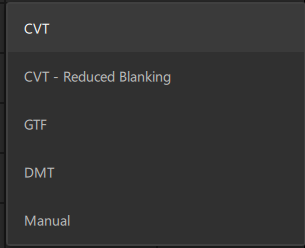
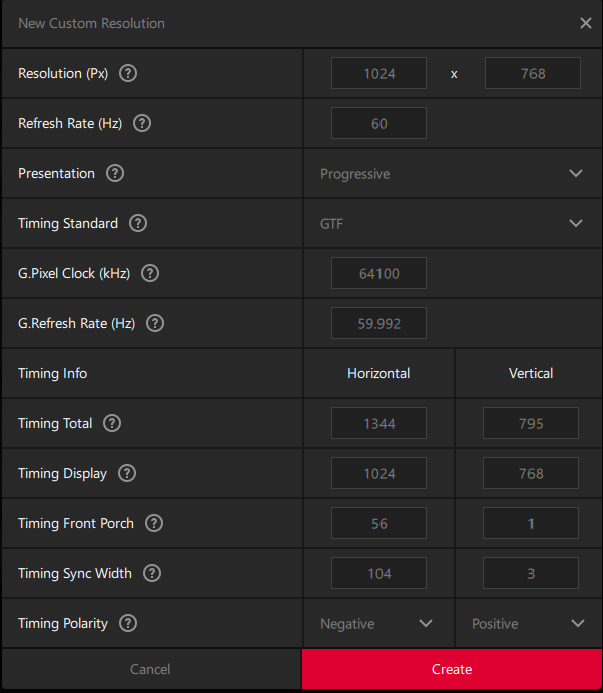
Forcing the resolutions in the Radeon driver does have quite a few technical options for the timing standards. Could the problem be from the wrong standard / settings?
Hi @Z0NK0UT , would you please check this thread out if you get a chance. Thank you!
#7 — raster-fari · 2023-05-09
Was this resolved? I’m trying VGA input and it’s not having any effect.
EDIT: I reset the firmware and VGA input is working now : )
#8 — Entropist · 2023-05-09
Thats good news. I had given up. Which revision did you get to work? I tried without success on 1.0rc16 and 1.01
It seems to be a known issue that Lars is working on for next firmware release so i’ve been waiting on that.
#9 — raster-fari · 2023-05-09
Hi,
It was 1.01 but when I reset it said 1.01lc3 (I believe, or similar) Now it only says 1.01 again and it’s not working!
It is a bit sketchy, it would accept one straight up VGA signal (from Gieskes vga oscillator) It was fairly stable, though seemed to lose sync from time to time on a slow cycle.
When I tried it with an HDMI > VGA it’s not having it either.
A pity VGA is not working yet, composite out from the RPI is terribly noisy.
#10 — Entropist · 2023-05-09
Interesting. The TBC2/ Expander doesn’t seem to like VGA converters. I unfortunately don’t have a native VGA source to check with. Hope the update comes soon!
#11 — nerdware · 2023-05-09
I convert HD1080 HDMI->SDI->Component. No problems. Are you using HD1080 on your VGA?
#12 — raster-fari · 2023-05-09
Yes when I tried again with the same native VGA source it said ypbpr at 420p and blinked on and off.
#13 — raster-fari · 2023-05-09
I was using whatever the pi was set to, 720 I believe. However I don’t have an SDI to component converter.
Only HDMI to VGA, which even when pi is set to 1080 it won’t work.
#14 — kristenstewart · 2023-05-09
If I recall correctly, the VGA expander was announced when HDMI features were removed from TBC2. Has the VGA + SCART Expander consistently worked for anyone?
#15 — raster-fari · 2023-05-09
I have another native VGA which does output 1080p I will have a go with this and see if VGA alone is possible again. I accidentally pressed reset firmware when the VGA was connected, and this was the time it worked. After another restart it won’t work with the device which was successful before.
#16 — raster-fari · 2023-05-10
VGA is working via the expander using 1.01rc3.
I reset the firmware again to factory and it works with a native source but not an hdmi to vga converter.
Hopefully converter will be supported in later revisions.
#17 — VanTa · 2023-05-10
I guess the adapter is waiting for some kind of EDID from a display (TBC2 in this case).
I think it’s worth trying something like this: https://www.amazon.es/EVanlak-passthrough-rearrange-splittersand-1920X1080/dp/B07YN42M1V
It will basically trick the HDMI-Adapter into believing that it is connected to a screen with some set resolution. Though, TBC2 should then be able to accept that resolution.
#19 — raster-fari · 2023-05-13
Thanks for the tip, those digital flags can be tricky in certain cases

#20 — raster-fari · 2023-05-13
I tried again with another native vga device and the tbc2 could not recognise it. I tried some different resolution settings on the vga device but it did not work. Is there an outside range on tbc
#21 — kristenstewart · 2023-05-13
Entropist wrote:
Hi > @Z0NK0UT> , would you please check this thread out if you get a chance. Thank you!
This thread was created 83 days ago, on Feb 19, 2023. Has the VGA + SCART Expander consistently worked for anyone? If it is working, a shared video of it’s function or a note from the manufacturer would be helpful.
#22 — creatorlars · 2023-05-13
Please see this thread for a recent update:
Hi TBC2 crew – just wanted to update you. I just received revised boards for some production changes on TBC2 that were necessary for batch #2, and expect to be back to the software related fixes next week. I want to at least get 1.0.2 out in the short term. > For batch #2 we will be moving to a Gen3 style front panel design. There will be some update kits (frontpanel + standoffs/screws) available for anyone who wants to change their Orion era assemblies. We’ll keep the price close to costs on …>
#23 — kristenstewart · 2023-05-13
creatorlars wrote:
Firmware 1.0.1 is out now, and only includes a couple of quick fixes.>>>> Firmware 1.0.2 is next, and includes some fixes for VGA input detection and any other bugfixes.>>>> Firmware 1.1.0 will be after that, and includes any new feature adds (Component proc amp, Screensaver, etc.)
All of these features have been implemented (some I was planning to make part of 1.0.1), but there have been some new bugs I introduced while adding them, so that’s what’s keeping me from a quick release. I am prioritizing finishing assemblies and shipping orders to those who don’t have the module yet, but am getting close to being caught up. So hang tight, please try to enjoy the initial release firmware, and we’ll have updates soon.
This recent update from 38 days ago on Apr 5, 2023 is the only mention of VGA in thread. Does ‘some fixes’ imply that the VGA + SCART Expander is not currently working?
#24 — creatorlars · 2023-05-13
kristenstewart wrote:
Does ‘some fixes’ imply that the VGA + SCART Expander is not currently working?
As mentioned up thread, you can get video into VGA/SCART in HD/SD video formats without problem. VESA input support (640x480, 800x600 and 1024x768) is what will be added in firmware version 1.0.2. Does this answer your question? What device are you currently trying to use?
#25 — raster-fari · 2023-05-14
Thanks for linking this, I had missed it. I have had some success with the vga but it is a little inconsistent at the moment.
I had success with the Gieskes VGA oscillator, at I think 600x480 (or whatever classic VGA is)
I tried with a VGA output at 1920x1080 from my video converter feedback device. This was not recognised.
Normally I use a VGA to video converter on the VGA output of the feedback device so I know it is outputting a stable signal, it’s more stable than the composite output : )
#26 — dryodryo · 2023-05-16
I don’t know about any of that VGA stuff, expander stuff, etc.
But the best way to get the full range of possibilities for PC → LZX is:
-
Set PC output to a proper broadcast standard. E.g. 1920x1080 interlaced @ 59.94 Hz.
-
Convert HDMI to YPbPr, plug into decoder RCA inputs. Note that DisplayPort and DVI outputs should be able to connect directly to an HDMI input with passive adapter or cable.
I am using a fairly expensive broadcast switcher to do the D → A conversion, and my decoder is the Syntonie VU003B, but the basic concept is the same.
#27 — Chickenbone · 2023-05-31
I use the best buy insignia brand HDMI to NTSC (RCA) composite converter. That’s how i go from PC into visual cortex. I get full color by converting the composite to component. Not the most elegant solution, but I like it.