Vidiot - Troubleshooting
Category: Helpdesk · Tags: — · Posts: 25
#1 — laserpalace · 2018-10-01
Hello ~
I received my Vidiot today, for the life of me I can’t figure out how to generate any visuals with it

I’m using NTSC, loop set to down, colorizer out to my display (C64 monitor). Cycling through the modulation presets doesn’t change or enable anything, nor does turning pots. I’ve tried patching as well without results. I did try the video input via a VCR but this will only display a faint version of the video. The colorizer and luma processor have no effect. I also receive a quick visual jump when switching between PAL and NTSC but nothing else.
Also worth mentioning I tried a different cable as well as a different television with the same results.
Anyone else ran into this issue? Is there a Hello World! Patch I should be doing. Am I truly a Vidiot!??
#2 — creatorlars · 2018-10-02
What is the display currently showing? Is it black/no signal? Are you using the included power supply? Have you power cycled the unit after switching to the desired NTSC/PAL setting?
We are supposed to be doing an output test immediately before each unit goes into its box (in addition to more involved QC procedures earlier on), but it looks like a couple of DOA units have gone out. So if you feel like that’s the case please submit an RMA request on our website along with your return shipping address. We’ll send you a prepaid shipping label for return and a prompt return or replacement! Link here: https://www.lzxindustries.net/support/ticket/submit
#3 — Axxejaxx · 2018-10-02
I just opened mine, same issue.
#4 — laserpalace · 2018-10-02
What is the display currently showing?
It’s black. My HDTV registers a signal coming through though.
Are you using the included power supply? Have you power cycled …
Yep using the included supply and did a few power cycles.
if you feel like that’s the case please submit an RMA request
Thanks Lars, I’m going to give it another go later tonight but I feel like this one might fall under the DOA category. I appreciate your insight.
#5 — wednesdayayay · 2018-10-02
my wife had a couple little issues when I got mine a while ago lars got it sorted very quickly
I will try to post up a quick vidiot check type video
#6 — creatorlars · 2018-10-02
Yes, sounds DOA. It could be something very simple, like the internal board-to-board cable has been installed in a reversed orientation (which would explain why it passed QC initially, but then probably skipped the output check after final assembly.) Send over the support ticket when you get a chance and we’ll get this sorted out ASAP.
#7 — Vdot · 2018-10-03
Same here

tested with a couple of PVMs with he same processes marked above, no signal. Tested a couple of other sources through the same cable and monitor intput and they come through fine. I’ll submit a ticket.
#8 — creatorlars · 2018-10-03
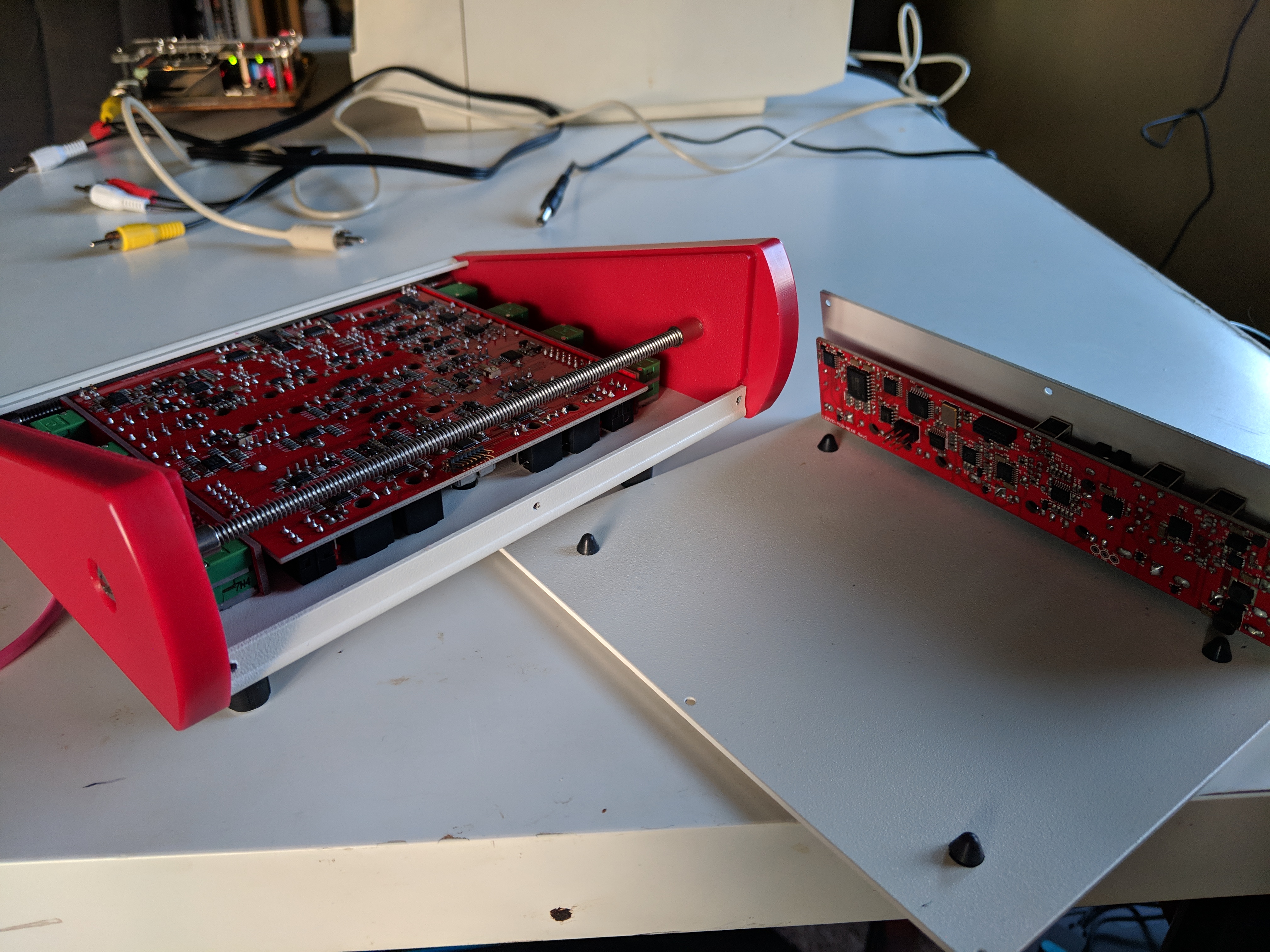
I can now confirm that it looks like some units escaped with the internal cable flipped the other way around. If you are DIY handy and would rather disassemble and reassemble the unit to flip the cable around instead of going through the hassle of sending it back, you are authorized to do so without voiding your warranty. And of course we are happy to deal with it here if you attempt disassembly and decide you’re unconfident, or if you’d rather us just deal with it. Just providing you the option!!
#9 — Vdot · 2018-10-03
Whoa that worked! Is the ribbon cable itself assembled wrong? It doesn’t look like it should stick out towards the back panel.15386094898174846262915113018002|375x500
#10 — creatorlars · 2018-10-04
The cables we’re using are just ones we have in stock for EuroRack module power cables, so yes – that’s as intended (it fits in the case just fine.) Rev1 had a much smaller connector that mated directly to the rear board and made assembly difficult (not to mention an expensive part) so this is a between batches update that makes things easier and more serviceable. That is, when someone remembers to plug it in the correct way!
#11 — Vdot · 2018-10-04
Thanks, I’ve closed it back up and spent all evening jamming with it. The footage available online don’t do it justice, there’s so much in there! You can close my ticket.
#13 — creatorlars · 2018-10-04
You beat us to it! Here are some photos, too:
In late September 2018 we had a batch of Vidiots (we suspect no more than 20-25 units) escape with an incorrect cable orientation inside the unit. These units will not display any output (DOA behavior) until this issue is corrected. LZX is authorizing a DIY fix as shown below without voiding your warranty status at all. But your unit is also covered under warranty and we’re happy to pay to have it shipped back to us and then back to you after performing the fix and verifying proper operation.…>
#14 — Bengt · 2018-10-09
I’ve spent the evening trying to get mine to work as well. First I thought it was a problem with the settings on my Intenstity Shuttle but now I’m noticing it actually captures something - black noise! Nothing happens when I turn the pots or flip the switches. The Intensity Shuttle itself works fine with my Critter ETC, so that’s not the problem. Do you think I got a unit with the incorrect cable orientation or am I doing something wrong?
#15 — Bengt · 2018-10-09
I opened it up and it turned out the cable was installed incorrectly. Fixed it and now it’s working.
#16 — creatorlars · 2018-10-09
I’m very sorry for the waste of an evening, but super glad to hear you’ve got it up and running now.
#17 — Bengt · 2018-10-10
No worries!

Thanks!
#18 — Vibes · 2018-10-18
just receive my Vidiot and had to do the change, now it is working perfectly. I am glad I saw this thread.
#19 — creatorlars · 2018-10-22
Glad you got it sorted out!! I should pin this post.
#20 — wednesdayayay · 2019-04-12
just for reference, as it seems like a lot of people have trouble at first here is some clear info
the little circles with the black filling around the jacks means they are outputs the ones with just the circular outlines that are unfilled are inputs

LZX input/output is simply talking about 1/8th inch inputs
if you want to sync to your LZX setup take a composite out from VC into the sync input and then take whatever you want to process into the LZX video input
#21 — scnlns · 2019-04-28
Hi, I was attempting the cable twist fix on my vidiot, but I don’t have a cable at all. Any suggestions? This is one of the early units with the back plate misprint.
#22 — Vibes · 2019-10-27
Hello,
sorry for the bad English I hope I can be understood.
I watched the 3 patches example Youtube video for the Vidiot and I realized that I may have an issue with my unit.
At the beginning of the Youtube video, turning the Luma knobs without patching the unit does affect the picture coming from the colorizer video out. On my unit it does nothing, the Luma processor affects the picture only if I patch the signal from Luma out to some other inputs. Plus the Detail function knob does nothing whatever I do.
Am I doing something wrong? Hope I can fix it since a Staircase is on its way. Thank you
#23 — Z0NK0UT · 2019-10-27
Your English is great!
It sounds like your luma processor section is working correctly. You can check by monitoring the signal from the luma output on the back of Vidiot. If monitoring from the chroma output, be sure to select the EYE icon in the colorizer section, to view the luma processor through the colorizer. You can also just patch the output from the luma processor into another input (RGB, key, etc) to see it.
The Detail parameter is a subtle control that only becomes apparent in some situations. I find it helpful to feed a voltage into the CV input for Detail to boost the response.
#24 — Vibes · 2019-10-28
Chad, many thank for your prompt and great help, especially on a Sunday!
So much to explore with the Vidiot; I have missed the little EYE…
I am so so so happy that I will wear my Vidiot party hat and return back syncing my abstract music with beautiful moving LZX made colorful shapes

#25 — Z0NK0UT · 2019-10-28
Would love to see your work!
#26 — Vibes · 2019-11-06
I am learning fast, thanks to the numerous LZX videos, and I will be happy to share my creations when I feel ready