Memory Palace Dev Blog July/August 2018
Category: Unknown · Tags: lzx, memorypalace · Posts: 52
#1 — creatorlars · 2018-07-19
I thought I’d take use of this new space to do some journal writing about the day-to-day here in the LZX lab as we enter our sprint towards the release of the Orion Series modules.
Right now amidst a hectic production schedule with restocks and Vidiot, @eyesnoface , Ed and I are working on the first rev of the production boards for Memory Palace. This is the point in which we take what we’ve been doing with various prototypes and development boards, and implement the full vision for the first time. We need to be production ready by September, and we want to make sure there’s time for a couple revisions of the circuit boards if need be, without effecting the schedule.
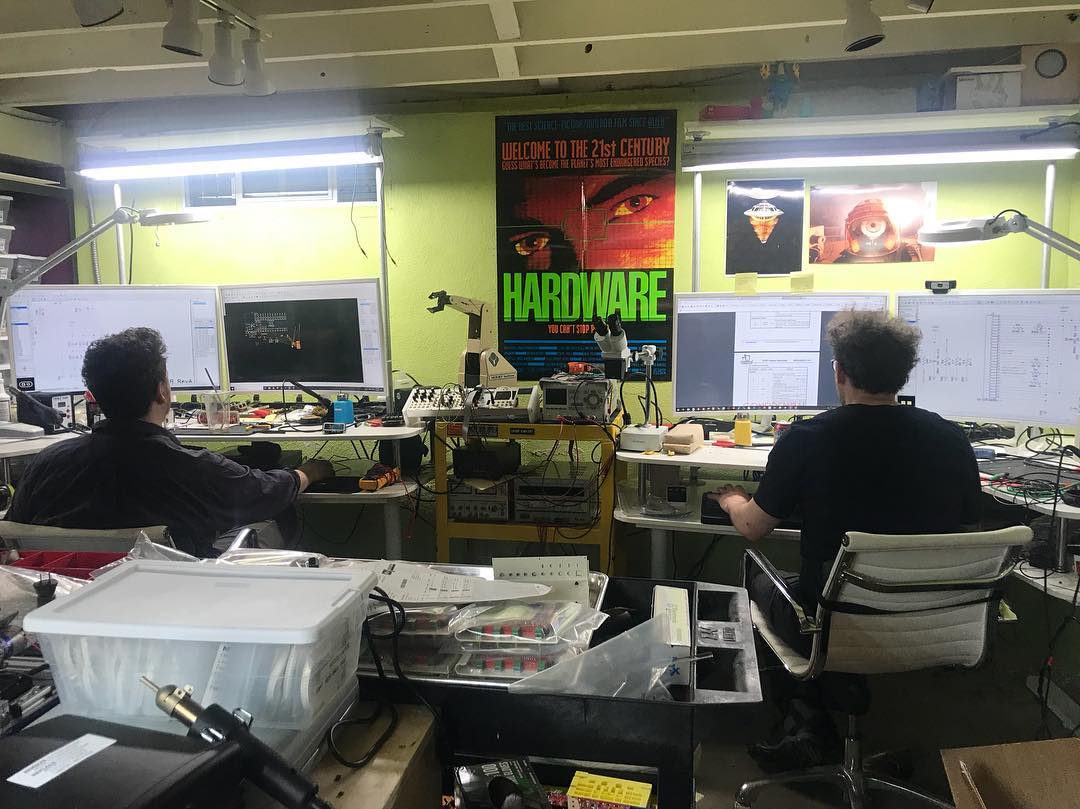
Photo by Zach Michels, who we were happy to receive a visit from on Monday.It’s an especially tedious phase of module design and production, as not only do we need to design the circuit boards and frontpanel CAD files, but every part in the assembly needs at least one reliable source/supplier, and all the variables of stocking levels, lead times, and costing can quickly become dizzying. This is one reason we like to do product series – they share a lot of the same parts, and some of the liability and cost is spread across several products rather than one. Without this strategy it would be difficult to make it all work!
The first module in a series, with lots of new parts and circuitry, is always the most work. In this case that’s Memory Palace. The assembly has three PCBs – Jonah is working on the main control PCB while I work on the display and interface PCBs. Here are some quick renders of where I’m at with the first two boards.
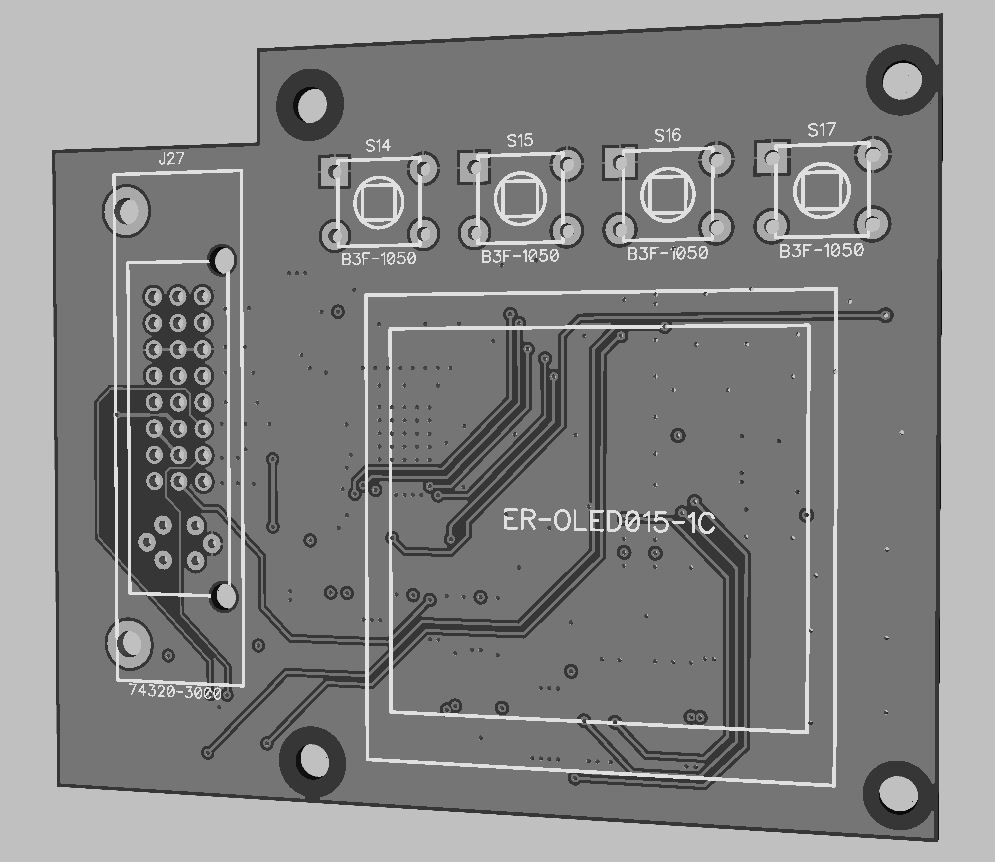

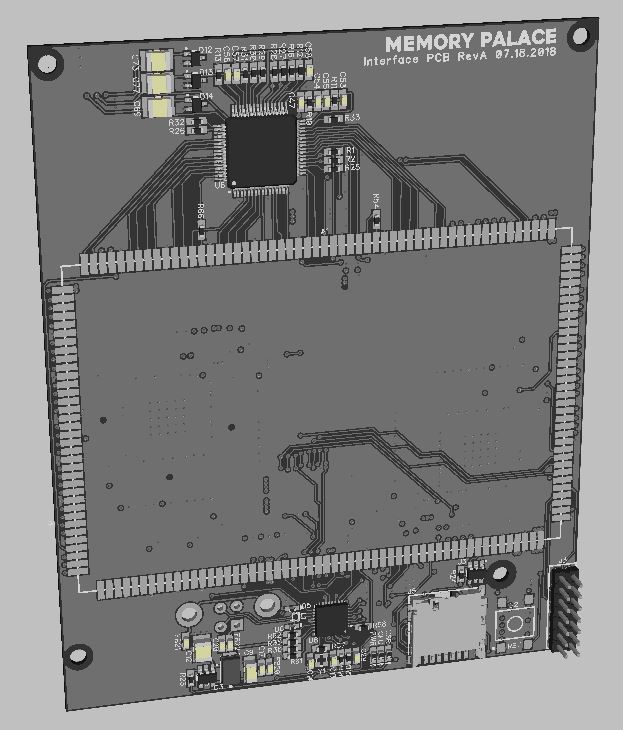
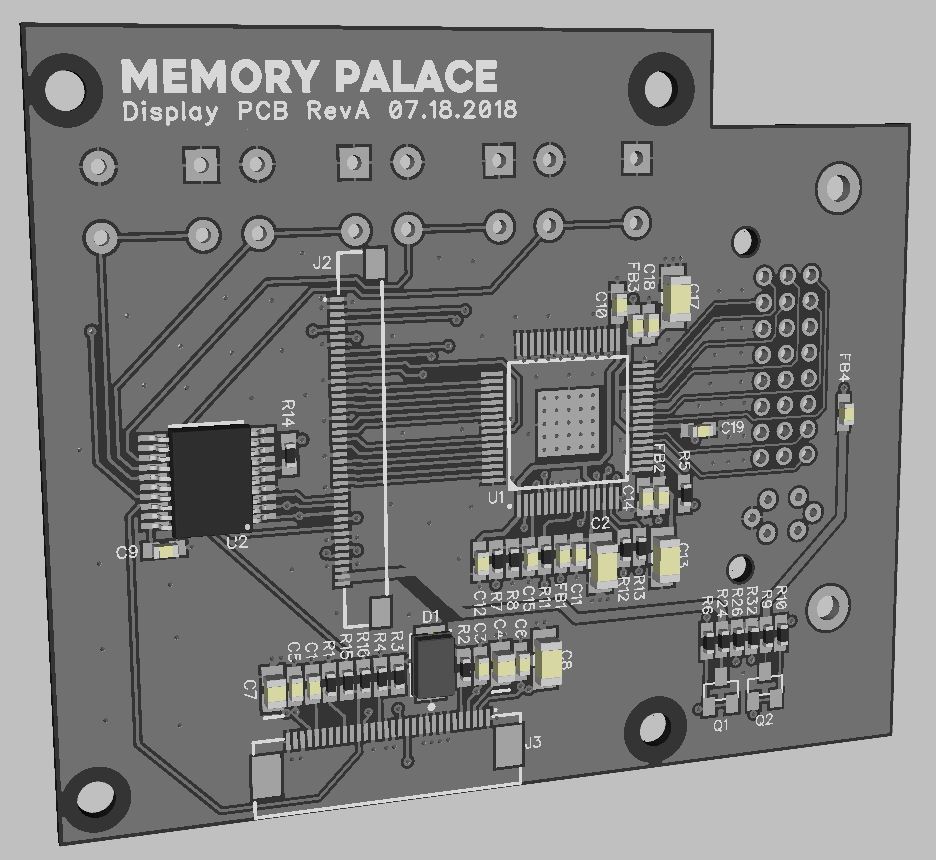
We’ve still got some polishing and review to do but I am very happy with how it’s all coming together at this stage. It looks like we’ll be ordering boards to build up this first revision by the end of this week. Hopefully it will be the units we show at KnobCon!
@dave has been polishing the frontpanel silkscreen graphics and also working on pixel art UI graphics for the display. We’ll be able to show you some of that next week.
Feel free to ask questions and be part of this with us!
Over and out,
Lars
#2 — Maytoast · 2018-07-19
Love seeing the development process. It helps me understand better how to use these wonderful tools as I can see the design goals, the issues, and the solutions that lead to the final product.
#3 — 337is · 2018-07-19
I’m paying attention to the people behind the curtain! Thanks for peeling it back a bit for an insiders look. So excited for this next phase of Orion!

#4 — creatorlars · 2018-07-19
Thank you both! I’ll keep posting these. You know earlier this year we were talking a lot about the type of promotional content we wanted to be part of our company. And it all came back to all the early inspiration we used to get from Behind The Scenes features on old VHS tapes, or educational specials. The Reading Rainbow episode where Levar Burton takes us to the set of Star Trek: The Next Generation being a huge one for me personally. For @eyesnoface I know it was a love for practical effects, mask making, horror fan magazines, etc. We feel like marketing can be a little forced sometimes, but showing what we’re actually doing – nothing could be more honest than that.
#5 — creatorlars · 2018-07-19
Today I’m continuing to refine the interface PCB, optimizing traces and polygon pours.
Here’s a screenshot of something you don’t normally see, one of the internal layers of the PCB! (This PCB has 4 total layers, two internal and then top and bottom facing.)
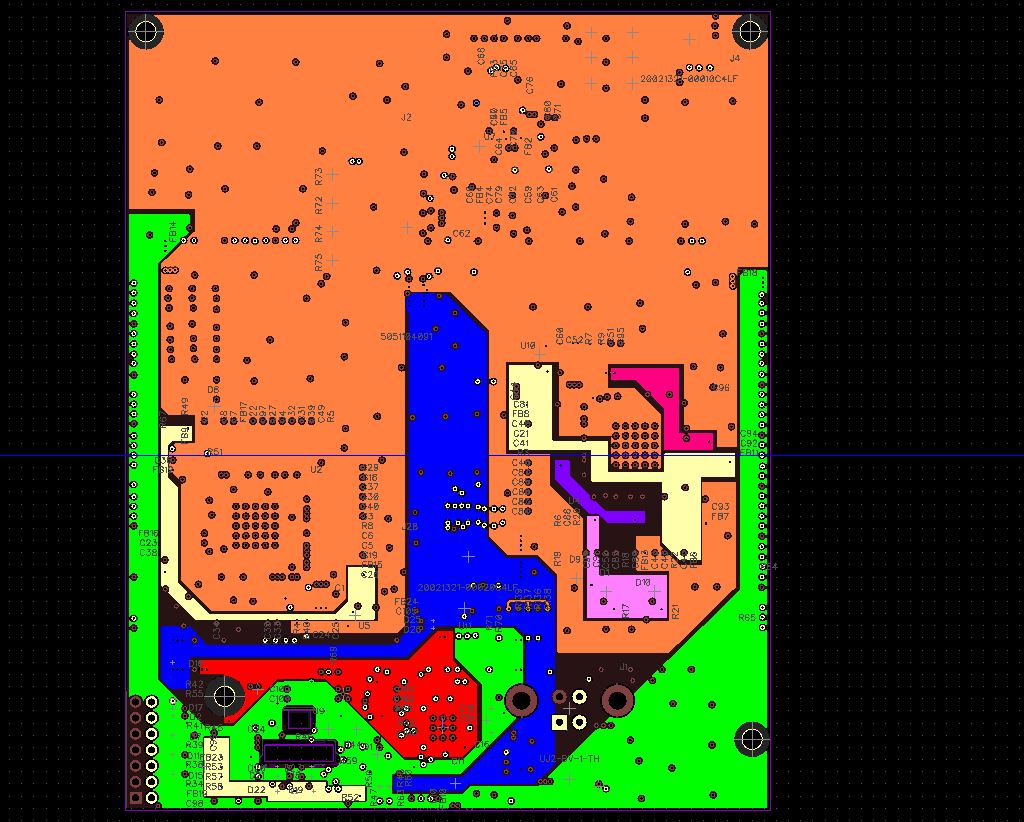
The colored polygons are different power planes that distribute power to various points on the board. Planes like this have very low impedance and help with controlling noise/crosstalk.
#6 — 337is · 2018-07-19
It also looks pretty!

#7 — eyesnoface · 2018-07-21

Prototype frontpanel arrived for silkscreen testing. The final powdercoat will be a dark charcoal as opposed to this flat black.
#9 — pbalj · 2018-07-21
OH BABY BABY
so nice.
#10 — wednesdayayay · 2018-07-21
this is a thing of beauty
looking good
#11 — creatorlars · 2018-07-25


#12 — creatorlars · 2018-07-26


First test print of the panel. No closeups because we had to wipe this one!

A different ink has been ordered.
#13 — Jesse · 2018-07-28
Couldn’t choose a better marketing strategy than showing off what goes on in that HQ. Ace work, loving the updates and behind the scenes looksie.
Those 3d modeling type shots are so hot, I remember seeing my first CAD drawing in 3d… So exciting. Useful as all hell too, glad there’s something similar with PCB’s.
Hats off!
#14 — creatorlars · 2018-07-28
Proud to say that after a rigorous review, all 4x Memory Palace boards and all 2x Escher Sketch boards are complete and have been ordered! The countdown to KnobCon has begun.
#15 — wednesdayayay · 2018-07-28
YESSSSSSSS
congratulations
how deep are you expecting memory palace to be?
#16 — creatorlars · 2018-07-28
Very shallow. Same as Marble Index & Polar Fringe, which are two stacked boards but on very low profile headers. Keeping the power header and any RCA jacks on the lower board means the mounting clearance is the same as a single board module. In addition to the stacked boards, there’s a display board that sits very close to the panel (it has the DVI connector and display+buttons on it) and a tiny adapter PCB for the USB OTG Mini AB connector.
After nearly (or more than?) 50 designs, we’re getting the hang of this EuroRack thing!
#17 — wednesdayayay · 2018-07-28
pancakes behind the panel and pancakes within
so it has been written
#18 — creatorlars · 2018-08-03
First look at packaging.


#19 — creatorlars · 2018-08-08
An exhausting week over here so far. The pre-production prototype boards arrived and we’ve almost got them built up. At this stage, everything we can verify is an item checked off a long list of things we may need to correct before the production version – so far, we’re looking good!


#20 — joem · 2018-08-08
Assuming those few unpopulated things (U3, S2, R35, R36, etc) are intentional?
Otherwise, I think I figured out why it won’t turn on!

(In all seriousness, though, I love the dev blogs!)
#21 — creatorlars · 2018-08-08
Yes, we’ve got a couple more components to place! We won’t be turning it on for the first time until tomorrow morning. We have a rule around here that we never fire up a new prototype at the end of a long day!

#22 — luix · 2018-08-09
or on fridays… thats the rule we use to deploy systems lol
#23 — creatorlars · 2018-08-13
Happy to report that we have our first prototype booting up and most of the peripherals verified at this point. The first unit is on its way to Ed in Sydney, and we’re building up a second one today so we can work on development in parallel.
#25 — creatorlars · 2018-08-15
The keyer in Memory Palace serves as a way to create an alpha channel for sources that do not have them (luma/chroma key), as an alpha channel processor, and as a kind of pre-buffer write conditioner (so, luma key based writing creates luma trails effects when masking the input to the buffer.) It can also composite between the input and feedback path. It’s not a patched out key generator module like Doorway and Polar Fringe, or an alternative to them, since it’s tethered directly as an integral part of Memory Palace’s workflow and signal path, which is complex and designed to be a next generation video feedback instrument. Using it as an alpha processor with ramps or patterns as input sources is just as powerful as the luma/chroma modes, since there is a video rate alpha input. You could think of it as a post-processor for analog keys, or as a way to selectively write things into the buffer, or composite feedback into the signal path.
#26 — jjplano · 2018-08-21
I’m wondering about that DVI output since I first saw the inicital draws of memory palace. I think one of the main problems working live with analog video today is having to use a projector or LED screen that only allows digital input (or maybe it’s the only one generally used and there for it’s the only cable present on stage).
so my question to you Lars is, are you doing latency tests with that output? having something on the modular itself that allows to convert to digital and has low latency would be a huge plus <3
#27 — creatorlars · 2018-08-21
There will always be some latency through a frame buffer in general, and also at the frontend of a projector, but in terms of the IO on this module there shouldn’t be any latency comparatively between the analog video and DVI outputs.
#28 — jameswashington · 2018-08-21
I have a question regarding CV control of the Delay input on Memory Palace: is this input designed for video rate signals, or would it work best with slower frequencies? If you were to send, for instance, a vertical ramp, would the left side of the screen be moving at a slower pace than the right?
#29 — creatorlars · 2018-08-21
All of the modulation/CV inputs on Memory Palace will be either audio rate (so vertical displacement possible) or animation/LFO rate. By its nature, frame delay time modulation won’t respond to frequencies above the actual time delay (the modulation must happen slower.)
The exception is the alpha channel (and its corresponding modulation input, the opacity control.) If you wanted to crossfade smoothly between delayed and non-delayed versions of the image, that’s what the internal alpha compositor/soft keyer are for. You could input a vertical ramp into the alpha input and use that to fade (using the internal compositor) between what’s inside the buffer and the incoming data stream.
There may also be a slitscan mode, that specifically uses internal wipe patterns and a soft key based mask (controlled by an internal LFO) to do time displacement effects.
I can’t wait to talk more, but if I talk too much I won’t have time to implement half the cool features I’d like to before launch.

#30 — wednesdayayay · 2018-08-22

yay things to come
#31 — drumasaurusrex · 2018-08-28
Can’t wait to see it at Knobcon! I am dying to ask some more questions, but I can wait… maybe… lol.
#32 — creatorlars · 2018-08-28
I am ready to start answering some questions, especially if they are specific.
#33 — luix · 2018-08-28
are there gonna be Easter eggs on my digital video module?

#34 — creatorlars · 2018-08-28
Of course!! Maybe even a bunny.
#35 — wednesdayayay · 2018-08-29
will there be the ability to scale the CV inputs via the menu or will that be relegated to attenuation/cadet scaler etc
how many levels deep is the deepest menu currently?
you mentioned somewhere that there may be variable slew on the sliders that could be set via the menu. If that is correct is there any potential for something like a clocked sample and hold? where the clock speed was static and definable via the menu and the sample input is the slider
and if we are dreaming since you have left some mystery in the menu it seems
will there be any way to potentially reference a slider say the delay and scale/sum it with another slider say the opacity?
#37 — wednesdayayay · 2018-08-29
I wasn’t going to ask questions I promise
haha
#38 — creatorlars · 2018-08-29
will there be the ability to scale the CV inputs via the menu or will that be relegated to attenuation/cadet scaler etc
Through the menus. Whether or not it will be a global CV scale select or per channel is one of the issues on our list for RevB hardware (which we are working on now, and will likely be the production release.)
how many levels deep is the deepest menu currently?
Current wireframe is 16 different settings, most of which select between 2-3 options. Currently not at a point where we need to have different pages. Most of the work on the menu and UI tweaking in general will be done in the next few weeks. We’re trying to keep it elegant and simple – the complexity comes from all the different combinations of the 13 slider based controls, the settings menu just defines the context they operate within.
you mentioned somewhere that there may be variable slew on the sliders that could be set via the menu. If that is correct is there any potential for something like a clocked sample and hold? where the clock speed was static and definable via the menu and the sample input is the slider
We could do that, probably as a stretch or post-release goal. But in general, that’s what the trigger input is for. You can assign the trigger input to toggle or gate a switched function (such as any of the 13 pushbuttons or some other internal parameters).
and if we are dreaming since you have left some mystery in the menu it seems will there be any way to potentially reference a slider say the delay and scale/sum it with another slider say the opacity?
Non-linear relationships between the CV inputs and slider controls are possible since they’re sampled separately – but in general what you’re describing (modulation summing and gain control) is something we feel like is best patched with analog control signals outside the module; part of the nature of the modular synth as an instrument. You could mult a CV source to multiple inputs at once and then use attenuators/offsets to define their control range.
#39 — luix · 2018-08-29
Sooooo … Im starting to think how Ill be using Memory Palace in performance/concert. Im asumming there will be some sort of presets save/load stuff…
so when I use presets during a performance, and then I fiddle the effect so much (let say just before the climax/chorus…) I really like to come back to the initial preset via a reload optio, it will be nice to be able to quickly reload just the current page/effect settings not the whole preset.
Im thinking each part/fader of the MP will probably have settings, and just wanted to understand if there will be a reload option for the current settings of a particular fader, in addition to globally reload/load the preset.
A reset option (also individual and global) would be nice, to reload the original/factory settings for that particular fader or tge whole preset.
This reset option is very usefull when learning a new instrument, because it helps you to creatre a known starting point or baseline that you can always come back to start experimenting again
#40 — creatorlars · 2018-08-29
There won’t be any preset save/recall for any of the performance oriented stuff – we placed all of that on the frontpanel so that you can play it like a synth and don’t feel like you have to do any menu diving to use it as an instrument.
The settings are more like configuration options, like blending mode selection (sets the context for how feedback is composited with the incoming signal), midi channel selection, DVE position in the signal path (pre-keyer, post-keyer, etc), video I/O formats, customizing the response/lag of the sliders, etc. There will be a settings profile save/load, but the intention is that it sets up the context for the whole patch/performance rather than being a live thing. I think it will make more sense in context once I post the settings.
I think for what you want (performance based recall that can switch between totally different looks instantly) you will want to use an external MIDI sequencer and manage your presets on the controller side. For me this is very interesting in the context of USB-MIDI control in concert with editing software or a DAW, so you can do parameter automation in time with the timeline.
Think of the settings menu vs Sliders/Buttons as a DSLR camera. On the DSLR camera menu you have lots of access to settings that you may change before or after you start shooting. While you are shooting, you have the exposure wheel, button, viewfinder, etc to interact with.
Or another analogy is that the settings menu is more like the type of strings you pick for your guitar, and how you tune them before you play.
#41 — luix · 2018-08-29
creatorlars wrote:
The settings are more like configuration options, like blending mode selection (sets the context for how feedback is composited with the incoming signal), midi channel selection, DVE position in the signal path (pre-keyer, post-keyer, etc), video I/O formats, customizing the response/lag of the sliders, etc. There will be a settings profile save/load, but the intention is that it sets up the context for the whole patch/performance rather than being a live thing. I think it will make more sense in context once I post the settings.
Gotcha! I was thinking MP as a instrument… similar to an audio synth, thats why I make all those assumptions.
I guess the concept in LZX instruments is more like a Guitar or a Trumpet (in a video orchesta), rather than an Hardware with Digital Synthesizer (like Elektrons, TeenageEnginering, etc…).
#42 — creatorlars · 2018-08-29
Yes, that’s the idea. Part of it is that Memory Palace is a component of a modular instrument, and we want the modulation interface for a modular instrument to be hands on controls, patch cables and voltage control! So the complexities of routing and so on, should come from how you patch.
We will do an Orion series standalone instrument at some point, likely a year or two from now. That will be a different context, and may be more like the video equivalent of an Elektron style synthesizer. For now we feel like modules are the way to go when it comes to the frontier of experimentation, opening up new contexts for use and multiplying possibilities.
#44 — giantmecha · 2018-08-30
Good questions, @DesertMuseum
One more: Will MP’s a-to-d converter be the glorious resolution to all the complications of bringing SD footage into an HD world?
#45 — wednesdayayay · 2018-08-30
creatorlars wrote:
You can assign the trigger input to toggle or gate a switched function (such as any of the 13 pushbuttons or some other internal parameters).
wow that is fantastic news
I’m not sure if it would be something worth exploring but can it be toggled at video rates?
creatorlars wrote:
Whether or not it will be a global CV scale select or per channel is one of the issues on our list for RevB hardware
a happy medium that pairs a couple channels together could be nice too
opacity, hue, saturation, brightness
threshold, soften
delay, feedback
X,Y
rotation, zoom, stretch
or something along those lines
but then again there is something nice about the simplicity of global CV scaling
#46 — creatorlars · 2018-08-30
DesertMuseum wrote:
-
Can you output from MP’s DVI-D out, composite out, and 3.5mm RGB simultaneously?>>>>
Yes.
DesertMuseum wrote:
-
Can you output a wet signal from the DVI-D and a dry signal from the composite out at the same time?>>>>
Unplanned feature, but possible with the hardware. The analog outs (RGB + CVBS/YC) will always be the same signal, but the DVI out could take its feed from a different part of the signal path and may be capable of additional resolutions. The real question is what you mean by “dry and wet” and why you want it.

We’ll let you tell us after you get a chance to play with it.
#47 — creatorlars · 2018-08-30
wow that is fantastic news>>>> I’m not sure if it would be something worth exploring but can it be toggled at video rates?
Probably not, but that’s part of the reason for the internal keyer and alpha channel (video rate key input.) The Opacity CV slider/channel are video rate analog as well (they sum with the alpha input.) So you can create a video rate effects mask with an external key, gate, or gradient, for video rate wet/dry switching.
a happy medium that pairs a couple channels together could be nice too>>>> opacity, hue, saturation, brightness>>>> threshold, soften>>>> delay, feedback>>>> X,Y>>>> rotation, zoom, stretch>>>> or something along those lines
That’s possible! The sections are divided up like this:
Opacity (modulation for the Alpha channel input)
Hue, Saturation & Brightness (related to the CSC: colorspace converter)
Threshold & Softness (related to the Keyer/Alpha compositor)
Delay & Feedback (related to the frame memory storage and its feedback loop to the keyer)
X, Y, Rotation, Zoom, Stretch (related to the DVE, digital video effects)
Most of the pushbutton features are related to the DVE, the others relate to parameter modes (auto-scroll, auto-spin, etc) and some are related to the buffer (clear/freeze)
#48 — creatorlars · 2018-08-30
giantmecha wrote:
One more: Will MP’s a-to-d converter be the glorious > > resolution> > to all the complications of bringing SD footage into an HD world?
We’re focusing on 480i/576i resolutions right now, but will add HD formats and an upscaler for the DVI output if we can (the hardware is capable of it.) A lot of that has to do with whether or not we take a processing hit that in any way compromises the effects themselves. We’d of course love to offer multiple upscaler modes that can be tuned. All that said, the 24-bit RGB signal path and uncompressed memory/feedback of this device does things to SD video that are smoother and richer than anything I’ve seen before in the format. It preserves the beauty of the analog signals in a patch incredibly well, and that’s our biggest priority!
#49 — drumasaurusrex · 2018-08-30
creatorlars wrote:
you will want to use an external MIDI sequencer
Are there Settings/options that MIDI can tickle which aren’t available to modulate via CV inputs?
#50 — creatorlars · 2018-08-30
drumasaurusrex wrote:
Are there Settings/options that MIDI can tickle which aren’t available to modulate via CV inputs?
No, probably not. We’re trying to avoid feature creep in that direction entirely. However given that there’s only a single trigger/gate input (which can be mapped to anything) you could probably have a lot of fun doing more complex sequencing of the pushbutton modes via a multi-channel MIDI trigger sequencer.
With this piece of hardware, we already have the core application running and looking beautifully – what happens for the next few weeks is implementation of all our stretch goal features. The priority for us is to push the hardware to its limits (providing maximum value to all of you, in owning a dedicated digital video platform) but those pushes will likely be in the area of maximizing the fidelity and latency of everything in the core applications rather than adding new features, unless it makes sense to do otherwise.
#51 — creatorlars · 2018-10-06
#52 — brendanleespengler · 2018-10-06
That display looks fantastic! Simple, E-Z to read layout. More and more psyched every time I get another glimpse.
#53 — creatorlars · 2018-10-06
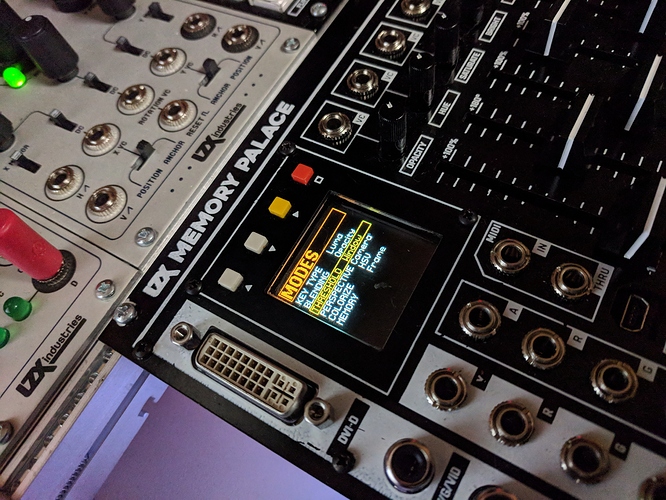
Thanks! We just finished making custom fonts today. This view shows the current version of basic parameter selection screens, but some pages will also have animated elements (that respond to the sliders) and we’re hoping to get full speed video preview going as well. The OLED really looks stunning in person.
#54 — luix · 2018-10-06
looks very nice thanks for sharing
#55 — a_digital_index · 2018-10-14
Is the soften circuit similar to edge feathering or even across whole image?
#56 — creatorlars · 2018-10-14
That’s the edge softness of the key.