Vidiot Archive
Archived community reference. This page preserves the official LZX Community forum thread for Vidiot inside the new documentation site.
Additional related discussions are included below.


Vidiot is the first standalone video synthesis instrument from LZX Industries, designed in
collaboration with video synthesis pioneer Dan Bucciano. Capable of analog shape and pattern
generation, external video processing, colorization, audiovisualization, keying, and much more.
- A Complete Visual Instrument. Vidiot is a complete instrument for analog video synthesis and processing. Everything you need to connect to a display and create video art is in the box.
- Past Tech Made New. We worked with video synthesis visionary Dan Bucciano to bring the design philosophy of the 1970’s into a totally new and groundbreaking device for video artists.
- Modular Synthesis Compatibility. Vidiot is fully compatible with all existing LZX EuroRack video synth commands. Like our modules, any audio or control voltage source can be patched to any of its 13 patch inputs.
- 2 analog discrete-core VCOs, one dedicated to horizontal pattern elements, and the other dedicated to vertical pattern elements. 3 waveshapes from each oscillator: Sine, Triangle and Square. Dedicated sync inputs and bypass switches.
- Noise output includes ultra-wide spectrum white noise for television static and snow effects.
- Dual concentric control knobs provide CV level and offset in the same footprint as a single knob.
- Process the grayscale range of external video or internally generated patterns, with dedicated voltaged controlled sections for Brightness, Contrast and Detail. Keyer controlled functions include negative and solarize effects. Dedicated video output.
- Colorize external video or internally generated patterns, with dedicated voltaged controlled sections for Red, Green and Blue. Keyer controlled functions include full color negative and selectable single color negative effects. Dedicated composite video and 1V RGB outs.
- 2 hard key generators with adjustable threshold levels, each dedicated to the Luminance Processor and Colorizer effect sections.
- Symmetry knob controls the mix of horizontal and vertical VCO outputs. Three two dimensional shape outputs: Circle, Diamond and Crosshatch.
- Dual 8 position rotary switches select modulation sources for the Luminance Processor and Colorizer, enabling quick access to most of the instrument’s features without patch cables.
Accessories
- 16-page User Manual
- Vinyl Sticker
- 5VDC 1.2A Universal Input Voltage Power Supply (CUI SMI6B-5-V-P5)
- Video RCA Cable (5 ft / 1.5M length)
- 2x Patch Cables (6 inch lengths, 1 red, 1 blue)
- Stereo Audio RCA Input Adapter
- Official Vidiot Birthday Party Hat
Videos
Downloads
Other Resources
Related Archived Discussions
Should I start out with Visual Cortex, Vidiot or the DIY Cadet modules?
Should I start my video synthesis journey with Vidiot or with Visual Cortex? What would you recommend for a beginner just getting started? We’d love to hear everyone’s opinions, this is a question we are often asked.
Thread Replies
There is a third option: Cadet series!
Yes! This post came from a migrated question. I’ve edited the OP.
Hello -
I’m totally new to video synthesis but have been lurking for some time and am interested in getting started. I am already invested in eurorack for audio so I’m steering toward commands. That being said, I’m into DIY and am interested in the Cadet series but am also ignorant as its capabilities and what I would want/need as a starting point there.
Any help is much appreciated! Apologies if there is a more appropriate post for my specific inquiry. Thanks!
When I was a beginner (with modular video that is) , I started out with the Cadet 21 set (21 pcb’s)
The Cadet modules only have a BOM and the schematic,
and you have to source your own parts.
I did this before, so that was no obstacle for me.
It was a lot of work (everything custom, so a lot of wiring) but it became a very nice system.
I grew quite confident of my DIY video module building skills.
I’m now adding new modules to my system that are build from schematic (LZX has quite a few cool documents on their site: a summing mixer,a VCA, Sandin designs and all Cadet and Castle modules are available as schematic too.)
This route has enabled me (as a not so wealthy video artist) to create a large video system with extensive possibilities.
Thanks LZX!
I’d recommend this route to all die-hard DIYers :)
brand new to video synthesis and I started with Vidiot. For me it was immediately fun, I was up and patching right away but still referred to the manual when needed.
I own a eurorack modular synthesizer and I’ve been using lumen, processing and praxis_live for video for quite a while for processing video, creating ad modulating shapes and webcam feedback, with mixing, layering etc.
I’m thinking about adding an old video camera, a 2nd macbook (both of which I already have) and possibly a video mixer and to start integrating hardware video synths…
so should I dump the mixer and get a system made up of visual cortex, prismatic ray, color chords, staircase and a couple of bridges and maybe add a memory palace and a diver (and obviously other modules) in the future
or should I get the mixer and a vidiot and just be done with it? and spend the money on audio modules!!!
@Agawell It’s hard to say, it really just depends on how much the LZX style modular workflow suits your creative personality and the kind of content you want to create. There are always surprises and new perceptions that happen after you start actually patching. What you can do with the modules you described vs. a video mixer + Vidiot is vastly different and the modules certainly take you into some territory that’s hard replicate otherwise. But Vidiot is essentially a module inside its own case, too, so you could expand from that instead of starting with Cortex (any of the modules that don’t require sync are great for this… Pendulum, Staircase, Doorway, etc.) I would just find a spot to dip your toe in, and then grow in the direction you find most interesting.
To answer the OP’s question, Visual Cortex, Vidiot, and the DIY Cadet modules all have their strengths and weaknesses as starting points, IMO. Here’s my attempt at listing the ones I can think of…
Visual Cortex strengths:
- a lot of utility packed in
- excellent base to expand from – if you’re planning on getting more LZX modules, you’ll soon realize that this is practically a necessity
- really well designed module
Visual Cortex weaknesses:
- price – the most expensive of these options, it might be too pricey as a first video module for some, especially if they don’t already have a eurorack case to put it in
- can’t do a whole lot on its own – not to say it can’t do anything, but it really shines as the input/output/glue for other modules
- needs eurorack case and power
Vidiot strengths:
- can do a ton of things out of the box! – you could potentially be happy with this alone
- can interact with LZX modules (and other people’s modules too) – expansion is totally possible
- don’t need a eurorack case or power supply
- easily portable
- the most immediately fun of all these choices
Vidiot weaknesses:
- kind of pricey – for what it does, it’s an amazing price! but like the VC, it might be too pricey for a beginner dipping their toes in
- I don’t think I can see any other weaknesses???
DIY Cadet modules strengths:
- easy DIY builds – through-hole and low part counts puts these way on the easier side of DIY builds (easier than most audio modules I’ve seen!)
- the least expensive option, for basic synthesis – with just Cadet 1, Cadet 2, and then something else (Cadet 4 or 9, probably) you can start synthesizing some video, though it probably won’t be terribly exciting
- many of the Cadet (and Castle!) modules are great additions to the retail LZX modules (and Vidiot)
- the Cadet modules are basic building blocks of video synthesis – you can learn about the basics before moving on to the other more complicated (but excellently designed) LZX products
- the schematics are freely available – great for learning purposes, but it also means it makes modifying them easier
DIY Cadet modules weaknesses:
- you have to build them – not a problem for everyone, but a roadblock for some
- you have to source the parts yourself – again, not a problem for everyone, but a roadblock for some
- not as immediately fun as the other options – they’re basic blocks, so you need a whole bunch of them to even approach what the other options are capable of
- needs eurorack case and power
One notable strength for ALL of these options:
- Lars is amazingly generous with answering questions and helping people out – there are a lot of helpful creators in the modular world, but Lars is seriously at or near the very top of the pile!
(I just realized this’ll need to get expanded to add Memory Palace, too, but I’m not going to add it yet since it’s not even released and I don’t have the best grasp of what it does yet.)
I started with some Cadet modules, since I didn’t really know much about video synthesis at all and wanted to dip my toes in slowly and on the cheap, and I’m pretty proficient with DIY commands. I still haven’t moved beyond LZX’s DIY offerings (so grain of salt with my pros/cons above!), but I now have more Cadets and some Castle modules, and I’ve learned so much about it all. I didn’t really understand what a lot of the Expedition series did, but now that I’ve played around with a lot of Cadet stuff and learned more about video synthesis, I get it, and I really appreciate their designs. (Seriously, Lars, awesome stuff!) Next time I’ve got money to make big modular purchases, I plan on getting some.
If I were getting into video synthesis with the level of understanding I have now, I’d probably get a Visual Cortex and some other modules (if I could afford that) or a Vidiot (if I couldn’t afford the VC,etc). But I regret nothing about my Cadet and Castle modules! Almost all of them will be great companions for when I do start getting Expedition series stuff, and I’ve had so much fun with them so far and probably wouldn’t have figured things out as much as I have without them.
Really thoughtful and useful post!
@reverselandfill @joem Thank you both.
Am I correct in understanding that the cadet series modules come with a blank pcb/schematic (and panel) that I need to layout and route myself? Or is the PCB routed and the schematic provided just as a engineering/reference/learning tool. I’m pretty sold already, I just want to be sure about what I’m getting into 
The Cadet modules come with blank PCBs and frontpanels. You need to buy all the parts yourself. The schematic is provided for learning/reference, but you can also just install the parts according to the BOM without ever looking at the schematic. If you haven’t done electronics DIY kits before, I’d recommend you get a kit that comes along with step-by-step instructions on how to solder, source parts, etc before diving into these, which are intended more as intermediate/advanced level projects for the electronics hobbyist.
It takes 11 Cadet modules to begin to approach what Visual Cortex can do (probably around the same for Vidiot), so Visual Cortex and Vidiot are definitely the better “bang for your buck and time” purchases, unless DIY is just something you’re excited and passionate about. With video synthesis there’s an up front kind of buy-in cost of all the host I/O circuitry, and you have to pay that no matter which approach you’re going. Think of it like buying the DAW/Mixer combo for an audio rig – those items are necessary in order to start recording and mixing tracks.
In my personal opinion, the best approaches for people on a limited budget who aren’t too scared of Synth DIY, would be Visual Cortex plus a few of the Cadets that expand it well (C9, C6, C7, C8 especially) or if you want more of an encapsulated instrument, Vidiot plus a couple LZX Expedition modules in a small Euro case (Passage, Staircase, Pendulum are all good for this.)
Vidiot goes a long way, but if using it without other modules, prepare to invest in a nice camera/feedback setup, as that’s where it really shines and you get the most out of it. If you’ve already got some video mixers and cameras, then it’s a great way to step in and incorporate this stuff in your rig without feeling like you have to keep buying modules if it’s not something you want to pursue further.
If you’re on a very extreme budget or just love DIY stuff, Cadet only can work… it’s just going to be a lot of modules before you feel like you’ve got a complex system. I just want to make clear that it’s tempting to consider Cadet to be the cheapest route – but if overall budget is the concern, and a complex system (rather than just a starting point) is the goal, most of these options tend to even themselves out at the end of the day.
@alargeformat “blank pcb’s” / The pcb’s are not blank as in perfboard They are routed and printed.
The schematic is for reference.
The Cadet route is very ‘open’, in a way that everything is patchable, and must be patched to get things going.
This means that you will need to understand every module very good and use several modules for basic synthesis.
The Cortex & Expedition modules have a lot of handy routings and features build in.
These functions can also be patched with the Cadet modules, but this will take more effort.
(input and output attenuverters, waveform options etc)
I have a panel that combines the sync generator, the video input and the output encoder.
Most of my other panels are dual or triple (like dual VCO’s, dual Processors, triple function generators)
You can combine several Cadet modules in one custom panel to save some patch cables ,
for example: a VCO and a Processor & Multiplier in one package. That’s one option I’m considering now
Maybe that route is for the more experienced builders. Start with a few Cadets and work from there!
Hi, as a complete beginner I really appreciate all the info thus far.
Ultimately my main interest is effects processing. Sending external video (and maybe audio) in, manipulating it, and then recording the output (not for live performance).
How much of a stand alone unit will Memory Palace be?
If it is, can anyone recommend a basic 2-4 module set-up for that? Would you need Visual Cortex at all?
Of course, I’d love to start big with the modules above, but I’m still unsure if the Vidiot can do a fair amount of effects processing as well? Most of the examples I see are more colored shape and pattern generation stuff. (I guess you could just add a video source and it might be more of what I’m looking for???)
Can anyone help me better wrap my head around the possibilities?
Thanks much.
@vacuum Memory Palace is not meant to be used as a standalone unit – generally when we do EuroRack modules, the design decisions relate to the context of a larger system (we have a pretty expansive vision of how it all fits together.) That said, you could do an effects processing system with just the TBC2 + Memory Palace that would be awesome and do a wide range of effects, especially if you have lots of external modulation options. This may be the best approach if processing and a small initial system is your goal. You will need TBC2 to get external video into the system’s patchable workflow, and then Memory Palace provides all the effects and dedicated video outs.
If you’re into the more analog processing techniques like colorization, solarization, RGB and wipe offsets, etc Visual Cortex by itself goes a long way as a processor as well. Vidiot can process external stuff but you can’t get full color video through it from in-to-out, and it’s best in a feedback loop environment with external cameras and video mixers.
Great question, and people have given very thoughtful objective insights. When I think about this question of how to enter the world of video synthesis… I find myself thinking about what I would have done different if I knew what I know now, or in light of the latest gear that is available. My take on it is predictably very personal, but… If I were starting fresh now. I’d start with a Vidiot, hands down! … except that the waiting list is a major stall out if you want to get going ASAP.
Background:
My start was with a 3TrinsRGB+1c… on a whim… half purchased with a tax return. I was very aware of LZX equipment at that point, but I didn’t know what I was doing and couldn’t justify the entry point cost. I explored the 3Trins for a short while before I hit a creative wall. I then started tinkering with DIY circuits that I could power from the 3Trins and interface on the header pins… in order to expand on the 3Trins and also utilize it as an RGB encoder for video circuit experiments. It was exactly the slippery slope I feared it might be (hoped for?).
Eventually I purchased a Visual Cortex, originally to have a more flexible platform for encoding and experimenting… one that was much more advanced and robust than the 3Trins. After that I saved up for a Staircase, Bridge, and Video Logic. Those are my only LZX modules so far, but I love them. I am waiting on a Vidiot, and I look forward to the day I can play with it!
All that said… if I were starting over… I would dive in at the Vidiot point for the following main reasons: [1] it is a “ready to play” system (similar to how 3Trins was for me), and that is a great way to have fun right off the bat; [2] it effectively represents (to me) a best blend of benefits between something like a 3Trins and a visual Cortex starting point… it has oscillators, colorizing, keying, and can act as an encoder for further DIY experimentation… and it is more robust than 3Trins regarding external inputs (3Trins should only really be interfaces with signals that are powered from its own headers, which is kind of limiting); [3] it has an envelope follow for smooth out-of-the-box audio-visualization; [4] clean power… although I owned some audio Eurorack equipment prior to video modules, I find that my power supplies are quite noisy (which is fun sometimes, but not always), and not greatly suited for video… but everything I’ve seen from Vidiot so far looks wonderfully clean.
Cheers!
Probably another thing to point out in this thread. We know this stuff is very expensive for most of you. Just know that you are getting what you pay for with LZX stuff. Everything is priced on direct multiples of component cost and assembly complexity (that is, we don’t upcharge anything just because it took longer to think of or design.) Just compare the price tag of Memory Palace + TBC2 to the Roland V4EX or other broadcast equipment with similar specs – and realize they are producing it at a much larger scale, with much more vast resources – if you want a basis for comparison. We don’t intend for anyone to be able to drop several grand on modules on the first day. We encourage you start small, add modules 1-2 at a time as you can, and learn the new possibilities of each addition exhaustively before continuing to grow. It’s meant to be a long and satisfying journey.
I also have some lzx-cadet based designs that built for my self… maybe you want to trade pcbs with me?
@creatorlars @reverselandfill @drumasaurusrex
Thank you for your insightful comments. I’m at the stage where I still feel like a beginner DIYer but have built a considerable amount of kits/opensource modules and so I’m up for the challenge. I also want to continue improving my soldering/troubleshooting skills, etc. I have fabbed my own boards recently which is what confused me about the ‘blank’ pcb term 
While budget is always a concern, it’s not my main one. I am more looking at Cadet as a way of learning/understanding the fundamentals and hopefully not hurdling over them and getting ahead of myself.
Thank you all for the help before I dive in!
@creatorlars
Thanks for the reply - been thinking about it some more - especially with regard to workflow and expandability
I think that the vidiot path is out - I’m coming out of the computer in colour so I’d like to retain that through the workflow and vidiot doesn’t do colour video in does it?
I have a 2000€ budget now and am likely to go to midiamsterdam to order next saturday
currently my thinking is this:
Visual Cortex, Prismatic Ray, Bridge, Color Chords and Staircase (I take it I will also need a synch cable between VC and PR, and a few of the rgb snakes look like a good idea)
Maybe swap Arch for Bridge, I already have 8 attenuators in the rack
I’ll also need a vga or HDMI -> component converter of some sort
This will fit in my eurorack cases for now
Then Arch, Pendulum, Passage - for which I will need another case!!
And sometime in the future Memory Palace, TBC2. The TBC2 adds an extra 2 video channels in doesn’t it? so for example if I get either the VC or the Memory Palace, then I would have 3 video channel inputs - ie 2 laptops and a camera (and if I had all 3 then there would be 4 input channels)
Quick question about Sensory Translator and Diver - they appear to have signifcant overlap - what are the pros/cons of each?
Exciting! That sounds like a fun rig!
Sensory Translator vs. Diver: They are both tools that are great for audiovisualization, but are entirely different functionally.
Diver is more like a sampler/buffer that can transpose audio waveforms across the dimensions (horizontal and vertical) of the video image. Think of it like a 1D to 2D converter, or a video oscillator that can capture the waveform of an audio input. So this would be used to actually take the shape of an audio waveform and make it visually viewable, freezable, and 2-dimensional. In context of the whole system, that’s quite powerful because all the analog shape modules (Staircase, Navigator, etc) work as video rate waveshaping processors for horizontal and vertical waveforms, meaning Diver can feed audio into a patch in such a way that all your resulting pattern generation is based on the original audio itself. Say you were using this with a track, it would work best if sent something simple – like a bassline or the kick track, or whatever you want to add specific visual emphasis to.
Sensory Translator is an analog FFT decoder and envelope follower, essentially. This splits audio into 5 different frequency bands and then applies low frequency amplitude following to each. So the results could be patched to different destinations that will then animate in time with the presence of each frequency component. So this is good for sending in a full mix or track, and splitting it up so that you can have different frequencies effect parts of your video patch differently.
The two would play well together because you could use the envelope band outputs from Sensory Translator to do things like modulate the phase inputs on Diver. Audiovisualization works best in my opinion, when you are doing at least 2 different things that interact, so these two modules are a powerful combination.
hahhaha
I think Lars just sold me (nearly) everything
I definitely want TBC2, Diver and Memory Palace
but those will have to be for next year!!!
as for this year (@creatorlars) if I order the modules I mentioned above from MidiAmsterdam tomorrow (Saturday) any vague idea when I can expect to see them? - & yes I’ve seen the production schedule thread!!!
modules were Visual Cortex, Prismatic Ray, Bridge, Color Chords, Staircase and Arch… seriously considering adding a Sensory Translator to the order too
@Agawell I’m not sure what MidiAmsterdam have in stock currently, but our production status updates are all here: LZX Production Status 2018, Updated August 8th
We expect to have restocked everything before the end of the year. Visual Cortex and Prismatic ray are some of the next ones up in September. The others should be available.
@creatorlars thanks
doesn’t look like they have any stock, everything is “will be ordered on request”
but that timescale looks good to me…
and they’re ordered!!!
the wait begins…
@creatorlars I was looking for the knowledge base article about what peripherals I need/might want now I have a visual cortex (on order) - iirc converters, cameras, black magic intensity shuttle etc
could you please re-share this or create a new one
found the links and added it here:
Just circling back:
I ended up going with a visual cortex and am currently pacing by the mailbox; Will soon be following @creatorlars suggestion and expand with some cadet commands. Very excited to embark on this journey and be a part of such a welcoming community.
Getting ready to take the plunge and I can’t wait!
I’m currently borrowing a friend’s Vidiot and having a blast. I already have a full Eurorack system, and am plenty comfortable doing DIY. Since I want to ventually expand to a system like this, I’m leaning towards a Visual Cortex over vidiot. I think I will start with a system like this (maybe with a doorway, shapechanger or navigator in the unfilled area)

Since I’m really loving the Vidiot though, I was curious about getting some more feedback on where to start, as there are some things it immediately gives you which you don’t get with a Visual Cortex…
I love the immediacy of the Vidiot’s two oscillators, but I think getting a prismatic ray, staircase (or 2?), and building a Cadet scaler to go with the Visual Cortex would probably be enough to have the oscillator/pattern generation aspects mostly covered. Would love to get the cadet VCO but it would be too big for my current skiff (only 50mm/61.3mm). Creating the default patterns from Vidiot seems relatively straightforward w/ the right utilities and two oscillators. Maybe lose some potential by only having one oscillator that is capable of being FM’ed at video-rate, but that doesn’t seem like a terrible thing!
One thing I love about Vidiot so far is patching the RGB outputs back to various inputs - but I believe this could be achieved with VC by patching the YPbPr outputs to the YPbPr inputs (though this prevents camera usage… unfortunately). Can someone verify that this would be what I expect?
Another thing I love about the Vidiot is CV over colorization (e.g. using LFOs from modular to control colorization). I believe with clever patching of the compositor section this would be easily achievable: For instance, in multiply mode, you could patch your pattern into colorize, turn MIX for channel A on, and then use channel B for your slow color modulations. (maybe dummy-cable composite to keep the composite VC at 0). Alternatively using 3x Cadet Multipliers could do the same thing.
I also really like the Gate/key inputs for solarize/negative/color+rgb negative on Vidiot, but I think you could also get lots of related results by creative patching of the compositor and/or Cadet/utility commands. It seems like you could really get some unique things by how you decide to patch signals to colourize and/or composite, how you set the mix+composite mode switches, etc. Getting color chords now (instead of e.g. shapeshifter or navigator) seems like it would make a lot more crazy stuff possible with the compositor on VC
Obviously with Vidiot you get 2 keys, but with the Cortex you can automate threshold changes which seems incredibly useful to me based off of how much fun I’m having playing with the Vidiot thresholds.
VC also doesn’t have all the useful attenuators/inverter switches, but that doesn’t seem like a huge deal.
Anyways I know this is a lot, but if anyone has any more thoughts on this, I would certainly appreciate hearing them!
You may want to look at Marble Index too. It can do a lot of the things it sounds like you’re interested in.
I just wanted to add my two cents. I’m coming from a circuit bent hardware mixing background and I had to consider this question seriously. I decided to go with the vidiot, and I know that the chromaganon is replacing the vidiot but I absolutely love the vidiot. Used in conjunction with circuit bent hardware it creates absolutely wild Wonderland’s that I didn’t even know could exist. I’ve had it for a couple months and it has inspired me to order my first module (da bridge) and I’m very excited to get deeper into the commands. I would have went with the Cadet series but im just tired of doing it myself.
you could always ask someone to build it for you:
https://community.lzxindustries.net/t/cadet-castle-module-builders-list-and-build-requests/
Recent LZX entrant asking/musing about a couple things
Hi everyone, I’m a very fortunate recent entrant into the LZX ecosystem, in that I acquired a Visual Cortex, and have been enjoying exploring it.  I found Shawna Lee’s VC/Vidiot video, and was taken with quite a few of the patterns, shades, and textures in it. https://www.youtube.com/watch?v=_sZ2DDvdkvk I’m sure the Chromagnon could accomplish this and more with the VC, though I’m interested in expanding my LZX set sooner. If I were to choose some Gen3 modules to do similar things, do you think the DWO3 and maybe the FKG3 would be the first choices? A few time markers that caught my fancy were at 2:00, 3:00, 5:30… I’d like to be able to CV some of those sections that she was adjusting via knobs, especially the 3:00 one. This seems to be adjustment of oscillator frequency–gentle FM of DWO3 might do this?
…
When I first saw what the DSG3 could do, I wanted to smoothly transition between the various settings that the switches select–a smooth morph instead of the hard cut the switch delivers. However, the more I read about analog video synthesis, it seems my desire would require a ridiculous amount of extra circuitry added to the module–is this correct? I thought maybe the FKG3 could be the morphing function, mixing between the two separate DSG3 generators, with their respective settings set to the patterns I want to morph between. If this is correct, it makes me think two FKG3s would be even better, like VCAs in audio modular. And furthermore, with the multiple outs on the DSG3 and ins on a FKG3, various very happy morphing accidents would result. Do I have any of this right?
…
A little of my background is I’ve been doing eurorack audio for around 6 years, and got into it with a specific idea of what I wanted to explore. I’d like to do the same with analog video synthesis, and start by exploring the shifting of patterns and colors. Who knows what the future will bring, but at this time this is what compels me and what I want to focus on.
…
A bit of what I’ve done so far with the VC: I’ve gotten a big kick out of sending all 4 of VC’s ramp outputs into a modulated 4 channel VCA, sometimes with an offset, into various ins in the colorizer & compositor. I’ve tried amplifying a sync out from the VC to get an analog oscillator to sync to it to varying degrees of success, one of which was getting my Synchrodyne+Expand to make (amusingly wiggly) verticle lines. I still don’t grok the animation and key gen section, but I’m giving myself time with it.
…
Thank you if you’ve read this far! If someone’s interested I can share the audio modules I used in another post since this is a book.
Thread Replies
Sorry, don’t have time to look at specific time stamps of the video at the moment, but if you’re looking for pattern synthesis and have a Visual Cortex (which has both basic ramps and mixing/keying — somewhat analogous to DSG and FKG, respectively, though less feature-rich than either), the next module I’d probably recommend is Stairs, since that plus ramps can do a lot of fun stuff. Especially if you already have LFOs.
Then probably a DWO, yeah, to get some video-rate oscillators into the mix. Or a DSG, if that more symmetrical look is your jam.
But to answer your question about DSG, rather than trying to mod it, you could just put some outputs into Channel A of the VC and others into Channel B and voltage control the mix/fade between them there. …And, yeah, you could also do this with an FKG.
Yes, you are spot on. This is exactly in line with how these modules are designed to be used together, and the right thought process to explore sculpting video shapes with them. The functions of the modules are specific as a prompt for understanding their functions – but the patch is entirely freeform. If you look at FKG3 and DSG3 as a pair, you have 8 outputs on DSG3 and 11 inputs on FKG3 – that’s an enormous number of patterns and configurations, that are entirely defined in the patch, with no wrong answers.
Yes, this is correct. It’s often nice to have things like interpolators/faders, multipliers, etc on separate modules – that way they can be patch programmed to make whatever transition you want, rather than fixed to a specific processor/function. It’s exactly the same as “never too many VCAs” and “modulate the modulator that modulates the modulator” principles in audio synthesis.
Welcome @scuto!
Riffing on the great suggestions already presented, another possible way that you could smoothly morph between DSG3 outputs would be by using a crossfader:
https://www.videoheadroom.systems/storefront/p/channel
PROC would be another useful tool for dialing things in and for processing your DSG3 outputs in a more specific way:
Have fun and let us know what you discover along the way.
Stairs looks interesting, then I watched the three patch video on your suggestion. Short-listed! The self-feedback was an unexpected perk, and has led me to consider other modules’ self-patching/feedback.
With your and others’ replies, it seems DSG is more the way forward for me for a foundational shape-maker, though I am intrigued by the potential patterns and shapes it and a DWO interacting could make.
Good suggestion to make more intentional use of the features on VC–I’ll get to know it better while ogling the next module or two.
The LZX twitch streams (though at times a bit, uh, meandering) can also be a useful way to learn what does what.
Thank you for this feedback and clarifications! It feels good to start to understand the rationale behind the structure of the Gen3 framework–seems like a good fit for me to both learn the concepts and functions while having fun exploring them. (The VCA analogy makes a lot of sense.) Plus, that 8>11 situation is appealing, plus the VC (and Stairs!) I could have a lot of fun! I feel I’m better understanding patch programming in video modular so far compared with audio, possibly out of pure ignorance of “proper” signal flow in video. In audio I already had certain notions that I’ve been chipping away at with the help of patching modular.
Thanks for this lead! I’ll check this out. I just found the Discord, which I’ve only “skimmed” so far.
Thank you for the welcome, and the interest!
I’ll have to look into Channel, it seems feature-dense.
Interesting about Proc–the benefit of it over an audio module with the same features is the 0-1v range, and it can handle video frequencies? From the module page with the front panel legend I wasn’t clear on its offset function–if one of the two inputs marked with the same color are unpatched, that one adds an offset to the signal in the other one?
Ramps are the landscape, Oscillators are the weather…
Ramps are the harp, Oscillators are the harpist’s fingers…
Oscillators are the escalator, Ramps are the passengers…
Lots of ways to think about how to define the relationship in a given patch.
Proc is a very handy block for situations when you need to create manual voltages, attenuate a signal, invert a signal, offset a signal, or sum two signals (like a source with a modulator). Having three in one module makes it easy to patch for RGB workflows, or you can use the 3 functions independently. Generally a useful utility function block.
It can also be used as an expander for other commands. For example, 3x Proc + 1x FKG3 could create an extended color processing subsystem system where you have Gain + Offset knobs for all 9 color inputs on the FKG3.
This just made Proc the top module on my wish list!
I think I’ve already stumbled upon a visual related to this! It seems Gen3 modules would give me more control and predictability than I have now for this kind of visual.
I appreciate the Proc description! However I’m still not clear on how it creates an offset–whether the first or second column is dedicated to offsets (and the other atten/invert), or if it comes about via patching in a certain way. 3 Procs plus a FKG3 would be a remarkably detailed system for RBG-fests!
Edit: Just watched the Proc video, and it’s the column of C knobs that provide the offset, if anyone in addition to me was unclear!
The output function is A + B + C.
A is a direct input.
B is an input with it’s level/inversion controlled by the corresponding B knob.
C is a bias voltage generated by the corresponding C knob.
In general if you see knobs with outlined triangles these are controlling the level of a specific input jack that’s on the same panel.
Knobs with solid triangles are a bias control or related to some other function.
Nice–I appreciate that, and the conventions of triangle types is a good call!
I wasn’t sure where else to put this, so I’ll post it here: Is there a Gen3 module that has (or down the road will have) the same functions as the upper left Sync Generator section of Visual Cortex? I’ve been getting more out of it than I initially suspected I would, specifically feeding the H and V sync to things to see what might happen, including audio oscillators that can handle it (shout out to uniCYCLE and Synchrodyne + Expand).
Unfortunately not yet. Been waiting for this functionality myself.
Gotcha. Good to know others have this in mind as well!
In thinking about it, what I’m asking may be easier with SD resolution(s) in that an analog audio oscillator may not respond as well–or at all–to an HD sync signal compared with the SD ones from Visual Cortex. Guesstimating tho’.
People with RCA sync Prismatic Rays have had success syncing them to HD rates. They say the contrast is a little softer, however still very useable.
HD sync vs SD sync is really not that much faster. Frequency and bandwidth are two different things. If you can get an audio oscillator to lock to SD H/V sync, it seems unlikely it won’t be able to lock to other sync pulses in timings that are just a little bit faster.
EDIT:
Yep, I’ve been able to do this with both RCA and CV/Gate sync bus versions of Prismatic Ray. My experience has been that PR’s outputs have a perceptibly softer character in 1080i and especially 720p (an inherent low pass filter is being revealed in those timings) in comparison to SD timings but no obvious issues with sync itself.
Ah, interesting, thanks! Makes sense. If/when I go to an HD encoder it’ll be interesting to see how they fare.
I believe H/V sync is likely to be implemented in a TBC2 firmware update. I’ve certainly been harping on it long enough. 
In general, any module that does not require SD sync will work fine in HD timings, with some horizontal blur. That blur is scene-dependent. In other words, with some images you will notice significant blur, with others you may not notice it at all. It all depends on how much detail is present in the horizontal dimension. Fine details are lost, hard edges are softened, but smooth gradients are unaffected. It’s basically a very light slew applied to changes in the brightness of each channel. Try to push a one pixel wide vertical stripe test pattern through, and you’ll get something close to solid gray. But with a normal camera image, it may look perfect.
Technically the chips are not fast enough to do full HD resolutions even though HD timings are not a problem at all.
For reference, pixel clocks:
1080i60 ~62 MHz
720p60 ~55 MHz
480i60 ~9 MHz
If I’m not mistaken, the chips in pretty much all modules top out at 10 MHz.
I wasn’t aware about TBC2 getting that in the future–I thought my wallet was safe from it since I’m not focused on processing external images/video!
Regardless, this is good info to know. I’ve been working with gradients up until very recently, so smooth and slew is in my wheelhouse.
There’s been no promise of H/V sync front panel output for TBC2… I’m just speculating. But presumably it would not be a difficult feature to add.
BTW, in all of my patches I use a sample and hold circuit to prevent horizontal tearing. I use Pulp Logic tiles because they are simple and inexpensive. Send any video synced oscillator or vertical ramp through a comparator to generate a pulse. That’s the S/H trigger source. Modulation source goes into S/H signal input. Result: modulation value is held for the entire duration of the field/frame.
I think this is proof that the CV/Gate sync bus output works
Yup, can confirm you just need to flip the dipswitches on the back of TBC2 to enable H/V sync to be sent to CV/Gate bus.
I confirmed this earlier this year, in another thread. 
Also, I noted an interesting sync artifact when syncing vertically in HD. My Prismatic Rays are slow enough to get oscillating, after an HD sync, that there can be a noticable space on the left side of the image before the first bar appears.
For me, this just makes the PRs more fun. When a patch makes me notice this effect, I can look for creative ways to use it. That can only be a good thing.
Great info share that should be stickied!
I’ve still not put a visual to the term “tearing” in my brain, but your explanation makes sense. It’s good to know that other modules made for audio can be useful in a video synth context! I’d not thought of using a S/H in video, though again I’d have to try it out to know what it does visually.
I had a Kinks in my video case briefly, but didn’t fully explore it before it was moved back to audio case duties. I liked its first and second function blocks, though I don’t recall what (if any) limitations it had for video.
Patch a clock or trigger source into your encoder. You will mainly see the whole screen flash on/off but when the pulse does not line up exactly with the vertical sync generated by your sync generator, you will very briefly see the flash ‘start’ in the middle of the frame. This is what we mean by “tearing”.
Video may seem continuous but it’s actually discrete moments in time when you consider we’re seeing n frames per second.
Yeah, “tearing” is any instantaneous change in the picture that does not happen during the vertical interval between frames. It manifests as a sharp horizontal line. Commonly seen in fast-moving computer games, where the render update is not synchronized to the display refresh rate. Graphics cards have a setting called “Vsync” in which the rendered data is held in a memory buffer until the next vertical interval. It’s an option because some people want faster updates to rendered frames, others want smooth video with no tearing.
By the way, if you want horizontal bars in an image, resulting from e.g. cranking a modulating audio oscillator up into supersonic video range, then you can’t use the sample/hold technique. It’s always going to limit the modulation frequency to the current frame rate, so you will never get intraframe transitions, i.e. horizontal bars.
Also by the way, we’re starting to see this sort of thing implemented within commands. VH.S Aural Scan has the vsync S/H circuit built into it.
Thank you both for thse explanations. I’m at work so can’t try the clock into encoder thing, and am having difficulty understanding:
Does this mean that I would use, say, a ramp instad of an oscllator (either audio or video) in order to try the S/H technique? Or is it meant for processing external video?
I find the term “intraframe transitions” a useful way of conceptualizing horizontal bars–thank you!
Aural Scan is a tempting one, for sure. Eventually I’d like to coordinate my audio and video, but feel I have much to learn.
Question for either of you–or anyone, really!: how is the frame sync out on the front of Visual Cortex related to this discussion? I’ve not yet tried plugging it into an audio oscillator to sync it since I was having too much fun with the other outs.
The concept here is to limit the modulation frequency to the frame rate. A free-running oscillator, or any modulation source, can change value within a single frame. If it’s a sudden change, you get a sharp horizontal line. If it’s a gradual change, like a sine wave, you get a gradient.
In the former case, you can put the modulation source through a sample/hold circuit. Whatever value the modulation source has at the beginning of the frame is held until the next frame. No jagged horizontal bar.
In the latter case, e.g. with a high frequency audio oscillator, the horizontal pattern may be desirable. Soft scrolling horizontal bars look cool. If you want that, then you can’t use the S/H method, because that quantizes the modulation so that it can only change between frames, not in the middle of a frame.
Visual Cortex Vsync output should be perfect as the trigger for the S/H. In the absence of a true Vsync, one can generate a pseudo-Vsync from a ramp or video-synced oscillator through a comparator.
None of this is directly processing video images, it’s solely about wrangling the low frequency and audio frequency sources that feed into video processor commands.
Ah, scrolling vs synced audio oscs! That was the distinction I didn’t pick up on, makes much more sense now. Recently I’ve only used audio oscs synced, if you can believe it. Sync up a PDO, get those self-phase-modulations going, (attenuate) and have some squiggly fun (for just one example). And I’ve definitely been on a gradient kick, more sine than tri (though don’t tell my VU009!). Thank you for taking the time with these explanations! I’ve got a few case adjustments to make, which I actually enjoy once I get the time.
Yeah, if you have an audio oscillator that syncs its duty cycle to an external clock, you probably don’t need the S/H. Just feed it Vsync or pseudo-Vsync with sufficient amplitude for the trigger. But for more complex modulations, S/H is a helpful technique.
I’ll definitely be playing with the S/H teachnique now that I’ve understood it a little better.
It has been interesting to see which audio oscillators take the VC’s V-sync well–some of which I didn’t expect, and others I thought would take it well don’t. Some day I will do a proper test of the ones I have, likely using the Vermona Amplinuator to boost the sync if/as needed since the modules of theirs that I have play relatively well with video.
Often you don’t even need to increase the gain of the V sync–you just need to offset/bias it so the rising edge is crossing the voltage threshold the oscillator’s sync input is expecting.
Ah, interesting! I’ll have the offset option on hand when I give this a shot. I like me an offset module–might test them as well for handling of video signals, got a handful that can offset an incoming signal.
Bias/offset becomes much more important in video than audio because we’re primarily dealing with a DC coupled signal instead of AC coupled signals.
If you send offsets into an audio output module, you’re not going to really hear anything exciting. At best, AC coupling will negate any DC offsets you introduce and at worst, you’re going to force the speaker cone to just sit stuck in one position and it will probably not sound great.
Plug offsets into a video encoder module, and you’re directly altering the black level of each color component.
Thanks for that about offsets in video! Makes sense. I already have a Passage, and may have to get a second or a Proc due to its input cascading/“multing”. Crucial utility modules, those.
When it comes to audio modular, though, I’d argue offsets are important as well–primarily for working with control voltages. If an audio oscillator doesn’t have a fine enough tune control, attenuating an offset into an FM or pitch input gives super fine control. The larger the knob’s diameter, the finer the tuning (AFG, Richter Oscillator as two good examples), but those “trim pot” style knobs for fine tune are too prevelant on many euro oscs–not good for accurate fine tuning unless their range is greatly restricted. I’ll be adding an offset module for fine tuning DWO3 when I get a chance to tend to my case. Offsets are also useful if you want to introduce asymmetrical clipping/distortion to an audio signal. Then there’s combining offsets and a sequential switch to make a simple sequencer.
Not all audio output modules are AC-coupled, since some believe they can hear the capacitor’s effect on the sound. Other output modules AC-couple/ground lift through a transformer instead (I like these, personally). But it’s not even necessary to have an output module in audio since many mixers, audio interfaces, and digital handheld recorders can easily attenuate the (Eurorack) modular level to line level without clipping. Some may clip no matter what, but most seem to handle it fine.
Completely valid point about the use of offsets in audio modular. I was more referencing what happens when plugging a DC offset directly into your output stage with nothing in between. Biasing your control voltages is essential for fine tuning whether it’s in audio or video land.
Yup, totally hear you on the AC-coupled point, too. Was just hitting the broad generalization that folks can often have an audio output module and it’s not unusual for them to be AC coupled. Luckily modular lets you pick what works for your approach–I just put all of my outputs into a chunky outboard mixer for years and never had any problems. 
Ah, gotcha! Thanks for clarifying. Yeah, not much interesting in audio putting DC right to the output.
That’s cool–what mixer have you been using? I was using Mackies before going straight into a Zoom H5 and mixing more in the case.
Mackie Onyx 1640i, then Firewire  multitracked to a DAW for recording.
That mixer is no joke! Nice piece of gear. Haha, I get you re firewire–if it ain’t broke… If I may be so snobby, one of the things I like about us electronic creative types is our relative resistance to planned obsolescence. I love it when I see someone keeping a WinXP/OS9/C64/Atari/etc. computer alive because it runs that software we just need to have because it does that one thing so well–or was the last thing to do it at all.
@scuto “Is there a Gen3 module that has (or down the road will have) the same functions as the upper left Sync Generator section of Visual Cortex? I’ve been getting more out of it than I initially suspected I would, specifically feeding the H and V sync to things to see what might happen…”
You could look into the sync trigger stuff using the newly for sale SCROLLS module, which features a PULSE output for these kinds of experiments. (phase adjustable and capable of scrolling motion).
Wanted to add that the VU009 is great for generating pseud0-VSYNC through a comparator because VU009 has an Offset control. Basically it’s a bias, and if I remember correctly, it clips anything above 1 and below 0. @syntonie
I wouldn’t have realized this otherwise–thanks for pointing it out!
I already have one so this is an interesting suggestion. I used Modulargrid to look up video comparators and saw that Seuils has them (I’ve already been ogling Seuils for its phase shifting and blue-ness).
Also on that MG list was Cadet VIII which leads me to ask if any hard key generator can do this. So far my only hard key gen module is Ribbons, but I’m unsure if being a window key gen is too off the mark to do pseudo V-sync.
(NB I’ve not grokked VC’s keying section yet… don’t even know if it’s working correctly!)
You don’t need a video rate comparator for pseudo-VSYNC. It’s only a maximum of 60 Hz. Any audio rate comparator will work. All you need is a voltage downconverter, since audio rate modules will output variously 5V, 10V, or even 12V
Ah, thanks! I think you or someone already informed me of the 60Hz rate. Got me some logic, attenuators, and will give this a whirl soon.
I made a video demonstrating sample and hold patches to correct frame tearing and shape distortion.


Been away for a bit, but this is a treat to return to, as well as your DSG3 video–my weekend will fill my brain now, thank you!
Ok, that was great! Thanks for making this. Learned a bit more about this topic, and it makes more sense. Mutable’s Kinks has been in and out of my video case for a while, so this will bring it back again. And Mystic’s Ana will likely be my comparator. In addition, your shirt rules, and you’re a fellow Firefox user.
And it looks like I can set Mutable’s Ears to spit out a 8v gate at a jumper-selectable level, and 1v is among the choices (2v and 4v being the others). Am I thinking correctly this could be the comparator?
I don’t know about Ears. You certainly don’t want the microphone to be active, you only want the gate to be triggered by the sync signal you supply. The threshold probably needs to be slightly below 1V, unless you preamplify the sync signal to greater than 1V.
Ok, that makes sense. I have some preamp means, so I hope to try it soon!
Eurorack Vidiot? I went for it
My first attempt at a custom panel. Laser printed glossy paper applied to hand drilled/filed steel plate and sprayed with matte clear coat. I know the bottom edge is F’d. The Vidiot guts barely fit between the rails, and I was not ready. I’ll make a new one where all the screws fit maybe, later… Above is a WIP 3D printed back panel with a 3.5" preview monitor and a nice big eyeball dude with room to mount a rPi underneath for waaavepool n stuff…

Thread Replies
That is ingenious, I love that it’s hand drilled and finished - well done!
How messy is it underneath? Show us some pics
This looks amazing!
Have you got a breakout panel for all of the inputs from the rear?
@Marizu The black 3D printed thing with a screen above the Vidiot is the back panel.
@Rik_bS No mess just the sexy red vidiot board with stock ribbon cable to back panel. The only “mod” to the Vidiot guts was to solder a small cut off end of an RCA cable to the input loop connection for the screen. Going to add a switch and another connection to the color output since I’m mostly using the RGB outputs to Structure now.
Bravo!  Looks rad. Well done!
The preview monitor is a nice touch. Bravo!
Super job! The monitor is very nice.
@j4s0n Nice work! Looks great, and similar to the original! I like the different style knobs on the selectors. So whats the difficulty rating on such a swap, and what can we offer in exchange for a set of these panels? Seems like an excellent solution to modular integration and travel.
@j4s0n - this is a rad finish.
I have been headed down a similar path to eurorack, and havent really decided what im going to do with the remainder of that area…
however - ive hit a snag regarding the rear panel alltogeher
Upon opening the unit, I do not have a ribbon cable, just a very fine pitched ( 1.5mm?) 2x8 right angle pin header and socket. eep.
has anyone else gone this road?
does anyone have any clue what the pitch of this connector might be?
my caliper says 1.5? 1.3? it cannot decide.
is there any reason why i should not just install a ribbon connector into this variation of Vidiot?
thanks!
@dubpixel Mine just has a standard 16 pin eurorack power cable going between the boards. Can you take a picture? Or, maybe ask LZX directly? Contact Us – LZX Industries
@Tremendm_Labs Thank you! Please excuse the delayed response. Those are some old Radioshack knobs I had in the pile here. They’ve been on a few different projects over the years. Not really sure how to rate the difficulty. I’d say it depends on your experience with such things. For me it was not “difficult” at all. Just time consuming but, fun! I hadn’t really considered making any for others but, I will share my CAD if you have access to a 3D printer and feel like DIY. If I would have purchased a Shapeoko instead of Chromagnon and TBC2 pre-order, maybe this would be a different story. Oops! 
i saw this post digging around - betting this is from the earlier design.
Vidiot - Troubleshooting - #10 by creatorlars?
aaaand based around the way things go in parts land i have a feeling its a 1.27mm 2x8 header. (0.050" derp). idk what i was really thinking 1.5 1.3 - lol.
neither is logical because they both convert to something wacky when in inches. because inches is still a thing…
i’m hesitant to bother LZX support (with all the other shit their dealing with atm…) with a ticket regarding essentially me voiding my warranty (albeit in the name of greater good). i will ultimately be prepared for the consequences of what extending the ribbon means - but it may not even come to that.
TBH i think that the angle of the 2x8 header (and the subsequent mating ribbon) makes vertical clearance a no-go. i have not triple checked my math - but will report back when i do.
even if i do not assemble it into ‘rack-mode’, generating the front panel in eagle (with help from fusion) has been fun. the crossover between the two softwares still sucks (understatement) but its been interesting.
nevertheless for my skill set and tools in the shop, this mod, gets a ton easier when i have someone else’s ‘robot’ do the panel drilling (as well as the artwork for that matter) .
you made reference that main-board clearance is dodgy - but im guessing not impossible?
i’m waiting for a knurled nut driver to finish removing mainboard from existing panel. i need to check it against some mockups of the panel i have , and adjust the placement of hole grouping versus the ‘center’ of the mainboard between the rails. this will also help to inform me if i can actually fit my version of the dang thing with the ribbon.
regarding the alleged part(s)
samtec makes a line of 1.27 headers and they are (for a header) very expensive. like 2.50-3.75 each end. the ‘dragon eye’ or some nonsense line ribbon cables for this pitch are just unholy as well. pin to socket 1’ will be like $20 uSD. ffs.
i havent dug around digi or newark, but mouser not cheap!!
normally with this tolerance id just order the part and try it - but its a lot to spend.
Itd be wild if yall were willing to customize other peoples vidiots for this
I’d need your “guardian” to sign a permission slip for that field trip! But, if we could get a precise layout from LZX (or @dubpixel if they work it out), frontpanels.com has no minimum order qty… or I’d be glad to do it if/when I get a CNC machine, for a fair price. Making just my top panel by hand was quite the task, and it is far from perfect. The 3D printed part is fine but, it’s 3D printed plastic… Other option might be to sacrifice the original case, just chop off the top and bottom edges and drill some screw holes, not sure about the back panel though. I wonder if it would fit in a 1U row? My cases don’t have those so…?

Very close.
It mostly comes down to bumping up tolerances on holes and maybe shifting the gap between rows in one location. It’s all parametrically modeled in fusion and left mirrors the right. Currently the spacing on that mirror is maybe a touch off. But also it does fit.
Moving on To the rear panel next.
Plan is to make 3 versions.:
1 is blank in the remainder space
1 is a small preview monitor,
1 will have some space for 1RU tiles (provided my cnc guy surfaces and gets me the parts back I had cut)
Nevertheless you will need some HP! The output board doesn’t fit vertically so you got all that extra room above it to have fun with. I probs won’t spare the space to put it in my main system but it’s been/is a fun project to be working on.
I’ll be putting the final proven designs out
free on the GitHub. They will feature the original LZX art. Lzx has asked (quite logically) I/we not sell units with their art. so y’all can go nuts If you print your own.
To be clear, this is dicey with a rev1 unit. rev2 is way easier.
For the r1 I have yet to get the nerve up to desolder the right angle 0.05 header and reverse its direction and add a ribbon cable (damn pricey one too!) otherwise it’s impossible (or frighteningly tight) to fit between rack rails. I just need a calm day to spend some time at the bench.
Looks Great! Except the pill shapes around the jacks should be filled in for outputs and outlined for inputs.
Hey @dubpixel, amazing work here! Did you have a chance to post your design on GitHub? I’m gonna do the same for my Vidiot, installing it closer to the other LZX modules in my synth :))
Thanks!
Can you do as much with a Chromagnon as you can do with a Vidiot?
I’m not talking in terms of specs, because I know the chromagnon has the Vidiot beat, but in terms of versatility and the complexity of the patterns that the instrument can produce on it’s own. I ask this because the Vidiot seems to have a much more extensive patch bay than the chromagnon. Also, the website doesn’t say if the chromagnon’s different workflows can work alongside one another or not, so that’s a big factor as to whether or not I get one.
Thread Replies
For someone who has a Vidiot already, they can choose between keeping their Vidiot and adding a Chromagnon or replacing their Vidiot with a Chromagnon.
I’m not sure buying a Vidiot is an option anymore. So, for someone who doesn’t have a Vidiot, the choice may be much simpler. Either buy a Chromagnon or not. I’m in this position, BTW. The Vidiot never interested me, I didn’t buy one and now I don’t have that option. You may be more fortunate, but I don’t know.
So, if you can still buy a Vidiot then your question makes the most sense. Regardless, I’d recommend waiting until a demo video is posted before making any commitments. You can compare it with the Vidiot demo when that video appears on the LZX YouTube channel.
There’s the odd vidiot Comes up for sale used
I would ignore to some extent the number of available patch points
The important thing is what you can do with it
Chromagnon has many apparent advantages over vidiot
More video inputs - including colour
High def analog video output
Image Rotation
Laser compatibility
A ton of buttons and switches - some of which may change internal routing of some patch points - idk I am speculating a bit here!
As nerdware said - wait for the demos and compare - there may be a few more vidiots available used at that time too
This thread might give you a better impression of Chromagnon’s capabilities (though wait for a demo video, if you’re still not sure):
The way I see it Chromagnon will be the best of Vidiot and Visual Cortex (and Navigator, Shapechanger, Mapper, and Staircase) packed into one module. I think the key difference you’re looking for is that the Vidiot excels primarily at making grids of shapes with a pair of oscillators, but can’t do rotating quadrilateral figures or any of the tricks that a Nav+SC combo would give you. From what I gather, Chromagnon is going to have the complexity to make patterns and shapes far above and beyond what Vidiot is capable of, and with wavefolding it will likely be able to generate grid of shapes too, but with many more possibilities for modulation and animation. Also worth noting that Chromagnon has several built in modulation vectors, whereas Vidiot only has scrolling horizontal bars.
Can Chromagnon actually rotate an image? I thought it was just the ramps, but perhaps I’ve missed something. Anyway, I don’t recall Vidiot doing any kind of rotating, so Chromagnon definitely wins on that feature. I agree with all your other points. I’d add 1080 component input, too. I think that’s a really big feature.
So what does Vidiot have that Chromagnon doesn’t? Two oscillators, for a start. It’s small size is another factor, making it easier to carry to gigs etc. One of the suggested Vidiot applications is video feedback using a B/W camera and monitor. I don’t think Chromagnon is so well suited for that.
You’d need Memory Palace or some kind of frame buffer to perform image rotation. Processing a Luma camera signal using Navigator and Shapechanger (effectively the MK1 versions of what has been described in Chromagnon) will just get you a brighter or darker image.
Rotating ramps in the context of a scan processing patch displayed on a XY monitor (or ILDA if you have super fast galvos on your laser) would appear to rotate the image as the H/V ramps are defining an arbitrary raster.
Yes, it looks like Chromagnon can instead rotate the chroma part of the signal, not luma.
Am I right in thinking Chromagnon will let you access the luma part of the input and then feed the result back into Chromagnon to be recombined with the processed chroma part?
So much of this is speculation! We really need to see that demo video.
as no demo is available yet I guessed that if this is replacing shapeshifter and navigator that it would enable image rotation of some kind… maybe just wishful thinking on my part - fingers crossed!
Well, a new module like this encourages a degree of wishful thinking! For a short time, I wondered if Chromagnon could process HD video internally. I’ll be really impressed if it can do this, but now I seriously doubt it. I’d like to be wrong, but we’ll see.
exactly - from what I’ve read I would assume that if you can put HD analogue video in and get HD analogue video out then the entire workflow would work like that - downscaling on the fly adds complications - and I remember reading somewhere that a lot of the expedition modules (staicase etc ) can handle HD analogue - it was just never an option before
think about it - it’s really about recognizing the frame and line markers in the stream - so as long as the circuits can handle a faster signal it shouldn’t be an issue
but I might be wrong!
I just sold my Vidiot on reverb to pay for my chromagnon preorder. I’d assume that once chromagnon does drop that people who wish to replace the Vidiot in their setup will put them up for sale. So their may be an influx of used vidiots for sale at that point in time.
Perhaps–but those who keep Vidiot will be rewarded by patching it into Chromagnon.
Oh yes. See the Chroma and Luma buttons on the right side? Those are selecting where the output color converter’s sources come from. So you could have a gradient shape colorized by the chrominance of input video only, etc. Or colorize luma video with a gradient created by the XY shape generating chroma, etc.
Chromagnon can rotate the luma or the chroma. Luma rotation will look like a continuous solarizer.
Chromagnon will process whatever native format it’s internal sync generator is running in: any of the SD/HD resolutions. The HD image may look a little soft on very hard edges, but this is a machine designed for linear edge processing, so, at worst, in HD it will look like a “very high quality/organic SD upscale” with a little horizontal filtering.
Note that the video inputs (CVBS/Component) are directly into the TBC. So they go thru the digital subsystem for time base correction before entering the analog signal path. The frontpanel RGB 1V inputs are direct inputs to the analog path. All of the outputs (video, laser, 1V) are fully analog.
The digital subsystem manages sync and TBC – so the TBC will scale whatever your input video is to whatever your “house sync” format is automatically. There’s a lot of auto-detect/auto-switch code in the digital system, so for the most part, it should just work without much worry.
Video input, auto-sync enabled = “house sync” matches video input format
Video input, auto-sync disabled = “house sync” matches programmed sync format, and video inputs scale to match
Video input + sync input = “house sync” matches sync input, and video inputs scale to match
Sync input only = “house sync” matches input sync
No input = “house sync” matches programmed sync format
Excellent! That confirms it, thanks. 
Don’t make me feel bad! I already miss my little robot!
Vidiot + '?' - Next Module?
Just asking for suggestions, but if you were starting out with the Vidiot …
what would be your next choice for a LZX module?
*thanks in advance.
Thread Replies
staircase, pendulum, arch are my favorites that don’t require sync and are on the cheaper side
if you end up getting a couple of those and are still enjoying video synthesis
start considering what kind of things you want to make
that should inform your module purchases
I really appreciate the speedy response here, and from everyone that has replied to my various posts. Good advice. I’ve been interested in video synthesis for quite a while, but have just recently decided to dip my toes in the water. Got a Vidiot on order, so am looking around for ways to supplement it. Thanks!
in these two videos the vidiot is getting combined with the larger system
there are more of these kind of videos on my account there
the vidiot is a great starting point but has gotten so much more integral now that I finally got it setup like I want
sync coming out of the vessel case into the composite in on the vidiot then I can use visual cortex as the “sync master” and just patch in and out of the vidiot with RCA or 1/8 outputs
I’ve recently grabbed my Vidiot and begun to really put some time in with it again. CURTAIN! My current recommendation is Pendulum + Curtain. Curtain can really add some subtleties and depth, especially when patched into the LumaProc CVs…
any of the DIY lzx modules you would recommend for adding to the vidiot?
the closest to DIY modules that I have are the sandin IP function generator and differentiator
function generator in combination with the luma processor of the vidiot is just golden
the differentiator is good fun too but I haven’t used it specifically with the vidiot just yet I don’t think
This video series might not make the choice any easier. Vidiot plus ANYTHING is pretty fun.
vidiot + fader if you have some external audio eurorack commands.
It will allow you to have more control on your vidiot.
Vidiot + curtain is my favorite pick. Then the pendulum, and then the staircase.
Hey there, I picked up a bridge after I got a vidiot so it could talk to my circuit bent video mixers but I’m real curious as to what direction you decided to branch out in. I seem to be in a similar location and want to build upon the video synthesis aspects of my videos. I was looking at Pendulum or Staircase but I haven’t been able to decide.
For me it was the diver module,after that i’ve added a curtain and that’s it so far.
DJing with live visuals
Hey folks! I’ve been DJing since the mid 90s, and just started integrating my video synthesis system with live Twitch streams.
Here are some highlights, enjoy them while they last. I’ll upload full copies someday after they expire in the coming weeks. Expect to hear Braindance, Acid, House, Techno, DrumFunk, and some Jungle. 
808 Day
Acid House focused stream from 8/07
FRC 2020 virtual campout
Thread Replies
Hey Dr Rek, Dr M here from Tremendm Labs, clicked your link to check ya out and aparently we already follow you haha, I turned on the notifications to catch your next live session. We do live hardware visuals with music on Twitch also, if you have the time check us out at Tremendm LabsTV on Twitch. Cool content, thanks for posting!
Hey folks, I did another live AV mix for the Unison 8 streaming event. Mixing tracks in Serato and creating live visuals with my video synthesis rig. Check it out when ya can, good time party vibes with some House and Acid and tings. Dr. Rek - AV mix - Unison 8 on Vimeo
Doing an AV set again tonight. 7 pm PST on Ambient Mafia twitch. Expect downtempo, braindance, and ambient with live video synthesis.


Archive here, this went great! FKG3 killing it on the compositing magic with two memory palaces and a vidiot. Also Diver, Pendulum, Hypno, Structure, Bajascillator, Fluxus Duo, and AutoWaaave all up in the mix. Enjoy!

Another live stream coming up Sunday with a short live DJ and visuals set, and the premiere of Rek’n It 003 with RELMS debut live performance and my visuals.

Archives are up on YouTube


Playlist for a full day of entertainments
Did visuals for DJ CZ at Chillits last weekend. My personal AV set from Chillits post coming next week. Both sets feature DSG3 and other Gen3 modules throughout. Very happy with the DSG3 and Mapper combo, infinite rainbow shapes!

Looking good! Nice to see DSG3 and MemPal hanging out with the AI Furbies.
Lots of DSG3 Mapper rainbows in my set from Chillits, I used a less complex patch with Sensory Translator, Baja and Pendulum mixed in Submixer into DSG3 > Mapper > ESG3 to focus on rainbows for this Friday Night performance the night before the above CZ set.

First test, trying to add to the forum thread, adding a current live test of some of my lzx stuff,… please delete my post and let me know where to post if this is out of form. thanks again
(12) LZX - YouTube
that should work for the yt link
Welcome. Your flower power video looks great!
This thread is for discussing “DJing with live visuals”, so you might consider sharing in the gallery thread:
I need a solid recommendation for a converter for ESG3 to HDMI projector for an upcoming live gig, (Component/YPbPr to HDMI). Performing at the Music Box in Nola, if anyone’s been. I saw photos of the projections for the Meridian Bros. a couple weeks ago and the place looks amazing.
Hey! Probably better threads for that discussion, but best thing I’ve found so far (if you are fine with 30 fps, which is fine for almost all live performance situations) is this one: CVH-01 V2 - SmartAVI
A converter that supports 60 fps and 10-bit color, I’m still on the hunt
I need a component to HDMI converter, from ESG to projector.
Yes you will find most component inputs on converters and video mixers need the vga to rca component cable. This box should work with one of those. They come in 3ft and 6ft Monoprice 6ft VGA to 3 RCA Component Video Cable (HD15 - 3-RCA) - Monoprice.com
Confusing. So is a cheap RCA to HDMI converter not a good option? Does the ESG3 have problems w the YPbPr outs v. the composite out? Do most venues have projector setups w HDMI inputs only? The handful I’ve encountered recently do. What is the solution for VJing w ESG3?
Or there are lots of cheap Chinese options like this on Amazon
Color is 8-bit, and I’ve no idea about quality, but probably worth checking out one model or another with free Amazon returns.
I can’t confirm it will work with esg3 but could. Anyone tried these type?
That’s the HDMI to Component converter (if you use this for input, you probably want to use the version that has a built in scaler). They also make a Component to HDMI converter.
I use both. From what I have seen, the Portta HDMI to Component converter (with scaler) is a bit soft. The Portta Component to HDMI looks good, but I’m only working in PAL.
I’m planning on getting a Retrotink 5X soon for live projections. It’s core purpose is for retro gaming with old SD game consoles on modern TVs which prioritizes low latency and has upscaling capabilities. I know some people on the Discord were discussing there’s recently.
I have a retrotink 2x and it works great for SD to HDMI stuff. FYI The 5x doesn’t support 1080p source resolutions, and is pricey, so I decided against it.
From New Years Eve,
High quality HEVC download: EditTraxNYE22-DrRek.mp4 - Google Drive
or the lower quality youtube: Dr. Rek - EditTrax NYE Full AV mix - YouTube
YouTube is really bad at 60 fps video synthesis compression… 
 Interesting the forum doesn’t preview the link anymore
Vidiot freezes when I attempt to use external video
Hi there,
new Vidiot user here. I am attempting to use video in through the composite port on the back, but as soon as I connect a cable there, the video coming out from the Vidiot completely freezes, until I remove the cable again.
I am guessing that maybe the incoming video signal (coming from a Raspberry Pi with composite output) is in a format the Vidiot doesn’t like? Is there a limit on what video signals the Vidiot can take in?
Thread Replies
WAG here - NTSC and PAL are accepted. Do you know what the PI is outputting?
Thanks. I did manage to switch my Pi output to PAL and 4:3 and the freezes are gone now, but instead nothing shows up at all when I switch the modifier knobs to video.
It’s like nothing is there. I know video is being output as PAL now, because I can connect to my capture card and get the video straight from the Pi.
How would I go about checking if my video input circuit is broken?
You’ve made it to the limit of my knowledge!
If the PI outputs PAL, and the capture card accepts it, then it seems like the PI should make it through the Vidiot. I don’t have one yet to help. My only further guess would be to consult the manual and check that the knobs on the Vidiot are in a default setting.
Hi,
I believe I learned from a previous question/answer that the Vidiot cannot get full color video from in to out.
Can someone confirm this is actually the case?
Or help me understand what exactly it can do with regard to external video sources that are not cameras? (rather, things like computers)
Thanks!
Correct; Vidiot only takes video in as luma information (black and white version of the image.) This is a traditional approach for video devices that include a Colorizer like this.
once you start digging in and patching/adding feedback the vidiot can get some pretty wild colors going
honestly I can easily pick out (at least in my own work) what includes and doesn’t include the vidiot
it has a special look that I can’t get enough of
hello, i post here as i think my situation belongs here instead of a new tread. i read now in this topic that the vidiot doesn´t accept coloured input. i can´t seem to get anything displayed in the vidiot from external source, but if i input my external source, and then connect a display unit in the loop through, i can see the image i input in full colors, i tried this with 2 different devices and the behaviour is the same. is this normal? i´m converting an hdmi to pal composite, in regard to Vacuum question 2 posts above, with the purpose of manipulating clip inside the vidiot. i´m using a pc for inputing video into the vidiot, how would i go having black and white image? cause turning colors off from the vj program i use for triggering clips doesn´t change the situation…what confuses me is that i can loop through the image i input and see it in full colors, but i can´t display it inside the vidiot. also, there a guy on youtube who is using a dvd player into the vidiot, isn´t that a color output?..thanks for your amazing work
You can use color video signals, but when processed through the Vidiot, only the grayscale image is used for modulation and colorization. Loopthru seems like its functioning normally, but it doesn’t sound like your external input is functioning correctly. Does the output of the unit look normal otherwise? You see shapes, patterns in color from the color output?
yes, everything seems to work correctly except for the video input that, again, is displaying the full coloured image on the loop through.maybe is the device i use to input?i have an hdmi to av converter set to pal 720*576 50hz. i can loop through the image but no way to see it inside the vidiot. i also tried with a gopro hero 5 through the converter and then in the vidiot, same behaviour: i see the full image on the loop through but i can´t see it in any way in the vidiot.the cv input seems to work, if i input anything in the 1/8" jack of the video input on the back panel it displays, and i´m also able to take it´s outpunt on the front panel and input it anywhere and it displays. is there any recommended setting for viewing the image? i thought it would show setting the colorizer modulation to camera, or setting the luma to camera and the colorizer to luma, but i had no luck. any further test i can take to check the input functionality? thanks for your kind help
Do you have just a normal DVD player you can use? Which converter are you using? Some can be trouble. Ultimately this sounds like a warranty repair, but I’d check with a device that has native PAL output first.
i use a super cheap linq hdv620. i can thest with a dvd player in 2 week as i will get home for a couple of show in wich i will use the vidiot. i have one question tho, if i take the luma out and input in the video in and the the colorizer to camera, shouldn´t i see the luma images? i tried this and the screen is vertically divided in 2 colored portion. if i set the gate negative mode to key 2 i can sweep the vertical division across the screen, with the vertical division at left with key threshold at 0, in the middle with treshold at 50% and on the right with treshold al 100%. with the 3 color knobs voltage offset set at -100 and modulation depth at 0 the left is black and the right is white( it colours going up with the knob, with the dark portion always at the left).i also noticed i get a cv change whenever i input something in the ext video in if the colorizer is set to luma. for example if i set luma to horizontal osc and colorizer to luma, the horizontal division transform into a curve starting from upper left and endin in lower right, this also affects the square and round modulation. but maybe that´s normal behaviour? thanks again for your kind help
hello, i tried with a dvd player and there´s no way to display the image in the vidiot. is there any recommended setting for viewing external input?
A double image of the external signal sounds like the device is trying to send a progressive output rather than interlaced. Can you write out what your exact signal path is, when passing video through with the DVD player? Try to eliminate any external converters if possible when testing,.
it was just the dvd straight into the external input of the vidiot. now that you mention it i might want to check on this progressive/interlaced thing
hello, the video input is not working, now it started acting weird when i activate loop through, the whole image flicker with grey color, how do i open a ticket for repair? also how long would it take approximately? thank you
You can now open a repair ticket directly by e-mailing support@lzxindustries.net
We’ll get it sorted out!
thank you, i´ll send some videos to show the problem and see if it´s doable
Black Burst for Vidiot sync - via Cadet I 14 pin sync?
Hey There.
I have a vidiot and a semisize cadet+Castle system (33 modules so far).
With 3 cadet III, and 3 Cadet II in the system, it already makes the syncronization of ins and out a rather complex task. But i manage using TBCs and referenced sources from my hackingtosh via lots of black magic and a genlocked scanconverter etc…
But in order to get the vidiot to play along in sync with the system without having an active video input showing, I for now use an old Syncronicing pulse generator that i had on a shelf for years, for making a Black Burst ie a synchronized signal that have no image that i can input to the vidiot. (Plan is to setup a small 2 input one output switch with the blackburst on one, and whatever source i want to put into the vidiot on the other.)
But i would rather not have to carry the sync generator along for gigs, and have wondered if there is a Black Burst already generated somewhere int the system that could be used…
Recently i followed the sync busboard design thread, and learned that there indeed is something on pin 7 of the 14 pin sync header bus, mentioned as burst in that schematic thread. But there is also a composite sync, as far as i can see. In the owners manual of the Cadet I the pin 7 output is labeled Burst Gate.
So my question here is, is the burst gate the same signal type as the black burst that my rackmount synchronizing pulse generator sends out, or something different?
And from the same part of the soup in my head: what is then composite sync, if not blackburst?
If long technical precisions is not on the to do list for now, then please just tell me if its possible, and what pins I should connect to generate a black sync signal for my vidiot?
Best Lau!
Thread Replies
Hey Lau!! Vidiot does not output.
To answer your technical question, black burst basically means “black video signal with color burst and sync”. It’s a standard normal video signal that’s just black. The sync output from Vidiot is more like “black + sync”. It is black video and sync but without any colorburst. You can use any video source that is synchronized to your main system as the video input to Vidiot, and it will sync. Vidiot already has the same genlockable sync converter circuit as found in Cadet I.
Does this answer your question in full? Love having technical discussions, so make sure all your questions are answered.
Thanks for the explanation @creatorlars, but its not exactly what im after.  I will try to rephrase my question and give a little background.
I know that the sync generators, both the cadet I and the vidiot outputs a black sync signal from the out RCAs when no signal is plugget to the input, but what im after is some output (in the 14 pin sync bus) of a proper sync signal which is black, nomatter if a video signal (with an image) is plugget into the input of the sync generator.
Usually i sync my cadet I sync generator to a signal coming from either a camera, that does not take genlock, or from one of my blackmagic capture cards (that have no genlock,) and then genlock all the other signals i have before inputting them to the cadet video inputs and the vidiot. (i have 3 Cadet Vidio inputs and the vidiot so that means that i often use 4 different sources into the system at once) I then route all the synched signals around in my analog composite system (containing the synth, V8, mx50s etc…)using a matrix router. This is all pretty simple. (for me at least  )
)
But what im after is synching my vidiot to the cadet system, without getting a visible video input into the vidiot. (because the video signal is then always present in the luma section of the vidiot, whichI sometimes want, sometimes dont want).
For now i generate such a black signal outside the lzx system and use this to sync the vidiot to the rest of the system, without inputting an actual visible video stream into the vidiot. I would like to ditch the rackmount sync generator, and use a signal already present in the sync bus to sync the vidiot, if possible.
Is there a black sync signal generated inside the cadet I sync generator, which is sent through the 14 pin sync bus outputs that could be used to sync the vidiot to the cadet I:

I would of course have to DIY some kind of adaptor from the sync header to RCA, that could be input into the RCA input on the vidiot, but this seems pretty doable
In other words will my vidiot slave itself to the sync generator, if i feed the vidiot with Burst Gate, C sync, or any of the other signals present here?
This all relies on the assumption that what the sync generator sends out through this header is only sync signals without any image information. This might be a wrong understanding?
Hope this makes sense? And thanks for the explanations!
you might be able to use c sync out to the vidiot. not sure that it would need color burst or not, since it only gets luma on the input, i wonder if the sync generation is similar to the cadet in that it will generate a colorburst (edit: nevermind that, sync gen doesnt generate colorburst, the output encoder generates the colorburst. everywhere in between is just rgb signals). give it a shot anyway.
For what you want, just build another C2 RGB Encoder for your Cadet system and don’t patch anything to the inputs. This will give you black video output and serve as a black burst generator.
The other option would be to make a DIY circuit that attenuates and buffers the CSYNC on your sync bus and drives it thru a video op amp buffer. @reverselandfill has incorporated this approach into his sync busboard design, with the full thread located here:
Alternately, you can drive the Vidiot from Visual Cortex’s sync out chain on the rear of the module.
The CSYNC on the 14-pin sync bus is TTL level (5V logic). When you attenuate it to 0.6V, buffer with video opamp, and drive thru 75R resistor, it is now “black video.” (Not quite black burst, which also includes subcarrier embedded along with CSYNC, but that’s a different topic.)
Thanks Lars. Seems a little more complex than i had hoped for. Had not grasped it in my first read through of the sync busboard thread.
Making a full C2 module just for a black video signal seems a little over the top for me, and I have no Visual Cortex (module that is! ) so i think i will go for some kind of diy solution as described.
You could also go with something like this:
https://www.markertek.com/product/bmd-convmsync/blackmagic-design-convmsync-sync-generator-mini-converter?cvsfa=3786&cvsfe=2&cvsfhu=424d442d434f4e564d53594e43&ne_ppc_id=1629435546&gclid=CjwKCAiA7vTiBRAqEiwA4NTO65g3w55KZjeLZovH8muY_071orkAzsIRVFx3oqEqenxbXKoDK_-S-BoCPxkQAvD_BwE
Oh, yeah, thanks. That is indeed smaller for the rig, not bad! (but still a bit pricy)
Think im going for Martijns Sync bus board that have an rca sync output though.
The RCA sync busboard is the obvious solution!
Vidiot and Visual Cortex not syncing properly
Hello everyone! Need some help troubleshooting my system. Just got my Vessel and put everything in and powered it up. I followed the sample from LZX on a YouTube about running my Vidiot into my Visual Cortex. When I do it looks like it is having issues syncing with each other. The NTSC light is on the VC and the Vidiot is set to NTSC, but the lock light flashes. This creates a flash on the screen that matches the pulse of the lock light. Not sure if it is a power source issue or something else. I put a 8 sec video link for reference of the light flashing. Thanks for any help! New to all this. https://vimeo.com/347199329
Thread Replies
take a look here specifically at the sync section
there is a vidiot picture that I’ve put up that describes my setup
most of the time the issue with the vidiot has to do with a wrong input / output setup
so the most helpful thing you can do if you aren’t sure would be take a picture of the back of your vidiot with everything plugged in also take a picture of the back of the visual cortex
Thank you for the link! I will try that out. I was running the video out of the Vidiot into the video in of the VC. I thought that was how the LZX YouTube video directed set up.
You will also want to connect the sync output from the Cortex to the sync input jack on the back of the Vidiot.
Thanks for the tip! I should be getting my sync cables in soon!
You will only need a 2.5mm (1/8") cable for the connection.
I found some extra cables and got the Vidiot synced.
Now I noticed a visual issue. Its not the Vidiot, because I see it with it connected and not, it does it with the Visual Cortex. It is a line on the left side of the screen and the bottom of the screen that is alway there. Does anyone know what could cause it? I wanted to try to have a consistent symmetry with the imagery and this trows it off for me. It smudges the pattern a bit. You can see it in this screen shot. 
That is odd. Is it there no matter if you are just using the Cortex on its own, patched internally?
Do you see the same issue on multiple displays/recording devices?
I broke it all down and patched it back up with just the VC and don’t see the lines. I will run it back again through the Vidiot and see. Might have bee my Blackmagic too. That thing is a bit quirky.
Just received my Memory Palace, very excited, but one quick syncing question. Do I run sync out from the Visual Cortex to the in/loop thru of the MP then sync out from MP to sync A or B of Vessel? Also do I set it to external on the MP? What do I set loop thru/ext sync/terminate to? I want to be able to also sync my Vidiot to the Vessel A or B sync out for Vidiot use.
Yes, these are the correct connections to use Visual Cortex as your sync source. You want the MP sync source set to EXTERNAL since it’s coming from VC, and you want the loop switch set to THRU since MP is not terminating the sync signal, you are passing that through to the Vessel bulkhead connector. Note that you want to use the two Loop Sync RCA connectors on the Memory Palace, not the Sync Out, since MP is not generating sync in your configuration. This is the same as my setup, except I’m also going THRU a Prismatic Ray after MP before leaving the Vessel. I also just received my MP today and set it up like this (VC → MP → Prismatic Ray → Vessel sync connector → Vidiot). Also make sure you center the MP sliders, with them all pulled to the bottom it’s likely that the image will be out of frame.
Awesome! Thank you for the help!
How do we only need an 1/8" cable for sync between VC and Vidiot? The Sync on the back of Vidiot is an RCA connection. What am I not understanding? Thanks 
Apologies, I mis-posted. You’ll want to use the RCA video input. Vidiot cannot receive sync via the 1/8" luma input on the back.
Hello, I have a few questions I’ve been trying to understand about the syncing the Vidiot’s RCA input and I feel this might be the right thread to ask,
Is the sync signal that goes into the Vidiot’s RCA video usable? In other words, does it feed into the the Vidiot’s Luma processor, or would I need to feed a different signal into the Luma processor from the dedicated 3.5mm input?
Also, I noticed in another thread, the second composite output of the Visual Cortex was used to sync to the Vidiot. Could I do the same with a Memory Palace? Additionally, do the rear panel sync signals contain video, or is it only timing code? Finally, would it make sense to sync up a system where the Visual Cortex is synced to the Memory Palace via the rear panel RCA sync jack, and synced to the Vidiot by way of the Visual Cortex’s second composite out?
I’ve synced both MP and Vidiot to the Cortex composite output without issues, but I am not sure if this is a “supported” configuration. The downside to syncing Vidiot this way is that the input is a video input… so the output of Cortex is now going to be feeding into your luma processor. Which I think kind answers your first question? Any video going into either luma input (RCA or 3.5mm) gets mixed together into the luma processor. If it’s only a sync signal then you can patch into the 3.5mm jack to have video+sync together
Oh but it should be mentioned that everything has to share common sync, so if Cortex is synced separately from a video source, then you won’t be able to use a second video source going into Vidiot unless the two video sources are externally synced together.
You can work around this if you have a video mixer, perhaps. Some have the ability to display opposite buses via the “program” and “preview” outs, so what I do is connect Cortex and Vidiot to these different outs, which will be synced, allowing me to use two different video inputs between Cortex and Vidiot while staying synced together.
Awesome! Thank you very much for answering my question so quickly. I really appreciate it.
Vidiot Power Supply Question
I am loving my Vidiot first of all, thanks for all of your guys’ hard work! I have several desktop units that I am trying to figure out an integrated power solution for, and I am wondering if there is any leeway in the PSU voltage that the Vidiot is able to safely accept. I searched around and wasn’t able to find any specifics on what kind of internal regulation it might have, any insight would be appreciated!
Thread Replies
Using the Vidiot with any power supply other than the one provided by LZX would pose a risk to the instrument and void the warranty. It wouldn’t be a good idea to send the Vidiot any voltage above 5V.
A nice power strip and lots of cable ties might be the best solution.
You could power it from any 1.2Amp 5V source (like a phone charger) and a cable like this! I’m not sure if that helps. Definitely don’t power it by a voltage above 5V.
Thanks so much Lars! I had not thought to use USB power for some reason, that’s actually perfect.
just an FYI…
i have been upgrading my powerstrips with ones that have USB power ports on them.
like this:
https://smile.amazon.com/gp/product/B07V3JZDW7/ref=ppx_yo_dt_b_asin_title_o09_s00?ie=UTF8&psc=1
and also using one of these:
https://smile.amazon.com/gp/product/B07HK7WWFS/ref=ppx_yo_dt_b_asin_title_o06_s00?ie=UTF8&psc=1
i noticed an issue with my Vidiot creating a ground noise with my main audio output when i was streaming live.
unplugging it from the USB power port and plugging it into a USB PSU on a regular outlet plug killed the ground noise.
i also noticed this same problem with my two norns.
one norns can be plugged into the USB power port but the second norns has to be plugged into a USB PSU.
Vidiot and Visual Cortex not syncing properly... Continued
Hi! Would be so incredibly thankful if someone could help me out on this.
I know there is another topic on his, but it’s not answering it to me.
I have a Vidiot video signal going into the Visual Cortex. And the Synk flash red, and image are no synk.
All other sources I have tried are fine, and stable into the Visual Cortex.
And I can record video from the Vidiot to my Blackmagic Intensity Shuttle, and then from the Shuttle into the Visual Cortex.
Cheers mates


Thread Replies
It might be better to slave the Vidiot to the Cortex sync (using the front or back panel Cortex sync connections and sending to the Vidiot’s input section). Also nice in this patch would be to run the Vidiot RGB outs on the back panel to the RGB inputs on the Cortex. That way you get the full color Vidiot signal.
Ok. Thank you ever so much for your promt reply. I will try that. 
Diid try this. The pattern is looks stable, but not the video…

You have your oscillators synced to the Cortex in this patch, which is how you’ve stabilized the pattern. Could you instead send sync into the 1/8" video input on the back of the Vidiot? Also, you might want to remove the RCA connection between the two and patch RGB to RGB for full color.
Thank you again for helping. Did you mean like this? Some result though. strange, because I can record the composite signal to BM Shuttle and then feed into the Cortex perfectly.

I think the idea is like this:

1V RGB outs from the Vidiot -> Visual Cortex colorizer/compositor channel A. One of the VC composite outputs goes to the Vidiot camera input, providing composite sync for the Vidiot to genlock to. The other composite output from VC (gray RCA cable) goes to my display. This should look exactly the same (assuming default VC settings) as connecting that gray RCA cable directly to the composite color output from the Vidiot.
This sync configuration works for me. Typically I am chaining sync further down, like VC rear sync out -> Vessel RCA connector -> Vidiot -> Cadet I -> Cadet/Castle ramps and VCOs to sync my DIY system to the Vidiot and the Vessel. I have not been successful using the Vidiot as a master sync source, regardless of the position of its loopthru switch – neither my VC or Cadet I will genlock to any of Vidiot’s 3 RCA outputs. Based on this post from Lars I think this is supposed to work, but possibly your Vidiot has the same issue as mine. Since I got a Visual Cortex I just use that as the sync generator and all is groovy.
Dear You, that worked!!! Cheers mate!
Not sure its the same thing, but I’m up and running - thanks again.
It seems my Vidiot has an issue…

No issue that I can see. This is the correct patch.
Thanks for elaborating. A photo always works best!
I think possibly the perceived issue is this:
My impression from other posts and the Vidiot manual and so forth has been that this should sync correctly, you will just get monochrome Vidiot output because the VC composite decoder only extracts luma. It seems neither of us have been successful with such a connection, which presents some confusion in getting a working sync configuration.
When using Vidiot and Visual Cortex together, Visual Cortex should be the master sync generator.
Vidiot s-video output
I was hooking up a video mixer today and had a thought about the vidiot…
it has two outputs
one luma
one color
s-video adapters allow two RCA outputs (luma,chroma) to come together into a resulting s-video signal
so why not try to take both vidiot outputs via an adapter into an s-video input
it seems to work quite well I’ll post up some pictures in a bit
just thought I’d share
Thread Replies
Any luck with this? Good idea 
You could try it, but with Vidiot you really have these elements:
Vidiot Colorizer Out = Luma + Chroma + Sync (color video, CVBS)
Vidiot Luma Processor Out = Luma + Sync (black and white video, VS)
Whereas with S-Video format, you have:
Luma + Sync (black and white video) on one pin
Chroma (the hue/saturation component of color video) on a separate pin
So if you tried to use the Vidiot outs with an S-Video adapter, you’d have luma+sync (from the colorizer) appearing on the chroma pin too. How this ends up being received on the other end just depends on the display or device I’d expect. Some devices may ignore the colorizer’s luma+sync portions and just take the chroma – whereas others may sum the luma and chroma directly, resulting in a mixed version of the colorizer’s luma channel with the luma processor’s luma channel.
Bump - has anyone played with such adapters? What are the results?
@wednesdayayay We’ve found that some T.V.s generally will accept an s-video signal that’s adapted to yellow composite.
Our KORG Entrancer has a composite (yellow) and an s-video output port for the main video output, but no preview output. We send the s-video to the capture card and the composite input to the tv because both KPE video outputs always work. Or in other words, connecting one does not disengage the other. That’s our workaround for the lack of a preview out on the KPE.
On occasion we have added an s-video to composite adapter to the s-video cable to connect the s-video to a composite only t.v., with no problems or corrupted signal.
The adapter is very simple composite to s-video, no power adapter no converter box.
@wednesdayayay Would doing this adapter trick just give you basically a third video output from the Vidiot (but with full output from both luma & chroma channels) ? At the expense of losing the luma Output?
That’s a crazy find on that obscure dual rca to s-video adapter. It’s like a squirrel-monkey skeleton at the circus, certainly it can’t be real, but I wanna buy one and show it’s weirdness to all my friends.
Funny story, I think I remember trying to make a cable (Late in the night at a vj gig, at a fest). I put s-vid to comp adapters on both ends of a rca cable to make a s-vid cable, or maybe I did the opposite, either way, it didn’t work - but it probably wasn’t the cables fault, I was fairly haught that night…lol
Vidiot Power Supply?
I lost my Vidiot power supply, and I can’t find any documentation on the power connector size.
I know it takes a 5v DC 1.2A, but what size is the barrel / tip?
Also what is the polarity?
Thread Replies
Lars recommended to just use one of these.
this is how i power mine…
Thanks for the reply Spike.
So… that usb cable looks to be 5.5mm OD /2.1mm ID, center is positive.
Is that same cable you use? I don’t want to damage it with the wrong polarity.
same one i bought and use.
Ok thank you, that is very helpful!
This is the one that shipped with Vidiot:
Thank you, that’s perfect!
LZX VIDIOT Horizontal scroll issue
How can I stop horizontal scroll of my video image input? I have plugged in a VHS player into my VIDIOT video input and hooked the Vidiot up to a video projector through the chroma monitor output : the image scrolls (spins) horizontally even with both synch buttons on. Suggestions? Thanks!
Thread Replies
Since you are using a VHS input source, you probably need some kind of time base corrector, such as the upcoming LZX TBC2 or an outboard video mixer. See How do I avoid glitchy behavior when using VHS tapes as an input source?
I was reminded that the Vidiot has a time base corrector built in and there is a switch at the back that enables it above the video input, it has a loop logo , I flipped it up and the scrolling is fixed. Thanks!
I have a different problem in that it’s the vidiot that is scrolling when I plug into The 3trins. Yeah I know there is correction but not enough.
Does it lock okay if the 3trins output goes into the Vidiot input instead?
Yes but I’m creating feedback loops.
What is the Vidiot output resolution?
I’m intending to capture the Vidiot’s output to a Macbook (2012) with the Blackmagic Intensity Shuttle’s composite input (assuming that’s the best method). I was unable to find the Vidiot’s output resolution/fps in the manual though. (Also wondering about best capture format etc.)
Thanks!
Thread Replies
Thanks for the question. Lots of Vidiot + Intensity Shuttle posts on the forum:
Vidiot outputs a standard 480i composite signal.
More capturing tips available in this video:

Good luck and have fun!
Thanks, I’ll look through these. FYI I searched the forum twice for vidiot resolution and nothing came up.
I think that’s because composite video resolution is standard and not specific to Vidiot.
Got it, I was misinformed by blackmagic’s tech support. They told me the Intensity Shuttle’s Video Standard Settings were resolution:framerate when they’re actually analogresolution:fieldrate
Vidiot: How to fix internal cable orientation
In late September 2018 we had a batch of Vidiots (we suspect no more than 20-25 units) escape with an incorrect cable orientation inside the unit. These units will not display any output (DOA behavior) until this issue is corrected. LZX is authorizing a DIY fix as shown below without voiding your warranty status at all. But your unit is also covered under warranty and we’re happy to pay to have it shipped back to us and then back to you after performing the fix and verifying proper operation. If you’d like to initiate the RMA process, please submit a repair ticket at this URL:
https://www.lzxindustries.net/operations/support/ticket/submit
Step #1. Remove (3) Philips Head #2-56 screws.

Step #2. Remove (3) Philips Head #2-56 screws.
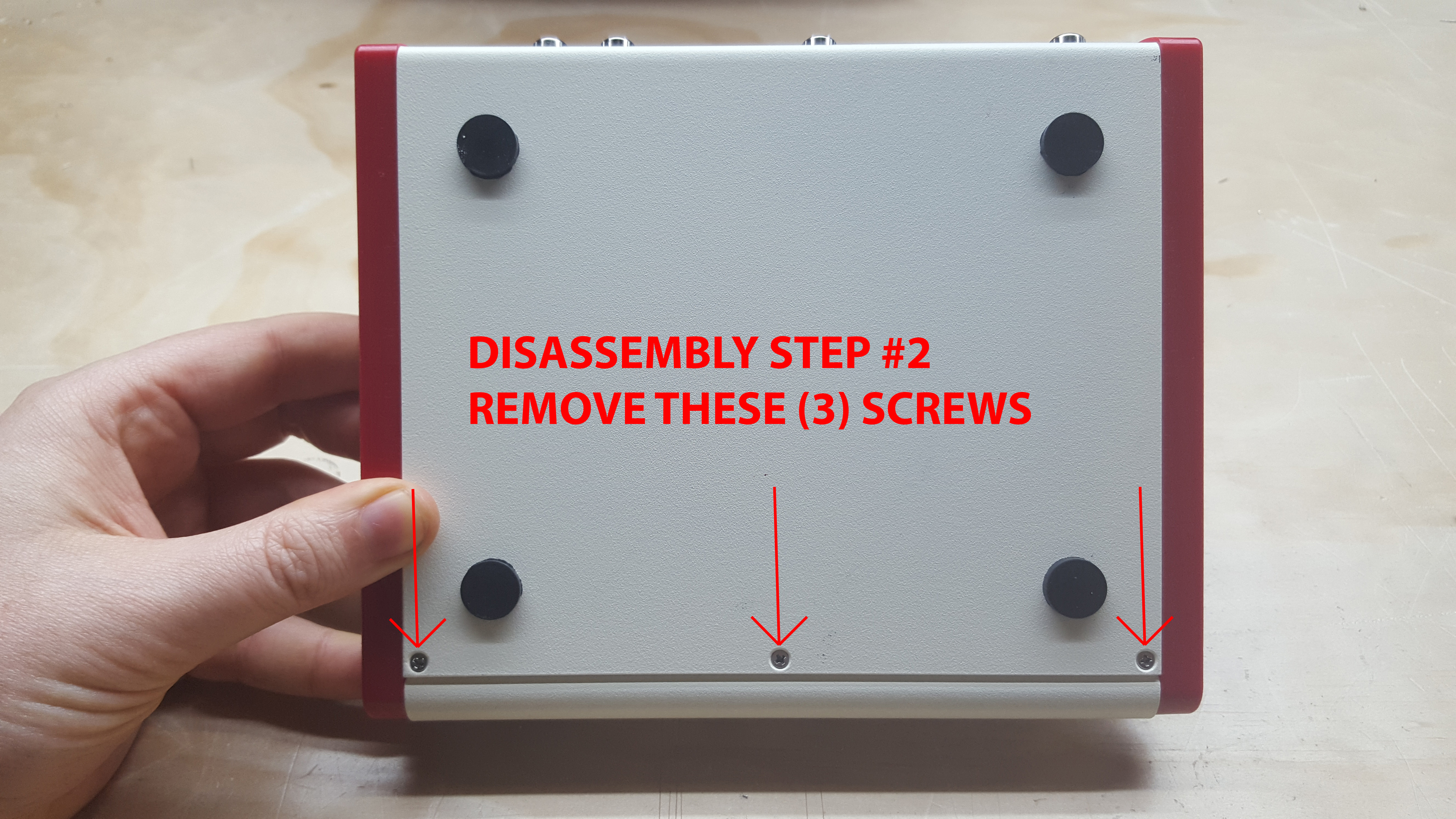
Step #3. Separate the rear enclosure piece gently, then unplug and reinstall ribbon cable exactly as shown below. Make sure cable is firmly seated on both ends.

Step #4. Reassemble your unit before powering back on.
Thread Replies
And here’s a nice video showing the fix from @7pip
How to make patterns move sideways?
Hi,
How do I (with the Vidiot) make patterns, lets say a simple line, move from side to side on the screen? It’s easy to make it move from top to bottom or the other way around by just pushing the Horizontal Sync Switch (LED indicator lit) and turning the Symmetry control all the way to the left.

But doing the other way around, pushing just the Vertical Sync Switch (LED indicator lit) and turning the Symmetry control all the way to the right results in moving DIAGONAL lines…

Also the sweet spot is EXTREMLY hard to find when in the second case. Most of the time it’s just chaos on the screen…
Thanks!
Thread Replies
I’m not sure that what you want to do is possible with only the Vidiot. I intended to explain here but am getting pulled back to work and so I don’t have the time at the moment to go into more detail — perhaps someone else will before I get back to it. The gist is that horizontal vs vertical lines require different frequency ranges and different sync timings.
yes, check in the manual what frequency range you need to move the vertical and horizontal. try with a very wide range lfo, one that can go from sub harmonic to overaudible frequencies
But the suggestion to modulate the frequency will not simply translate/scroll the lines… it will change the number of lines on the screen (and yes thereby shift them when changing frequency), but it won’t simply scroll the existing number of lines.
yeah you´re right i totally misunderstood the question. it is then a matter of the voltage you input in the horizontal and vertical sync right?
scrolling across the horizontal axis is pretty difficult to achieve in analog. you need a very stable oscillator with a very small frequency offset from some multiple of the line rate to scroll horizontally. digital oscillators are really good for this as they are rock solid without any drift. analog oscillators will drift which causes the crazy fluctuations even if you hit a sweet spot.
The Diver module I’m working on now is a different kind of video oscillator that does this. For analog VCO cores like Vidiot you need to reset the sync pulse to move the phase of the waveform. On Vidiot try getting creative with what external image you feed into the horizontal oscillators sync input.
Vidiot video input gone haywire?
Hi all,
In the past I had a very easy time getting my video camera working with the Vidiot. It was plug and play and super fun.
Now, I am unable to get a ‘still’ screen, regardless of what I try. Is my video input module fried or am I missing an obvious ‘neutral’ setting? (I used another video module as video source earlier, maybe it can have caused damage?)
The camera has RCA out, and displays fine on my projector if I take the Vidiot out of the chain. I tried still images and video, no difference. The signal is clearly coming through, I can see the image shooting extremely rapidly diagonally across the screen, with all kinds of distortion and craziness. When I unplug the camera, the crazy diagonal movement stops and all is quiet again. I think I tried all possible combinations of settings and patching. I spent many hours trying at least.
I hooked up my PS2 and it looks fine on my projector, but when the signal goes through Vidiot I can clearly see the menu screen of the game flying diagonally. There are many of them, so many smaller screens flying across diagonally. It’s like an extremely aggressive screensaver basically.
Edit: Big black diagonal bars also appear as soon as I connect the video camera, these move in the same diagonal direction at the same quick pace.
I am unable to affect direction or speed of what’s going on except by unhooking the video camera.
The video module I used is the critter & guitari video scope. Could it damage the Vidiot?
The identical setup worked flawlessly before, so now I wonder if I damaged my video input? Hopefully it is user error.
Thanks for any help!
Thomas
Thread Replies
It sounds like you have bumped your PAL/NTSC or SYNC LOOP switch. Try switching either of those and power cycle the Vidiot between each change.
I’ve done that before while fumbling around blind for the power switch. Turned it back on later and signal was totally jacked. Thought i fried it somehow
Thank you for the advice! When I have time I will sit down and power cycle patiently between changes. I was not aware this was important.
I come from the world of analog synths where, when I “lose” the audio I just twist some knobs and flip some switches until I hear sound again. No power cycling:)
Video sync doesn’t really have an equivalent in the audio world. Can you imagine having different amp formats that your line level output had to synchronize with, depending on where you live?
Yes, of course it makes sense there is much more going on inside video electronics than with an analog synth, where it’s mostly just voltages.
The Vidiot is so easy to play, it’s easy to forget there is a complex little guy inside.
It’s an amazing device, I just invested in a standalone hdmi recorder so I can create music and video without any pc involved. Using audio to affect one of the Vidiot parameters makes for great ambient and noise video scapes!
What camera are you using? Can someone please recommend a camcorder or a camera which wouldn’t cost me much? I have the same problem that my video camera input doesn’t sync to the Vidiot, I’m using a very old Panasonic MC6 camera. I feel as if I’m missing out a big part of Vidiot’s capabilities right now.
If you’re using PAL, WV-CP474E or equivalent is gen-lockable, cheap and easily available on ebay.
thanks @transistorcat, will a “Panasonic WV-CP454E” also be as good as the one you highlighted?
I haven’t tried it so i can’t really say, but it seems to have mostly the same features.
The important thing is to get the -E version to get PAL.
Hi @transistorcat , I got my Panasonic camera now, but when I connect it it is still not syncing, do I need to put a cable into the Genlock (is it an input or output?) on the camera - going where?
Thanks very much
The genlock input needs to be connected to any video source you want to sync to (typically your other input or the output of your system)
Ahh , glad to find this post . Was having the same issue at Thomas . Video input having diagonal jagged lines , flipped the ntsc switch and powered off an on Again. Back to normal . Thought something was fried.
Vidiot + Diver performance
Using Vidiot together with Diver, the quality of the edges seems to be quite poor. In the images you see Diver’s output patched into Vidiot’s key 2 input. In the Vidiot + Diver tutorial video with this exact patch it doesn’t seem to be so bad, so my main question is if this is normal or what I can consider to improve it.


Also, is it true that Diver is an NTSC device? So it is never possible to use Diver + PAL camera + Vidiot?
Thread Replies
Dirty edges like that usually indicate a noisy power supply. What power solution are you using?
Since there is no video encoding or decoding going on in the module, Diver works with Vidiot no matter if it is set to PAL or NTSC.
For power I am using a Doepfer A-100LC1.
Ok. The Diver input only looks normal when Vidiot is set to NTSC, if set to PAL the diver input looks like my PAL camera looks when setting Vidiot to NTSC…
Are you sending the camera into Vidiot and looping the sync through to Diver?
Yes that is the way I’m doing it. But even without the camera connected, Diver only seems to work when Vidiot is set to NTSC.
Ok I didn’t connect the sync cable properly  . I reattached it to the back of the Diver and now it also works when the Vidiot is set to PAL.
@mauiey Did you ever figure out why you were getting the rough edges with Diver? I’m having this issue as well, and I don’t think it’s the PSU giving the issue…
I upgraded my power supply to a Doepfer PSU3, which helped. I now also have a V4 (for a different issue described here) in the chain. Probably it does nothing for the edges but the Vidiot + Diver performance is much better now.
Ah interesting, thanks for letting me know. Strange that my Diver’s edges seem much rougher than other modules on the same PSU, but maybe it’s more sensitive because of its particular circuitry.
Differences in monitor/screen types for use with Vidiot?
Hey so I recently picked up a Vidiot and was trying to just follow along with the intro video for it on the LZX youtube channel and noticed certain things looked different and I wondered if my TV was the issue. Any time my patterns got too dense, it would tend to look blurry and fuzzy rather than simply a dense pattern.
The TV i’m using is an LED Samsung TV (like 32" or something, just had it in a closet and it’s the only screen I own with input other than HDMI). I never changed any aspect ratio settings in case that makes a difference. I was using composite (I just ordered a set of component cables after reading here that it is higher quality).
I noticed that most people use CRT monitors or LCD screens. The former is more money than I’d like to spend unless I have to (I’d rather spend the money on a camera or DVD/VHS player unless I manage to find a tube screen locally for under $100) so I’m debating trying to find a barebones LCD just to have more excuses to lose a few hours to the Vidiot or figure out if my current TV can work.
Can anyone share some insight on the advantages/disadvantages of screen types and/or ways to mitigate the downfalls of less-than-ideal devices? Sorry if this has been asked. I tried searching for “monitor” and “television” and “led” and wasn’t able to figure out the answer to my question. tia
Thread Replies
Thanks for posting. Where are you located? I see free CRTs on the curb and cheap ones at thrift stores all the time in Texas. Check out the free section of your local Craigslist!

Hey thanks! I tried searching “crt monitor” in my area (Cleveland) and didn’t find what I was looking for nor did I find anything at my local thrift store but it looks like there’s quite a few on the free section!
Is that going to give me a picture more similar to the LZX demo videos of the Vidiot? Is using the composite cable included fine?
Appreciate the suggestion. Looks like I’ll have to snag myself a tube TV and get back to toying around
Most people giving away CRT monitors just think of them as OLD TV’s! Hope you find a good one.
The Vidiot demos on Youtube are captured digitally (Blackmagic Terranex Mini- SDI out to Blackmagic Hyperdeck Shuttle 2), but there are lots of people rescanning CRT screens.
Try looking for terms that were more common to CRT owners and brands/models that were more common on CRT models, these are terms I’ve used successfully:
13" TV - a common size of small CRTs that is rare for HDTVs.
Trinitron, Wega - popular lines of Sony CRTs
JVC - Brand that didn’t make a lot of HDTVs.
PVM - Try your luck! Sony’s professional CRTs are extremely sought-after by retro gamers and video artists alike for their exceptional image quality.
I’ve found the most reliable search term for cheap CRTs is definitely “tube TV.”
That’s what people who don’t realize they might be worth something seem to call them.
Is all Vidiot functionality replicated in the Chromagnon?
That’s it. Is all Vidiot functionality replicated in the Chromagnon? I know it has a lot more but does it have all the same functionality as well?
Thread Replies
It’s a good question.
Chromagnon doesn’t have Vidiot’s independent H&V oscillators, dedicated luma processor or RGB controls, and its keying interface will be different. You will be able to achieve similar results with either instrument, but in different ways. Owning both won’t be redundant.
Vidiot into Ultrastudio HD mini?
Hi! Is there a way to go from the composite output on Vidiot into the Blackmagic Ultrastudio HD mini? I see the Ultrastudio’s analog input is component so I wasn’t sure what solution would be required to get one to talk to the other. I understand the bnc connector is not an issue to adapt to from RCA but read that composite and component signals are incompatible.
I tried looking through the forum and searching online but I am stuck in a loop without a good understanding.
I am new to this, coming from audio modular synths and a visual art background. Deeply enjoying the Vidiot and am going to pair it with a Memory Palace, so fun!
Thread Replies
Welcome to the world of video. From what I’ve read online, BMD Ultrastudio HD Mini accepts component and composite. If using composite, just connect to the first (left most) analog video input. I look forward to seeing your work, once you get it captured.
Thanks so much for that info! This box is great, I got it up and running in 15 minutes and captured some of Vidiot’s output which I then quickly layered and keyed in After Effects! Just a first doodle but I’m excited to start incorporating some of my drawings and animation. This rules
It’s not as affordable as the Intensity Shuttle but I highly recommend this capture solution for anyone who wants something that works straight out of the box without too much trouble… I wasn’t aware it doesn’t up convert to HD and I am have not yet figured out what the best way to compress for web but I’m sure I’ll figure it out
Looking good!
Have you watched this?
Thanks! Yes but I rewatched it and it was helpful for sure. I’m uprezzing my file to 1080 after compositing in the 480i timeline, but I wonder if there is any point to this? I wonder what the benefits / disadvantages to this would be. I will keep experimenting and try not worry too much about it for now since there’s a lot to learn, I considered changing my capture solution to something that can up convert to 1080 but I think I should chill on the spending, it’s getting out of hand quick
Help with Vidiot RGB Negative Mode
Please pardon this question if its something painfully noob-ish and simple. Just want to make sure everything is in good working order. Vidiot is my first video synth so still in the process of learning it. Is there a simple Vidiot-only patch anyone would recommend that demonstrates the RGB Negative Mode in action? (bullet points 61 and 71 on p.12 of manual) My assumption is that it inverts that color only in the image, but so far I have not been able to get it do anything.
I have tried patching external gate and CV into it in addition to various out’s from the Vidiot’s patch points. I have used attenuators on a Moog CP-251 to lower or boost the CV but i still don’t notice any results from any of the three settings. The same CV or gate signals that I was sending out were working fine to trigger the threshold on the Color Negative without a problem though.
If it helps at all, I am running the included RCA video cable from Vidiot’s color video out into a LCD tv.
Thank you!
Thread Replies
It sounds like you’re doing everything right! Please submit a repair request on the main website when you’re ready, we’ll get a prepaid return label sent to you so we can fix the issue here in house.
Had a feeling something was off. I will get on that asap.
thanks for the quick response!
so after two weeks of “vidioting” i ran into the same problem. at first i thought its just lack of knowledge and i´ll figure out how this works. still not shure if its a user error but there is no noticeable change when using the input and/or the switch.
do i need to send it in? or is there a quickfix?
New to Vidiot: Semi-modular Questions
Hello! I just ordered a Vidiot and am excited to begin patching. I’ll be combining the Vidiot with a V4 mixer and C&G ETC to have some fun. I’m aware that the Vidiot is modular friendly and am wondering if a Behringer Neutron and Crave, as well as a 0-Coast will be a good match for their mults, attenuverters/attenuaters, lfos, and envelopes. Have any of you tried using these semi-modulars as utilities? Are they only useful for their audio outputs? Thank you for your guidance
Thread Replies
I’m not very familiar with the semi-modulars you mentioned but generally speaking: Passive attenuators and mults should be fine. Active attenuators and mults will often be using audio-rate amplifier ICs that don’t have enough bandwidth to pass video frequencies (up to several MHz for horizontal details). You can often use audio-rate oscillators at vertical frequencies though, this works especially well with oscillators that can be hard-synced. Vidiot’s envelope follower allows allows you to derive an animation signal from the volume of any audio signal. LFOs and envelopes are great but may need to be attenuated down to the 0-1V range (you won’t hurt anything though, all LZX stuff accepts -12V to 12V input, it just generally clips at +/- 1V).
I’ll add that audio filters can often have interesting results with video images too. Detail smudges to the right, which can create color separation effects beyond what the Vidiot can do on its own. Indeed, sometimes just the slower audio-rate components on any function will create these effects (or other, unpredictable, wave-shaping).
Vidiot’s detail function also needs more than a 0-1v input signal to sweep its full range, so having some >1v signals in the mix can be helpful there as well (otherwise, it is often hard to tell that it is doing anything at all).
I’ve found my Mother 32 (similar to a Neutron, I guess) generally more immediately useful than my 0-Coast, but should probably play around more with the latter too. Definitely additional fun to be had by adding multi-functional audio modular gear to a video set-up. But a lot depends on what you want to do.
I got a neutron and use it all the time for various patches and experiments. Just one example: one of the really cool functions in the neutron is the digital LFO with retrigger input, and variable shape. These can be controlled and synched with video rate sync signals…
Another is the slew limiter that are good for smoothing audio envelope from the vidiot …
Lots og other nice features as well…
But you will need a lot of scalers, i have 7 cadet 4channel scalers in my system currently.
/
Lau
The scalers should be 5v/1v or ±5v/1v? The need for them is for better control of the 1v input (in other words, the 10v output of the neutron would not provide fine enough range for the vidiot)? Would the 1v to 5v scalers be necessary to get the signal into the neutron and then the 5v to 1v to get it back into the vidiot? Thank you for your help
Correct. You can also use Bridge.
Many Vidiot functions have attentuators, so you can get pretty far without downscaling (though it certainly helps).
You can do with using the attenuverter cv inouts on a good many of the inputs on the vidiot, but not all of them. Some will need downscaling. Use the 5v to 1v (which is actually bipolar ±5V to bipolar ±1V, to make things even more complex). I seldomly use the ±5V to 1V (bipolar ±5V to unipolar 0-1V), and the 1v to ±5V even less…
Even more important you need to upscale (amplify) the vidiot signals to go into the neutron using the 1V to 5V (which is also bipolar to bipolar) to get the right reactions (synching the LFO for instance, controlling cvs on the LFO shapes etc).
I got both a VIdiot and a 60 module DIY system to infiltrate on my neutron and other stuff, you can probably make do with less scalers then me, if you just have the neutron for now (watch out about that, btw).
/Lau
Thanks for all the help! I can tell that Bridge will be almost a necessity, but then I also need a skiff since I’ve been strictly semi-modular. The 4MS Pod looks like a good deal to go with a Bridge and maybe Maths, and maybe also a Staircase. However, that’s another few hundred dollars so I’ll see what I can get away with for now before I expand.
Vidiot not accepting input video
I have used the vidiot to process video multiple times before but now it seems to not accepting the signal. When video is sent into the vidiot it just begins scrolling uncontrollably. I’ve read a similar post and thought I had the incorrect position for the loop switch. After checking my loop switch it is in the correct position.
I’ve recently been using fortress and diver synced to the vidiot and could have possibly had the sync cables routed incorrectly. Is there risk of damaging any of the components of the vidiot when the sync cables are improperly routed?
Thread Replies
PAL/NTSC switch in correct position?
Sorry to hear you’re having trouble with your Vidiot.
What is the video signal you want to process?
How is your sync routed?
If you use just Vidiot, without Fortress and Diver connected, does it improve your results?
Yeah, it still occurs even when the vidiot is stand alone. I have the pal/ntsc switched up. I’m using the p10 as my source but other sources produce the same result.
My sync goes out the vidiot to diver sync then thru to fortress which is switched to terminate. Is the sync port above the thru on the fortress? And the diver sync is to the left of the thru?
I tested it again this morning and after switching my sync routing it worked. Vidiot sync out to fortress sync in (bottom port) then thru to diver sync in (right port) diver sync switch down to terminate. Though my relief was short lived as I powered down and up again and the scrolling returns. So I’m still confused…
I appreciate you all looking into this.
You had it working for a second, that’s a good sign.
Could you try powering things on in this order? Video source, Vidiot, eurorack case.
I again swapped my sync route and it seems to be working consistently.
I’ll power on in this order from now on.
Thanks Chad!
Really digging how fortress and diver pair together by the way.
Sync is tricky, isn’t it?
Very good to hear you are taking advantage of Diver + Fortress. Post some pics or videos, when you have a chance?
It is still something I’m trying to understand but there’s a lot of info on here.
I’m excited to get memory palace in the mix. I’ll have to do a bit more reading about syncing mp before November.
Will do!
Do I need an upscaler
With the following setup I get an unstable video signal (see below):
Vidiot > BMD Mini Converter Analog to SDI > BMD Video Assist 4K
But this setup works very good:
Vidiot > BMD Mini Converter Analog to SDI > Edirol V4 > BMD Video Assist 4K
I know using an upscaler after the Analog to SDI converter is recommended, but I prefer not to buy one because I figured it would be useless when my Chromagnon arrives with its HD output.
@Z0NK0UT do you already know if it is still recommended to use an upscaler when the Chromagnon is here? Not for the resolution but could it be the V4/upscaler create some sort of stability?
Main reason I’m asking is because I’d rather get rid of the V4 and get an upscaler as soon as possible, for portability reasons and because then I don’t need to wait with recording in HD until Chromagnon arrives. But even then I’m not even sure if an upscaler could fix this problem?
The artifacts I get when not using the V4:

Thread Replies
I think the V4 is contributing frame synchronization and stabilizing some Vidiot timing that Video Assist doesn’t like. Vidiot is a rowdy little box. Chromagnon should adopt the role your V4 is playing in this instance.
What if you sync the Vidiot to the V-4? Simple as putting one of the V-4 outputs into the Vidiot input. I find that my Vidiot has trouble generating stable sync by itself, but it locks to incoming sync better.
Allright, thanks @Z0NK0UT then I’ll wait it out.
@Genlok that also works!
Vidiot - no video input :(
Hi guys,
Very happy to have snapped up one of the last Vidiots recently, and have loved playing around with it.
Sadly, I haven’t been able to get the video input to work successfully. I’m using an old Sony Handycam Vision Video 8 XR (CCD-TRV27E - PAL).
With the composite in/out cables already connected, I instantly lose the main video output from the Vidiot as soon as the Sony is powered on. With the camera still on, main video out from the Vidiot returns as soon as I take out the video input cable. This happens whether I’m outputting to a TV, or to a Blackmagic interface.
I’ve tried swapping out composite cables and changing the NTSC/PAL & loop switch positions to no avail. Am I missing something?
Thanks in advance

Thread Replies
Sorry you are having trouble with Vidiot.
If you are using a PAL camera, you will want to switch Vidiot to PAL mode and turn off the sync loop through switch. Then power cycle Vidiot. Are you also using a PAL monitor (or PAL setting on your Blackmagic interface)?
What happens when you plug the camera directly into your monitor or interface?
If you aren’t playing prerecorded video from your camera, you will want to open the lens cover (it is closed in the photo).
Definitely set the Vidiot to PAL as the pic appears to show it set to NTSC. It should still display something though.
Does the video output fail regardless of which mode the Vidiot is in or only in the eye/camera modes? If it’s the later, have you tried messing with the with the left-most controls to see if it’s simply set to light or dark?
Also do you have any other analog video sources to try? Old dvd player, game consoles?
Hi guys - thank you for your quick responses. Turns out it was mixture of things causing the issue:
- Blackmagic interface wasn’t configured to PAL
- I hadn’t tried power-cycling the Vidiot after changing switch positions
Vidiot is now switched to PAL will loop switch in the up position, and video input is working as expected - problem solved  thank you!
Vidiot suddenly not powering up
Hello, my Vidiot just now stopped powering up.
It was powering up less than an hour ago, but I was only getting pure white video output. I tried swapping out cables, then I went through all the switches on the back, double checking NTSC/PAL, etc. This involved multiple on/off power cycles. Suddenly it stopped powering up.
I was powering it via a USB 5V cable, I tried switching to the factory Vidiot power supply and still no luck.
Is there anything else I can try at home? Any thoughts what this might be?
Thanks for any help you can offer.
Thread Replies
Sorry to hear it. Sounds like you have a fried/failed power component.
Please send a message to support@lzxindustries.net to open a support ticket.
Thanks, I’ll do that.
mine did this too; i assumed it must have got plugged into a 9v supply because i didnt imagine it would just stop working when i was still a new user, but i can’ actually recall that happening. would be interested to know what the issue is or how to fix it because, being a uk customer, seems expensive and long to send it off for repair. it bust just as covid hit, near the end of it’s 1 yr warranty so i just couldn’t get it together to send it off at the time… hope you get it fixed, best wishes for '21
Diver plus vidiot
Hi I was wondering if I could use the Diver with the vidiot? Thanks
Thread Replies
Greetings. Diver would be a really fun module to use with Vidiot. You could use it as a ramp generator to make Vidiot’s patterns more complicated. Or use it as a way to visualize audio signals through Vidiot. Have you watched the Diver demo video? You can pretend that Johnny is using Vidiot instead of Prismatic Ray and Visual Cortex. The results with Vidiot would be very similar to what he comes up with in the video.
Memory Palace Questions
Hello
I’m wondering if I will need any additional modules to process a video signal sent from the vidiot’s RGB outputs into the memory palace?
I also am curious about the midi implementation of the memory palace. Is it possible to change the CC#’s that control the sliders of the memory palace?
Unfortunately the controller I would be using sends specific cc#s and only two(3&9) are able to control the default cc’s for the MP’s sliders.
Thanks!
-J
Thread Replies
You can patch right out of Vidiot’s RGB jacks into Memory Palace.
You won’t be able to change the CC#'s with the current firmware. Later versions may make it possible though.
That would be perfect for my setup. I’m trying to control my current setup for solo A/V gigs with the MPC Live but seemingly it won’t let assign certain cc#’s.
Does LZX have or plan on making more modules with midi implementation?
Vidiot sync alternatives?
Hi everyone!
Well, i´m using vidiot and visual cortex. i use VC as a master and Vidiot as a slave. I can synchronize them without problem but i would like to know if there is a possibility to use the 1/8¨ video jack input (luma input jack) in the rear panel of vidiot to receive sync signal from VC.
Actually vidiot receive sync signal from VC through the video RCA input, and i would prefer to use this input for other things like feed a videocamera to do feedback.
is possible to use the luma input jack to sync ??
thank you!
Thread Replies
Vidiot can receive sync signal from Cortex by using any of Cortex’s 3 video outputs (2x CVBS Composite or Y/Luma).
Navigator Plus Vidiot
I’m thinking of adding a navigator to my vidiot and am wondering what to expect from the navigator when processing external video. There’s only one video I found on youtube showing color changing of the external video. I think a bridge and a staircase may also be necessary to get more pattern effects, but I’m trying to do one thing at a time. If you have experience with the vidiot and navigator working together could you please provide your insight?
Thread Replies
Also, tips/insights for patterns generated on the vidiot using only the navigator would be welcomed also. I’m new to video synthesis but I’m excited to be getting into this world. I’ve watched all of the videos on youtube about the navigator, but found most of them to involve several other modules so I’m really trying to get my head around what the pair of vidiot and navigator can do alone. Thanks!
It should be a fun pair. Have you seen this?
Indeed! That’s actually the one that made me buy it, but now I’m looking for more examples/ideas
Cool. You’ll have fun experimenting with the pair. If you find a novel patch, please post your results.
Will do! I picked up a few more modules so I’ll see what I can come up with
What is the Vidiot shape knob doing?
I searched on the form but can’t find a straightforward answer. What exactly is the Vidiot’s shape knob doing?
Thread Replies
It controls a crossfader between the horizontal and vertical oscillators, using different oscillator outputs for the diamond (triangle outputs) or circle (sine outputs). If you patch the H and V triangle outputs from the Vidiot to a Cadet crossfader and sweep the knob, the result looks identical to sweeping the Vidiot shape knob and looking at the Vidiot diamond output.
CV control over the shape knob seems like an odd omission on the Vidiot, it’s such a effective modifier.
Totally. Wonder if there’s a way to mod it…
the shape knob is a rotary switch (if I remember correctly) so CV control is more difficult probably
The Cadet Fader module does it. If you have any interest in DIY I highly recommend the Cadets as a way to expand the Vidiot. The parts sourcing is not fun but once I had all the parts I had a great time assembling them and learned a whole lot about how the Vidiot and video synthesis works. It also made me appreciate how much value goes into the LZX commands.
You could also use the fader in Bridge or Pendulum.
IDIOT QUESTION: Vidiot and RGB Encoder
Just to get this one thing out of the way first, I’M NOT SMART! So please forgive me if this is a stupid question.
Ok, I have the Vidiot as my main LZX “module.” I don’t have an RGB Encoder do I? I noticed on Visual Cortex and Chromagnon that there are separate RGB ins. The Vidiot only has separate RGB outs and RGB cv inputs. I have some modules that seem to require RGB ins. What can I do? Is there a module I can buy (like Mapper or 3rd Party) that will give me these RGB ins?
Please don’t be shy if the answer is obvious because I don’t see it. In fact, most of the video stuff confuses me to no end. Please help.
Thanks 

Thread Replies
Vidiot’s frontpanel RGB CV inputs are just like any RGB inputs (since all RGB inputs are CV inputs). Just patch into Vidiot’s RGB inputs with the knob position at 12 o’clock and adjust the attenuation rings to taste (fully clockwise and the RGB inputs behave like jacks without attenuation). Have fun!
Awesome! Thank you so much 
Would filming a screen in 4K look good blown up?
Hi. If I filmed the Vidiot’s output, which is 576, off of a large screen with a 4K camera, would that look better blown up on a big screen vs. just outputting the Vidiot to a big screen?
Thread Replies
It really depends on what you understand by better. Bear in mind that filming a screen, even if done with a high-resolution camera, doesn’t output the same result as using the actual video from vidiot.
There are several things to take into account. What type of screen will display the vidiot and how will it affect the original footage? Every screen is different.
Same thing for the camera. How well does it interact with the screen and what type of characteristics does it add to the video?
I don’t own a vidiot but from my experience with the Visual Cortex, the output is good enough to be used on a high resolution television without noticeable or damaging artifacts. This naturally depends on the television used.
In this particular case, the best result is probably obtainable by using hardware upscalers.
PS: try it out and see for yourself, maybe you will like the result! CRT televisions add glow and lines to the video which can be very appealing. If you do try it share the results here
I definitely think it would! I’ve had great results rescanning in 4K with my Blackmagic Micro Studio Camera genlocked to the video source.
Questions regarding Vidiot digital to analog to digital workflow
Hi there!
I’m a director working on a short film that mixes digital and analog effects. I was lucky to find an authorized reseller with Vidiot units in stock, and I’ve been combing through the forums and doing a lot of research on the workflow to get the digital signal converted to analog and back without having to re-record a screen with another camera. I still have several doubts though, and I was hoping the community could provide some insight.
The theoretical setup would be as follows:
- Signal out from my computer (2013 MacPro) via thunderbolt to a Blackmagic Intensity hub
- Intensity output to Vidiot input
- Vidiot colorizer output to Intensity input
- Intensity back to computer for re-recording via BM recorder software or similar
Thing is, I’m not 100% sure if this chain will work at all. I’m also not sure what kind of cables I would need to go from one link in the hub to the next and back, asides from the thunderbolt cable to go from the computer to the Intensity. Not sure if I need cables that can convert from composite to thunderbolt or similar, etc.
Here’s an example of the effect I’m trying to create:

This was done using Lumen, but I’m really hoping I can find an analog solution with the Vidiot. I think the result will be several orders of magnitude better if I can get it working.
Thanks in advance. Cheers! -Carlos
Thread Replies
from what I can tell you need 2 intensity shuttles as the intensity shuttle will only do 1 direction at a time
from mac -> thunderbolt cable -> intensity shuttle 1 -> component rca -> vidiot input
from vidiot output -> component rca -> intensity shuttle 2 -> thunderbolt cable -> mac
NB I own neither a BM Intensity Shuttle, nor a Vidiot
Welcome Carlos. Jim is right that the Blackmagic Shuttles can only operate in one direction at a time. To do in/out concurrently with them requires one for each direction needed in your signal path; one for output from the computer to the Vidiot, and one for input back to the computer from Vidiot.
Hey guys, thanks for the answers.
Didn’t know that about the shuttles, which certainly complicates things. Not to mention pricey.
Is anyone aware of a more streamlined solution for this kind of post-production work, i.e. processing ProRes footage?
That is the ‘streamlined solution for this kind of post-production’ work
cheaper can work but may not be good enough for what you want - everything else is way more expensive
have a search on this forum there is quite a bit of discussion - links etc
Thanks. Like I said I’m completely new to this type of equipment and I’ve been going through the forums to try and figure out how to get this working. I also contacted LZX to see if they could provide some insight, but I was hoping someone in here might have some experience with what I’m trying to do and could walk me through it.
When you say “component rca”, what kind of cable are you referring to specifically?
Also, one of the things I’ve been reading about with the Intensity is that it can be a bit finicky when sending video out to a Vidiot depending on the format, framerate, etc. I’m going to be processing ProRes 4444 files @ 24FPS, any idea if that would be supported?
I’m sure a lot of these q’s seem like no-brainers, but I just want to make sure I have all my t’s crossed and i’s dotted before making the investment.
you’ll probably need to convert to PAL or NTSC
component rca cable is a triple rca cable
you might need composite though
as I said I have neither of these things
Hey guys, thanks again for the replies and all the help. I’m going to be putting together the setup Agawell suggested: 2x Shuttles, 1x Vidiot. Besides the thunderbolt cables, I wanted to double check this is the correct type of component rca cable I’m gonna need:
Any type of male RCA cable will work, but I prefer cables that are not bundled together.
Vidiot - slow scrolling wobbly
When I use the right oscillator for scrolling animation, it can become pretty wobbly at slow speeds.
I’m still getting to know the vidiot, so I’m wondering if this is normal behavior or not?
example:
(edit: it seems to be connected to what speed the left oscillator is set to, even though I’m not using that oscillator for anything)
Thread Replies
Seems like an odd issue – occasionally wobbly drifting speed is normal, but the little jumps you’re seeing here aren’t something I’d expect. Is this with nothing patched?
Here is a picture I took of the patch used when recording the video above:

Sync cables jammed up Cadet modules
I’ve found that when I tried to use the LZX Video Synch distribution cable with my Cadet modules side by side in the case that I don’t have enough space. Currently I need at least 1-2 hp between each Cadet or Castle to keep from overcrowding.
I’m building one of Martijn’s (Reverselandfill) buffered sync busboards as a way to get around the crowding. To get this working all I would need then is a master synch from Cortex to the busboard, and then individual 2.54mm Pitch 14 Pin Female to Female IDC cables to each module?
Thread Replies
jep!
14pin sync from VC to the busboard sync input.
16 to 16pin power cable from your power busboard to the sync busboard
and then you have 10 x 14pin buffered sync connectors for connecting your commands.
You can cut off/remove the strain reliefs on the sync distro cable to get it to fit between Cadets.
Vidiot Vertical Scroll Issue
Hey yall!
I have been having an issue with my Vidiot, when I create a pattern that moves vertical the pattern jumps or jitters for example the pattern moves 3 frames down and then jumps back up a frame and then continues down. Creating kind of a nauseating effect and that I can’t seem to get ride of. I have nothing patched into it and I have ran it thru a v4 and v4ex and gotten the same issue. It doesn’t do it as bad if i go straight into my bm analog->sdi converter but I get a bunch of little glitchy bars. Plus my setup i really need it to run thru my mixers.
Here is a short video of it.
and another
Thanks,
JS
Thread Replies
This might happen with certain patches. Could you post a photo of your patch?
Do you get the same effect at all scrolling speeds?
Yeah I do get it with all speeds, some speeds just exaggerate the effect more than others.
Here is a pic of the patch:


Here is a video of that patch the only thing I screw around with is the right oscillator to get different speeds of scrolling.
Jason at LZX HQ thinks it can be improved. Send a message to support@lzxindustries.net if you would like to send it in.
Vidiot loop thru
Hi all. When I have a camera running into the Vidiot and I toggle the loop thru switch it blows out the highlights, is that normal? The image will look fine when loop thru is off, but when I toggle it on the image image brightness (and maybe contrast?) increase significantly and needs to be adjusted. (Toggling the loop thru without anything plugged into the sync out also creates weird banding.)
Is this normal operation?
Thread Replies
That is a normal quirk of Vidiot’s design.
Does the loop thru switch choose whether the loop thru jack’s output is terminated with a 75 ohm resistor to ground or not?
Yes, you are correct.
Vidiot as sync generator to MP = B/W analog out image?
Hoping everyone is doing well with all that is going on.
Got a question on some behavior that seems peculiar.
When my MP is getting sync from Vidiot with composite or s-video output plugged directly into CRT the image is in black and white. The DVI/HDMI out is color though. Unfortunately new MP firmware did not fix this if that is even the issue.
If I run MP composite output into Structure then have Structure composite plugged into CRT the image is in color. ?!
Is this expected and the Vidiot just not a suitable sync generator for MP? Or is there some kind of trick to make MP output color in this scenario. I find image quality on s-video notably better and in general would like to use MP as output. Also, the primary reason I’m using Vidiot as sync generator is to get a camera patched into my system (I don’t have a Cortex & waiting on TBC2)
Thanks for any help or clarification on this!
Thread Replies
Losing color is a strange behavior. What camera are you using? Do you have Vidiot’s sync loop through turned on? Are you patching the Vidiot rear RGB outputs to the RGB inputs on Memory Palace?
If you have Palace set to internal sync, is S-video still black & white?
After some more testing tonight, it seems the black and white MP analog video output is caused by using Vidiot as master sync source for MP. Everything seems fine when Vidiot gets sync from camera(or anything else).
For example, if my cheap mini security camera is plugged into RCA video in on back of Vidiot with loop thru switch on or off, and system is getting sync from the back panel RCA sync out/loop thru, luma or chroma, MP analog outs are in color.
If no camera or other sync source is plugged into Vidiot, using it as master sync for system causes MP to be in black and white when analog outs are going directly into TV (but color if patched into Structure)

I have the Vidiot patched to MP with 1vRGB and when internally synced, MP behaves as expected.
I can certainly work around this if its normal, just seems weird. Hopefully this explanation makes some sense. It’s gotten late 
On a somewhat related note, is it possible to get rid of or adjust the borders around tiled image as seen in attached image?
Thank you!
Excellent. Glad you found the path!
Aside from the black & white issue, everything sounds normal–including the borders, which are an anomaly of the Vidiot/Memory Palace combo (and are a byproduct of Vidiot’s sync output).
Vidiot Luma Processor issue
Hello - I’ve been having an issue where I’m not getting a signal out of the Luma processor RCA output Everything else seems to be working fine. I’ve tried both positions for the Loop Thru switch, but no luck. I have a couple of questions:
-
Could this be due to the ribbon cable issue I’ve read about on here?
-
The CRT I’m using for a feedback monitor has a black-and-white mode. I’m wondering if taking the output of the “Sync Out/Loop Through” RCA jack into the feedback monitor (in black-and-white mode) gives me the same signal I’d get from the Luma Out?
Thanks for any help!
Thread Replies
Sorry to hear you are having trouble.
What is your patch like on the LUMA side? Could you post a photo? Are you seeing only a white screen at the output?
If you are unable to see anything at the LUMA out under any conditions it would be best to contact support@lzxindustries.net to arrange an RMA.
At this point no Vidiots should have reversed ribbon cables. You wouldn’t get a coherent output from either output jack if it was reversed.
The LUMA output is only available from the LUMA output RCA jack. The loop through output is an unprocessed signal.
Thanks for the quick reply! I get no output (just a black screen) from the LUMA side no matter the knob/switch settings or what I have patched in. Will send some video via email
How to make Vidiot output symetrical?
I’d love to make symmetrical designs with my Vidiot. Mirroring the screen, or a kailedescope style multi-axis design. (Making the output circular somehow would also be nice.) I don’t think there’s a way to achieve this with the Vidiot alone, but if there is I’d love to know. Is there another module or device that can do this? I’m a little lost reading the LZX module descriptions as to what they actually do. I think Diver might do this, and maybe Arch? I’d love to know more.
EDIT: right after posting this, I watched the excellent 3 patches video for navigator. It seems like that would do what I want. I’m also wondering if Chromagnon has similar capabilities.
Thread Replies
it will take some outboard gear.
an Edirol V-4 or V-8 would do that as well as a Roland VR-3EX.
You might like Memory Palace!
Can I use the Andor 1 media player with Vidiot and other video synth modules?
Yes. Andor 1 can send Composite Video (NTSC & PAL) via a 3.5mm TRRS to A/V Cable (included with the deluxe version.) It may be used to input video to Visual Cortex, Vidiot, and Cadet III Video Input. Color input can be achieved with the upcoming Orion TBC2 module or with Visual Cortex and an external Composite-to-Component YPbPr video converter.
Sync Issue with Vidiot Composite Output
I was helping a friend figure out how to record from his Vidiot to a computer and ran into what I’m assuming is a weird sync issue.
I have a system built around a Visual Cortex and use the Blackmagic Analog to Digital Converter + Blackmagic UpDownCross HD. I can take a composite signal straight out of my Visual Cortex and record no problem. I thought it would be really easy to do the same with his Vidiot, but I couldn’t get any signal. If I ran the composite out to a CRT is showed up just fine, but not through the Blackmagic converters. The Vidiot was definitely switched to NTSC (I tried PAL also) and I tried both the sync loop through settings.
Finally, I went and got my V4 and tried running it through that. It worked perfectly through the V4, but still no signal going directly from the Vidiot. My friend doesn’t own any sort of video mixer or DA and would like to get started with just the Vidiot. Any thoughts on what the issue could be?
Thread Replies
If you are able to get a clear Vidiot signal with your V4 and CRT, then it must be the settings on the Blackmagic device(s) that are causing the problem. If it were a sync issue, you would be seeing an unsynced (scrolling) signal, rather than no signal at all. Some people have had issues setting up various Blackmagic devices; there might be some good advice in other threads here on the forum.
My Vidiot has a lot of trouble generating its own sync and this causes issues when I try to capture its direct composite output with a BM Intensity Shuttle. Similarly to your scenario, running it through a mixer fixes this.
Without a mixer, I’m also able to resolve the capture issue by externally syncing Vidiot with a video source plugged into the composite input. I’m just using a camera but any composite video source with stable sync seems to do the trick.
Vidiot NTSC/Pal Switch placement differs from Manual
Hi all,
I just got my Vidiot last week and started playing with it.
I noticed that on my unit, the NTSC/PAL Switch and Video Loop Thru Switch are inverted. The labeling on the back of my unit differs from the Vidiot User manual and the Vidiot photos on the LZX site. I’m including photos of my unit and the manual.


I’m wondering if my unit was mis-painted, the Vidiot specs were revised during manufacturing, or if my unit is defective. Does anyone know how to shed some light on this?
(I’m new here, so forgive me if this has been answered. It didn’t turn up in a forum search.)
Is there a simple patch/test I can do to confirm what these switches do?
Thanks,
Bishbosh
Thread Replies
Your Vidiot is correct; the manual has an error.
Thank you for the quick answer!
Vidiot loose knob issue
Hey all,
I have had my vidiot for a few months now and have just noticed that the left top knob for the horizontal is very loose, wobbles around and comes off with no force.
This is the only one that i have the issue with! Its been lose since i received the unit, but it only now just slides off with the slightest pull.
Is this a common problem? and whats the best way to fix it! (Don’t want to find myself losing it at a gig  )
)

Thread Replies
Hello.
Could you please send an email to support@lzxindustries.net?
Sure ill send one through now
Andor 1 - Vidiot sync issue?
Hey all,
I just bought an Andor 1 to serve video clips to my Vidiot. The problem I’m having is that the Vidiot does not seem to lock sync with the video file from the Andor 1.
I connected it through the video in/out and used the loop function to bypass the Vidiot, however just being plugged into the Vidiot messes up the signal. If I connect directly from the Andor 1 to the projector, everything is fine.
Can anyone let me know what might be wrong?
Thank you!
Thread Replies
Sorry to hear that the Andor/Vidiot combo is giving you trouble.
Be sure to turn off “loop through” on Vidiot, since you are not passing sync to another device. Sometimes it helps to power cycle Vidiot after doing this.
Are both Andor and Vidiot set to the same format (NTSC or PAL) as your monitor/projector?
Vidiot stuck in white screen
hello,
we are stuck in white with an brand new vidiot device.
the first minutes after unpacking it reacted quite well also with camera input but after an couple of minutes we got stuck in an white screen. no mater what ever we do.
the center led indicator is always on.
very very rarely we get a picture by it self, the center led indicator turns of. but this state wont last long.
we tried to repatch this example https://www.youtube.com/watch?time_continue=6&v=Lngn4w46EdA without successes.
we haven’t attached any external device yet. except one camera to the dedicated cinch input.
we tried the included patch-cables with the device itself considering input/output directions.
so we come to the conclusion something must be wrong ? maybe a bad contact in the normalization chain or a bad solder joint ?
thanks for any help in advance !
Thread Replies
Sorry to hear of your Vidiot troubles!
Where are you located? What sort of monitor are you using? Have you tried switching between NTSC and PAL formats?
thank you for your reply.
it’s an old professional sony video monitor with composite input.
yes. we tried ntsc and pal.
its erratic behavior (suddenly showing an picture and suddenly falling back to white) feels like an loose connection.
we are located in germany.
Thanks for the info. It seems best to open a support ticket. Could you send an email via the LZX website?
Vidiot stacked knobs sticky
hi there! (hopefully this is the right place for this)
just got my vidiot in yesterday, and I cannot be more excited! one thing i noticed though is that when i twist some of the bottom stacked knobs, the upper knob will also rotate as well. is this something that will go away with use? or do i need to send this back to get looked at?
thanks!
Thread Replies
Hey there! There’s supposed to be a nylon washer between the two knobs, which prevents this. In our rush to get units out last week we may have forgotten to install them. If you could contact us via repair ticket with your address (Contact -> Repair) on the website and description of the issue, we’ll send you some of the washers. In the meantime, if you slightly pull the top knob up, you should be able to spin them freely (temporary fix until we get you the washers.)
thanks for getting back to me so quick! i don’t see a specific repair section under Contact, should i just submit the ticket using the form under contact us?
Yes, that’s fine! Or just send e-mail to sales@lzxindustries.net
ok will do! thank you very much.
Vidiot bottom left knob issue
I have a vidiot that has a very stick bottom left corner knob. The top of it does not spin freely like every other knob on the unit. Turning the top turns the bottom as well. I also do not have a full range to turn it, it just gets super tight. I was told to ask here. Thanks for any help!
Thread Replies
Thanks for the message. Does it help to pull up on the top knob body a little, so it doesn’t rub? It sounds like the knob is just pushed down too far.
Vidiot tv sync issue?
All the sudden my vidiot has an issue where there is a horizontal scroll when it is plugged directly into a tv with no patch and both oscillators locked. It’s fine though when plugged into a video mixer? Any ideas on how to fix this?

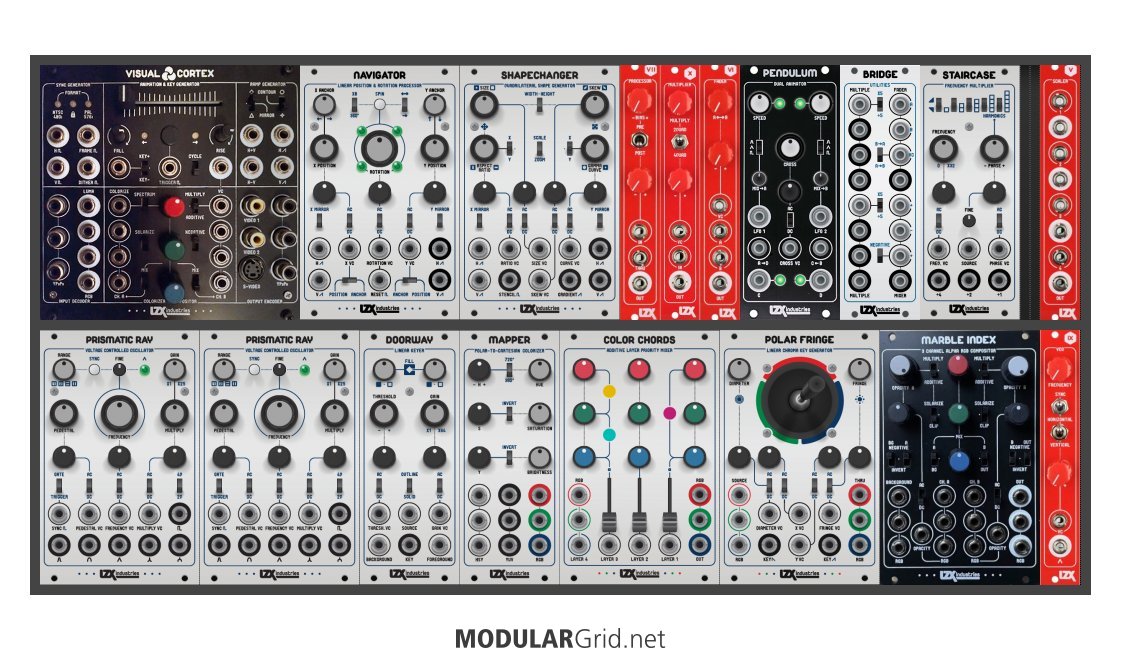
Thread Replies
Sorry to hear the Vidiot is giving you trouble. Have you checked the PAL/NTSC switch to make sure you are in the correct format? Have you tried changing the sync loop-through setting on the back? Sometimes it helps to power cycle Vidiot after changing those settings.
Vidiot Audio Input
Hello, I have a question about the audio input of the Vidiot. I’ve noticed that if I have a patch going from the ear/audio input to anything, it reacts as if it were a square envelope. There is no smooth movement between modulation. However, when I put a patch jack in loosely I can see more interpolation between modulations. I see a smooth transition/envelope for the modulation. I’ve tried turning down my sound source. This doesn’t help. Does anyone else experience this behavior? It doesn’t seem right. I would expect the modulation to reflect the audio input dynamics with a smoother transition between modulations.
Thread Replies
It sounds like you might have a jack that is wired backwards. Could you send a message to support@lzxindustries.net ?
Discuss on the Vidiot forum hub · Search forum for Vidiot · Search forum