Teletect Enhancer
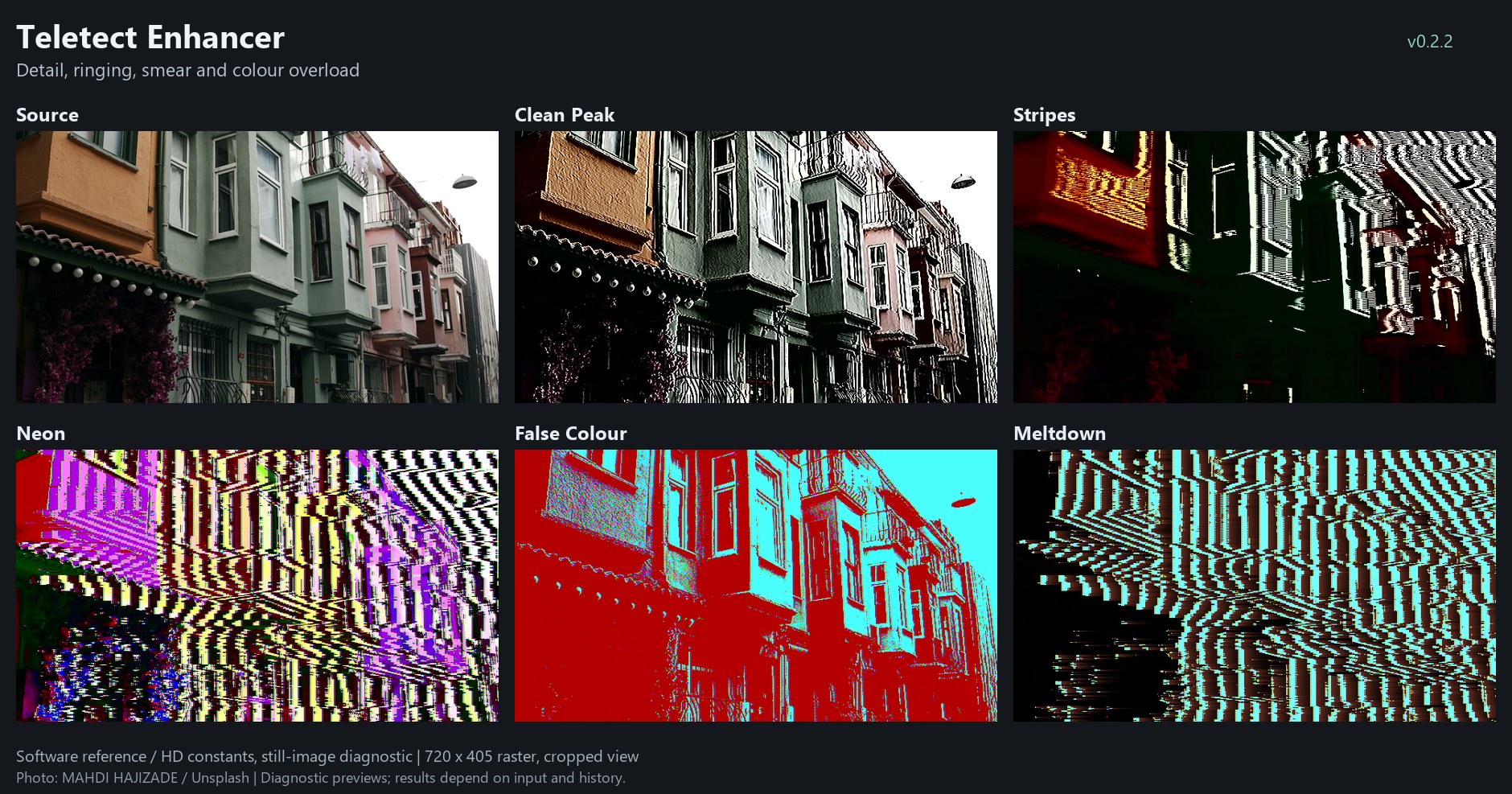
Teletect Enhancer factory presets on one photograph: Clean Peak, Stripes, Neon, False Colour and Meltdown. Software reference renders; your results depend on the source.
Overview
Teletect Enhancer is a digital, artistic take on the circuit-bent video enhancer: the cheap consumer "detail" boxes (Archer, AVE MOD and their relatives) that video artists open up and rewire for overdriven sharpening, ringing ghosts, smeared color and blown-out highlights. A clean Enhance core sharpens and drives the picture into a clipper. Four switchable branches (Clip, Echo, Ring and Chroma) add the misbehaviors of a bent box, and one Variation switch picks the flavor of every branch you have engaged.
At low settings Enhancer is a usable detail enhancer. Turn it up and edges ring, colors tear along brightness boundaries, highlights flare and streak to the right, and the echo branch can turn bright areas into black-and-white stripe oscillations.
Note
Teletect Enhancer is a processing program. It needs a source connected: a camera, playback, or another Videomancer program upstream. It works on the digital YUV picture: it does not simulate a composite decoder, and it never alters sync.
What’s In a Name?
Teletect is the author’s name for this family of programs. "Enhancer" is the consumer-electronics name for a video detail processor: a box that boosts edges to make tired tape copies look sharper. Bent enhancers are a staple of glitch video because their peaking and clipping stages are so easy to push past their design limits.
Quick Start
-
Load the Clean Peak preset. Edges are crisper, but the picture is otherwise normal.
-
Raise Enhance (Knob 1) slowly. Contrast hardens; past about two thirds the picture becomes a hard black-and-white threshold.
-
Turn Bias (Knob 4) either side of center to choose what goes black and what goes white.
-
Raise Ring (Knob 2), then switch Ring Branch (Switch 9) On for trailing ghost edges.
-
Raise Chroma (Knob 3) for over-saturated color and rainbow fringes, then try Variation (Switch 10) in both positions.
Parameters
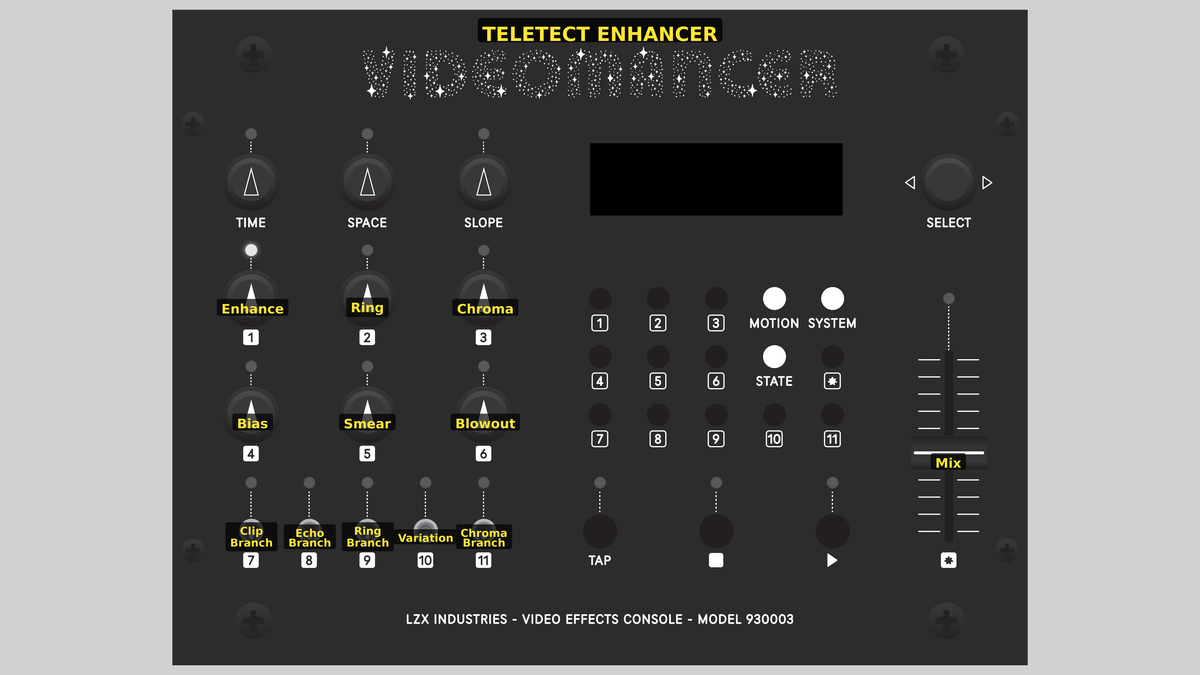
Videomancer’s front panel with Teletect Enhancer active.
The controls are arranged in columns. Read each column from the top knob down to the switch directly below it: the left column is drive and clipping (Enhance, Bias, Clip Branch), the middle column is ringing and smear (Ring, Smear, Ring Branch), and the right column is color and overload (Chroma, Blowout, Chroma Branch). Switch 8 (Echo Branch) and Switch 10 (Variation) sit between the columns.
Knob 1 — Enhance
| Property | Value |
|---|---|
Range |
0% – 100% |
Default |
34% |
Enhance is the drive into the clipper. At 0% the core runs at unity gain and the picture is clean. Turning clockwise adds up to six octaves of drive (about ×62), so the top of the range is a hard black/white threshold. Enhance also raises color gain together with Chroma and tightens the soft knee of the clipper.
Knob 2 — Ring
| Property | Value |
|---|---|
Range |
0% – 100% |
Default |
39% |
Ring sets edge peaking, up to ×3.75. With Ring Branch (Switch 9) on, it also sets the level of the resonator trail behind each edge, up to ×7.5.
Knob 3 — Chroma
| Property | Value |
|---|---|
Range |
0% – 100% |
Default |
29% |
Chroma raises color gain (up to ×12 with Enhance, hard-clipped), adds rainbow fringes along brightness edges, and triggers color tearing at edges. The tearing threshold falls as the knob rises. With Chroma Branch (Switch 11) on, Chroma also sets the depth of the color lag or the luma/chroma cross-coupling.
Knob 4 — Bias
| Property | Value |
|---|---|
Range |
-100% – +100% |
Default |
0% |
Bias is neutral at its center, with a small dead band. At low Enhance it acts as a black-level offset. At high Enhance it moves the clip threshold: it decides what goes black and what goes white.
Knob 5 — Smear
| Property | Value |
|---|---|
Range |
0% – 100% |
Default |
0% |
Smear fades in a short blur over the first half of its travel and a long smear over the second half. Color smears farther than luma. With Echo Branch (Switch 8) on, Smear also sets the echo or oscillator feedback amount. Smear does not change the rate of the ringing or echoes; those time bases are fixed.
Knob 6 — Blowout
| Property | Value |
|---|---|
Range |
0% – 100% |
Default |
0% |
Blowout lowers the highlight threshold. Highlights expand, flatten and streak to the right as a trailing overload, and either bleach or erupt in color depending on Variation. Above about 60% the overload decays four times more slowly, so the streaks get much longer.
Switch 7 — Clip Branch
| Property | Value |
|---|---|
Off |
Off |
On |
On |
Default |
Off |
Clip Branch adds a second clipping behavior. With Variation 1, whites fold back over a Bias-dependent rail (they invert). With Variation 2, values below a Bias-dependent threshold collapse to black and lose their color.
Switch 8 — Echo Branch
| Property | Value |
|---|---|
Off |
Off |
On |
On |
Default |
Off |
Echo Branch adds feedback echoes, with Smear as the amount. With Variation 1, edge contours repeat and feed back through the clipper, producing stripe trains. With Variation 2, a picture-gated oscillator draws black-and-white stripes wherever the picture is bright, with alternating line taps.
Switch 9 — Ring Branch
| Property | Value |
|---|---|
Off |
Off |
On |
On |
Default |
Off |
Ring Branch adds a resonator trail, excited by edges, to the core peaking. Variation 1 gives a tight ringing trail; Variation 2 gives an inverted, wider and longer trail.
Switch 10 — Variation
| Property | Value |
|---|---|
Off |
1 |
On |
2 |
Default |
1 |
Variation selects the flavor of every engaged branch and the color behavior of the core:
| Section | Variation 1 | Variation 2 |
|---|---|---|
Ring |
Tight ringing trail |
Inverted, wider, longer trail |
Chroma |
Color lag and bleed |
Luma/chroma cross-coupling (replaces the Smear color lag) |
Clip |
Whites fold over and invert |
Values below threshold collapse to black |
Echo |
Repeated edge contours, stripe trains |
Black/white stripe oscillator in bright areas |
Core color |
Tears flip color polarity; axial fringes; bleaching blowout |
Tears swap U/V axes; diagonal fringes; red blowout eruption |
The original bent hardware this program is modeled on used three-position switches (off / variation 1 / variation 2). Videomancer’s switches have two positions, so each branch has its own Off/On switch and they share one Variation switch.
Switch 11 — Chroma Branch
| Property | Value |
|---|---|
Off |
Off |
On |
On |
Default |
Off |
Chroma Branch adds extra color misbehavior, with Chroma as the depth: lagging, bleeding color with Variation 1, or luma/chroma cross-coupling with Variation 2.
Fader 12 — Mix
| Property | Value |
|---|---|
Range |
0% – 100% |
Default |
100% |
Mix blends the original and processed pictures in 64 steps. At 0% the output is the dry input, bit for bit. At 100% it is fully processed.
Tip
For a neutral starting point, set Enhance, Ring, Chroma, Smear and Blowout to 0%, Bias to center and all branch switches Off. The fully wet output is then identical to the input, so anything you add is the effect.
Presets
Teletect Enhancer has eight factory presets. Controls not listed in a preset take their default values.
| Control | Clean Peak | Stripes | Neon | False Colour | Tear | Sparkle | Fold | Meltdown |
|---|---|---|---|---|---|---|---|---|
Enhance |
13% |
88% |
70% |
55% |
61% |
78% |
68% |
80% |
Ring |
50% |
0% |
100% |
29% |
49% |
100% |
39% |
68% |
Chroma |
0% |
0% |
74% |
80% |
74% |
63% |
59% |
88% |
Bias |
0% |
0% |
-55% |
0% |
-2% |
-35% |
25% |
-6% |
Smear |
0% |
59% |
0% |
20% |
41% |
0% |
25% |
51% |
Blowout |
0% |
0% |
0% |
0% |
25% |
41% |
0% |
20% |
Clip Branch |
Off |
Off |
Off |
Off |
Off |
Off |
On |
On |
Echo Branch |
Off |
On |
Off |
Off |
On |
Off |
Off |
On |
Ring Branch |
Off |
Off |
On |
Off |
Off |
On |
Off |
On |
Variation |
1 |
2 |
2 |
2 |
1 |
1 |
1 |
2 |
Chroma Branch |
Off |
Off |
Off |
On |
On |
Off |
Off |
On |
Mix |
100% |
100% |
100% |
100% |
100% |
100% |
100% |
100% |
Background
Peaking and clipping
A video enhancer adds a scaled copy of the picture’s high-frequency content back to itself. Edges get a dark undershoot on one side and a bright overshoot on the other, so they look sharper. Push the gain and the overshoots ring. Push the drive into the following clipper and the picture flattens into hard black and white. Teletect Enhancer runs its core on 10-bit YUV with exponential drive, so the useful clean range sits low on the Enhance knob and the hard-clip range sits high.
Bent branches
Circuit benders rewire these boxes to cross-couple luma and chroma, feed outputs back into inputs, and overload the highlight stages. Each branch emulates one family of those modifications. All branches pass through the Enhance drive stage, so they interact: Echo contours are re-clipped, Clip folds what Ring overshoots, and Chroma Branch lag smears the colors that Chroma tears.
Deterministic behavior
Nothing in Enhancer is random. All recursive state resets during blanking, so a static input frame repeats exactly from frame to frame. Movement in the output comes from movement in the source and from your hands on the controls.
Exercises
Exercise 1: From Detail to Threshold
Learning Outcomes
Hear the full range of the Enhance core before any branch is engaged.
Video Source
A camera or footage with faces, text or architecture.
Steps
-
Set the neutral starting point from the tip under Mix.
-
Raise Ring to about 40% for visible edge peaking.
-
Sweep Enhance from 0% to 100%. Listen for the point where the image tips from "sharp" to "graphic".
-
With Enhance above 70%, sweep Bias. The black/white boundary moves through the picture’s tones.
-
Switch Clip Branch On and compare Variation 1 (white fold-over) with Variation 2 (collapse to black).
Settings
| Control | Value |
|---|---|
Enhance |
75% |
Ring |
40% |
Chroma |
0% |
Bias |
0% |
Smear |
0% |
Blowout |
0% |
Clip Branch |
On |
Echo Branch |
Off |
Ring Branch |
Off |
Variation |
1 |
Chroma Branch |
Off |
Mix |
100% |
Exercise 2: Echo Stripes
Learning Outcomes
Use Smear as a feedback amount and compare the two Echo variations.
Video Source
Footage with large bright areas: sky, windows, white walls or stage lights.
Steps
-
Load Stripes.
-
Sweep Smear. Higher settings feed more of the stripe oscillator back.
-
Switch Variation to 1. The oscillator becomes repeated edge contours.
-
Raise Chroma and switch Chroma Branch On for colored stripe trains.
-
Pull Mix down to around 60% to lay the stripes over the readable source.
Credits
Teletect Enhancer is by Teletect and is part of the Teletect Toolkit, released under the GPL-3.0 license. Preview images are reference-model renders of a photograph by Mahdi Hajizade on Unsplash.
Glossary
-
Branch: An optional processing path, switched in or out, that adds one bent-circuit behavior to the core.
-
Clipper: A stage that limits the signal to its legal range. Driving it hard turns gradients into flat black and white.
-
Peaking: Adding a scaled copy of an image’s edges back to the image to make it look sharper.
-
Ringing: Repeated overshoot and undershoot trailing an edge, like the decaying vibration of a struck bell.
-
Tearing: An abrupt color change triggered at a brightness edge.