Teletect RamBend
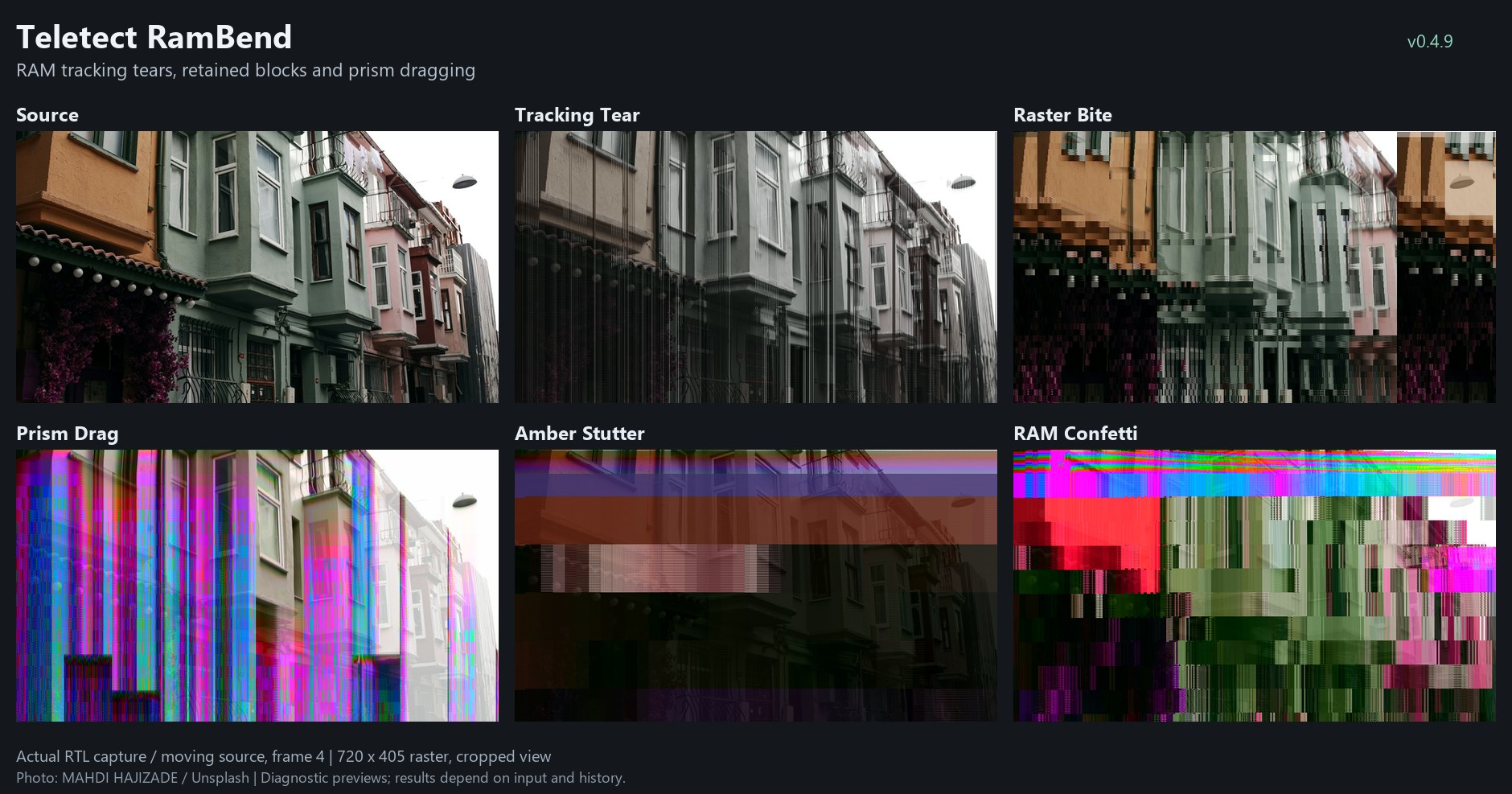
Teletect RamBend presets on a moving source. Frames captured from simulation of the program’s actual FPGA logic; your results depend on the source and on what is already in memory.
Overview
Teletect RamBend circuit-bends a video memory. It repeatedly reads, alters and rewrites a short store of video samples, and lets you rewire how that happens:
-
Route changes where the picture is read from. Different positions can lead back to the same stored material.
-
Clock changes when the read position advances. Pausing it stretches or repeats what is being read.
-
Data changes the stored material after it is fetched, corrupting its brightness and color.
Drive and Chroma process the result and feed it back into memory. Hold protects selected regions of memory from being overwritten, so blocks of picture persist. The Memory switch chooses whether those held regions refresh with fresh input or with their own processed output. Wet sets how much of all this you see.
The result depends on the incoming video, the material already in memory and the combination of controls, so a setting is a behavior, not a fixed picture. RamBend is not a frame freeze: its memory is a short video store, and held material can repeat vertically, change between frames and be altered by the other controls.
Note
Teletect RamBend is a processing program. It needs a source connected: a camera, playback, or another Videomancer program upstream. Video timing and sync are never bent; only the logical memory access is.
What’s In a Name?
Circuit bending is the practice of rewiring consumer electronics to make them misbehave creatively. In video, the classic target is a frame-store or effects chip: shorting its address lines, clock or data bus scrambles the picture it holds. RamBend reproduces those bends (address, clock and data) digitally, on a RAM buffer inside Videomancer’s FPGA.
Quick Start
The program loads with Reactive set to Content and Threshold centered, which releases the bends. Start from the Neutral preset instead:
-
Load the Neutral preset. On the Hold page, move Pot 6 slightly, then return it to zero. This confirms that Hold is off.
-
Keep Reactive (Switch 8) on Control while you learn the bend knobs, so Threshold can’t hide their effects. Keep Write Route on Raster, Stale Writes on Rewrite and Memory on Feed.
-
Set Wet (Fader 12) to 100%.
-
Move one of Route, Clock or Data past the first 4% of its travel. Explore slowly, then return it to zero before trying the next one.
-
Add Drive to make the memory return more persistent. Above halfway it adds stronger tonal wrapping.
-
On the Hold page, raise Pot 6 to bring in protected memory blocks.
When these are familiar, try Content mode and set Threshold to choose which parts of the incoming picture trigger the bends and Hold.
Parameters
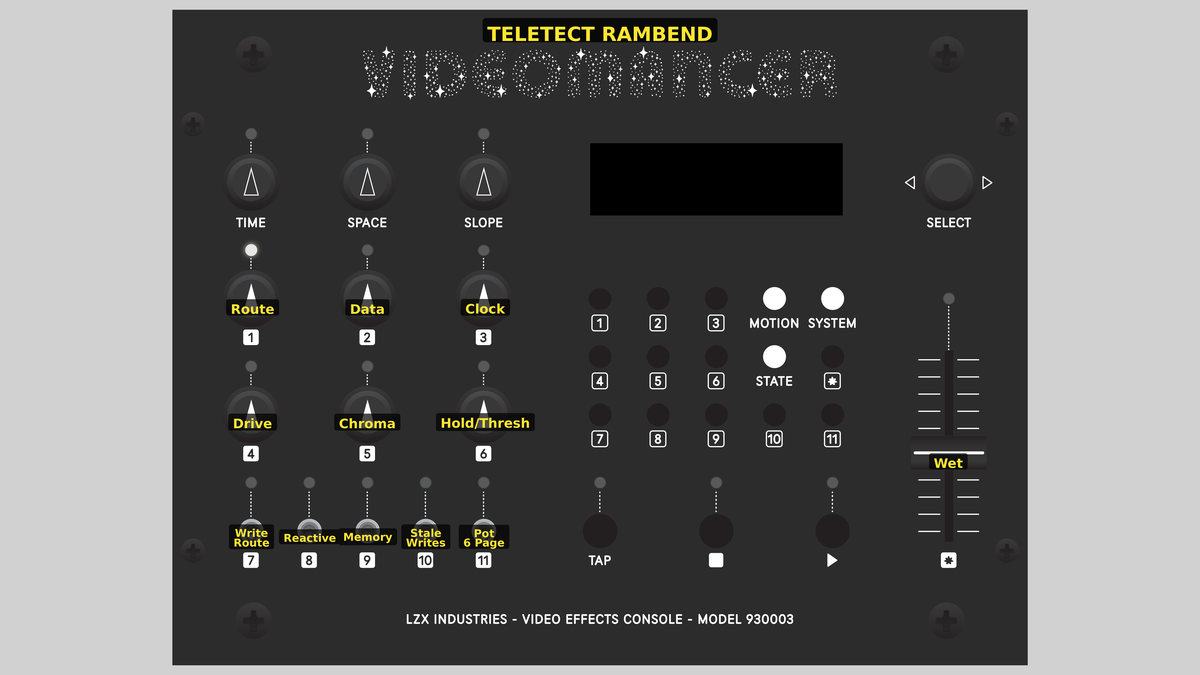
Videomancer’s front panel with Teletect RamBend active.
The controls are arranged in columns, each with its switch directly below: Route and Drive over Write Route (left), Data and Chroma over Memory (middle), and Clock and Hold/Threshold over Pot 6 Page (right). Switch 8 (Reactive) and Switch 10 (Stale Writes) sit between the columns.
Percentages below refer to a control’s travel. Displayed values and the boundaries described here are approximate.
How the bend knobs sweep
Route, Clock and Data are grouped patch selectors, not smooth effect-amount controls. Each starts with an off region of about 4%. Beyond that, the sweep passes through eight families of related connections, each taking about an eighth of the travel. Small movements within a family explore related patterns; crossing into the next family can change the kind of bend. The boundaries are slightly sticky, and connections change between lines rather than mid-line, so a setting is easy to find and keep.
The most advanced active setting among Route, Clock and Data also sets how overloaded brightness and color behave:
| Bend quarter | Shared tonal behavior |
|---|---|
First |
Early bend patterns. Upper-half Drive wraps (modulo); boosted color is limited. |
Second |
Folding and solarization: overloaded tones and colors turn back on themselves. |
Third |
Wrapping: overloaded color can reappear elsewhere in its range; Drive wraps. |
Fourth |
Memory-dependent Drive ringing; color moves back toward limiting. |
These behaviors are introduced across the picture in a fixed spatial pattern, not all at once. They are most apparent with Drive above halfway or Chroma above normal color. Higher does not always mean stronger: a new connection can give a different repetition, color relationship or feedback balance.
Knob 1 — Route
| Property | Value |
|---|---|
Range |
0% – 100% |
Default |
44% |
Route changes the memory positions RamBend reads from. It can make several parts of a line read the same material, reorder neighboring details and confine reads to a small repeating window. It is a memory-address effect, not a horizontal-position control.
-
Low: small aliases and rearrangements: fine repeated edges, doubled detail, short horizontal patterns.
-
Middle: larger address changes and tighter windows: broader repetitions, stacked sections, tightly repeated textures.
-
High: the processed picture itself influences the route, so the pattern becomes self-interacting.
With Write Route on Patched, Route also redirects where new material is written. For a readable starting point, try Route around 8–20% with Clock and Data at zero, modest Drive and Raster writing.
Knob 2 — Data
| Property | Value |
|---|---|
Range |
0% – 100% |
Default |
25% |
Data changes the brightness and color information fetched from memory: what is read, rather than where. Low settings alter fine detail (stepped edges, subtle corruption). Middle settings force tonal changes and coarser detail. High settings combine strong value changes with reduced tonal resolution and patterns derived from memory position: flat colors, dense textures and strongly outlined sections. Drive and Regenerate feed the corrupted material back into memory, and Chroma amplifies its color changes. Data is not a hue control; its colors come from corrupting the memory return.
Knob 3 — Clock
| Property | Value |
|---|---|
Range |
0% – 100% |
Default |
38% |
Clock decides whether the read position advances or stays put. When it stays put, successive output pixels fetch the same material, giving stutter, stretched detail, horizontal repeats and stalled-looking sections. Low settings give light, sparse stalls; middle settings regular read/hold rhythms; high settings long stalls that can last nearly a whole line, including picture-dependent behavior. Each line still starts from a fresh read position, and the external video clock and sync are never affected.
Clock repeats a fetched sample; Hold (Pot 6) protects a region of samples from being overwritten. Long, uninterrupted Clock stalls can also enlarge Hold (see below).
Knob 4 — Drive
| Property | Value |
|---|---|
Range |
0% – 100% |
Default |
31% |
Drive strengthens the brightness feedback and shapes the returned tones. It is a feedback and distortion control, not an exposure control.
-
Lower half: progressively stronger feedback and a modest brightness-dependent lift, restrained near black and white.
-
Upper half: a stronger tonal excursion is blended in, up to about half the signal at maximum. Usually this is modulo wrapping: overloaded tones wrap back into range, producing repeated tonal bands. In the fold family it folds (solarizes) instead, and in the top bend quarter it can ring.
Drive doesn’t add a black pedestal, and it always keeps at least half the brightness entering its stage. If the picture gets too dense, lower Drive or Wet. For persistence without strong wrapping, keep Drive below halfway.
Knob 5 — Chroma
| Property | Value |
|---|---|
Range |
0% – 100% |
Default |
44% |
Chroma controls desaturation, color gain, cross-color warping and color feedback. Its neutral point is low on the sweep:
-
0%: the processed picture is black and white.
-
0% to about 12.5%: color rises from none to normal.
-
About 12.5% (may display as 13%): normal color, without warping. The Neutral preset sets it exactly.
-
Above 12.5%: color gain rises and the color components couple in opposing ways, changing saturation, hue relationships and color boundaries together. The bend family decides whether overloaded color is limited, folded or wrapped.
If Wet is below 100%, the original colors still show through even with Chroma at zero.
Knob 6 — Hold/Thresh
| Property | Value |
|---|---|
Range |
0% – 100% |
Default |
31% |
Pot 6 edits two separately saved values, selected by Pot 6 Page (Switch 11): Hold and Threshold.
Hold page
Hold protects selected regions of memory from ordinary rewriting. Each region keeps its own stored picture samples. Raising Hold makes the regions larger, in eight size bands, and admits more regions according to their stored brightness. At zero, Hold is off.
| Effective Hold | Region size (width × height) |
|---|---|
Above 0% to 12.5% |
4 × 4 pixels |
12.5% to 25% |
8 × 4 pixels |
25% to 37.5% |
16 × 8 pixels |
37.5% to 50% |
32 × 8 pixels |
50% to 62.5% |
64 × 16 pixels |
62.5% to 75% |
128 × 32 pixels |
75% to 87.5% |
256 × 64 pixels |
87.5% to 100% |
512 × 64 pixels |
Sizes are in pixels, so they cover more of a lower-resolution picture. Long Clock stalls can raise the effective Hold above the knob setting (up to double it, never past the largest band); the size updates in 64-row bands so blocks stay coherent. Clock can’t turn Hold on if Hold is at zero.
Which regions are held depends on the saved Threshold direction: left of center selects dark stored regions first, right of center selects bright ones. Hold is not random: with the bends off, it’s a stable, picture-dependent memory operation.
Threshold page
Threshold is a bipolar brightness selector used in Content mode. Its direction chooses dark or bright; its distance from center sets how much of the incoming brightness range is admitted.
| Threshold position | In Content mode |
|---|---|
Center (about 47–53%) |
Dead band: nothing qualifies, so bends and Hold are released. |
Just left of center |
Only the deepest shadows engage. |
Further left |
More of the brightness range engages, starting from dark. |
Fully left |
Everything engages; held regions prefer dark. |
Just right of center |
Only the brightest highlights engage. |
Further right |
More of the brightness range engages, starting from bright. |
Fully right |
Everything engages; held regions prefer bright. |
Threshold responds to brightness, not motion or edges, and its decision covers a chunk of the picture rather than tracing a precise outline. In Control mode the incoming key isn’t used; Threshold’s direction only sets the dark/bright preference for Hold.
Tip
After changing pages, Pot 6 keeps the new page’s saved value until you move the knob slightly (about 0.8% of travel). From then on it follows the knob, which can cause a jump. Check the page before turning Pot 6 fully left: zero Hold releases blocks, but fully left Threshold opens the dark key.
Switch 7 — Write Route
| Property | Value |
|---|---|
Off |
Raster |
On |
Patched |
Default |
Raster |
Raster writes new material in normal picture order, so Route only bends reads. Patched applies the active Route connection to writes too: different incoming positions can target the same stored locations while others are starved of updates, so the image becomes more self-reinforcing or fragmented. With Route off, Patched has no effect of its own.
Switch 8 — Reactive
| Property | Value |
|---|---|
Off |
Control |
On |
Content |
Default |
Content |
Control lets the bends and Hold run freely across the whole picture. Use it to explore and to learn what each knob does. Content uses Threshold to decide which incoming sections engage Route, Clock, Data and Hold, so the source’s own brightness switches the effects in and out. Drive and Chroma are never switched off by the key.
Switch 9 — Memory
| Property | Value |
|---|---|
Off |
Regenerate |
On |
Feed |
Default |
Feed |
Held regions are refreshed in the background, out of sight. Feed refreshes them with fresh input, so protected blocks keep receiving new source material. Regenerate refreshes them with the processed memory result, so Drive, Chroma and Data keep reworking the held texture and changes accumulate. The switch only affects held regions: with no Hold active it changes nothing.
Switch 10 — Stale Writes
| Property | Value |
|---|---|
Off |
Rewrite |
On |
Hold |
Default |
Hold |
Rewrite allows ordinary memory updates. Hold adds write inhibition tied to the active Clock pattern, so some memory locations keep older material. This makes Clock patches feel more persistent or locked. It is separate from Pot 6 Hold, and has no effect when Clock is inactive.
Switch 11 — Pot 6 Page
| Property | Value |
|---|---|
Off |
Hold |
On |
Threshold |
Default |
Hold |
Selects whether Pot 6 edits Hold or Threshold. Changing pages doesn’t reset the other value.
Fader 12 — Wet
| Property | Value |
|---|---|
Range |
0% – 100% |
Default |
88% |
Wet blends the original and processed pictures at the output. At 0% the output is the exact original input. The feedback loop runs before this blend, so lowering Wet doesn’t stop, slow or clear the memory: the texture keeps evolving while hidden, and raising Wet again reveals what developed. Use it to reveal and conceal a prepared memory state, or to lay readable live detail over a heavily bent return.
Presets
Teletect RamBend has eight factory presets: a clean reference and seven bent patches. Every preset selects Control and the Hold page, so a centered Threshold can’t switch off its bends.
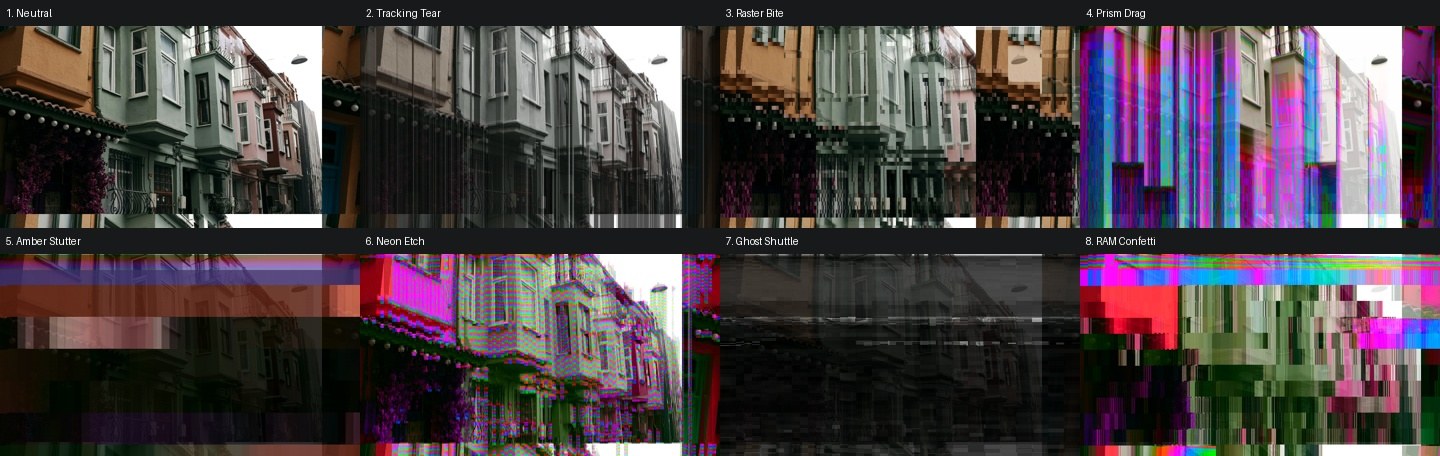
The eight factory presets. Frames captured from simulation of the program’s actual FPGA logic.
| Control | Neutral | Tracking Tear | Raster Bite | Prism Drag | Amber Stutter | Neon Etch | Ghost Shuttle | RAM Confetti |
|---|---|---|---|---|---|---|---|---|
Route |
0% |
46% |
52% |
0% |
0% |
34% |
76% |
12% |
Data |
0% |
0% |
0% |
57% |
0% |
0% |
20% |
5% |
Clock |
0% |
0% |
0% |
0% |
65% |
0% |
84% |
5% |
Drive |
0% |
3% |
28% |
41% |
59% |
9% |
9% |
59% |
Chroma |
13% |
0% |
13% |
19% |
19% |
38% |
0% |
38% |
Hold/Thresh |
0% |
9% |
47% |
59% |
72% |
22% |
22% |
72% |
Write Route |
Raster |
Raster |
Raster |
Patched |
Patched |
Raster |
Raster |
Patched |
Reactive |
Control |
Control |
Control |
Control |
Control |
Control |
Control |
Control |
Memory |
Feed |
Regenerate |
Feed |
Regenerate |
Feed |
Feed |
Feed |
Feed |
Stale Writes |
Rewrite |
Rewrite |
Hold |
Rewrite |
Rewrite |
Rewrite |
Rewrite |
Rewrite |
Pot 6 Page |
Hold |
Hold |
Hold |
Hold |
Hold |
Hold |
Hold |
Hold |
Wet |
100% |
75% |
100% |
75% |
88% |
88% |
88% |
88% |
Tracking Tear
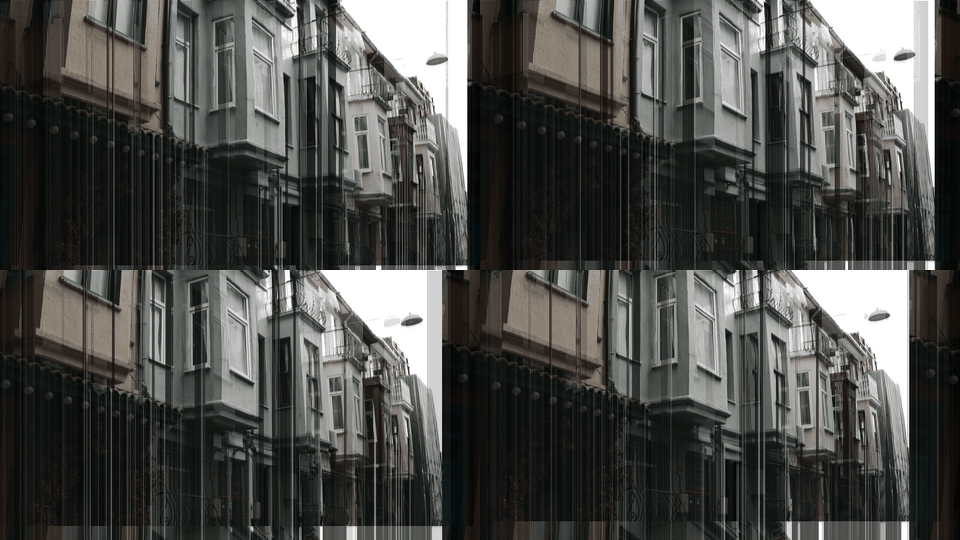
Fine monochrome tracking tears, with a small retained footprint and some dry picture.
Raster Bite
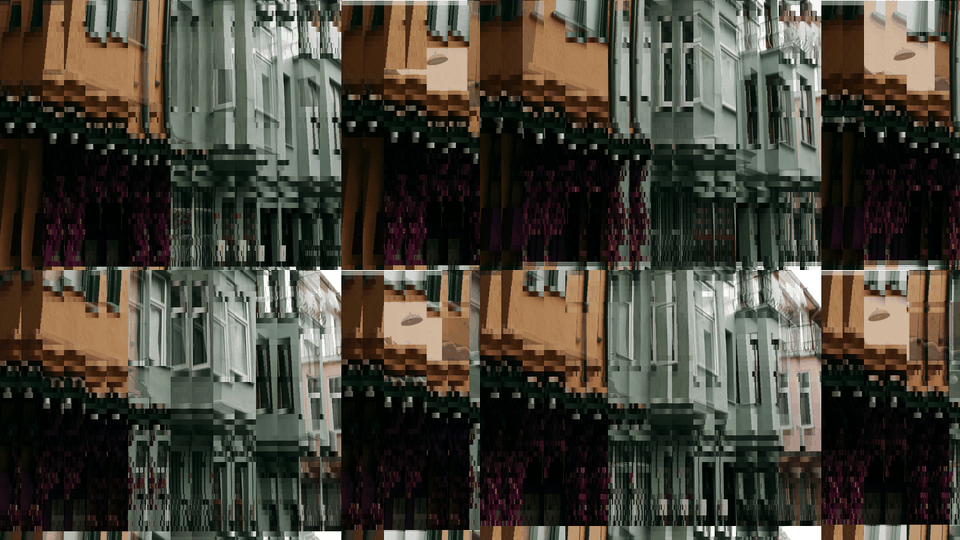
Natural-color retained edge blocks, from address inversion with raster writes.
Prism Drag
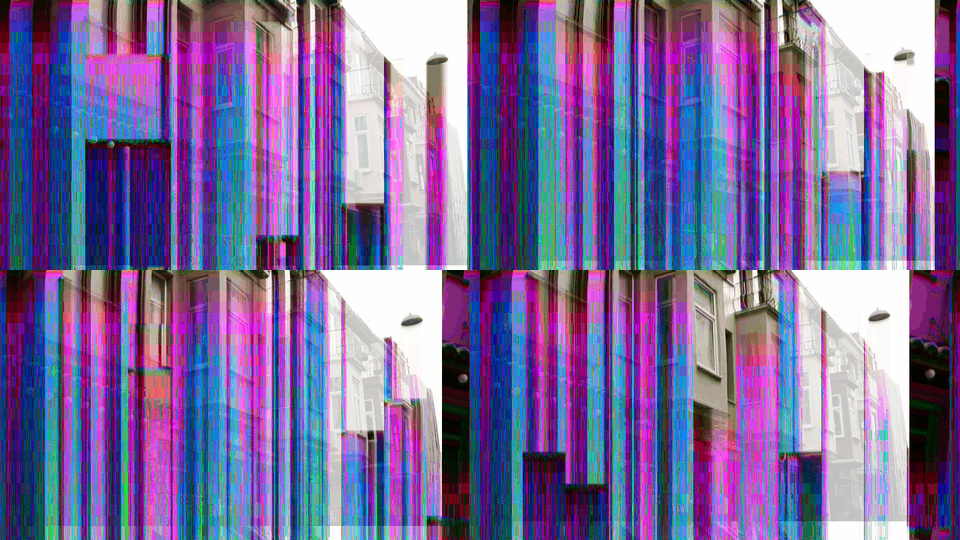
Patched writes and Regenerate pull color into vertical combs.
Amber Stutter
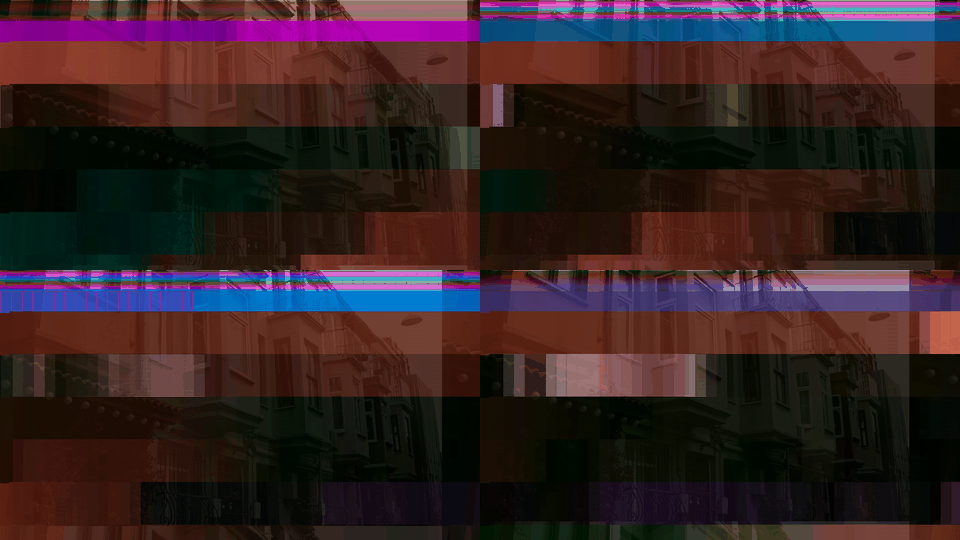
Coarse clock-held bands, warm color and a hidden live Feed refresh.
Neon Etch
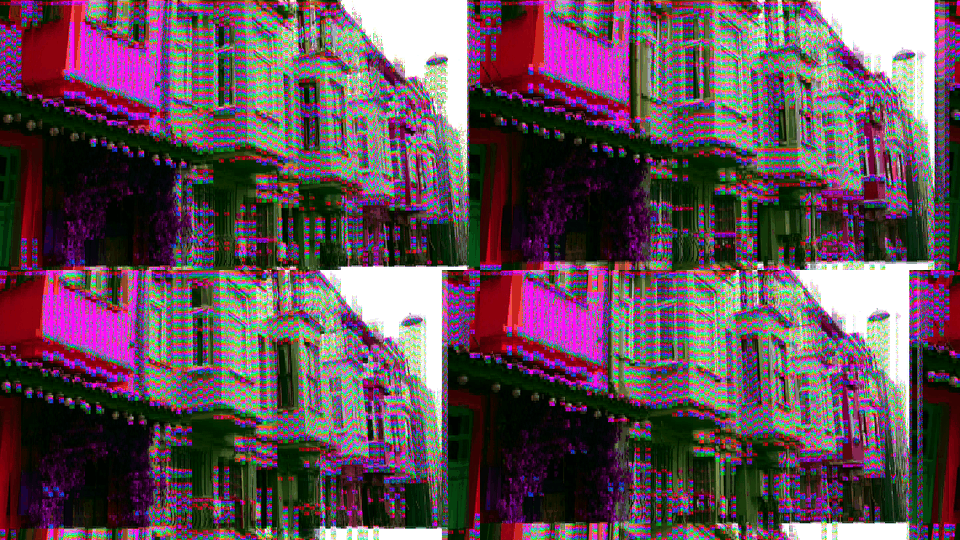
Fine bright magenta and green edge damage with smaller held regions.
Ghost Shuttle
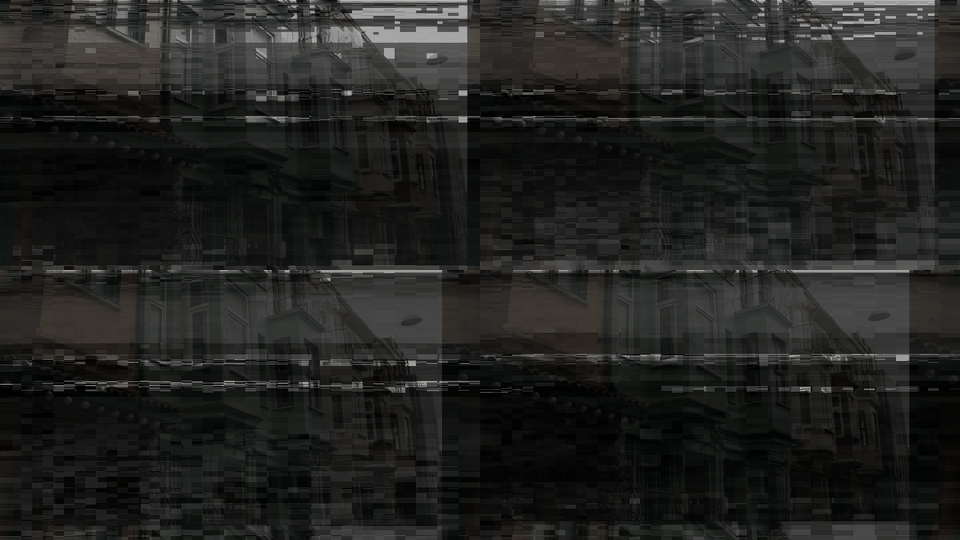
Monochrome processed-memory trails and horizontal ghost fragments.
RAM Confetti

Large multicolor retained steps and blocks at stronger Drive.
Hold in the presets
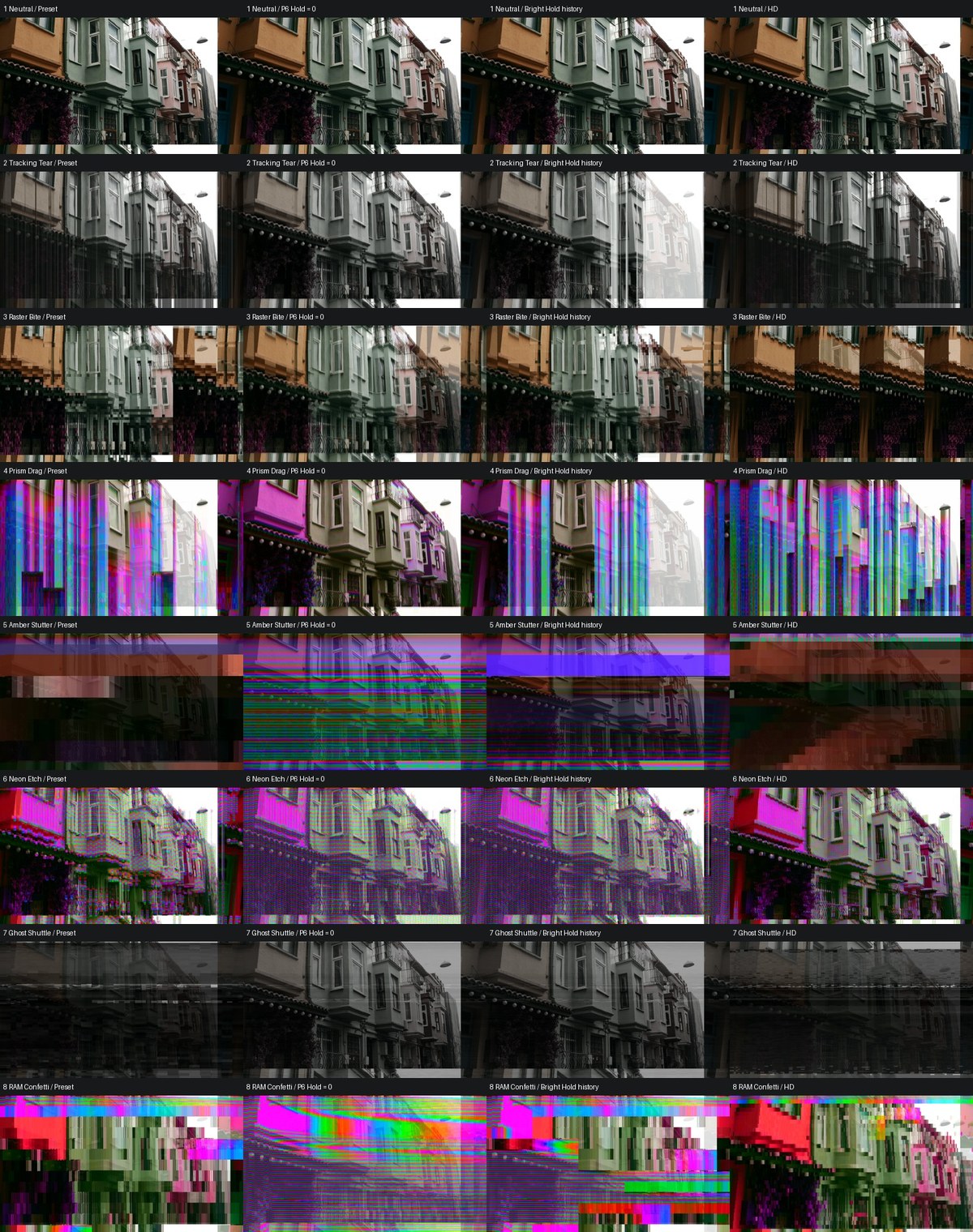
Each preset compared with Hold at zero, with a bright-region Threshold history, and in HD. Every effect preset changes visibly when Hold is removed.
Presets don’t store the contents of memory or both Pot 6 pages. After loading a preset from the Threshold page, move Pot 6 slightly on the Hold page to pick up the preset’s Hold value. A saved Threshold right of center makes Hold select bright regions; at or left of center it selects dark regions.
For brightness-keyed variations of any preset: set Threshold to about 25% (dark) or 75% (bright), return to the Hold page and restore the Hold value, then select Content. Switch back to Control to recover the full preset.
How the Controls Interact
| Combination | What changes |
|---|---|
Route + Write Route: Patched |
Both memory reads and the destinations of new writes are reorganized. |
Clock + Stale Writes: Hold |
Read stalls are joined by extra restrictions on memory replacement. |
Clock + Hold |
Long read stalls can increase the effective Hold size and coverage. |
Hold + Memory: Feed |
Held blocks stay on screen while fresh input refreshes them in the background. |
Hold + Memory: Regenerate |
Processed material is returned into held blocks, so changes accumulate. |
Drive + Chroma |
Brightness persistence, tonal shaping, color gain and color feedback interact. |
Content + Threshold + Hold |
Incoming brightness gates engagement; stored brightness and Hold select held regions. |
Low Wet + any patch |
The processed state keeps developing while less of it is visible. |
When a combination gets hard to read, return to Control, Raster, Rewrite, Feed, normal Chroma and low Drive, and add one change at a time.
Exercises
Exercise 1: Small, Stable RAM Blocks
Learning Outcomes
Isolate Hold from the bends.
Steps
-
Load Neutral. Keep Route, Clock and Data at zero, Drive at zero and Chroma at its neutral setting.
-
On the Threshold page, set Threshold left of center for dark stored regions, or right of center for bright ones.
-
Return to the Hold page and try 5–20% Hold.
-
Raise Hold for larger regions and broader coverage.
Exercise 2: Regenerative Block Texture
Learning Outcomes
Hear the difference between Feed and Regenerate.
Video Source
Moving footage: Regenerate needs changing source material to show its difference.
Steps
-
In Control mode, set Hold to 25–50%, with Raster writes and Stale Writes on Rewrite.
-
Switch Memory to Regenerate.
-
Raise Drive through 55–80%.
-
Add Data gradually, then raise Chroma above normal color.
-
Toggle Memory between Feed and Regenerate without changing anything else.
Exercise 3: Highlight-Selected Bends
Learning Outcomes
Use Content mode to let the source switch the effect in and out.
Steps
-
Set Hold to 25–50% on its page.
-
Set Threshold to 60–80% on its page.
-
Switch Reactive to Content.
-
Add a modest Route, Clock or Data setting.
-
Move Threshold toward center to narrow the effect to the brightest highlights, or further right to include more of the picture. For shadows, use 20–40% instead.
Exercise 4: Revealing a Prepared Return
Steps
-
Build a patch at a readable Wet setting.
-
Lower Wet to zero, leaving the feedback and memory controls engaged.
-
Let the source and processing develop the hidden state.
-
Raise Wet to reveal it, or mix it with the live source.
Troubleshooting
The bend knobs don’t seem to do anything. In Content mode, a centered Threshold releases the bends. Select Control, or move Threshold outside the dead band. Also move the bend knob past its first 4%.
There are no visible Hold blocks. Make sure Pot 6 Page was on Hold when you set the amount, and that Content mode isn’t releasing Hold. At low Hold only a narrow range of stored brightness qualifies; raise Hold or change the dark/bright preference.
Hold is larger than the knob suggests. An active Clock patch is producing long read stalls. Set Clock to zero to see the base Hold size.
Centered Threshold isn’t clean video. Centering releases the bends and Hold only in Content mode; Drive and Chroma keep working. Use Wet at zero for the dry picture, or load Neutral.
Regenerate, Patched or Stale Writes: Hold have no obvious effect. Each depends on another control: Regenerate needs visible Hold and moving input, Patched needs Route active, and Stale Writes: Hold needs Clock active.
Chroma at zero isn’t black and white. Wet is below 100%, so the dry picture’s color shows through.
Old material returns after a dry interval. Wet doesn’t clear memory. To get back to a clean reference, load Neutral, confirm Hold is zero on its page, and let incoming video refresh the memory. There is no global memory-clear command: unwritten locations can reappear in a later bent route.
The same settings look different with another source or resolution. Memory contents, motion and history all shape the result, and Hold sizes are in pixels, so they cover more of a smaller picture.
Credits
Teletect RamBend is by Teletect and is part of the Teletect Toolkit, released under the GPL-3.0 license. Preview frames are from simulations of the program’s FPGA logic, using a photograph by Mahdi Hajizade on Unsplash.
Glossary
-
Circuit bending: Rewiring consumer electronics to make them misbehave creatively.
-
Feedback: Routing a processed output back into the input of the same process, so changes accumulate over time.
-
Hold region: A block of memory protected from ordinary rewriting, so its contents persist on screen.
-
Modulo wrapping: Letting an overloaded value roll over to the bottom of its range instead of clipping at the top.
-
Solarization: A tonal fold where the brightest tones invert, named after the photographic darkroom effect.