Teletect PixSort
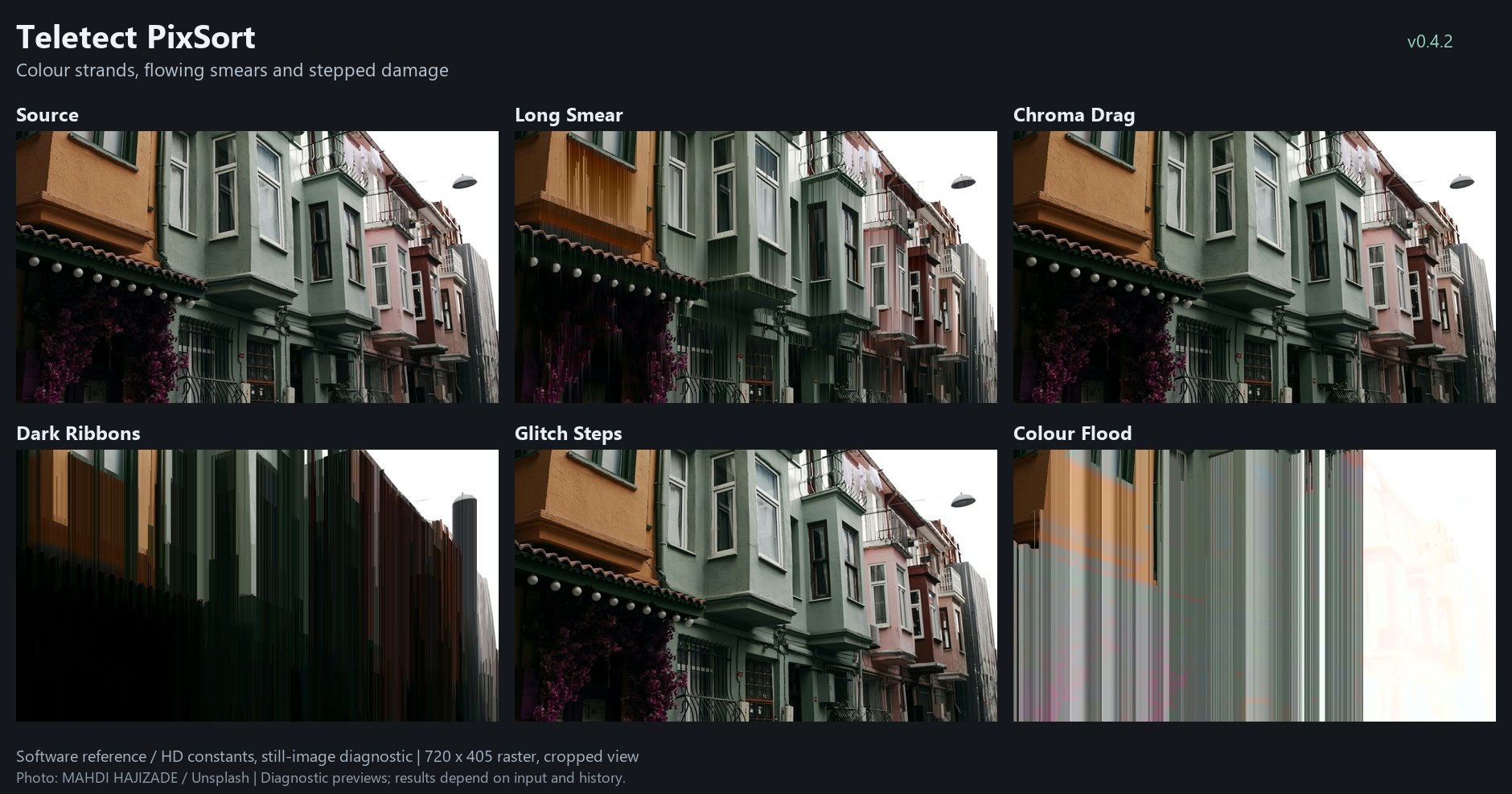
Teletect PixSort factory presets on one photograph: Long Smear, Chroma Drag, Dark Ribbons, Glitch Steps and Colour Flood. Software reference renders; your results depend on the source.
Overview
Teletect PixSort draws the long, dripping smears of the pixel-sort aesthetic, live. Pixels that pass a brightness Threshold start strands: trails that carry a color down (or to the right) through the picture. As a strand travels it can take up color and brightness from the pixels it passes, at rates you set separately for color and for luma. Order decides whether a strand accepts brighter or darker material, and Texture lets real source detail break into it.
Classic pixel sorting rearranges a whole row of pixels after the fact. PixSort works one pixel per clock with no frame store, so it is a streaming approximation of the look: it is fast enough to play live and reacts to every frame of your source.
Note
Teletect PixSort is a processing program. It needs a source connected: a camera, playback, or another Videomancer program upstream.
What’s In a Name?
Pixel sorting is a glitch-art technique that sorts runs of pixels by brightness or hue, producing streaks that look as if the image is melting. PixSort is Teletect’s real-time take on it.
Quick Start
-
Load Long Smear. Bright areas drip downward in long trails.
-
Sweep Threshold (Knob 1). Lower values start strands from more of the picture.
-
Turn Strand Length (Knob 4) down for shorter drips.
-
Raise Colour Flow (Knob 2) to let the trails pick up new color as they travel; raise Luma Flow (Knob 5) to let them follow the picture’s brightness.
-
Flip Direction (Switch 10) to Right for horizontal streaks.
Parameters
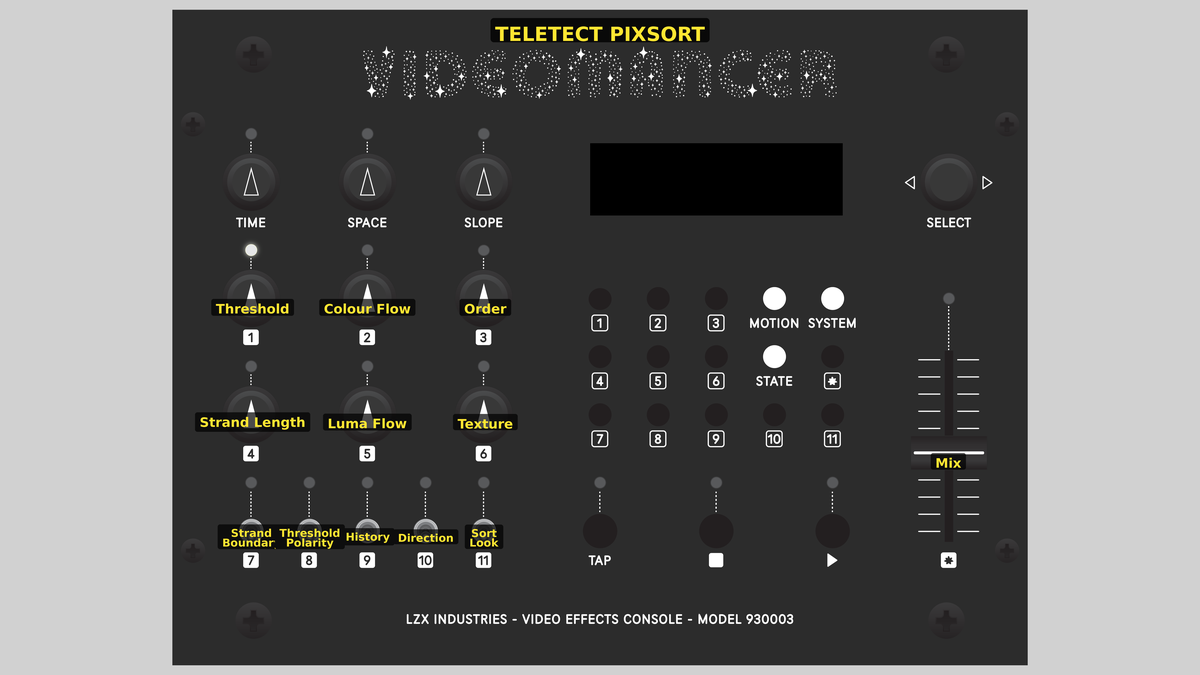
Videomancer’s front panel with Teletect PixSort active.
The controls are arranged in columns, each with its switch directly below: Threshold and Strand Length over Strand Boundary (left), the two Flow knobs over History (middle), and Order and Texture over Sort Look (right). Switch 8 (Threshold Polarity) and Switch 10 (Direction) sit between the columns.
Each control has one job: Threshold selects where strands start, Strand Length sets how far they go, Order filters brightness reversals, the two Flow knobs set how fast color and brightness change, Texture admits source detail, and Mix sets opacity.
Knob 1 — Threshold
| Property | Value |
|---|---|
Range |
0 – 1023 |
Default |
380 |
Threshold sets which source brightness can start a strand. With Threshold Polarity (Switch 8) on Above, pixels at or above the threshold seed strands; on Below, pixels at or below it do. The LCD shows the raw brightness value.
Knob 2 — Colour Flow
| Property | Value |
|---|---|
Range |
0% – 100% |
Default |
13% |
Colour Flow sets how quickly a strand’s color moves toward the color of each pixel it accepts. At 0% the strand holds its seed color for its whole length. At 100% it copies each accepted pixel’s color exactly. The response is spread over four bands, from very slow drifts to abrupt replacement.
Knob 3 — Order
| Property | Value |
|---|---|
Range |
0% – 100% |
Default |
50% |
Order sets how large a brightness reversal a strand will accept. In Bright sort look a strand favors pixels at least as bright as itself; in Dark sort look, pixels at least as dark. At 0% every pixel is accepted, for loose, aggressive smears. At 100% any reversal is rejected, so every strand stays strictly ordered from start to end.
Knob 4 — Strand Length
| Property | Value |
|---|---|
Range |
0% – 100% |
Default |
88% |
Strand Length sets how far a strand carries. Brighter seeds start longer strands and darker seeds start shorter ones (between half and the full set length). At maximum, strands never expire on their own.
Knob 5 — Luma Flow
| Property | Value |
|---|---|
Range |
0% – 100% |
Default |
6% |
Luma Flow does for brightness what Colour Flow does for color. At 0% the strand holds its seed brightness; at 100% it copies each accepted pixel’s brightness.
Tip
The two Flow knobs are most interesting when they disagree. Low Colour Flow with high Luma Flow gives held-color trails that follow the picture’s brightness. High Colour Flow with low Luma Flow pours live color through a held brightness.
Knob 6 — Texture
| Property | Value |
|---|---|
Range |
0% – 100% |
Default |
50% |
Texture lets real source detail break into a strand. Where the contrast between neighboring source pixels exceeds a level set by this knob, the strand copies the source directly instead of easing toward it. Higher settings respond to finer detail. Texture never invents detail: uniform areas stay uniform, and channels with Flow at 0% stay held.
Switch 7 — Strand Boundary
| Property | Value |
|---|---|
Off |
Threshold |
On |
Length |
Default |
Length |
Threshold stops a strand as soon as the source leaves the threshold region, keeping smears inside qualifying areas. Length lets it continue into the background until its length runs out.
Switch 8 — Threshold Polarity
| Property | Value |
|---|---|
Off |
Above |
On |
Below |
Default |
Above |
Seeds strands from pixels Above or Below the Threshold.
Switch 9 — History
| Property | Value |
|---|---|
Off |
Reset |
On |
Carry |
Default |
Reset |
Reset starts every frame (and, for rightward strands, every line) fresh. Carry keeps strands running across frame and field boundaries (and across lines for rightward strands), so trails can persist from frame to frame.
Switch 10 — Direction
| Property | Value |
|---|---|
Off |
Right |
On |
Down |
Default |
Down |
Strands travel Down the picture or to the Right.
Switch 11 — Sort Look
| Property | Value |
|---|---|
Off |
Bright |
On |
Dark |
Default |
Bright |
Sets the direction of Order: Bright strands climb toward brighter material, Dark strands sink toward darker material.
Fader 12 — Mix
| Property | Value |
|---|---|
Range |
0% – 100% |
Default |
100% |
Mix blends the original and processed pictures, with exact dry and fully wet endpoints. It controls opacity only; strands keep evolving underneath.
Presets
Teletect PixSort has seven factory presets.
| Control | Long Smear | Chroma Drag | Frozen Carry | Dark Ribbons | Strict Sort | Glitch Steps | Colour Flood |
|---|---|---|---|---|---|---|---|
Threshold |
300 |
240 |
0 |
600 |
420 |
320 |
360 |
Colour Flow |
19% |
2% |
0% |
19% |
6% |
100% |
100% |
Order |
25% |
0% |
0% |
100% |
100% |
0% |
0% |
Strand Length |
98% |
98% |
100% |
88% |
88% |
38% |
100% |
Luma Flow |
5% |
88% |
0% |
6% |
3% |
2% |
0% |
Texture |
38% |
63% |
0% |
38% |
0% |
75% |
63% |
Strand Boundary |
Length |
Length |
Length |
Length |
Threshold |
Length |
Length |
Threshold Polarity |
Above |
Above |
Above |
Below |
Above |
Above |
Above |
History |
Reset |
Reset |
Carry |
Reset |
Reset |
Reset |
Carry |
Direction |
Down |
Down |
Down |
Down |
Down |
Right |
Down |
Sort Look |
Bright |
Bright |
Bright |
Dark |
Bright |
Bright |
Bright |
Mix |
100% |
100% |
100% |
100% |
100% |
100% |
100% |
-
Long Smear: long, loose strands, with brightness moving more slowly than color.
-
Chroma Drag: held-color trails under fast brightness changes.
-
Frozen Carry: unlimited seed propagation across rows and frames.
-
Dark Ribbons: strict dark sorting with separate color flow and neighbor detail.
-
Strict Sort: ordered strands confined to qualifying source regions.
-
Glitch Steps: immediate color changes against slower rightward brightness.
-
Colour Flood: full color replacement in unlimited, carried strands.
Background
Strands
Each pixel that passes the threshold can start a strand with its full 10-bit color, a lifetime set by Strand Length and its brightness. At every step along the way, the current source pixel is a candidate. Order decides whether the candidate is accepted. If it is, the strand’s brightness and color each move toward it by at most the step set by the two Flow knobs, never overshooting. Strands end when their lifetime runs out, or at the edge of the threshold region if Strand Boundary is set to Threshold. They don’t fade out and they don’t get an artificial bright tip.
No randomness
PixSort uses no random numbers, hashes, dither patterns or oscillators. Everything you see comes from the source picture and the controls, so identical input gives identical output.
Memory
PixSort keeps one line of strand state (color, remaining length and the previous source brightness for each column). Downward strands read the line above; rightward strands use the pixel to the left. There is no frame store.
Exercises
Exercise 1: Drips
Learning Outcomes
Learn how Threshold, Strand Length and Order shape the basic smear.
Video Source
A well-lit face or figure, or footage with bright highlights.
Steps
-
Load Strict Sort. Short, ordered drips appear inside the bright areas.
-
Switch Strand Boundary to Length. Drips now run out of the bright areas into the background.
-
Lower Order gradually. Strands accept more reversals and smear more aggressively.
-
Raise Strand Length to 100% for unbroken trails to the bottom of the frame.
Exercise 2: Color Versus Brightness
Learning Outcomes
Separate the two Flow controls.
Video Source
Colorful, moving footage.
Steps
-
Load Chroma Drag: color is nearly held, brightness flows freely.
-
Swap the two Flow settings: set Colour Flow to about 90% and Luma Flow to about 2%. Now live color pours through a held brightness.
-
Raise Texture to let edges in the source cut through the trails.
-
Switch History to Carry and watch trails persist between frames.
Credits
Teletect PixSort is by Teletect and is part of the Teletect Toolkit, released under the GPL-3.0 license. Preview images are reference-model renders of a photograph by Mahdi Hajizade on Unsplash.
Glossary
-
Pixel sorting: A glitch-art technique that reorders pixels by brightness or hue to produce streaks.
-
Seed: The pixel that starts a strand and supplies its initial color.
-
Slew: Moving toward a target value by a limited step each time, rather than jumping to it.
-
Strand: A trail of color carried from its seed pixel down or across the picture.