MATTE
Static Voltage Generator & Control Panel
Overview
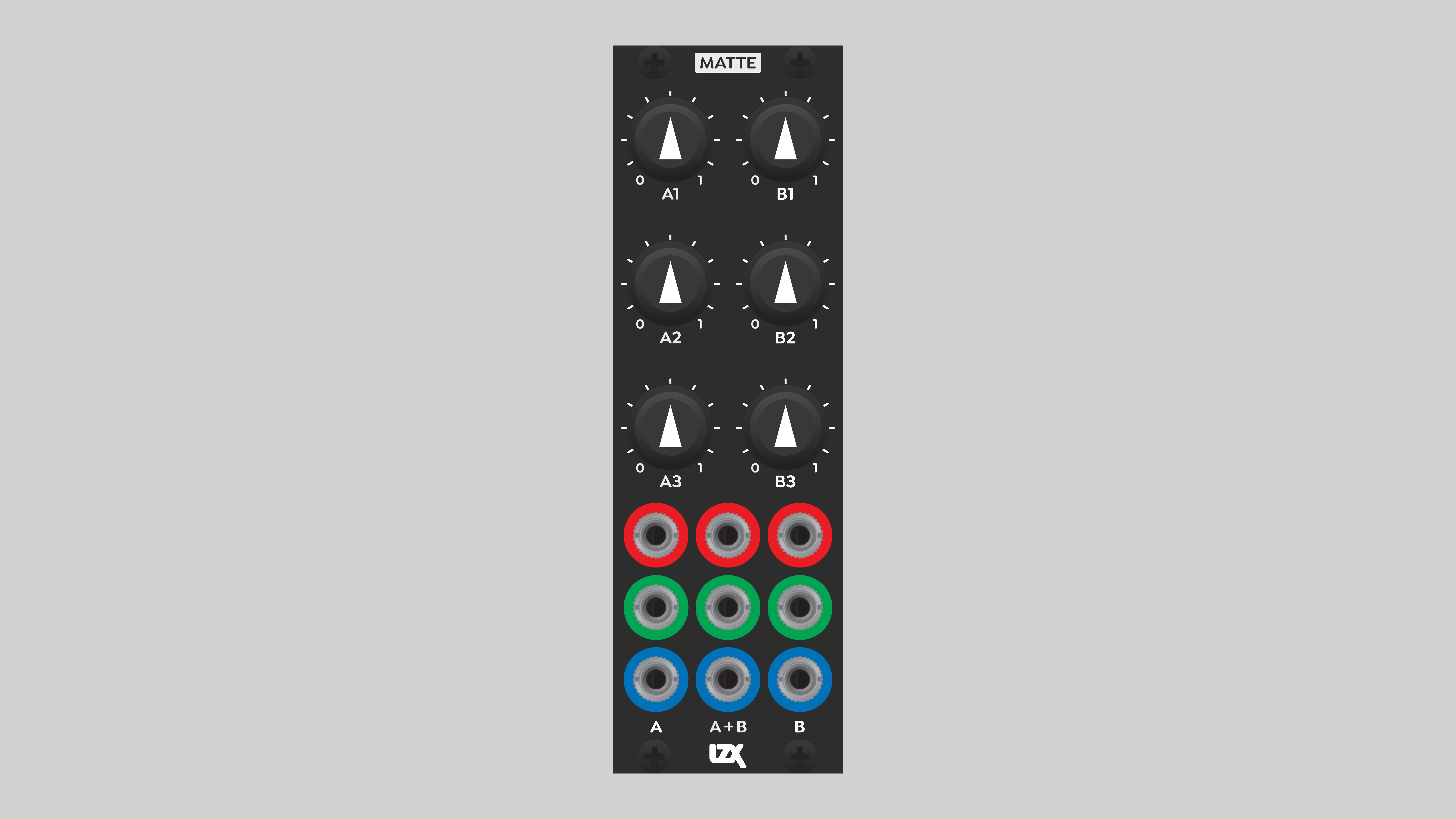
Matte is a static voltage generator optimized for selection of RGB colors. Far from trivial, Matte greatly expands the potential of the video synth as a visual instrument for real-time performance. As a control panel for parameter adjustments, it’s an ergonomic, conceptual, and performance breakthrough. Instead of diving through the spaghetti of patch cables, consolidate farflung patch parameters to a single module. Free your mind and body from simply trying to access individual controls, and focus on the aesthetics of your patch.
Matte’s bonus feature is the calculation of average values between pairs of values that you choose. This is helpful when you need two or three values to track with each other, such as thresholds in a multi-level keying patch.
Key Specifications
| Parameter | Value |
|---|---|
Mounting Width |
8 HP |
Power Consumption |
12V @ 50 mA |
Power Connectors |
16 pin EuroRack ribbon, 2.1mm DC barrel |
Included |
DC barrel power cable, EuroRack power cable |
Video Sync |
None |
System Integration Advice
Matte is most useful in medium or large modular systems. Its importance as a control interface increases dramatically with the size of the system. Complicated patches can quickly become unwieldy. Matte liberates your creative process, allowing management of many variables from a single point of access.
As a control panel, Matte is ideally mounted on the top row of the synth. Patch cables won’t get in the way.
Because Matte doesn’t output a high frequency signal, it’s is the least susceptible to visible noise from Eurorack power supplies.
Note
Matte’s output voltages are unipolar, ranging from zero to +1 volts. If the destination input has an attenuverter, then Matte can effectively act in a bipolar fashion. However, there are some situations in which a bipolar voltage source ranging from -1 to +1 volts is preferable or required. For example, picking YIQ colors with Swatch. In these cases, Proc is the preferred solution.
Controls & Connectors
Outputs are color-coded to represent RGB values, but can drive any parameter in the system.
Matte features two columns of three knobs, labeled A and B. These knobs define the voltages of the corresponding columns of A and B output jacks. Taken as a triad, each column can act as an RGB color picker.
The center column of three outputs, labeled A+B, provides average values of the adjacent A and B outputs.
Note
As with all Gen3 modules, potentiometers are buffered from the actual voltages they control. A small amount of slew is inserted, ensuring smooth transitions. This minimizes unintentional glitches, and extends the useful lifespan of the pots. The slew time is balanced to compensate for scratchy pots, but still allow for staccato manual performances.
TODO
-→
Video Tutorial
3 Patches for LZX Matte <br />presented by Johnny Woods
Example Patches
TODO
-→
Installation
Requirements
-
EuroRack enclosure
-
12V DC or EuroRack power supply
-
2.1mm DC barrel power cable or a EuroRack power cable (both options included)
-
Four M2.5 x 6mm mounting screws, or screws provided or specified by the enclosure manufacturer
-
#1 Phillips head screwdriver, or hand tool provided or specified by the enclosure manufacturer
Procedure
-
Power off and disconnect the EuroRack enclosure’s power supply and any attached DC adapters.
-
Connect either the EuroRack Power Cable or the DC Barrel Power Cable to the module. Do not connect both Eurorack and DC Barrel power.
-
Ensure that no mounting screws are in any holes in the area where you wish to mount the module.
-
Carefully test fit the module with its attached power cable in the open space in the EuroRack enclosure. If it is obstructed by the enclosure or any internal assemblies, abort this procedure.
-
Connect the disconnected end of the power cable to the power supply.
-
Mount the module to the EuroRack rails using all mounting holes.
-
Store the unused cable along with the product box in a safe location.
-
Power on the EuroRack enclosure and start patching.
Full Specifications
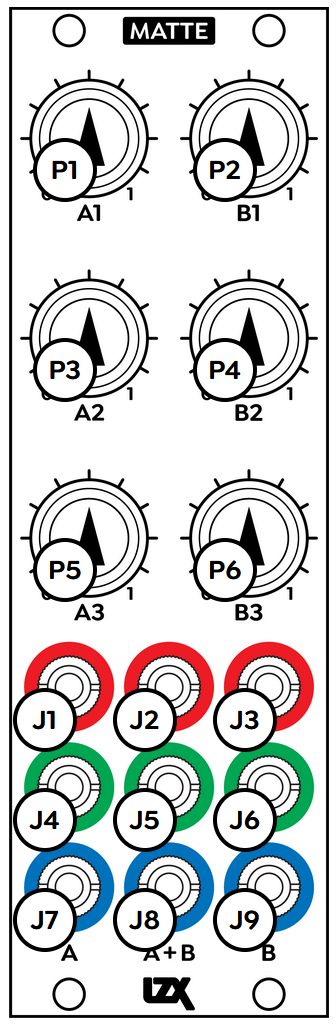
| Jack | Function |
|---|---|
J1 |
A1 out |
J2 |
Average A1 & B1 out |
J3 |
B1 out |
J4 |
A2 out |
J5 |
Average A2 & B2 out |
J6 |
B2 out |
J7 |
A3 out |
J8 |
Average A3 & B3 out |
J9 |
B3 out |
| Potentiometer | Function |
|---|---|
P1 |
A1 |
P2 |
B1 |
P3 |
A2 |
P4 |
B2 |
P5 |
C1 |
P6 |
C2 |
Technical Data
| Parameter | Value |
|---|---|
Manufacturer Part Number |
950044 |
Mounting Width |
8 HP |
Mounting Depth |
32 mm |
Mounting Hole Count |
4 |
Power Consumption |
12V @ 50 mA |
Power Connectors |
16 pin EuroRack ribbon, 2.1mm DC barrel |
Input Impedance |
1M ohms |
Output Impedance |
75 ohms |
Input Protection Range |
+/-20V |
Input Clipping Range |
+/-2.5V |
Output Range |
+/-2.5V |
Included |
DC barrel power cable, EuroRack power cable |
EuroRack Power Cable Type |
16-pin |
EuroRack Power Cable Length |
25 cm |
DC Barrel Power Cable Length |
25 cm |
RoHS Compliance |
Manufactured with lead-free processes. |
Video Sync |
None |
| Pronunciation | |
|---|---|
Propagation Delay |
TODO |
Bandwidth @ -3dB |
TODO |
Module Width |
TODO mm |
Module Height |
TODO mm |
Module Depth |
TODO mm |
Product Box Width |
TODO in / TODO mm |
Product Box Height |
TODO in / TODO mm |
Product Box Depth |
TODO in / TODO mm |
Product Weight |
TODO |
-→
Maintenance
Keep your module free of dust and debris by performing periodic cleaning. Spots may be cleaned from the frontpanel with a microfiber cloth and isopropyl alcohol or other electronics cleaner.
Hardware Revisions
The hardware revision code is printed on the circuit board visible from the rear of the module.